
이 문서에서는 BigQuery의 벡터 검색에 대해 간략하게 설명합니다. 벡터 검색은 임베딩을 사용하여 유사한 객체를 비교하는 기법으로, Google 검색, YouTube, Google Play와 같은 Google 제품을 지원하는 데 사용됩니다. 벡터 검색을 사용하여 대규모로 검색할 수 있습니다. 벡터 검색과 함께 벡터 색인을 사용하면 역파일 색인 (IVF) 및 ScaNN 알고리즘과 같은 기본 기술을 활용할 수 있습니다.
벡터 검색은 임베딩을 기반으로 합니다. 임베딩은 텍스트 또는 오디오 파일의 일부와 같이 특정 항목을 나타내는 고차원의 숫자 벡터입니다.
머신러닝 (ML) 모델은 임베딩을 사용하여 이러한 항목에 대한 시맨틱스를 인코딩함으로써 손쉽게 추론하고 비교할 수 있도록 합니다. 예를 들어 클러스터링, 분류, 추천 모델에서 일반적인 작업은 임베딩 공간에서 벡터 간 거리를 측정하여 의미론적으로 가장 유사한 항목을 찾는 것입니다.
임베딩 공간에서의 시맨틱 유사성과 거리에 관한 이 개념은 다양한 항목을 표시하는 방법을 고려할 때 시각적으로 입증됩니다.
예를 들어 동물의 유형을 모두 나타내는 고양이, 개, 사자와 같은 용어는 공통된 시맨틱 특성으로 인해 이 공간에서 서로 가까이에 그룹화됩니다. 마찬가지로 자동차, 트럭, 더 일반적인 용어인 차량과 같은 용어는 또 다른 클러스터를 형성합니다. 다음 이미지를 참고하세요.
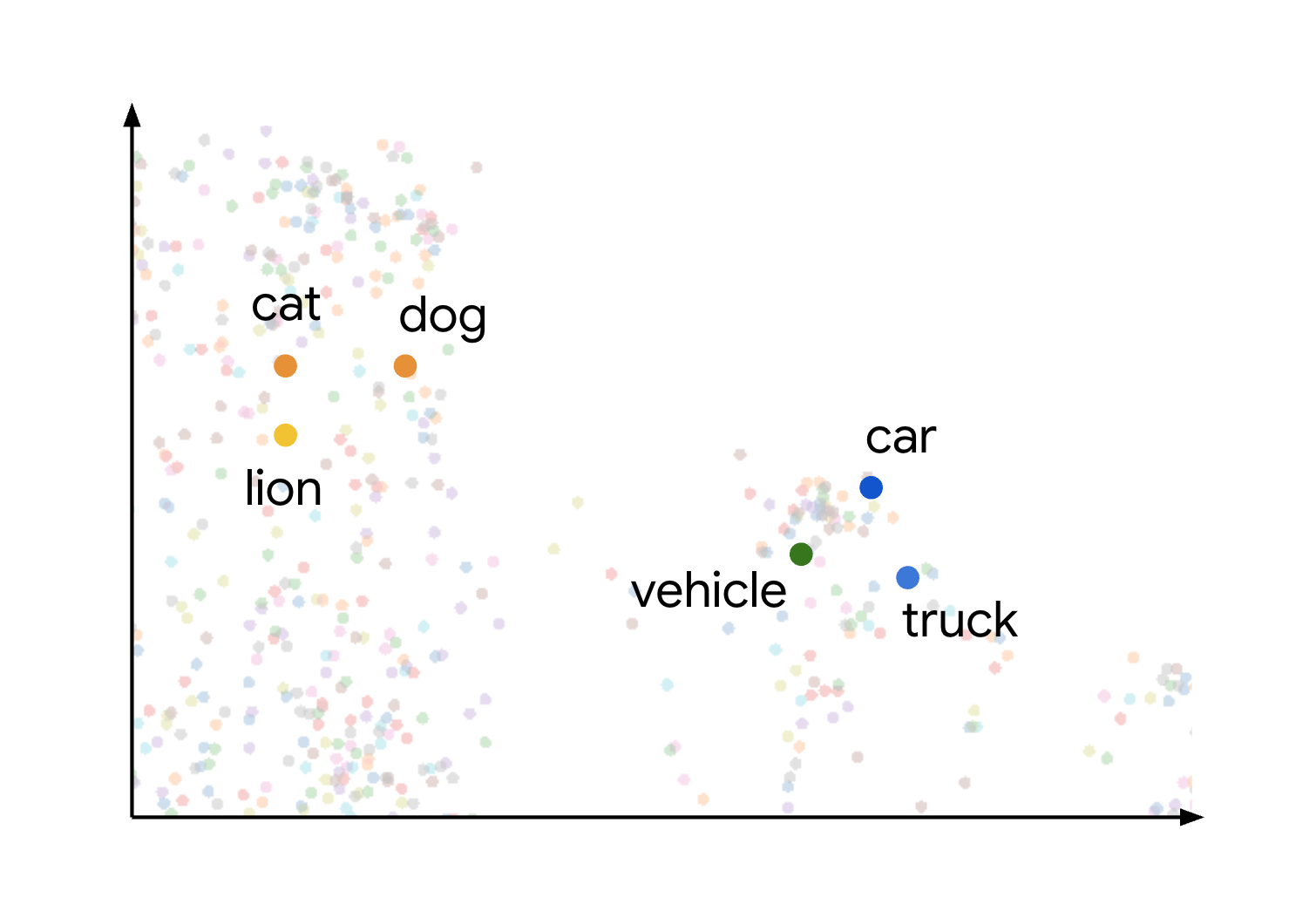
동물 클러스터와 차량 클러스터가 서로 멀리 떨어져 있는 것을 볼 수 있습니다. 그룹 간의 분리는 객체가 임베딩 공간에 가까울수록 의미적으로 더 유사하고 거리가 멀수록 의미적 유사성이 더 낮다는 원리를 보여줍니다.
BigQuery는 임베딩을 생성하고, 콘텐츠 색인을 생성하고, 벡터 검색을 실행하기 위한 엔드 투 엔드 환경을 제공합니다. 이러한 각 작업을 개별적으로 완료하거나 단일 여정에서 완료할 수 있습니다. 이러한 모든 작업을 완료하는 방법을 보여주는 튜토리얼은 시맨틱 검색 및 검색 증강 생성 수행을 참고하세요.
SQL을 사용하여 벡터 검색을 실행하려면 VECTOR_SEARCH 함수를 사용합니다.
원하는 경우 CREATE VECTOR INDEX 문을 사용하여 벡터 색인을 만들 수 있습니다.
벡터 색인을 사용할 때 VECTOR_SEARCH는 근사 최근접 이웃 검색 기법을 사용하여 벡터 검색 성능을 향상시키고 재현율을 줄여 더 나은 근사치의 결과를 반환합니다. 벡터 색인이 없으면 VECTOR_SEARCH는 무작위 대입 검색을 사용하여 모든 레코드의 거리를 측정합니다. 벡터 색인을 사용할 수 있는 경우에도 무작위 대입을 사용하여 정확한 결과를 얻을 수 있습니다.
대체 제품 또는 일치하는 제품 추천: 고객 행동 및 제품 유사성을 기반으로 대체 제품을 제안하여 전자상거래 애플리케이션을 개선합니다.
로그 분석: 팀이 로그에서 이상 징후를 사전에 분류하고 조사를 신속하게 진행할 수 있도록 지원합니다. 이 기능을 사용하여 위협 감지, 포렌식, 문제 해결 워크플로를 개선하기 위해 LLM의 컨텍스트를 보강할 수도 있습니다. 이 시나리오를 보여주는 노트북은 텍스트 임베딩 + BigQuery 벡터 검색을 사용한 로그 이상 감지 및 조사를 참고하세요.
클러스터링 및 타겟팅: 잠재고객을 정확하게 분류합니다. 예를 들어 병원 체인은 자연어 메모와 구조화된 데이터를 사용하여 환자를 클러스터링할 수 있고, 마케팅 담당자는 검색 의도를 기반으로 광고를 타겟팅할 수 있습니다.
이 시나리오를 보여주는 노트북은 Create-Campaign-Customer-Segmentation을 참고하세요.
항목 확인 및 중복 삭제: 데이터를 정리하고 통합합니다.
예를 들어 광고 회사는 개인 식별 정보 (PII) 레코드를 중복 삭제하거나 부동산 회사는 일치하는 우편 주소를 식별할 수 있습니다.
VECTOR_SEARCH 함수: 주문형 또는 버전 가격 책정을 사용하여 유사성 검색에 대한 요금이 청구됩니다.
주문형: 기본 테이블, 색인, 검색 쿼리에서 스캔된 바이트 수에 따라 요금이 청구됩니다.
버전 가격: 예약 버전 내에서 작업을 완료하는 데 필요한 슬롯에 대한 요금이 청구됩니다. 더 크고 복잡한 유사성 계산에는 더 많은 비용이 청구됩니다.
CREATE VECTOR INDEX 문이 표시되면 색인이 생성된 테이블 데이터의 총 크기가 조직별 한도 미만인 경우 벡터 색인을 빌드하고 새로고침하는 데 필요한 처리에 요금이 청구되지 않습니다. 이 한도를 넘어서 색인 생성을 지원하려면 색인 관리 작업을 처리하기 위한 자체 예약을 제공해야 합니다.
저장소는 임베딩과 색인에도 고려해야 할 사항입니다. 임베딩 및 색인으로 저장된 바이트 수에는 활성 스토리지 비용이 적용됩니다.
벡터 색인이 활성 상태면 스토리지 비용이 발생합니다.
INFORMATION_SCHEMA.VECTOR_INDEXES 뷰를 사용하여 색인 저장용량 크기를 확인할 수 있습니다.
벡터 색인의 범위가 100% 가 아니더라도 색인이 생성된 항목에 대한 요금이 부과됩니다. INFORMATION_SCHEMA.VECTOR_INDEXES 뷰를 사용하여 색인 적용 범위를 확인할 수 있습니다.
[[["이해하기 쉬움","easyToUnderstand","thumb-up"],["문제가 해결됨","solvedMyProblem","thumb-up"],["기타","otherUp","thumb-up"]],[["이해하기 어려움","hardToUnderstand","thumb-down"],["잘못된 정보 또는 샘플 코드","incorrectInformationOrSampleCode","thumb-down"],["필요한 정보/샘플이 없음","missingTheInformationSamplesINeed","thumb-down"],["번역 문제","translationIssue","thumb-down"],["기타","otherDown","thumb-down"]],["최종 업데이트: 2025-09-04(UTC)"],[[["\u003cp\u003eVector search in BigQuery allows searching embeddings to identify semantically similar entities, using high-dimensional numerical vectors that represent data like text or audio.\u003c/p\u003e\n"],["\u003cp\u003eThe \u003ccode\u003eVECTOR_SEARCH\u003c/code\u003e function, optionally enhanced by a vector index, enables this search, with the index improving performance through Approximate Nearest Neighbor search, and brute force offering an alternative to get exact results.\u003c/p\u003e\n"],["\u003cp\u003eEmbedding generation combined with vector search powers use cases like retrieval-augmented generation (RAG), resolving similar support cases, patient profile matching, and analyzing sensor data.\u003c/p\u003e\n"],["\u003cp\u003ePricing for \u003ccode\u003eCREATE VECTOR INDEX\u003c/code\u003e and \u003ccode\u003eVECTOR_SEARCH\u003c/code\u003e falls under BigQuery compute pricing, with free indexing up to a per-organization limit, after which users need to use their own reservations to index.\u003c/p\u003e\n"],["\u003cp\u003e\u003ccode\u003eVECTOR_SEARCH\u003c/code\u003e queries aren't supported by BigQuery BI Engine, and BigQuery's data security and governance rules apply to its use.\u003c/p\u003e\n"]]],[],null,["# Introduction to vector search\n=============================\n\nThis document provides an overview of\n[vector search](/bigquery/docs/vector-search) in BigQuery. Vector\nsearch is a technique to compare similar objects using embeddings, and it\nis used to power Google products, including Google Search,\nYouTube, and Google Play. You can use vector search to perform\nsearches at scale. When you use [vector indexes](/bigquery/docs/vector-index)\nwith vector search, you can take advantage of foundational technologies like\ninverted file indexing (IVF) and the\n[ScaNN algorithm](https://research.google/blog/announcing-scann-efficient-vector-similarity-search/).\n\nVector search is built on embeddings. Embeddings are high-dimensional numerical\nvectors that represent a given entity, like a piece of text or an audio file.\nMachine learning (ML) models use embeddings to encode semantics about such\nentities to make it easier to reason about and compare them. For example, a\ncommon operation in clustering, classification, and recommendation models is to\nmeasure the distance between vectors in an\n[embedding space](https://en.wikipedia.org/wiki/Latent_space) to find items\nthat are most semantically similar.\n\nThis concept of semantic similarity and distance in an embedding space is\nvisually demonstrated when you consider how different items might be plotted.\nFor example, terms like *cat* , *dog* , and *lion* , which all represent types of\nanimals, are grouped close together in this space due to their shared semantic\ncharacteristics. Similarly, terms like *car* , *truck* , and the more generic term\n*vehicle* would form another cluster. This is shown in the following image:\n\nYou can see that the animal and vehicle clusters are positioned far apart\nfrom each other. The separation between the groups illustrates the principle\nthat the closer objects are in the embedding space, the more semantically\nsimilar they are, and greater distances indicate greater semantic dissimilarity.\n\nBigQuery provides an end-to-end experience for generating\nembeddings, indexing content, and performing vector searches. You can complete\neach of these tasks independently, or in a single journey. For a tutorial\nthat shows how to complete all of these tasks, see\n[Perform semantic search and retrieval-augmented generation](/bigquery/docs/vector-index-text-search-tutorial).\n\nTo perform a vector search by using SQL, you use the\n[`VECTOR_SEARCH` function](/bigquery/docs/reference/standard-sql/search_functions#vector_search).\nYou can optionally create a [vector index](/bigquery/docs/vector-index) by\nusing the\n[`CREATE VECTOR INDEX` statement](/bigquery/docs/reference/standard-sql/data-definition-language#create_vector_index_statement).\nWhen a vector index is used, `VECTOR_SEARCH` uses the\n[Approximate Nearest Neighbor](https://en.wikipedia.org/wiki/Nearest_neighbor_search#Approximation_methods)\nsearch technique to improve vector search performance, with the\ntrade-off of reducing\n[recall](https://developers.google.com/machine-learning/crash-course/classification/precision-and-recall#recallsearch_term_rules)\nand so returning more approximate results. Without a vector index,\n`VECTOR_SEARCH` uses\n[brute force search](https://en.wikipedia.org/wiki/Brute-force_search)\nto measure distance for every record. You can also choose to use brute\nforce to get exact results even when a vector index is available.\n\nThis document focuses on the SQL approach, but you can also perform\nvector searches by using BigQuery DataFrames in Python. For a notebook\nthat illustrates the Python approach, see\n[Build a Vector Search application using BigQuery DataFrames](https://github.com/googleapis/python-bigquery-dataframes/blob/main/notebooks/generative_ai/bq_dataframes_llm_vector_search.ipynb).\n\nUse cases\n---------\n\nThe combination of embedding generation and vector search enables many\ninteresting use cases. Some possible use cases are as follows:\n\n- **[Retrieval-augmented generation (RAG)](/use-cases/retrieval-augmented-generation):** Parse documents, perform vector search on content, and generate summarized answers to natural language questions using Gemini models, all within BigQuery. For a notebook that illustrates this scenario, see [Build a Vector Search application using BigQuery DataFrames](https://github.com/googleapis/python-bigquery-dataframes/blob/main/notebooks/generative_ai/bq_dataframes_llm_vector_search.ipynb).\n- **Recommending product substitutes or matching products:** Enhance ecommerce applications by suggesting product alternatives based on customer behavior and product similarity.\n- **Log analytics:** Help teams proactively triage anomalies in logs and accelerate investigations. You can also use this capability to enrich context for LLMs, in order to improve threat detection, forensics, and troubleshooting workflows. For a notebook that illustrates this scenario, see [Log Anomaly Detection \\& Investigation with Text Embeddings + BigQuery Vector Search](https://github.com/GoogleCloudPlatform/generative-ai/blob/main/embeddings/use-cases/outlier-detection/bq-vector-search-outlier-detection-audit-logs.ipynb).\n- **Clustering and targeting:** Segment audiences with precision. For example, a hospital chain could cluster patients using natural language notes and structured data, or a marketer could target ads based on query intent. For a notebook that illustrates this scenario, see [Create-Campaign-Customer-Segmentation](https://github.com/GoogleCloudPlatform/chocolate-ai/blob/main/colab-enterprise/Create-Campaign-Customer-Segmentation.ipynb).\n- **Entity resolution and deduplication:** Cleanse and consolidate data. For example, an advertising company could deduplicate personally identifiable information (PII) records, or a real estate company could identify matching mailing addresses.\n\nPricing\n-------\n\nThe `VECTOR_SEARCH` function and the `CREATE VECTOR INDEX` statement use\n[BigQuery compute pricing](/bigquery/pricing#analysis_pricing_models).\n\n- `VECTOR_SEARCH` function: You are charged for similarity search, using\n on-demand or editions pricing.\n\n - On-demand: You are charged for the amount of bytes scanned in the base table, the index, and the search query.\n - Editions pricing: You are charged for the slots required to complete\n the job within your reservation edition. Larger, more complex\n similarity calculations incur more charges.\n\n | **Note:** Using an index isn't supported in [Standard editions](/bigquery/docs/editions-intro).\n- `CREATE VECTOR INDEX` statement: There is no charge for the processing\n required to build and refresh your vector indexes as long as the total\n size of the indexed table data is below your per-organization\n [limit](/bigquery/quotas#vector_index_maximum_table_size). To\n support indexing beyond this limit, you must\n [provide your own reservation](/bigquery/docs/vector-index#use_your_own_reservation)\n for handling the index management jobs.\n\nStorage is also a consideration for embeddings and indexes. The amount of bytes\nstored as embeddings and indexes are subject to\n[active storage costs](/bigquery/pricing#storage).\n\n- Vector indexes incur storage costs when they are active.\n- You can find the index storage size by using the [`INFORMATION_SCHEMA.VECTOR_INDEXES` view](/bigquery/docs/information-schema-vector-indexes). If the vector index is not yet at 100% coverage, you are still charged for whatever has been indexed. You can check index coverage by using the `INFORMATION_SCHEMA.VECTOR_INDEXES` view.\n\nQuotas and limits\n-----------------\n\nFor more information, see\n[Vector index limits](/bigquery/quotas#vector_index_limits).\n\nLimitations\n-----------\n\nQueries that contain the `VECTOR_SEARCH` function aren't accelerated by\n[BigQuery BI Engine](/bigquery/docs/bi-engine-intro).\n\nWhat's next\n-----------\n\n- Learn more about [creating a vector index](/bigquery/docs/vector-index).\n- Learn how to perform a vector search using the [`VECTOR_SEARCH`\n function](/bigquery/docs/reference/standard-sql/search_functions#vector_search).\n- Try the [Search embeddings with vector search](/bigquery/docs/vector-search) tutorial to learn how to create a vector index, and then do a vector search for embeddings both with and without the index.\n- Try the [Perform semantic search and retrieval-augmented generation](/bigquery/docs/vector-index-text-search-tutorial)\n tutorial to learn how to do the following tasks:\n\n - Generate text embeddings.\n - Create a vector index on the embeddings.\n - Perform a vector search with the embeddings to search for similar text.\n - Perform retrieval-augmented generation (RAG) by using vector search results to augment the prompt input and improve results.\n- Try the [Parse PDFs in a retrieval-augmented generation pipeline](/bigquery/docs/rag-pipeline-pdf)\n tutorial to learn how to create a RAG pipeline based on parsed PDF content."]]