
BigQuery
From data warehouse to autonomous data and AI platform
BigQuery is the autonomous data to AI platform, automating the entire data life cycle, from ingestion to AI-driven insights, so you can go from data to AI to action faster.
Gemini in BigQuery features are now included in BigQuery pricing models.
Store 10 GiB of data and run up to 1 TiB of queries for free per month. New customers also get $300 in free credits to try BigQuery and other Google Cloud products.

Features
Built-in predictive analytics and AI inferencing
Connect your data to AI with BigQuery AI. Train, evaluate, and deploy predictive analytics models directly within BigQuery using SQL. Easily integrate your models with Gemini Enterprise Agent Platform for advanced MLOps. Use generative AI in your workflows with AI functions for text summarization, sentiment analysis, and data enrichment. Beyond traditional tables, use BigQuery Graph to uncover complex relationships and patterns in your data. Build sophisticated context-retrieval and RAG applications with embeddings and vector, text, or hybrid search to find information based on meaning, not just keywords.
Agentic experience for all data teams
Get AI-powered assistance and automation for all data users across all analytical workflows. Automate data preparation, error detection, transformations, and pipeline building with Data Engineering Agent. Generate a detailed plan and run all aspects of data science including data loading, feature engineering, model training and evaluation with a simple prompt in the Data Science Agent. Democratize insights with the Conversational Analytics Agent, allowing anyone to ask complex questions in plain language and receive grounded, context-aware answers.
Agent development and analysis tools
Embed natural-language query functionality in your workflows using Conversational Analytics API. Connect to BigQuery easily from a variety of IDEs and developer tools including Gemini CLI using BigQuery MCP server, ADK integration or OSS MCP Toolbox. Stream detailed agent interactions to BigQuery for performance and cost optimization with a single line of code using BigQuery agent ops plugins for frameworks like ADK, LangGraph, and UCP.
BigQuery scale and performance for Apache Iceberg
Bring the best of BigQuery performance to your Iceberg data by enabling read/write interoperability across BigQuery, Google Cloud Managed Service for Apache Spark and other OSS engines with zero data movement. Get real-time insights via high-throughput streaming and simplify pipelines with multi-statement transactions and CDC. Google Cloud Lakehouse automates routine Iceberg maintenance—like compaction and clustering—to optimize price-performance and eliminate manual overhead.
Automate governance and give context to agents
Get built-in context with key capabilities such as automatic metadata harvesting, data profiling, data quality and lineage powered by Knowledge Catalog. Enable your agents to retrieve holistic context from your enterprise data. Through semantic search, Context APIs, and MCP tools, agents can instantly discover data assets, extract pre-generated, and enrich metadata.
Built for enterprise scale and efficiency
BigQuery’s unique architecture decouples storage and compute for petabyte-scale analysis while optimizing costs with compressed storage, compute autoscaling, flexible pricing, and more. BigQuery employs a vast set of Google infrastructure technologies like Borg, Colossus, Jupiter, and Dremel. While innovations like fluid scaling enable true per-second billing, advanced runtime and history-based optimizations accelerate native and Iceberg workload processing without code or schema changes.
Real-time analytics with streaming data pipelines
Use Managed Service for Apache Kafka to build and run real-time streaming applications. From SQL-based easy streaming with BigQuery continuous queries, popular open source Kafka platforms, and advanced multimodal data streaming and ML with Dataflow, including support for Iceberg, you can make real-time data and AI a reality.
Managed disaster recovery and observability
Cross-region disaster recovery offers managed failover, backups, and data recovery with enhanced observability and intersection routing. BigQuery operational health monitoring provides organization-wide environment views, now featuring agent-powered observability for turnkey troubleshooting. Additionally, agent-ready security via Security Center offers unified, fine-grained access control. These features ensure flexible recovery, better visibility, and robust security for your data operations.
How It Works
See how BigQuery can help you unify your data and connect it with groundbreaking AI. Learn how to access unstructured data like images, PDFs, texts, and others to populate an ecommerce website's metadata. Something that would take hours is made easy with BigQuery.
See how BigQuery can help you unify your data and connect it with groundbreaking AI. Learn how to access unstructured data like images, PDFs, texts, and others to populate an ecommerce website's metadata. Something that would take hours is made easy with BigQuery.
Data science
Simplify data to AI workflows
Simplify data to AI workflows
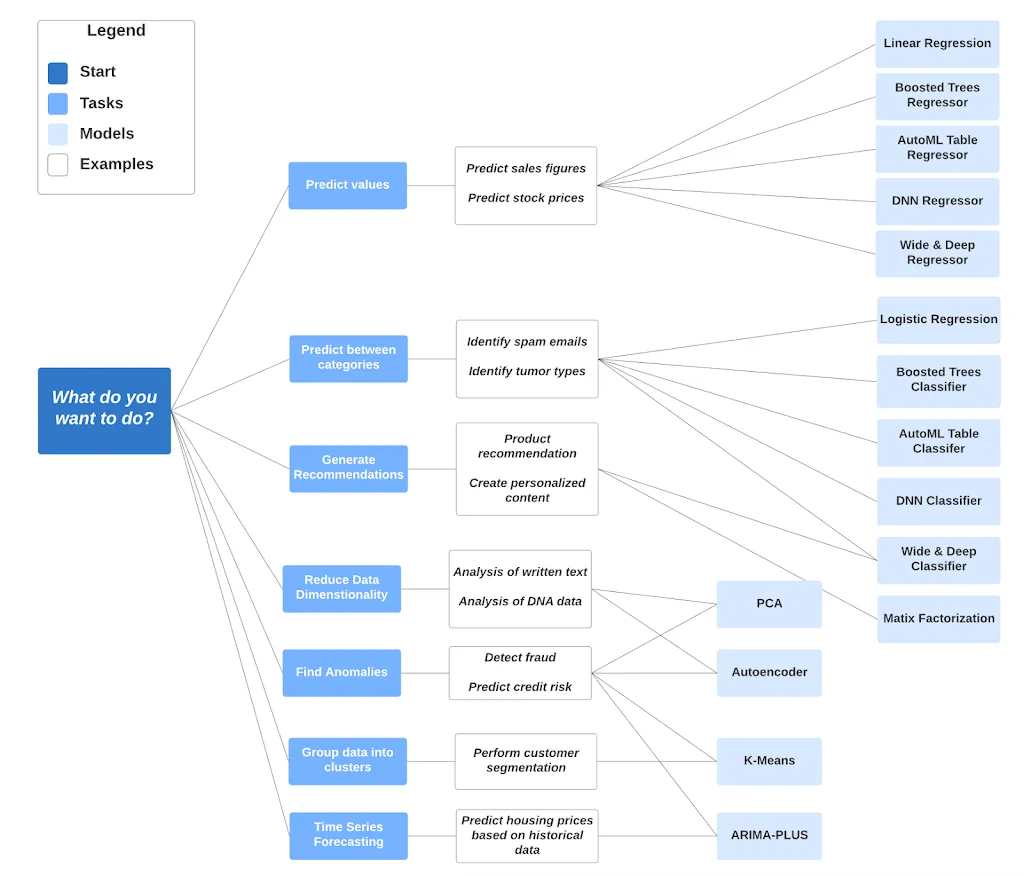
Streamline end-to-end data science workflows on Colab Enterprise notebooks with built-in agents or open source Python libraries through BigQuery DataFrames. Bring your preferred processing engine—SQL, serverless Spark, and additional open source frameworks. Train, evaluate, and deploy ML models directly within BigQuery or use pre-trained models like TimesFM using SQL. Conveniently store features for models built and used in BigQuery. Version, evaluate, and deploy the models by registering them in Gemini Enterprise Agent Platform for online prediction by using a single interface.

Tutorials, quickstarts, & labs
Simplify data to AI workflows
Simplify data to AI workflows
Streamline end-to-end data science workflows on Colab Enterprise notebooks with built-in agents or open source Python libraries through BigQuery DataFrames. Bring your preferred processing engine—SQL, serverless Spark, and additional open source frameworks. Train, evaluate, and deploy ML models directly within BigQuery or use pre-trained models like TimesFM using SQL. Conveniently store features for models built and used in BigQuery. Version, evaluate, and deploy the models by registering them in Gemini Enterprise Agent Platform for online prediction by using a single interface.
Unstructured data analytics
Apply generative AI to your data
Apply generative AI to your data
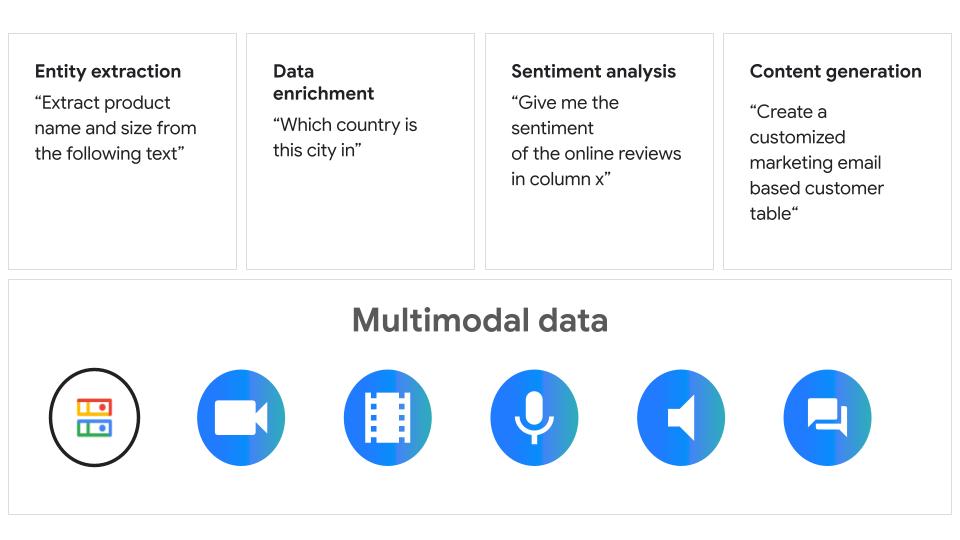
Connect Google and partner AI models directly to your multimodal data in BigQuery through simple SQL functions. Unlock deeper, semantic understanding from images, PDFs, audio, and video using generative AI functions. Automate routine tasks, such as classification, ordering, or filtering using purpose-built managed AI functions and perform specific tasks such as audio transcription or machine translation using Cloud AI APIs. Analyze unstructured data in Cloud Storage using object tables with remote functions or perform inference using BigQuery AI functions.
Tutorials, quickstarts, & labs
Apply generative AI to your data
Apply generative AI to your data
Connect Google and partner AI models directly to your multimodal data in BigQuery through simple SQL functions. Unlock deeper, semantic understanding from images, PDFs, audio, and video using generative AI functions. Automate routine tasks, such as classification, ordering, or filtering using purpose-built managed AI functions and perform specific tasks such as audio transcription or machine translation using Cloud AI APIs. Analyze unstructured data in Cloud Storage using object tables with remote functions or perform inference using BigQuery AI functions.
Data warehouse migration
Migrate data warehouses to BigQuery
Migrate data warehouses to BigQuery
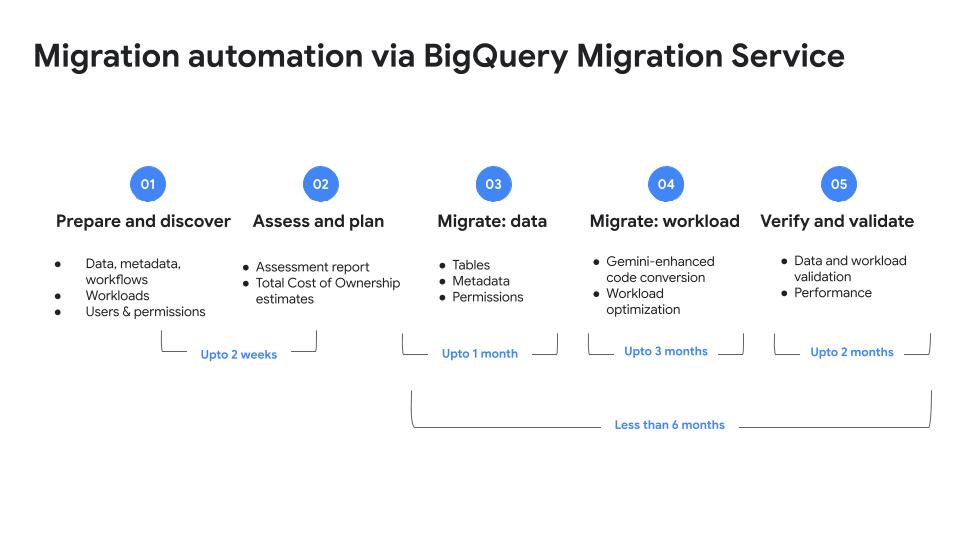
Solve for today’s analytics demands and tomorrow's AI use cases by migrating your data warehouse to BigQuery. Streamline your migration path from Netezza, Oracle, Redshift, Teradata, Snowflake, or Databricks to BigQuery using the free, AI-powered and fully managed BigQuery Migration Service.
Tutorials, quickstarts, & labs
Migrate data warehouses to BigQuery
Migrate data warehouses to BigQuery
Solve for today’s analytics demands and tomorrow's AI use cases by migrating your data warehouse to BigQuery. Streamline your migration path from Netezza, Oracle, Redshift, Teradata, Snowflake, or Databricks to BigQuery using the free, AI-powered and fully managed BigQuery Migration Service.
Data integration and ELT
Bring any data into BigQuery
Bring any data into BigQuery
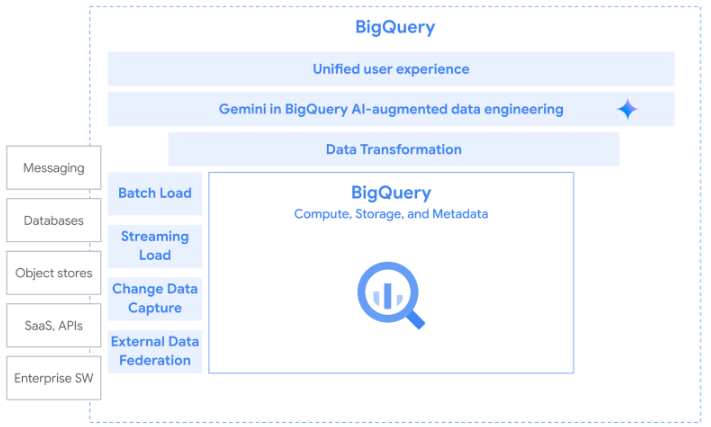
ELT is the recommended pattern for bringing data into BigQuery. There are many tools that offer flexibility for data integration. For batch load, use BigQuery Data Transfer Service (DTS) to automate the bulk load of data from supported data sources into BigQuery. For streaming load, Pub/Sub BigQuery subscriptions write Pub/Sub messages to an existing BigQuery table as they are received. For Change data capture (CDC), Datastream enables non-intrusive change data capture (CDC) from databases into BigQuery. Finally, you can federate to a number of external data sources that don't require data movement.
Tutorials, quickstarts, & labs
Bring any data into BigQuery
Bring any data into BigQuery
ELT is the recommended pattern for bringing data into BigQuery. There are many tools that offer flexibility for data integration. For batch load, use BigQuery Data Transfer Service (DTS) to automate the bulk load of data from supported data sources into BigQuery. For streaming load, Pub/Sub BigQuery subscriptions write Pub/Sub messages to an existing BigQuery table as they are received. For Change data capture (CDC), Datastream enables non-intrusive change data capture (CDC) from databases into BigQuery. Finally, you can federate to a number of external data sources that don't require data movement.
Real-time analytics
Event-driven analysis
Event-driven analysis
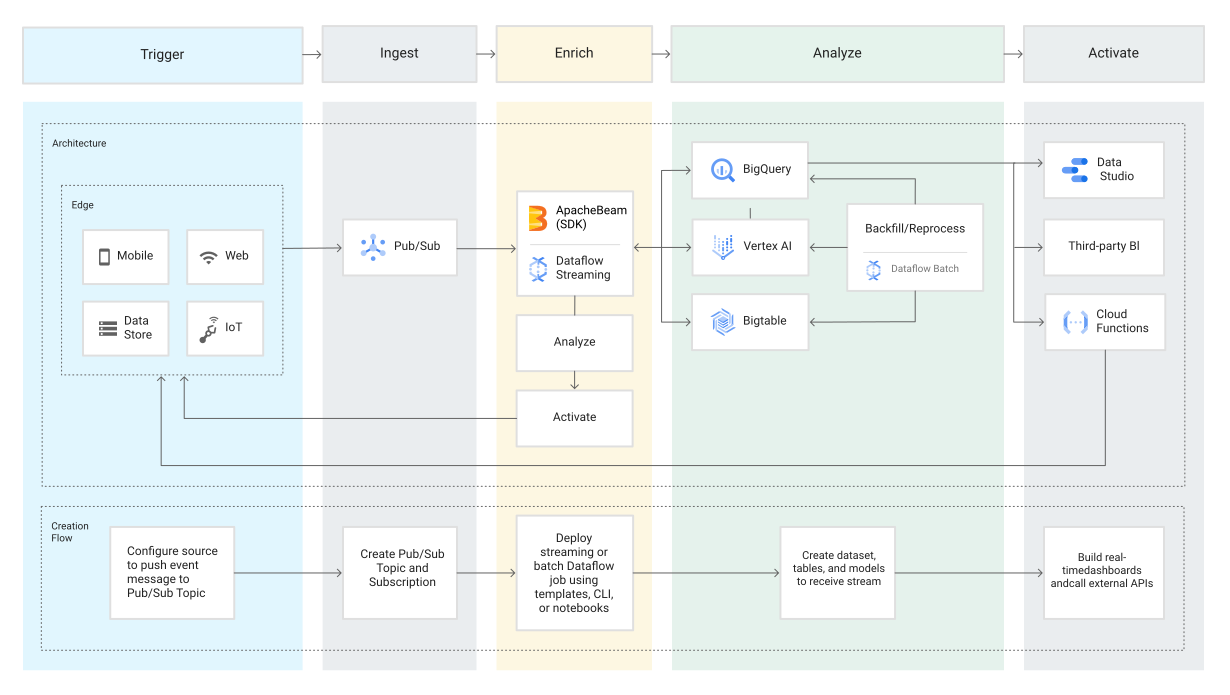
Respond to business events in real time with event-driven analysis. Built-in streaming capabilities like SQL-based continuous queries automatically ingest streaming data and make it immediately available to query. This allows you to stay agile and make business decisions based on the freshest data. Or use Dataflow to enable fast, simplified streaming data pipelines for a comprehensive solution.
Tutorials, quickstarts, & labs
Event-driven analysis
Event-driven analysis
Respond to business events in real time with event-driven analysis. Built-in streaming capabilities like SQL-based continuous queries automatically ingest streaming data and make it immediately available to query. This allows you to stay agile and make business decisions based on the freshest data. Or use Dataflow to enable fast, simplified streaming data pipelines for a comprehensive solution.
Geospatial analytics
Unlock planetary-scale insights with rich, easy-to-use geospatial datasets
Unlock planetary-scale insights with rich, easy-to-use geospatial datasets
Access a portfolio of rich geospatial data, powerful cloud computing, and built-in AI tools that make it easier for you to unlock insights that lead to more informed and faster business and sustainability decisions, without needing remote sensing or GIS expertise. Bring Earth Engine imagery and diverse Google Maps Platform datasets directly into your BigQuery workflows. This includes seamless access to Places, Routes, Street View, Aerial and Satellite Imagery, Population Dynamics, Air Quality, Pollen, and Weather data.
Tutorials, quickstarts, & labs
Unlock planetary-scale insights with rich, easy-to-use geospatial datasets
Unlock planetary-scale insights with rich, easy-to-use geospatial datasets
Access a portfolio of rich geospatial data, powerful cloud computing, and built-in AI tools that make it easier for you to unlock insights that lead to more informed and faster business and sustainability decisions, without needing remote sensing or GIS expertise. Bring Earth Engine imagery and diverse Google Maps Platform datasets directly into your BigQuery workflows. This includes seamless access to Places, Routes, Street View, Aerial and Satellite Imagery, Population Dynamics, Air Quality, Pollen, and Weather data.
Pricing
| How BigQuery pricing works | BigQuery pricing is based on compute (analysis), storage, additional services, and data ingestion and extraction. Loading and exporting data are free. | |
|---|---|---|
| Services and usage | Subscription type | Price (USD) |
Free tier | The BigQuery free tier gives customers 10 GiB storage, up to 1 TiB queries in on-demand compute free per month, and other resources. | Free |
Compute (analysis) | On-demand Generally gives you access to up to 2,000 concurrent slots, shared among all queries in a single project. | Starting at $6.25 per TiB scanned. First 1 TiB per month is free. |
Editions: Standard, Enterprise, and Enterprise Plus Includes Gemini in BigQuery AI-assistance features. | Starting at $0.04 per slot hour | |
Storage | Logical storage Based on the uncompressed bytes used in tables or table partitions modified in the last 90 days. | Starting at $0.01 Per GiB. The first 10 GiB is free each month. |
Physical storage Based on the compressed bytes used in tables or table partitions modified for 90 consecutive days. | Starting at $0.02 Per GiB. The first 10 GiB is free each month. | |
Data ingestion | Batch loading Import table from Cloud Storage. | Free When using the shared slot pool. |
Streaming inserts You are charged for rows that are successfully inserted. Individual rows are calculated using a 1 KB minimum. | $0.01 per 200 MiB | |
BigQuery Storage Write API Data loaded into BigQuery is subject to BigQuery storage pricing or Cloud Storage pricing. | $0.025 per 1 GiB. The first 2 TiB per month are free. | |
Data extraction | Batch export Export table data to Cloud Storage. | Free When using the shared slot pool. |
Streaming reads Use the storage Read API to perform streaming reads of table data. | Starting at $1.10 per TiB read | |
Agents | Input data Data Science Agent, Data Engineering Agent, and Conversational Analytics Agent | $3 per million tokens |
Output data Data Science Agent, Data Engineering Agent, and Conversational Analytics Agent | $20 per million tokens | |
Learn more about BigQuery pricing. View all pricing details.
How BigQuery pricing works
BigQuery pricing is based on compute (analysis), storage, additional services, and data ingestion and extraction. Loading and exporting data are free.
Free tier
The BigQuery free tier gives customers 10 GiB storage, up to 1 TiB queries in on-demand compute free per month, and other resources.
Free
Compute (analysis)
On-demand
Generally gives you access to up to 2,000 concurrent slots, shared among all queries in a single project.
Starting at
$6.25
per TiB scanned. First 1 TiB per month is free.
Editions: Standard, Enterprise, and Enterprise Plus
Includes Gemini in BigQuery AI-assistance features.
Starting at
$0.04
per slot hour
Storage
Logical storage
Based on the uncompressed bytes used in tables or table partitions modified in the last 90 days.
Starting at
$0.01
Per GiB. The first 10 GiB is free each month.
Physical storage
Based on the compressed bytes used in tables or table partitions modified for 90 consecutive days.
Starting at
$0.02
Per GiB. The first 10 GiB is free each month.
Data ingestion
Batch loading
Import table from Cloud Storage.
Free
When using the shared slot pool.
Streaming inserts
You are charged for rows that are successfully inserted. Individual rows are calculated using a 1 KB minimum.
$0.01
per 200 MiB
BigQuery Storage Write API
Data loaded into BigQuery is subject to BigQuery storage pricing or Cloud Storage pricing.
$0.025
per 1 GiB. The first 2 TiB per month are free.
Data extraction
Batch export
Export table data to Cloud Storage.
Free
When using the shared slot pool.
Streaming reads
Use the storage Read API to perform streaming reads of table data.
Starting at
$1.10
per TiB read
Agents
Input data
Data Science Agent, Data Engineering Agent, and Conversational Analytics Agent
$3
per million tokens
Output data
Data Science Agent, Data Engineering Agent, and Conversational Analytics Agent
$20
per million tokens
Learn more about BigQuery pricing. View all pricing details.


Business Case
Tens of thousands of customers choose BigQuery to build their data to AI platforms
Mattel saves time and money by connecting its data to AI in BigQuery.
TJ Allard, Lead Data Scientist, Mattel
"BigQuery and Vertex AI bring all our data and AI together into a single platform. This has transformed how we take action on customer feedback from a lengthy manual process to a simple natural language query in seconds, allowing us to get to customer insights in minutes instead of months.”
Read more customer stories
Deutsche Telekom designs the telco of tomorrow with BigQuery
Read the blog
10 months to innovation: Definity's leap to data agility with BigQuery and Vertex AI
Read the blog
Yassir migrated from Databricks to BigQuery and improved the performance and efficiency of its machine learning processes
Read the blog
See the BigQuery difference
AI-powered innovation with conversational, intelligent search, and all-new agentic experiences, enriched with semantic layer for accuracy.
Unified data to AI platform for seamless analytics, AI co-processing, and real-time insights on multimodal data, with unified governance, runtime metadata, and security.
Flexible and future-proof with low cost AI and seamless interoperability with third party and open source.
Partners & Integration
Work with a partner with BigQuery expertise





















































































ETL and data integration
Reverse ETL and MDM
BI and data visualization
Data governance and security
Connectors and developer tools
Machine learning and advanced analytics
Data quality and observability
Consulting partners
From data ingestion to visualization, many partners have integrated their data solutions with BigQuery. Listed above are partner integrations through Google Cloud Ready - BigQuery.
Visit our partner directory to learn about these BigQuery partners.
Other inquiries and support
FAQ
What makes BigQuery different from other enterprise data warehouse alternatives?
BigQuery is Google Cloud’s fully managed and completely serverless enterprise data warehouse. BigQuery supports all data types, works across clouds, and has built-in machine learning and business intelligence, all within a unified platform. With native Vertex AI integration, you can easily connect your data to Google's industry leading AI without leaving BigQuery.
What is an enterprise data warehouse?
An enterprise data warehouse is a system used for the analysis and reporting of structured and semi-structured data from multiple sources. Many organizations are moving from traditional data warehouses that are on-premises to cloud data warehouses, which provide more cost savings, scalability, and flexibility.
How secure is BigQuery?
BigQuery offers robust security, governance, and reliability controls that offer high availability and a 99.99% uptime SLA. Your data is protected with encryption by default and customer-managed encryption keys.
How can I get started with BigQuery?
There are a few ways to get started with BigQuery. New customers get $300 in free credits to spend on BigQuery. All customers get 10 GB storage and up to 1 TB queries free per month, not charged against their credits. You can get these credits by signing up for the BigQuery free trial. Not ready yet? You can use the BigQuery sandbox without a credit card to see how it works.
What is the BigQuery sandbox?
The BigQuery sandbox lets you try out BigQuery without a credit card. You stay within BigQuery’s free tier automatically, and you can use the sandbox to run queries and analysis on public datasets to see how it works. You can also bring your own data into the BigQuery sandbox for analysis. There is an option to update to the free trial where new customers get a $300 credit to try BigQuery.
What are the most common ways companies use BigQuery?
Companies of all sizes use BigQuery to consolidate siloed data into one location so you can perform data analysis and get insights from all of your business data. This allows companies to make decisions in real time, streamline business reporting, and incorporate machine learning into data analysis to predict future business opportunities.