What is end user computing (EUC)?
End user computing (EUC) refers to the systems and tools that allow everyday employees to access the applications, data, and desktops they need to do their jobs. It encompasses everything from physical devices like laptops and smartphones to the software that manages and secures them.
In the past, IT teams had to manually configure every single computer, which was slow and expensive. Modern EUC shifts this burden away from physical hardware management toward secure, cloud-based solutions that let people work from anywhere.
End-user computing that’s made for today and ready for what’s next
Core components of end-user computing solutions
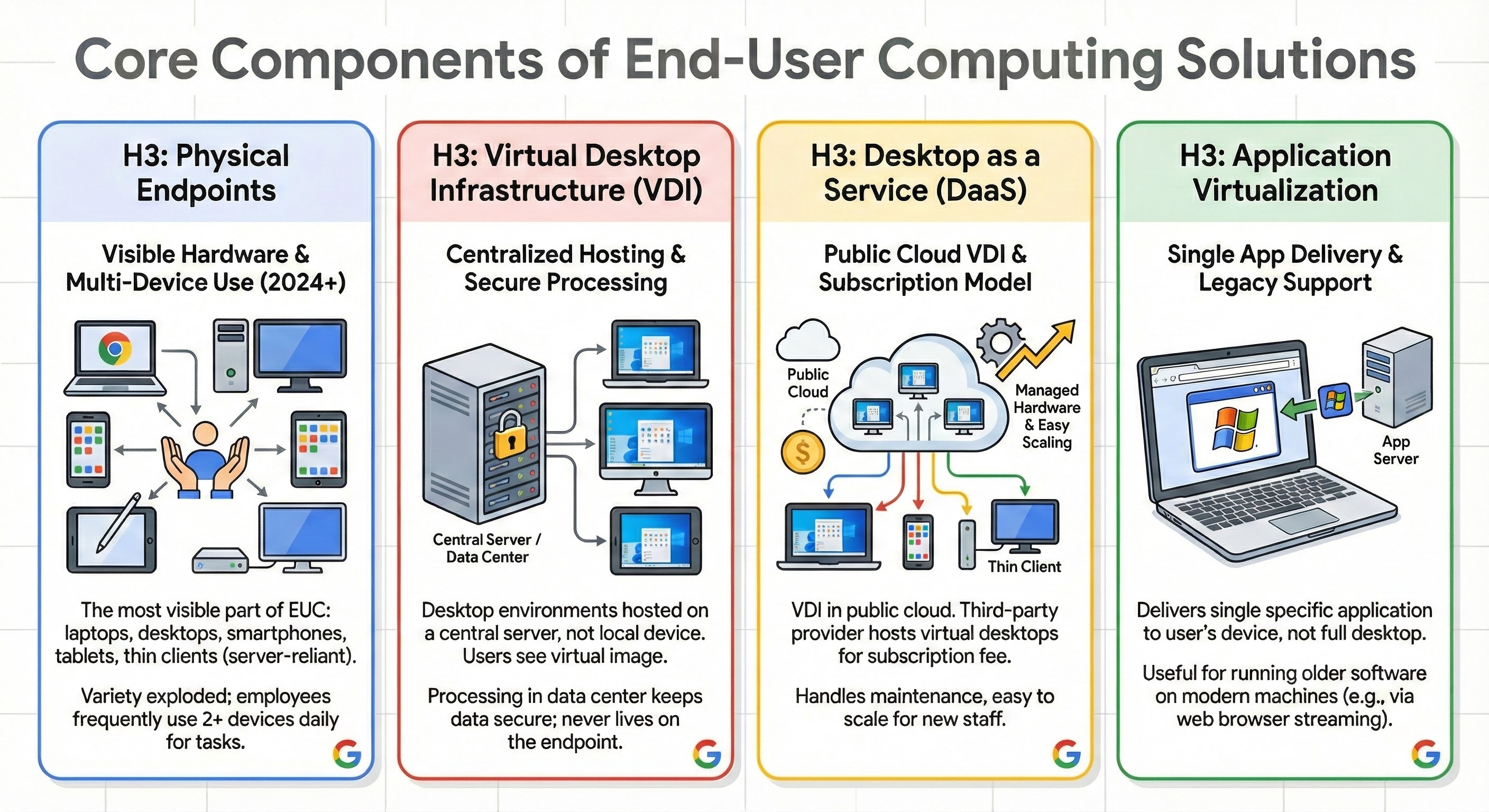
To understand what end user computing is in a technical sense, it helps to break down the different technologies involved. These components work together to help deliver a seamless experience for developers and general staff alike.
Physical endpoints
The most visible part of EUC is the hardware. This includes laptops, desktop computers, smartphones, tablets, and thin clients (stripped-down computers that rely on a server to do the heavy processing). Since 2024, the variety of endpoints has shifted, with many employees using two or more devices daily to complete their tasks.
Virtual desktop infrastructure (VDI)
VDI is a technology where desktop environments are hosted on a central server rather than on the local device itself. When a user logs in, they see a virtual image of their desktop. All the processing happens in the data center, which keeps data secure because it never actually lives on the user's laptop.
Desktop as a service (DaaS)
Think of DaaS as VDI that lives in the public cloud. Instead of your company buying and managing the expensive servers to run virtual desktops, a third-party provider hosts them for you. You pay a subscription fee, and the provider handles the hardware maintenance, making it much easier to scale up when you hire new staff.
Application virtualization
Sometimes you don’t need a full desktop; you just need one specific application. Application virtualization delivers a single app to the user's device, which can be useful for running older software on modern machines. For example, modern solutions like virtual app delivery (VAD) allow you to stream a legacy app directly into a web browser.
VDI versus DaaS versus cloud-native endpoints
Choosing the right end user computing solutions depends on your budget and your security needs. The table below compares the three most common approaches.
Feature | Virtual desktop infrastructure (VDI) | Desktop as a service (DaaS) | Cloud-native/browser-first |
Primary location | On-premises data center | Public cloud provider | SaaS apps & web browser |
Cost model | Capital expense (upfront hardware costs) | Operating expense (subscription) | Operating expense (Low hardware cost) |
Management | Higher IT effort | Medium IT effort | Lower IT effort |
Best for | Strict compliance requirements | Rapid scaling | General workforce & SaaS users |
Feature
Virtual desktop infrastructure (VDI)
Desktop as a service (DaaS)
Cloud-native/browser-first
Primary location
On-premises data center
Public cloud provider
SaaS apps & web browser
Cost model
Capital expense (upfront hardware costs)
Operating expense (subscription)
Operating expense (Low hardware cost)
Management
Higher IT effort
Medium IT effort
Lower IT effort
Best for
Strict compliance requirements
Rapid scaling
General workforce & SaaS users
The shift to browser-based computing and application streaming
While VDI and DaaS replicate full desktop experiences, modern EUC strategies increasingly rely on the web browser as the primary interface for work. This approach decouples the application from the underlying operating system entirely.
Rather than managing virtual desktops, organizations can now use application streaming to deliver software. In this model, the application runs on a secure server, but the visual interface is streamed as pixels to a browser tab on the user’s device. This offers a distinct technical advantage: it eliminates the "double hop" latency often found in traditional VDI and removes the need for users to navigate a secondary Windows desktop interface just to access one tool. This method allows legacy applications to run side-by-side with modern SaaS tools, creating a unified, browser-first workspace that is secure, simpler to manage, and lighter on infrastructure resources.
EUC use cases
End user computing supports a wide range of business scenarios. Here is how different industries apply these tools in the real world.
Remote and hybrid workforce support
When employees work from home, they need access to internal file servers and intranet sites. EUC solutions like DaaS provide a secure "tunnel" to these resources. This ensures that a remote developer can access the codebase securely without needing to copy files to an unsecure personal drive.
Contact centers
Call centers often have high turnover and shift-based work. Instead of buying a dedicated computer for every employee, companies can use thin clients. Multiple agents can use the same physical station during different shifts. When Agent A logs out and Agent B logs in, Agent B sees their own personal desktop and settings instantly.
Third-party and contractor access
Giving a contractor a fully provisioned company laptop is expensive and logistically difficult. With EUC, you can grant a contractor secure access to a virtual desktop that contains only the tools they need. While the organization may still need to provide a physical device to access this environment, the hardware can be a basic thin client with no sensitive data stored locally. Once their contract is up, you simply turn off their access credentials, leaving no corporate information on the physical machine.
Mergers and acquisitions (M&A)
Merging two companies usually takes years of IT integration. VDI and DaaS can help speed this up. The acquiring company can provide virtual desktops to the new employees immediately. This gets them on the parent company's email and HR systems on Day 1, long before the IT is fully integrated.
Why is an EUC strategy critical for modern enterprises?
An effective EUC strategy is about more than just convenience; it can be a business necessity. With effective EUC, organizations can help improve security and keep employees productive regardless of where they are located.
Security and compliance
Security and compliance
Traditional security relied on building a "firewall" around the office. Now that users work from everywhere, that perimeter is gone. EUC centralizes data so it stays in the cloud or the data center, not on a laptop that could be lost on a train. This aligns with "Zero Trust" security principles, where access is granted based on identity, not just location.
Hybrid and remote work
Hybrid and remote work
The modern workforce is distributed. Research suggests that nearly 28% of all work days were paid work-from-home days in 2023. EUC enables this by ensuring that an employee in a home office in London has the same secure access to files and apps as an employee at the headquarters in New York.
BYOD (Bring your own device)
BYOD (Bring your own device)
Many employees prefer using their own devices. A solid EUC policy allows this by separating corporate data from personal data. For instance, a containerized app on a personal phone allows a developer to check code reviews without giving the company control over their personal photos or messages.
How Google Cloud transforms end user computing
Google Cloud approaches end user computing differently. Rather than just moving old desktops to the cloud, Google Cloud helps focus on enabling secure access through modern, cloud-first tools. This shifts the focus from managing heavy operating systems to enabling instant productivity.
The "browser-first" endpoint (ChromeOS)
ChromeOS devices (Chromebooks) are secure by design. They boot up in seconds and can be resistant to traditional ransomware attacks. With Chrome Enterprise, IT teams can manage thousands of devices from a single cloud console, enforcing security policies without needing VPNs.
Virtual app delivery
Sometimes you still need that one specific application. Google's acquisition of Cameyo allows organizations to deliver these legacy apps seamlessly. Instead of a slow, expensive virtual desktop, Cameyo streams the specific app to a Chrome browser tab. This is perfect for a business that wants to move to the cloud but is held back by one critical legacy ERP system.
Partner solutions (The "heavy lifting" VDI)
For power users who need full Windows capabilities—like engineers using CAD software—Google Cloud partners with industry leaders. You can run Citrix or VMware (via Google Cloud VMware Engine) directly on Google Cloud’s global infrastructure. This gives you the familiarity of traditional tools with the speed and reliability of Google Cloud’s fiber network.
Productivity and collaboration
Google Workspace helps complete the picture by moving the actual work to the cloud. By replacing installed office software with cloud-native tools like Docs, Sheets, and Drive, you remove the need to save files on a local hard drive entirely. This can reduce the risk of data loss and makes collaboration real-time.
Power your code with cloud infrastructure
For developers, end user computing is not just about giving employees a laptop; it’s about defining where your development environment lives. Moving your dev environment from a local physical machine to the cloud can help performance and flexibility that a standard laptop cannot match.
High-performance remote development
High-performance remote development
Complex builds, data processing tasks, and container orchestration can bring a local laptop to a crawl. By shifting your development environment to the cloud, you can access high-performance virtual machines (VMs) with massive CPU, accelerator, and RAM capabilities. You can code on a lightweight Chromebook or tablet while a powerful Google Cloud Compute Engine instance handles the heavy lifting in the background.
Standardize operating systems
Standardize operating systems
Inconsistent environments are a major headache for engineering teams. With cloud-based development, you can standardize the operating system, libraries, and tools across the entire team. Google Cloud Workstations allows you to create managed development environments that ensure every developer is working with the exact same configuration. This reduces onboarding time from days to minutes and eliminates bugs caused by local configuration drift.
Secure access to production data
Secure access to production data
Developers often need to access sensitive data for troubleshooting or testing. Downloading this data to a local laptop is a security risk. By using a secure, cloud-hosted desktop or workstation, you can work with the data where it resides without it ever leaving the secure cloud network.
Related products and solutions
- Cloud WorkstationsLearn how to deploy managed development environments on Google Cloud to improve security and speed up developer onboarding.
- Chrome EnterpriseExplore how ChromeOS and the Chrome browser can secure your endpoints and streamline management for a cloud-first workforce.
 Google Cloud VMware EngineDiscover how to lift and shift your existing VMware VDI environments to Google Cloud without refactoring your applications.
Solution
Virtual Desktop Infrastructure (VDI)Browse the full range of VDI and DaaS partner solutions available on Google Cloud, including Citrix and Workspot.
Take the next step
Start building on Google Cloud with $300 in free credits and 20+ always free products.
Need help getting started?
Contact salesWork with a trusted partner
Find a partnerContinue browsing
See all products











