AI code generation
AI coding and code generation tools
Generate code snippets, functions, and algorithms in popular languages and frameworks like Python, JavaScript, and React—just using simple natural language text descriptions. AI coding tools can help non-technical users create real code and empower experts with code assistance.
Overview
What is AI code generation?
AI code generation is the use of artificial intelligence (AI) and machine learning (ML) to create code based on a user’s conversational prompt. For example, Gemini Code Assist offers developer code generation and completion capabilities. Code can be generated based on general best practices, organizational governance, and even a natural language description of the desired code.
What is code intelligence?
Code intelligence refers to the advanced capabilities of AI systems, particularly large language models (LLMs) and specialized tools, to understand, analyze, and manipulate source code beyond simple text processing.
This can include understanding the structure, syntax, semantics, and intent of the code, as well as its relationship to the broader codebase. This helps enable features such as precise code completion, semantic search, sophisticated debugging assistance, automated refactoring, and context-aware vulnerability detection, which can then help accelerate development cycles and improve code quality.
What are the benefits of AI code generation?
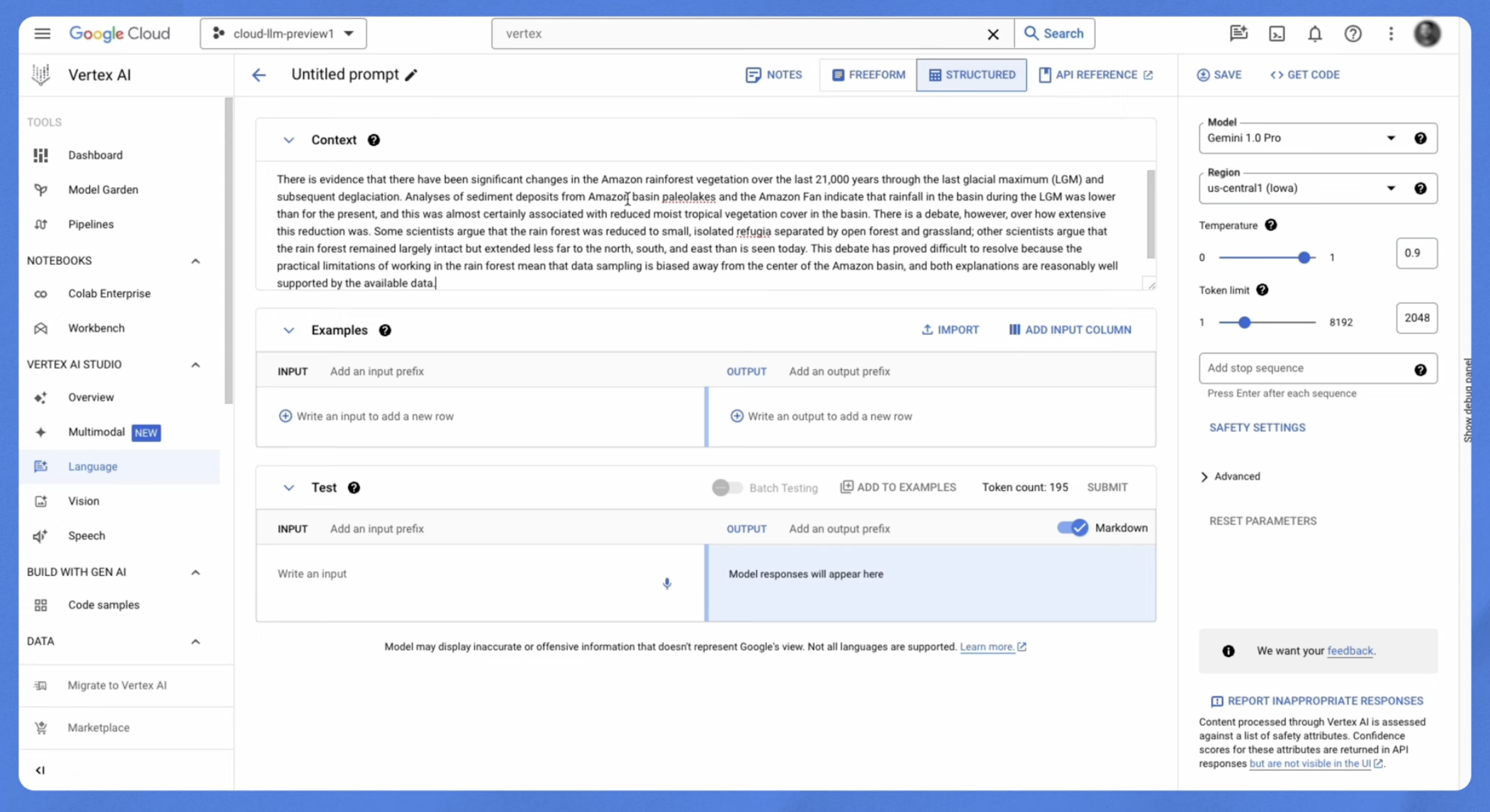
AI can help speed up development for both expert developers and non-technical builders. AI code generation tools like Google AI Studio can provide code snippets for specific tasks like file I/O, database interaction, or API calls. AI Studio can even generate complete functions, classes, or data structures based on text prompts. Seasoned developers can boost their productivity with code assistance tools that put AI-powered features like code completion and reviews right in their IDE.
What is the best AI for code generation?
Developers now have access to a wide variety of AI solutions for code generation. Google Cloud’s Gemini platform offers generative AI models that allow for all types of content generation, including code. Gemini platform leverages Google's cutting edge Gemini models to generate text and code in response to conversational prompts—even across various human languages.
| Tool | Overview | Use Case Examples | Pricing |
|---|---|---|---|
Gemini CLI is an AI-powered assistant integrated directly into your terminal. It brings the power of Gemini to your command line, understanding natural language prompts to help generate code and scripts, assist with complex shell commands, explain code, and automate development tasks without leaving your terminal. | Navigating legacy code: Use Gemini CLI in the terminal to quickly summarize modules, explain complex functions, or trace data flows in large, complex, or poorly documented codebases. Automated code refactoring & modernization: Gemini CLI aids in large-scale code changes, such as updating dependencies, migrating versions/frameworks, enforcing standards, or refactoring across many files for better performance and maintainability. Complex debugging assistance: Provide error logs, stack traces, and snippets to Gemini CLI for in-depth analysis, root cause identification, and suggested fixes for bugs in complex, multi-component systems. | Individuals: You can use Gemini CLI for free. By signing in with your Google account, you'll gain access to a generous free tier, including Gemini 3 with a large context window and generous usage limits, making it ideal for personal projects and experimentation. For higher usage limits, subscribe to Google AI Pro or AI Ultra plans. Business/Enterprise: Gemini CLI requires authentication through a Gemini API key, a Google Cloud API, or a Gemini Code Assist subscription. | |
Gemini 3 | The most intelligent and capable AI model series to date. Gemini 3 features state-of-the-art reasoning, vibe coding capabilities, and a 1M+ token context window. It powers agentic workflows and is available in Gemini platform, Google AI Studio, Gemini and Google Antigravity. | Vibe coding: Generating complex, aesthetic frontend interfaces or 3D visualizations from natural language prompts. Agentic workflows: Handling multi-step development tasks, such as autonomously planning and executing a full legacy code migration. Multimodal analysis: analyzing video, images, and code simultaneously to generate documentation or fix UI bugs. | Pay-as-you-go via Gemini platform. Gemini 3 Flash offers a low-cost, high-speed option for high-volume tasks ($0.50/1M input tokens). Gemini 3 Pro is available for complex reasoning tasks. |
An agent-first IDE (fork of VS Code) designed to orchestrate autonomous AI agents. It introduces an agent manager to spawn multiple agents that plan, code, and test simultaneously, along with a browser extension that allows agents to verify web apps in real-time. | Mission control: Delegate complex tasks to autonomous agents, as in, one agent refactors a component while another writes unit tests in parallel. End-to-end app building: Describe an app idea, and agents will plan the architecture, write the code, and use the built-in browser to click through and verify functionality. Visual debugging: Agents capture screenshots and recordings of the app in the browser to detect and fix visual regressions automatically. | Free for individuals during the public preview period. Includes generous rate limits for Gemini 3 Pro and Gemini 3 Flash models. Enterprise pricing plans available for team management and private codebase grounding. | |
An AI-powered coding assistant integrated directly into popular IDEs like VS Code and JetBrains. It provides real-time code completions, generates code from natural language prompts, and helps with debugging and code explanation. | Autocompleting code: Suggesting entire blocks of code as a developer types. Generating functions: Creating a function to read and parse a CSV file based on a simple comment. Unit test generation: Automatically creating unit tests for a specific function or class. Code explanation: Explaining a complex regular expression or a legacy piece of code. | Individuals: Free tier available with generous usage limits. Business/Enterprise: Paid plans with additional features like private codebase grounding, and enhanced security and governance. Pricing is per user, per month. | |
A comprehensive, managed machine learning platform on Google Cloud. It provides the tools to build, train, and deploy ML models and AI applications. Provides access to both third-party models and Google's powerful foundation models, including the Gemini family, for a wide range of tasks, including code generation. | Custom code generation models: Fine-tuning a code generation model on a company's private codebase to generate code that adheres to internal standards. Building AI-powered applications: Creating a web app that uses a Codey model to translate natural language into SQL queries for a database. Automating workflows: Developing a script that uses Gemini platform to automatically generate documentation for a codebase. | Pay-as-you-go, based on the specific services used. Pricing is typically calculated based on factors like the number of characters or tokens in the input and output, and the compute resources consumed for training and prediction. | |
An IDE extension for VS Code and JetBrains IDEs that simplifies the development of cloud-native applications on Google Cloud. It provides tools for creating, deploying, and debugging applications on services like GKE and Cloud Run. It also integrates with Gemini Code Assist. | Local development and debugging: Running and debugging a microservice locally before deploying it to GKE. Simplified Kubernetes development: Creating and managing Kubernetes clusters and deploying applications without leaving the IDE. Serverless development: Developing and deploying a serverless function to Cloud Run. | Cloud Code itself is a free extension. However, you will be charged for any underlying Google Cloud services you use, such as GKE clusters or Cloud Run instances. | |
A web-based tool for prototyping and experimenting with generative AI models, including the Gemini family. It's designed for rapid iteration and is a great starting point for developers who want to explore the capabilities of Google's AI models without writing a lot of code. | Prototyping AI features: Quickly building a proof-of-concept for a new AI-powered feature, such as a code summarizer. Experimenting with prompts: Testing different natural language prompts to see how a model responds and fine-tuning them for optimal code generation. Learning generative AI: Understanding the capabilities and limitations of LLMs for coding tasks in an interactive environment. | Google AI Studio has a free tier that allows for a certain number of API calls per minute. For more extensive use, you would typically move to Gemini platform, which has its own pricing structure. |
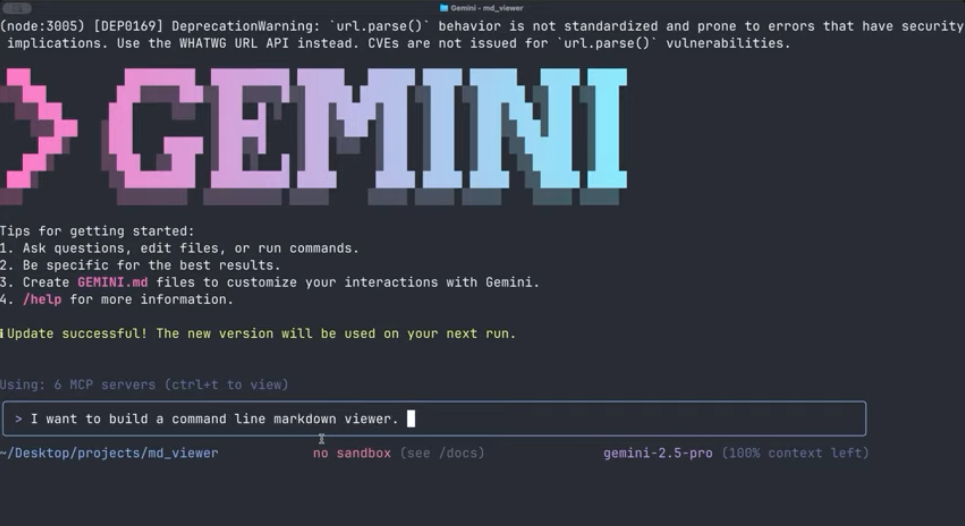
Gemini CLI is an AI-powered assistant integrated directly into your terminal. It brings the power of Gemini to your command line, understanding natural language prompts to help generate code and scripts, assist with complex shell commands, explain code, and automate development tasks without leaving your terminal.
Navigating legacy code: Use Gemini CLI in the terminal to quickly summarize modules, explain complex functions, or trace data flows in large, complex, or poorly documented codebases.
Automated code refactoring & modernization: Gemini CLI aids in large-scale code changes, such as updating dependencies, migrating versions/frameworks, enforcing standards, or refactoring across many files for better performance and maintainability.
Complex debugging assistance: Provide error logs, stack traces, and snippets to Gemini CLI for in-depth analysis, root cause identification, and suggested fixes for bugs in complex, multi-component systems.
Individuals: You can use Gemini CLI for free. By signing in with your Google account, you'll gain access to a generous free tier, including Gemini 3 with a large context window and generous usage limits, making it ideal for personal projects and experimentation. For higher usage limits, subscribe to Google AI Pro or AI Ultra plans.
Business/Enterprise: Gemini CLI requires authentication through a Gemini API key, a Google Cloud API, or a Gemini Code Assist subscription.
Gemini 3
The most intelligent and capable AI model series to date. Gemini 3 features state-of-the-art reasoning, vibe coding capabilities, and a 1M+ token context window. It powers agentic workflows and is available in Gemini platform, Google AI Studio, Gemini and Google Antigravity.
Vibe coding: Generating complex, aesthetic frontend interfaces or 3D visualizations from natural language prompts.
Agentic workflows: Handling multi-step development tasks, such as autonomously planning and executing a full legacy code migration.
Multimodal analysis: analyzing video, images, and code simultaneously to generate documentation or fix UI bugs.
Pay-as-you-go via Gemini platform.
Gemini 3 Flash offers a low-cost, high-speed option for high-volume tasks ($0.50/1M input tokens).
Gemini 3 Pro is available for complex reasoning tasks.
An agent-first IDE (fork of VS Code) designed to orchestrate autonomous AI agents. It introduces an agent manager to spawn multiple agents that plan, code, and test simultaneously, along with a browser extension that allows agents to verify web apps in real-time.
Mission control: Delegate complex tasks to autonomous agents, as in, one agent refactors a component while another writes unit tests in parallel.
End-to-end app building: Describe an app idea, and agents will plan the architecture, write the code, and use the built-in browser to click through and verify functionality.
Visual debugging: Agents capture screenshots and recordings of the app in the browser to detect and fix visual regressions automatically.
Free for individuals during the public preview period.
Includes generous rate limits for Gemini 3 Pro and Gemini 3 Flash models.
Enterprise pricing plans available for team management and private codebase grounding.
An AI-powered coding assistant integrated directly into popular IDEs like VS Code and JetBrains. It provides real-time code completions, generates code from natural language prompts, and helps with debugging and code explanation.
Autocompleting code: Suggesting entire blocks of code as a developer types.
Generating functions: Creating a function to read and parse a CSV file based on a simple comment.
Unit test generation: Automatically creating unit tests for a specific function or class.
Code explanation: Explaining a complex regular expression or a legacy piece of code.
Individuals: Free tier available with generous usage limits.
Business/Enterprise: Paid plans with additional features like private codebase grounding, and enhanced security and governance. Pricing is per user, per month.
A comprehensive, managed machine learning platform on Google Cloud. It provides the tools to build, train, and deploy ML models and AI applications. Provides access to both third-party models and Google's powerful foundation models, including the Gemini family, for a wide range of tasks, including code generation.
Custom code generation models: Fine-tuning a code generation model on a company's private codebase to generate code that adheres to internal standards.
Building AI-powered applications: Creating a web app that uses a Codey model to translate natural language into SQL queries for a database.
Automating workflows: Developing a script that uses Gemini platform to automatically generate documentation for a codebase.
Pay-as-you-go, based on the specific services used. Pricing is typically calculated based on factors like the number of characters or tokens in the input and output, and the compute resources consumed for training and prediction.
An IDE extension for VS Code and JetBrains IDEs that simplifies the development of cloud-native applications on Google Cloud. It provides tools for creating, deploying, and debugging applications on services like GKE and Cloud Run. It also integrates with Gemini Code Assist.
Local development and debugging: Running and debugging a microservice locally before deploying it to GKE.
Simplified Kubernetes development: Creating and managing Kubernetes clusters and deploying applications without leaving the IDE.
Serverless development: Developing and deploying a serverless function to Cloud Run.
Cloud Code itself is a free extension. However, you will be charged for any underlying Google Cloud services you use, such as GKE clusters or Cloud Run instances.
A web-based tool for prototyping and experimenting with generative AI models, including the Gemini family. It's designed for rapid iteration and is a great starting point for developers who want to explore the capabilities of Google's AI models without writing a lot of code.
Prototyping AI features: Quickly building a proof-of-concept for a new AI-powered feature, such as a code summarizer.
Experimenting with prompts: Testing different natural language prompts to see how a model responds and fine-tuning them for optimal code generation.
Learning generative AI: Understanding the capabilities and limitations of LLMs for coding tasks in an interactive environment.
Google AI Studio has a free tier that allows for a certain number of API calls per minute. For more extensive use, you would typically move to Gemini platform, which has its own pricing structure.
How It Works
AI code generation works by using a transformer model that has been trained on a large dataset of existing source code from public repositories like GitHub, as well as programming tutorials and documentation. During this training, the model learns the statistical relationships, syntax, and common patterns of various programming languages.
When a user provides a prompt, either as a natural language description (e.g., "write a Python function to check if a number is prime") or as the beginning of a code snippet, the AI uses this input as a starting point. It then calculates the most probable sequence of code "tokens" (words or pieces of code) that should follow, effectively predicting the next piece of the code based on the patterns it learned.
Google Cloud’s foundation models allow developers to build next-generation applications with access to multimodal models and AI coding assistance from Google in Gemini platform.
AI code generation works by using a transformer model that has been trained on a large dataset of existing source code from public repositories like GitHub, as well as programming tutorials and documentation. During this training, the model learns the statistical relationships, syntax, and common patterns of various programming languages.
When a user provides a prompt, either as a natural language description (e.g., "write a Python function to check if a number is prime") or as the beginning of a code snippet, the AI uses this input as a starting point. It then calculates the most probable sequence of code "tokens" (words or pieces of code) that should follow, effectively predicting the next piece of the code based on the patterns it learned.
Google Cloud’s foundation models allow developers to build next-generation applications with access to multimodal models and AI coding assistance from Google in Gemini platform.
AI-powered coding assistance
Get code assistance in Google Cloud console
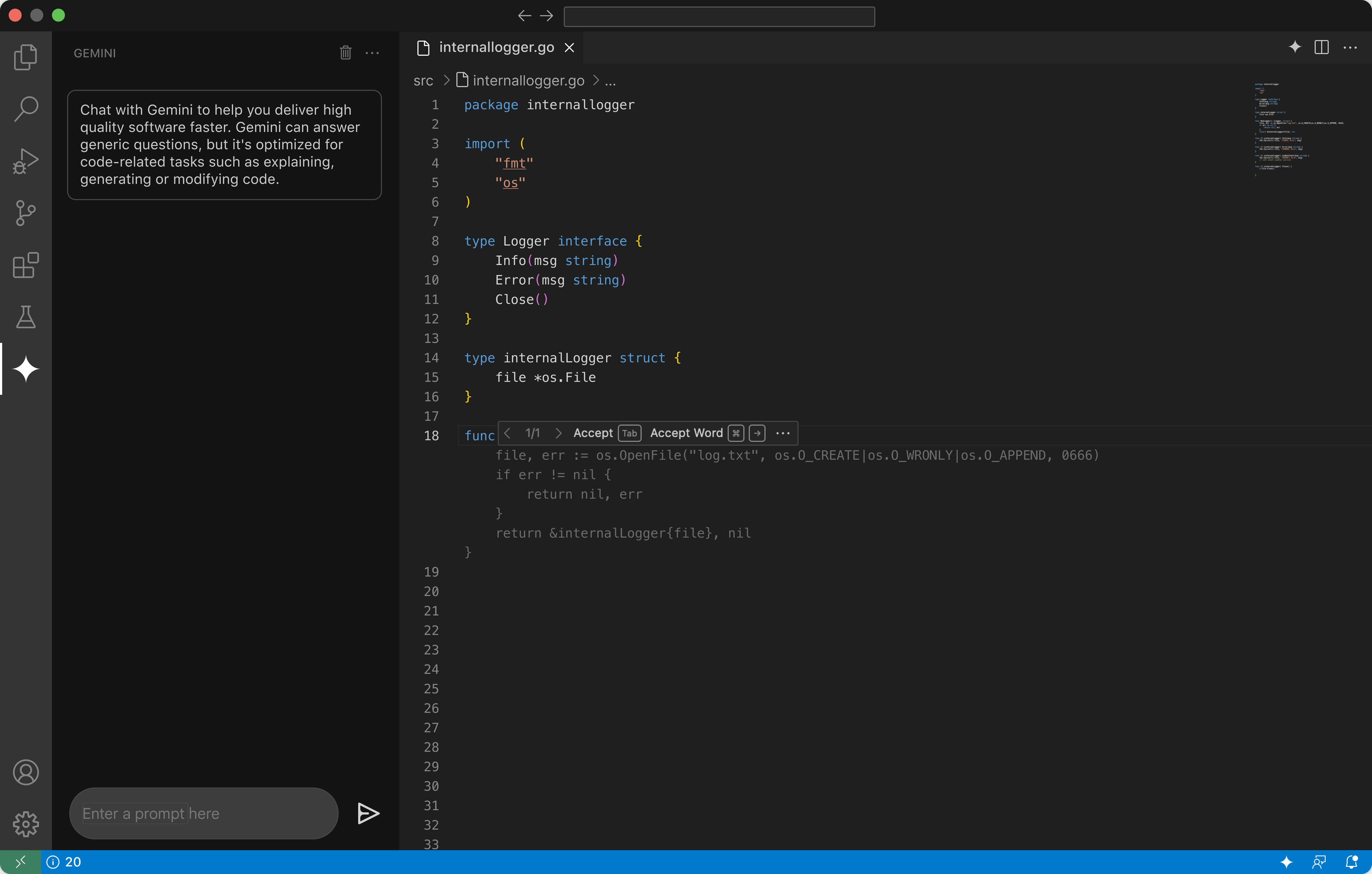
Gemini Code Assist gives application developers and data engineers code recommendations in real time, full function and code blocks, and identifies vulnerabilities and errors in the code, while suggesting fixes. Developers will find code assistance through a chat interface, Cloud Shell Editor, or via our Cloud Code IDE extensions for VSCode and JetBrains IDEs. It supports multiple languages including Go, Java, Javascript, Python, and SQL.

How-tos
Get code assistance in Google Cloud console
Gemini Code Assist gives application developers and data engineers code recommendations in real time, full function and code blocks, and identifies vulnerabilities and errors in the code, while suggesting fixes. Developers will find code assistance through a chat interface, Cloud Shell Editor, or via our Cloud Code IDE extensions for VSCode and JetBrains IDEs. It supports multiple languages including Go, Java, Javascript, Python, and SQL.













