Working with Gemini Enterprise App: A practical prompt guide across roles and industries
Working with Gemini Enterprise App: A practical prompt guide across roles and industries
Getting started
Get ready to transform the way you work with Gemini Enterprise App. Think of it as the central AI hub in your organization. It helps you organize and automate workflows across teams and departments, bringing the power of Google AI to every employee.
This guide will explain how people across roles and industries can use Gemini Enterprise App to become more efficient and impactful.
What is Gemini Enterprise App?
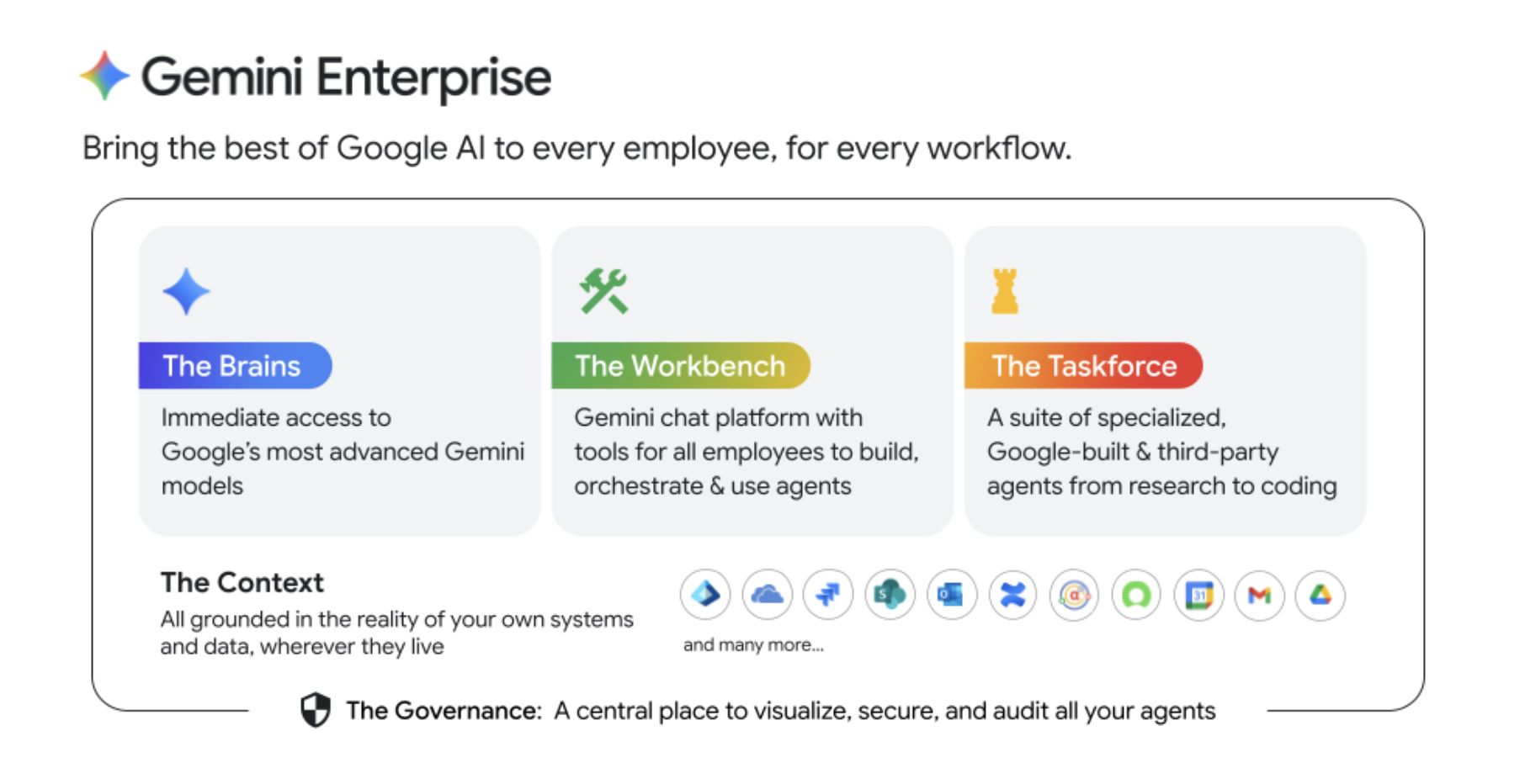
Gemini Enterprise App is Google advanced agentic platform. Powered by Gemini models, it connects siloed company data and information to provide actionable insights, generate content, and automate workflows with agents. It helps scale collaboration across applications with a secure, enterprise-grade platform to govern, orchestrate, and scale AI agents. It offers:
World-class Gemini models: Access Google advanced AI models through intuitive interfaces, and use them as the engine for your agents to tackle your work more efficiently Get help with:
- Summarization: Condense long documents, conversations, customer stories, support ticket details, and more.
- Analysis: Uncover trends and insights from market or internal data, error logs, user feedback, and other sources.
- Learning: Grasp complex technical concepts, product specifications, or intricate policies with Google-quality enterprise search.
- Brainstorming: Generate creative solutions, new product and campaign ideas, or different approaches to solve problems.
- Drafting: Get help creating emails, blog posts, product documentation, business reports, and more.
An agentic platform for every employee: Enable every employee to build their own custom agents with no-code tools like Workflow Builder, to turn expertise into automation and free employees from repetitive tasks, so they can focus on more strategic and higher value work.
A suite of specialized AI agents: Use pre-built AI agents and tools, such as Deep Research and Gemini Notebook, or connect with custom agents tailored for specific tasks. (Note: Availability of custom agents may vary based on your organization setup.)
Deep grounding: Break through silos to connect your data, wherever it lives. Gemini Enterprise App enables your agents to use your data ranging from Microsoft 365 and Google Workspace, all the way to core business systems like Salesforce, Jira, and others.
A single foundation of trust: Protect your critical information with Google enterprise-grade security, privacy, and governance. Gemini Enterprise App includes a single dashboard to visualize, secure, audit and govern all agents across your business, even if they were built outside of Gemini Enterprise App. By keeping your business data safe, you can work with full confidence to build, deploy and scale your agents.
Tips for effective prompts in Gemini Enterprise App
Quickly begin using prompts in Gemini Enterprise App, explore the suggested prompts under the prompt box.
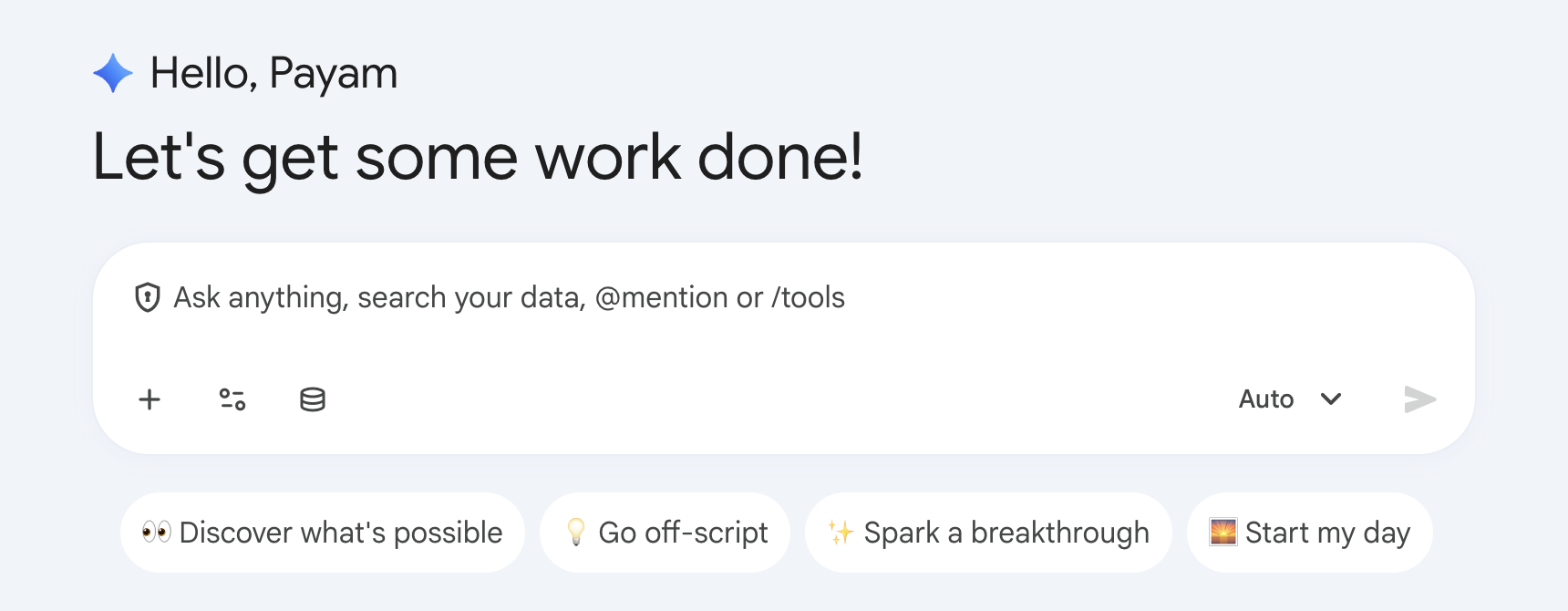
Click on any of the boxes, select any box to see suggested prompts.. See the “Take action” example below:
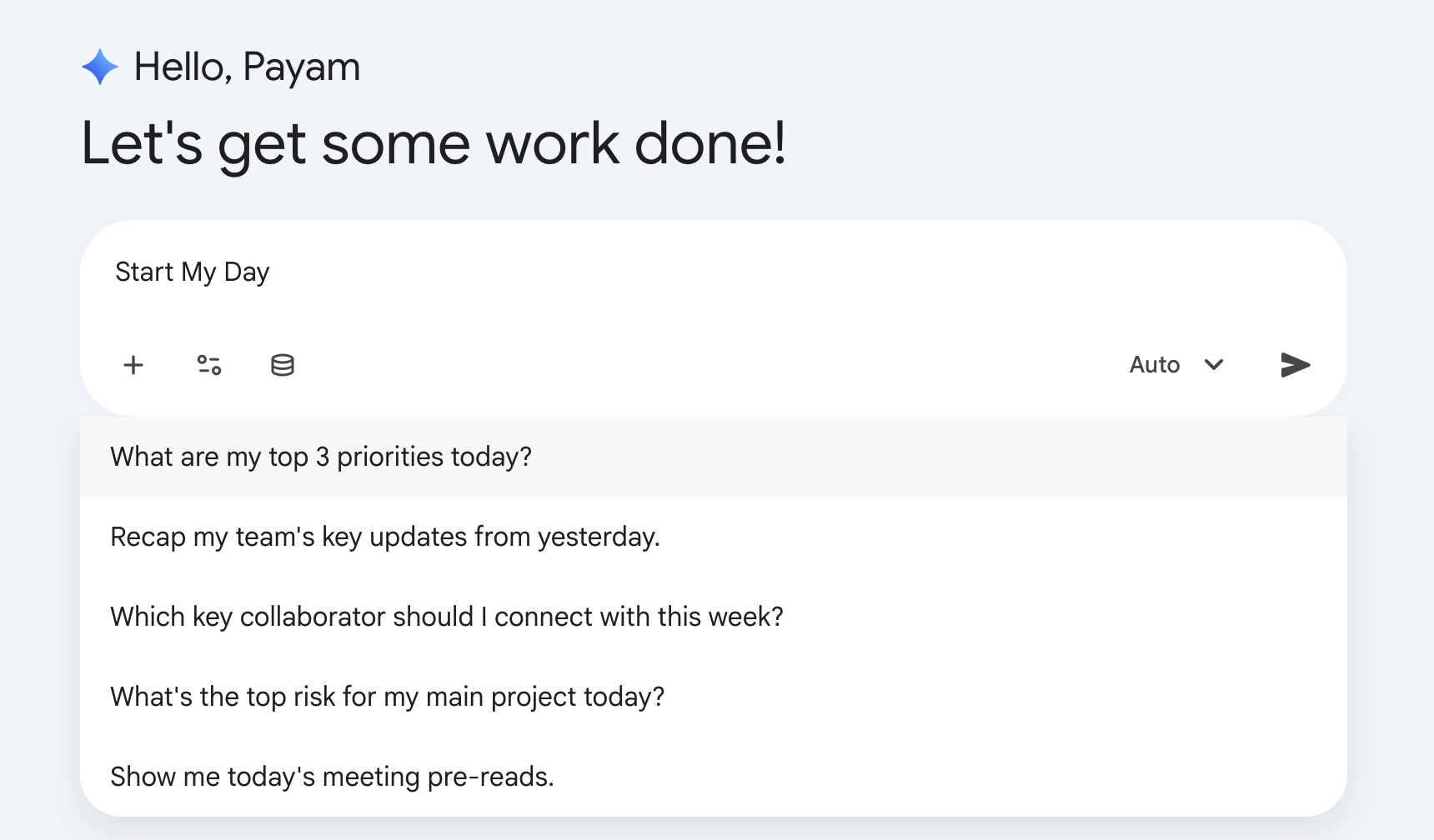
Beyond the suggested prompts, you can write your own prompts to engage with Gemini and your organization data. You can choose which connectors Gemini Enterprise App can use to find data and information to use in its response. For example, you can provide Gemini access to your SharePoint or Drive, Gmail or Outlook, Salesforce, ServiceNow, Jira, and more.
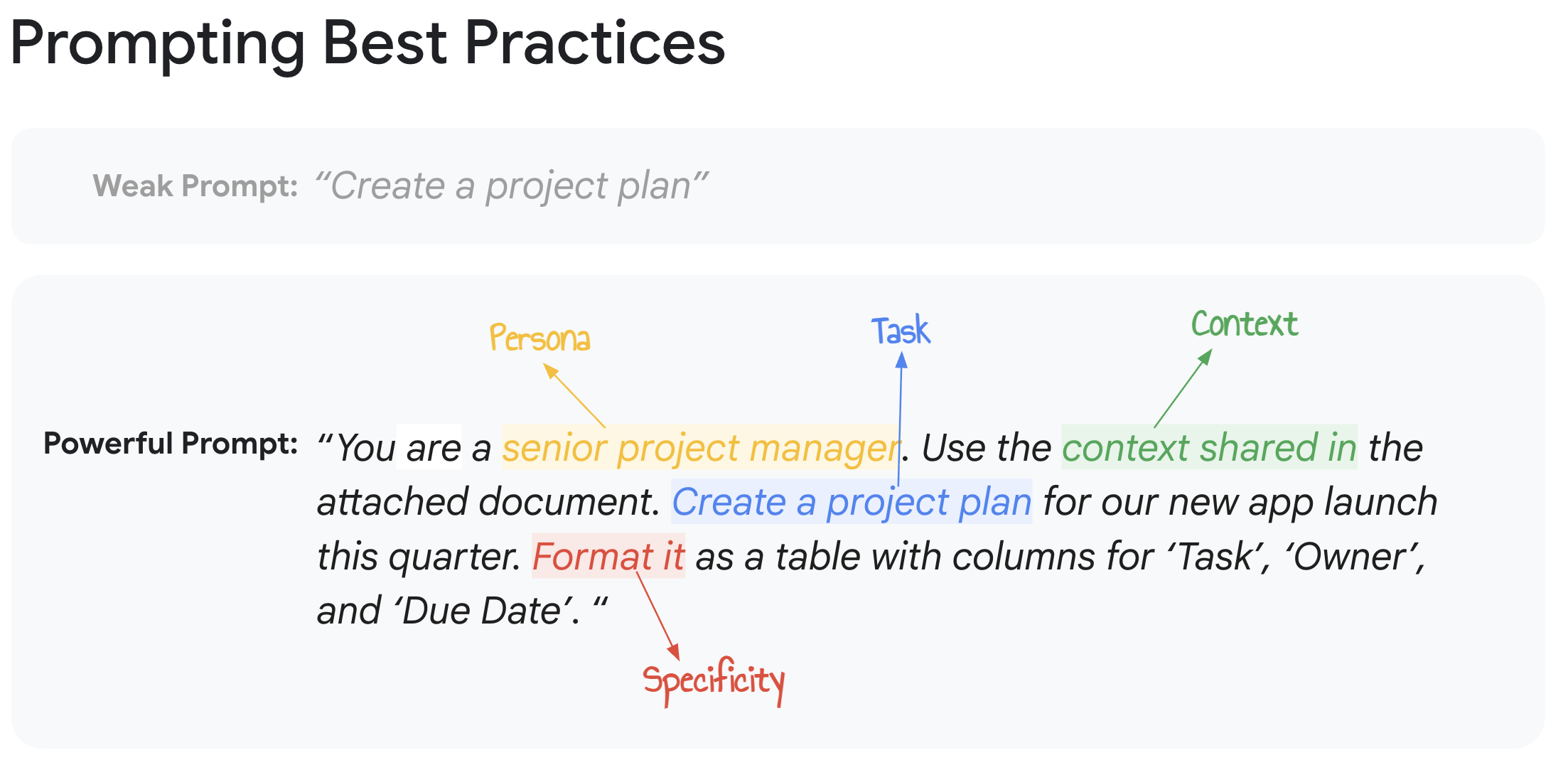
To optimize your results, keep these prompt-writing tips in mind:
Be specific and contextual: More detail is usually better. Use names, dates, project titles, SKU numbers, case IDs, policy names, etc.
- Instead of: “Find sales report.”
- Try: “Find the Q1 2026 sales report for the Alpha product line in the North region.”
Define the persona: Tell Gemini Enterprise App who it should act as.
- Example: “You are a friendly customer service agent. Draft an email to a customer…”
Define the output format: Tell Gemini Enterprise App in what format you expect the output to be shared, and also what formats to avoid.
- Examples: “Summarize this in bullet points,” “Generate a table comparing X and Y,” “Draft a short paragraph for a slide.”
Use action verbs: Start with what you want Gemini Enterprise App to do.
- Examples: “Find,” “Summarize," “Explain,” “Compare,” “Draft,” “List,”
Iterate and refine: If the first response isn't perfect, ask follow-up questions or rephrase your prompt.
- Examples: “Elaborate on Y,” “Make this more concise,” “Add a section about X.”
Use Gemini Notebook Enterprise for multi-document tasks: When analyzing information across multiple sources, add them to NotebookLM Enterprise to synthesize themes, generate comparative matrices, or produce interactive audio overviews. You can also share your notebook with your colleagues.
- Example (after uploading or adding reports): "Based on these three market reports, what are the common trends identified for the next year?"
- There are also several multi-modal ways to interact with your data once in Gemini Notebook Enterprise including audio podcasts, reports, infographics, and much more.
What can you do
Here are examples of the many capabilities available with Gemini Enterprise App pre-configured, even before connecting your organization and data:
AI Assistant - Generate and analyze content with secure and compliant access to the latest LLM models. Examples include:
- Writing an agenda template for your next team offsite
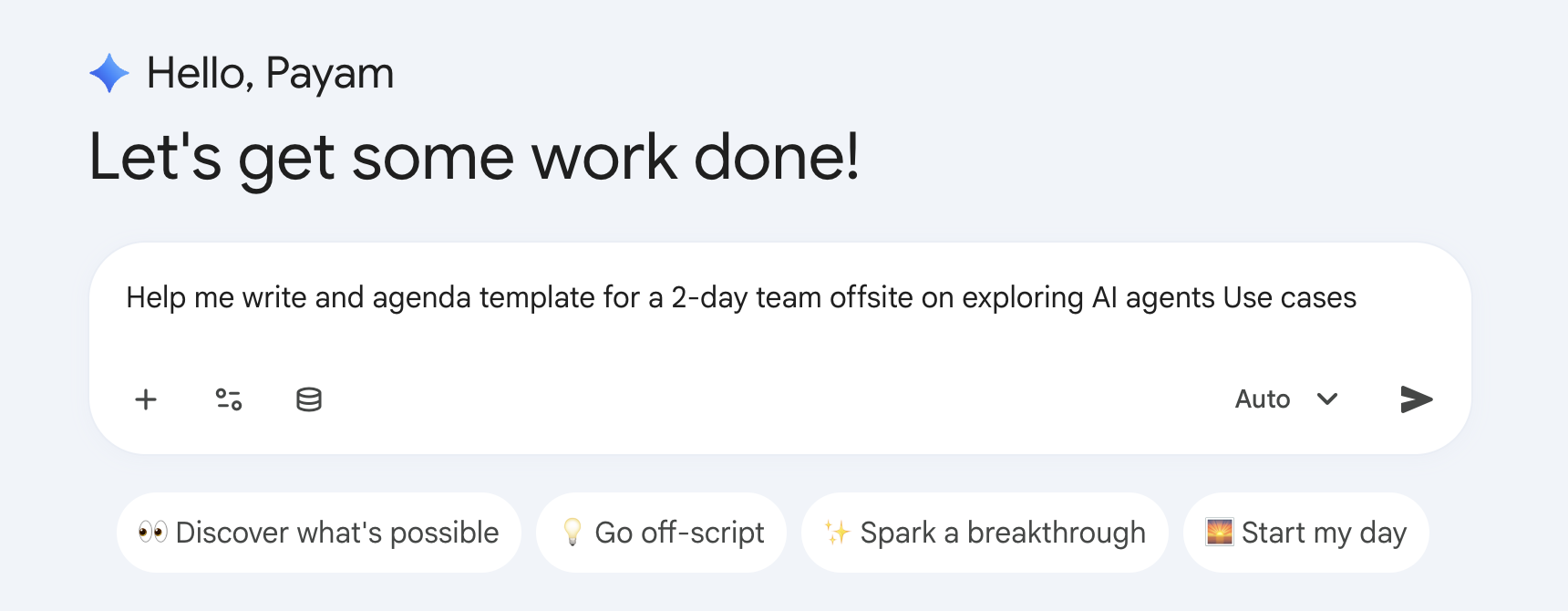
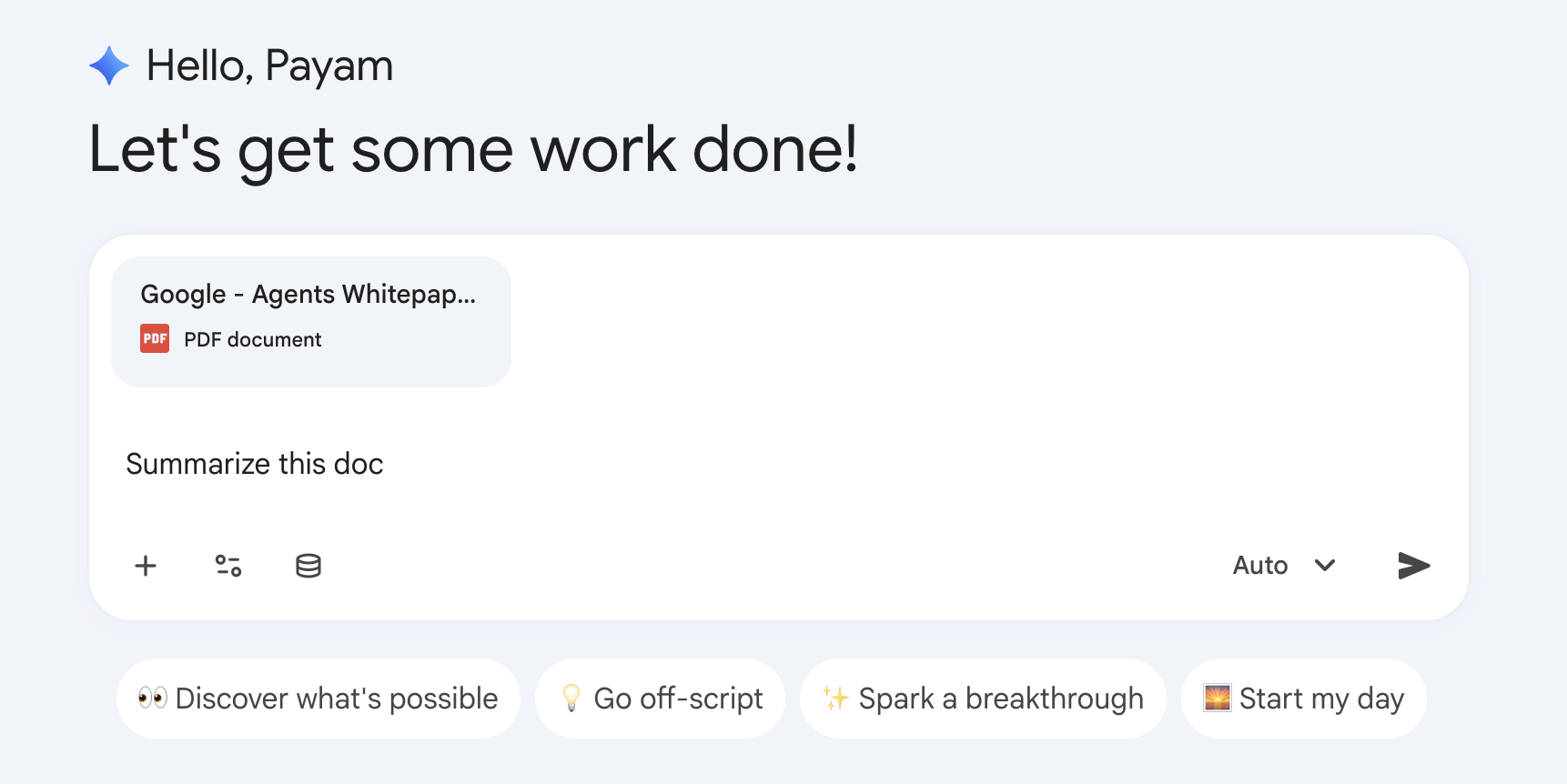
Attach one or more documents with the + icon (supports PDF, Microsoft Office, images, videos, …). Once added, you can summarize them, translate them, and more.
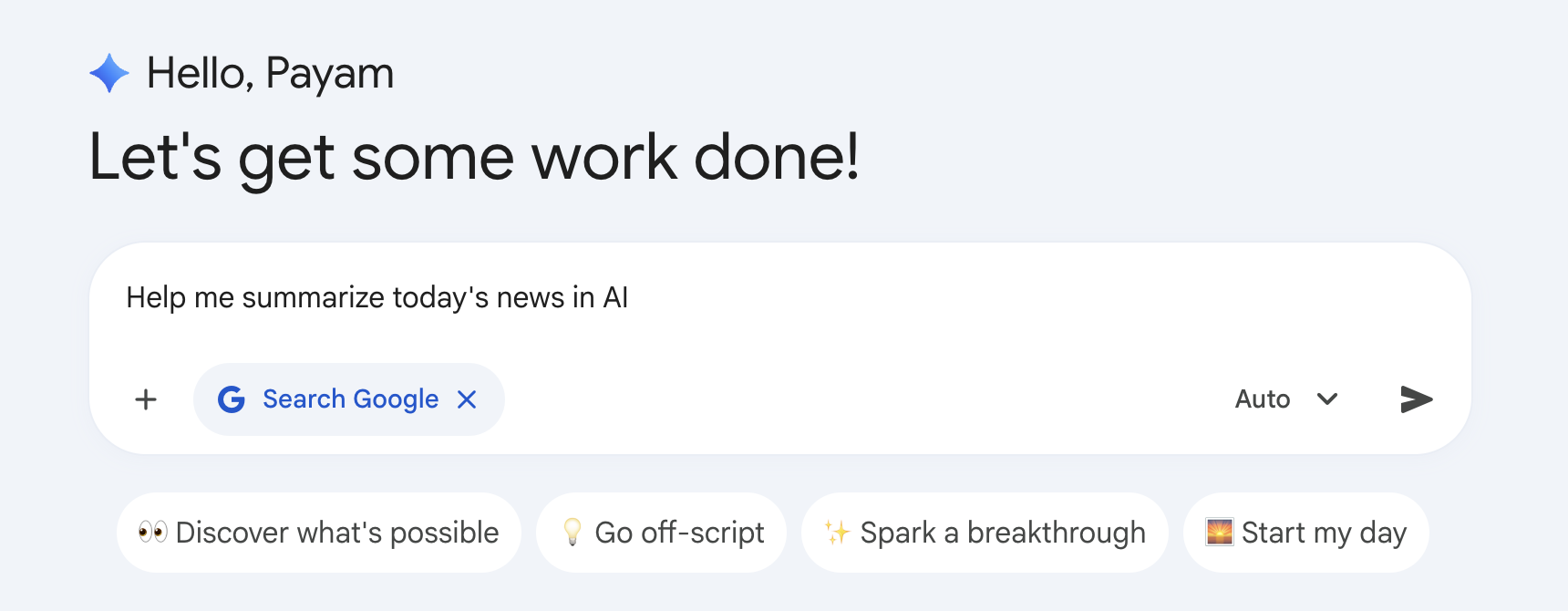
External web search - For the most up-to-date information, Gemini Enterprise App searches the public web and answer with data grounded in Google Search.
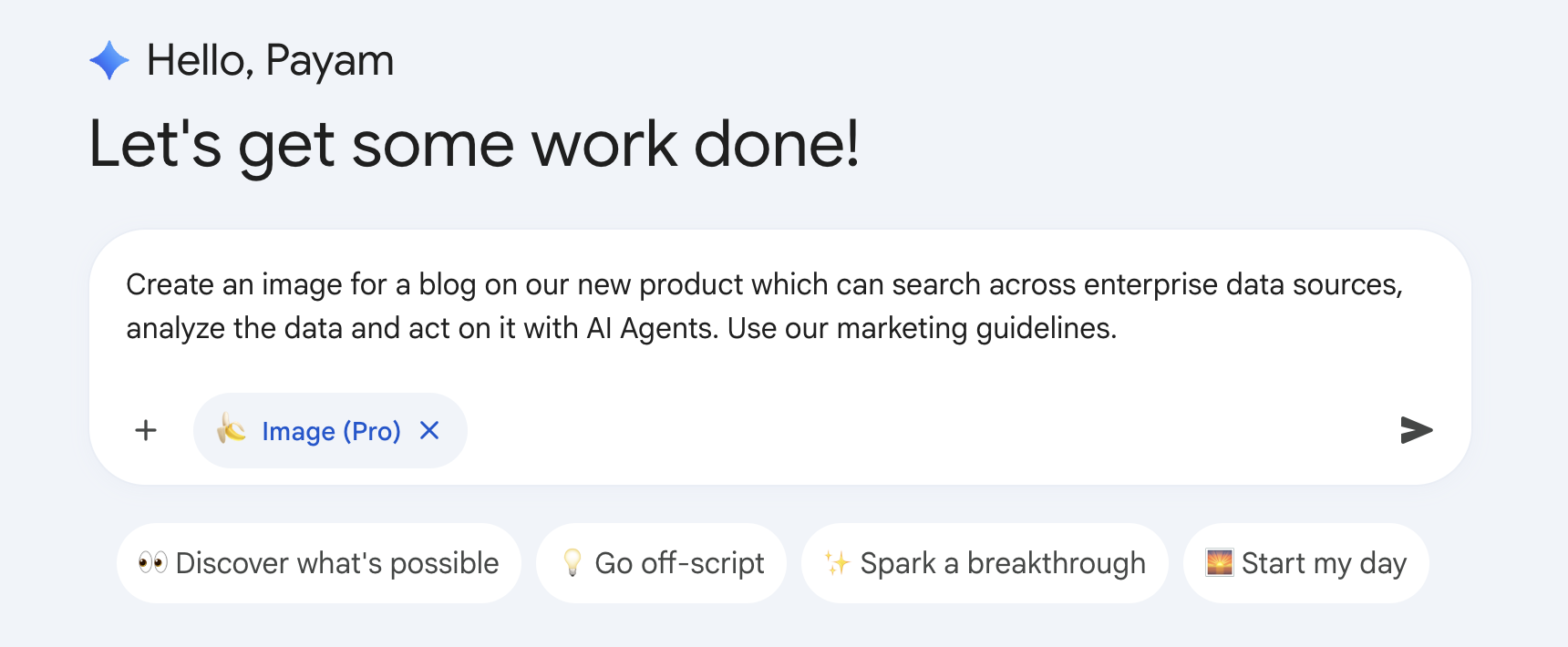
Media generation - Select from the tools menu on the chat box “Generate images” or “Create videos” option to generate images and videos using the latest Google image and video models
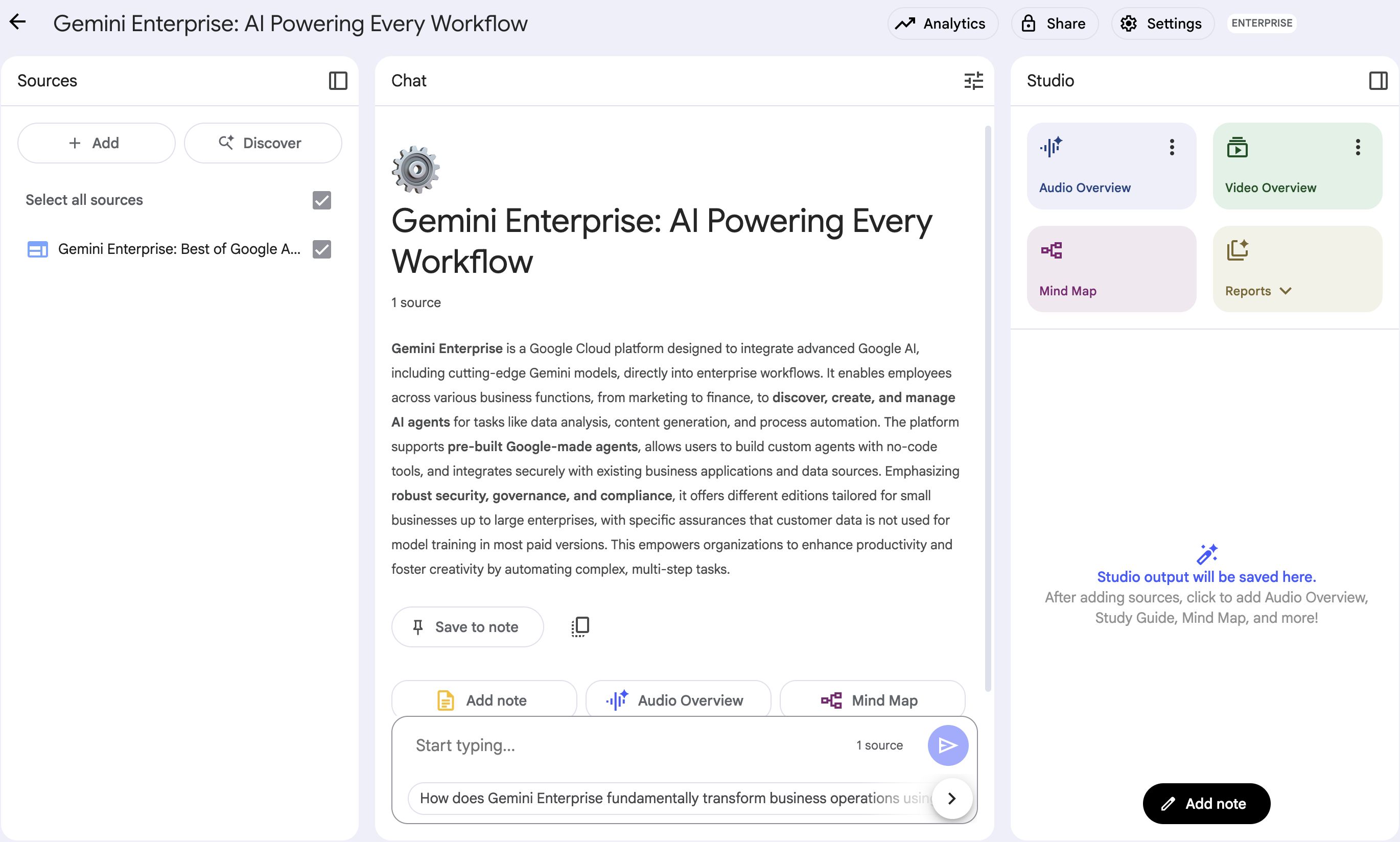
Gemini Notebook Enterprise - Integrated into Gemini Enterprise App, use Gemini Notebook Enterprise to analyze your uploaded content, ask questions, generate summaries, and even a custom podcast you can interact with.
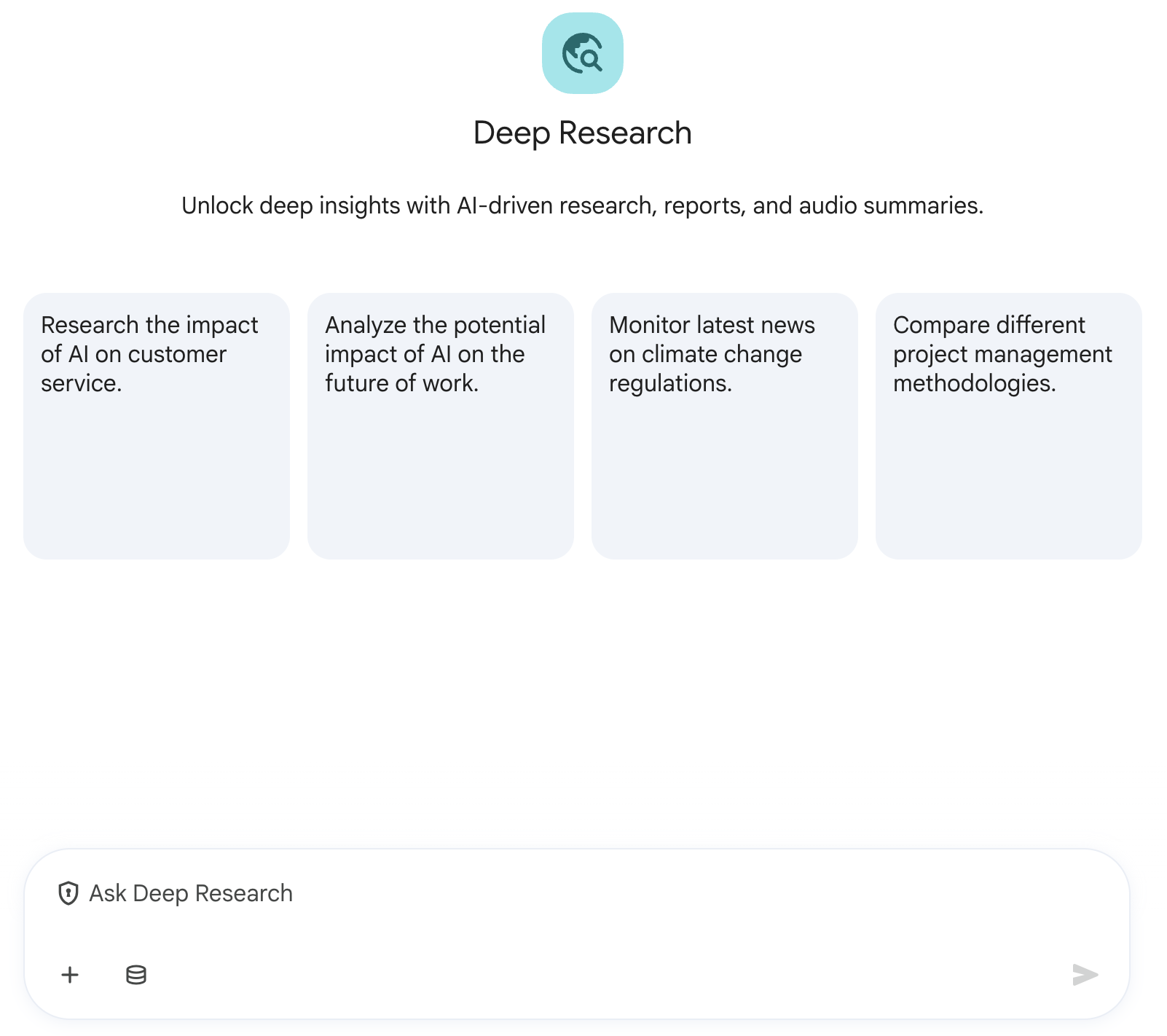
Deep research agent - A Google-built AI agent that creates in-depth reports grounded in Google Search and any data connected with your connectors on any topic you choose.
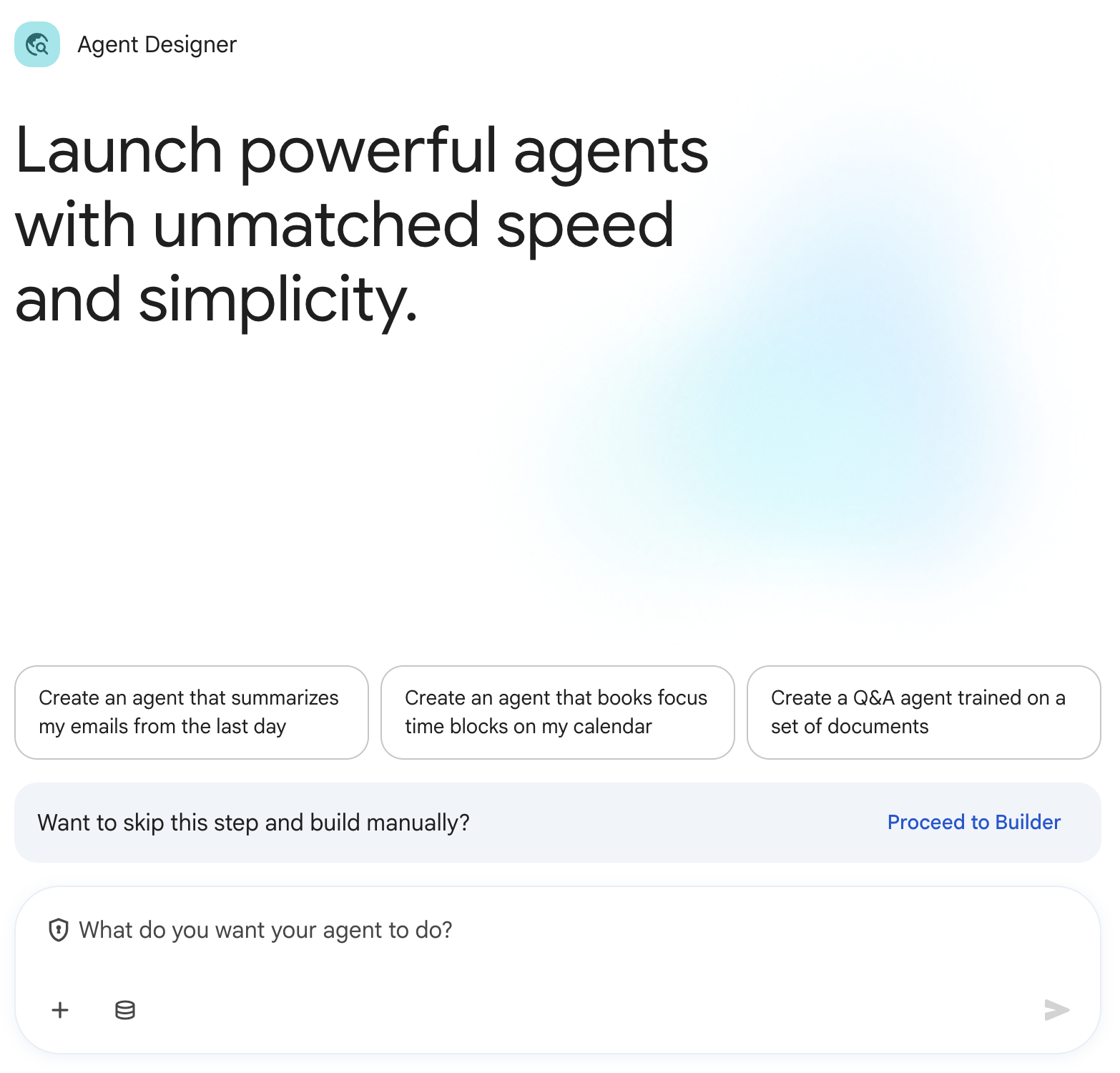
Workflow Builder - Create custom AI agents using a chat interface, no code required. Automate tasks using 30+ pre-built tools and actions.
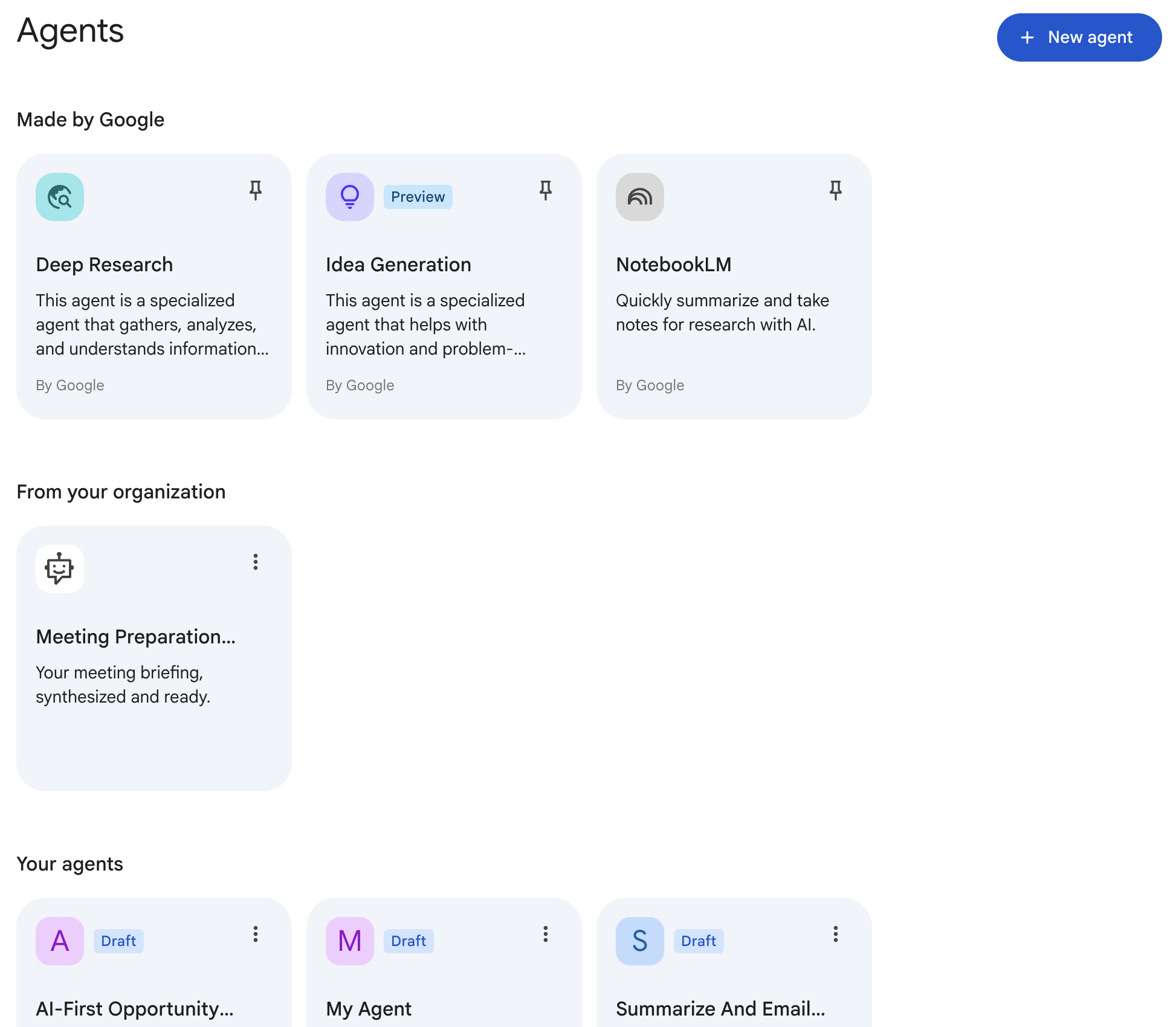
Agent gallery - Discover specialized agents built with any framework including Google ADK and then deploy and govern them in Gemini Enterprise App.
Google Antigravity 2.0 - Built-in developer capabilities accessible directly from your terminal, desktop, and IDEs (VS Code and JetBrains). Powered by Gemini models, Antigravity enables natural language code explanation, codebase-wide refactoring, automated unit test generation, and terminal command assistance.
Key Antigravity 2.0 Prompting Best Practices for Developers
- Use /grill-me for non-trivial logic: Before letting the agent touch production code or architecture, use /grill-me to surface implicit assumptions, security considerations, and edge cases.
- Isolate large refactors using subagents: Keep your main conversation context clean. Instruct Antigravity to delegate exploratory spikes, test writing, or multi-file edits to background subagents.
- Enforce closed-loop verification: Always pair code generation instructions with a verification command (e.g., "Apply the changes and run the test suite in the sandbox; do not declare done until tests pass").
- Leverage MCP for real-time context: Use @ mentions (e.g., @jira, @github, @postgres) to feed live issues, PR discussions, or schemas directly into the prompt without manually copying and pasting snippets.
Gemini Enterprise App across roles
Let’s explore how Gemini Enterprise App can help different professionals in their daily work. See examples of how it assist individuals in their roles:
For Human Resources professionals: Empower your team
Gemini Enterprise App empowers you to:
Instantly access information: Quickly locate benefits details, company policies, employee records, and onboarding materials
Analyze feedback and trends: Use AI to understand employee sentiment from surveys, identify attrition reasons, and identify training needs
Simplify HR processes: Get AI assistance drafting communications, generating interview questions, creating onboarding plans, and managing routine tasks
Enhance employee support: Provide faster, more accurate answers to employee queries
Using Gemini Enterprise App in daily HR tasks:
Example 1: Address an employee inquiry about parental leave
Goal: Provide accurate parental leave policy information and next steps.
- Summarize policy details from document: "Using the company current parental leave policy, summarize the key eligibility requirements, duration of leave, and the step-by-step process for submitting a request. Output the summary as a concise, numbered list."
- Draft supportive employee email: "You are an HR specialist. Draft a clear, supportive, and professional email to an employee using the summary from the previous step. Explain the parental leave policy (eligibility, duration), attach the request form, and include contact details for the benefits administrator for further questions. Maintain a concise and human-centered tone."
- Create document submission checklist: "Generate a checklist of all required documents an employee needs to submit for their parental leave application, referencing only the details provided in the policy document."
Example 2: Analyzing employee attrition trends
Goal: Understand Q3 attrition reasons and propose initial improvements.
- Consolidate Q3 attrition data sources: "Retrieve all Q3 2024 exit interview summaries, departmental attrition rate reports, and employee satisfaction survey results (specifically comments related to career development and management) from the last six months."
- Identify key attrition drivers and sentiment (using Gemini Notebook): Add the retrieved documents into Gemini Notebook using the “add to notebook” button. In Gemini Notebook, use the following prompts to interact with the data: "What are the top 3 recurring reasons employees cited for leaving in Q3? Is there a correlation with specific departments? What is the summarized sentiment regarding management and growth opportunities?' Output the findings as a concise, three-section report."
- Draft executive summary report: "You are an HR Analyst. Draft a concise summary report for HR leadership on the Q3 attrition trends. Highlight key drivers and potential areas of concern based only on the preceding analysis. The report should be suitable for immediate presentation to an executive."
- Generate actionable retention recommendations: "Generate three initial, recommendations for initiatives to improve employee retention, stemming from these findings. Output the recommendations as a numbered list with a 1-sentence justification for each. Also, outline the key discussion points for a follow-up meeting with department heads to cover the analysis."
Example 3: Streamlining the recruitment process for a new role
Goal: Efficiently source, prepare for interviews, and manage initial hiring stages.
- Extract key candidate requirements: "As an HR recruiter, use the 'Software engineer' job description and summarize the key mandatory skills and minimum experience requirements. Output the summary as a concise, bulleted list ready for candidate screening."
- Outline technical interview stages: "As an HR recruiter, use the standard interview process documentation for technical roles to identify the different interview stages (e.g., screening, technical deep dive, behavioral), the typical duration of each, and the role/title of the interviewer typically involved. Output the findings in a three-column table."
- Generate structured interview questions: "As an HR interview preparer, use the 'Software engineer' job description to generate a list of 10 technical and 5 behavioral interview questions specifically tailored to assess the candidate proficiency in the required skills. Format the output as two separate, numbered lists."
- Draft engaging interview invitation email: "You are a professional HR coordinator. Draft a clear, engaging, and informative template email to invite candidates to a first-round interview for the 'Software engineer' role next week. Include placeholders for date/time/interviewer and maintain a warm, professional tone."
- Automate job posting: (Requires agent/integration): "@PostJobAgent post the full 'Software engineer' job description to our internal careers page and public LinkedIn job board using the attached document."
- Coordinate candidate screening: (Requires agent/integration): "@SchedulingAgent schedule 30-minute screening calls with 5 selected candidates next week, coordinating against my calendar and the calendar for [Hiring Manager name]."
For marketing professionals: Drive growth and success
Gemini Enterprise App empowers you to:
- Accelerate analysis: Instantly locate KPIs, campaign results, creative assets, and customer feedback.
- Find insights: Synthesize qualitative feedback, compare campaign performance, understand market trends, and analyze competitors more effectively.
- Boost efficiency: Dedicate more time to strategy and less to data gathering.
- Enhance collaboration: Easily find, share, and discuss relevant data, reports, and insights.
Using Gemini Enterprise App in daily marketing tasks:
Example 1: Analyze performance of a recent digital campaign
Goal: Evaluate the "Q1 Product Launch" campaign and identify improvements.
- Create a KPI table: "Using the 'Q1 Product Launch' campaign performance report, campaign brief, and target audience definition. Generate a table of Key Performance Indicators (KPI) (CTR, CPC, Conversion Rate, ROI) broken down by marketing channel."
- Analyze the data: "Based on the KPI table, identify the top two performing marketing channels against our target audience objectives and identify the most critical drop-off points in the conversion funnel, providing a rationale for each finding."
- Draft analysis report: "You are a Marketing analyst. Draft a post-campaign analysis report for the 'Q1 Product Launch.' Include key successes, learnings, and 3 to 5 actionable recommendations for optimizing future digital campaigns, based on the synthesized insights."
- Generate Insights: "Based on the draft analysis report, generate three actionable insights that apply to the upcoming 'Q2 Awareness Campaign' to maximize channel effectiveness."
- Create slides from insights: [Use the canvas tool] "Draft the content for a single presentation slide summarizing the overall ROI and key takeaways from the 'Q1 Product Launch' campaign."
Example 2: Conducting competitor research for a new market segment
Goal: Understand competitor strategies in a new market segment.
- Conduct research: [Use deep research agent tool): "Conduct a in-depth research project on competitors [competitor A] and [competitor B]. Focus on their marketing campaigns, social media presence, and content strategies specifically targeting the '[new market segment]' in the last 6 months. Include any internal competitive intelligence reports or sales team feedback on their activities in '[new market segment]' (requires web access/specific data feeds)"
- Synthesize market strategy: "Based on the retrieved research, generate a comparative table for [competitor A] and [competitor B] that summarizes the following: primary marketing channels, core messaging themes, perceived strengths, perceived weaknesses, and their unique selling propositions (USP) for the '[new market segment]'."
- Draft competitive summary: "You are a market research analyst. Draft a concise competitive analysis summary based only on the comparative table from the previous step. Highlight key competitor strategies in the '[new market segment]' and identify 2 to 3 potential differentiation opportunities for our brand."
- Generate marketing assets and plan: "Based on the differentiation opportunities identified, generate a list of 5 content ideas for our blog and social media to appeal to the '[new market segment]'. Then, outline key strategic considerations for our upcoming marketing campaign targeting this segment, formatted as a checklist."
- Generate social media script: "Generate a short, modern, and attention-grabbing script for a social media video ad targeting '[new market segment]' for our upcoming product, highlighting its unique selling proposition of [USP]."
- Generate video: [Select veo tool] Create a video using the above script.
For sales representatives: Close deals faster
Gemini Enterprise App empowers you to:
- Gain a comprehensive customer view: Quickly access all customer information and interaction history.
- Prepare efficiently: Instantly summarize email threads or meeting notes, and get on products or competitors.
- Streamline sales processes: Reduce administrative tasks and maximize client engagement time.
- Enhance communication: Draft personalized emails and proposals faster.
Using Gemini Enterprise App in daily sales tasks:
Example 1: Prepare for a key prospect meeting
Goal: Be fully prepared to discuss a prospect needs and demonstrate how your solution can help.
- Retrieve core information: "Retrieve all relevant information including CRM records, past email correspondence, and meeting notes for prospect [prospect company name]. Additionally, locate recent news articles/press releases about the company and its industry, and relevant case studies for solutions applicable to [prospect industry]. Summarize these findings" (Requires web access/specific data feeds)
- Synthesize strategy for meeting: "Based on all documents, summarize [prospect company name] 3 key business challenges and the 3 most relevant features of our solution that directly address them."
- Draft meeting assets: "Act as a strategic sales executive. Draft a detailed pre-meeting briefing document that includes: 1) a list of 5 tailored, high-value discovery questions and 2) 5 compelling talking points, all focused on how our solutions specifically address the challenges of [prospect company name] in the [prospect industry]."
- Generate follow-up and automate: "Draft a personalized and concise follow-up email to send to the prospect after the meeting. Summarize the key discussion points from the briefing document's findings and propose clear next steps."
- Track task: (requires agent/integration): "@CRMAgent log a pre-meeting preparation note in the [your CRM app] for [prospect company name] outlining key objectives and talking points for the upcoming call on [date]."
Example 2: Respond to a Request For Proposal (RFP)
Goal: Create a compel and accurate RFP response
- Add related documents in Gemini Notebook: Search for the full RFP document from [client company name], the standard RFP response templates, internal pricing guidelines, relevant product feature lists, and case studies demonstrating experience with [specific requirement in RFP]. Add all retrieved documents into a new Gemini Notebook for comprehensive analysis.
- Perform analysis (using Gemini Notebook): Use Gemini Notebook, perform a detailed gap analysis with the following prompts: “Summarize the key requirements, evaluation criteria, and deadlines of the RFP”, “Identify all mandatory requirements and cross-reference them with our product capabilities, highlighting any gaps.” “Extract and adapt content from past successful proposals for the 'company overview' and 'proposed solution' sections."
- Draft proposal assets: "You are a proposal writer. Draft the initial content for the RFP response: (1) Write the 'executive summary' emphasizing our unique value proposition based on the synthesized requirements. (2) Outline the 'technical solution' section, ensuring it is structured by RFP requirement and incorporates relevant product features to address the client's specific needs."
- Generate checklist: "Generate a complete checklist of all required documents and information needed to finalize the RFP submission”
For developers: Build and troubleshoot efficiently
Antigravity 2.0 is the agentic developer platform built into Gemini Enterprise App (Standard, Plus, and Pay-as-you-go editions). Moving beyond legacy autocomplete and single-turn chat, Antigravity 2.0 provides an autonomous, multi-agent command center across the Antigravity Desktop App, Antigravity CLI (agy), and IDE Extensions (VS Code, JetBrains, Visual Studio, and Zed).
Antigravity 2.0 empowers developers to:
- Orchestrate parallel subagents: Deconstruct complex features into concurrent tasks executed across isolated Git worktrees, preventing context rot while accelerating delivery.
- Refine requirements interactively: Use interactive refinement commands (like /grill-me) to eliminate architectural ambiguity before generating code.
- Execute closed-loop sandbox testing: Autonomously run builds, linters, and unit test suites inside secure sandboxes, diagnosing tracebacks and patching failures until all tests pass.
- Integrate enterprise context via MCP: Query live project tracking (Jira, GitHub), database schemas, and company documentation directly within local development sessions using the Model Context Protocol (MCP).
Using Gemini Enterprise App and Antigravity 2.0 in daily development tasks:
Example 1: Investigating and fixing a defect in an isolated Git worktree
Goal: Diagnose a customer-reported regression, isolate the root cause, write a reproducing test, implement the fix, and create an audited pull request.
- Connect to enterprise issue tracking and inspect repository history: "@jira Find the issue details for ticket [BUG-XXX], including customer-reported steps to reproduce, environment headers, and stack traces." "Locate the commit history and PRs for module 'src/auth/session_manager.py' over the last 14 days that modified token validation logic."
- Refine & Isolate Root Cause: "/grill-me Analyze the traceback in [BUG-XXXX] against 'src/auth/session_manager.py'. Ask me 2 to 3 clarifying questions regarding how we should handle expired JWT refresh tokens during active websocket sessions."
- And after response: "Based on our discussion, summarize the expected vs. actual behavior and generate an execution plan for a patch."
- Act, Verify & Ship (Closed-Loop Sandbox): "Spawn a subagent in an isolated Git worktree on branch 'fix/bug-XXXX-session-timeout'. First, write a reproducing unit test in tests/test_session.py that fails on the current logic."
- "Apply the minimal patch to 'src/auth/session_manager.py' to resolve the race condition. Run 'pytest tests/test_session.py' in the sandbox. If tests fail, inspect the traceback and iterate until green."
- "Run the full linter and regression suite. Once clean, create a conventional commit referencing [BUG-XXXX] and draft a pull request description summarizing the root cause, the fix, and test verification output."
Example 2: Implementing a new feature with parallel subagents
Goal: Implement a new microservice API endpoint with database models, client validations, and automated integration tests per PRD specifications.
- Explore & Scope Architecture: Load design specifications and existing repository conventions.
- "/init Review the PRD and OpenAPI spec in 'docs/specs/user-preferences-v2.json'. Identify all dependencies on existing internal services."
- "Scan the existing codebase in 'services/gateway/' and outline the established design patterns for middleware authentication and error serialization."
- Multi-Agent Task Decomposition: Break implementation into concurrent, specialized tasks.
- "Break the implementation of the User Preferences v2 feature into a parallel task graph with three distinct work streams: (1) Database migrations and repository models, (2) Core controller endpoints and input validation, and (3) Integration test fixtures."
- "/grill-me Review the proposed database migration schema against our PostgreSQL performance guidelines. Flag any potential locking concerns on high-cardinality tables."
- Parallel Execution & Sandbox Validation: Deploy subagents to build and verify concurrently.
- "Spawn parallel subagents to implement the database model in 'models/preferences.py' and the API routes in 'api/v2/preferences.py' according to our schema."
- "In the testing subagent, generate an integration test suite under 'tests/integration/test_preferences_v2.py' covering authorization checks, malformed payloads, and rate limits."
- "Execute 'npm run test:integration' (or 'pytest') within the sandbox. Validate that all three subagent deliverables merge cleanly into the feature branch with zero lint warnings."
Example 3: Automated codebase refactoring & library migration
- Goal: Modernize a deprecated SDK dependency across multiple repositories and verify zero functional regressions.
- Explore Deprecations:
- "Scan all files in 'src/' for usages of the deprecated 'LegacyBillingClient' class and list all affected files, method calls, and test files."
- Refine Migration Strategy
- "Draft a step-by-step migration guide replacing 'LegacyBillingClient' with the new 'BillingServiceClient' from SDK v3. Include required error-handling changes and parameter mappings."
- Batch Execution & Verification
- "Refactor each affected file using 'replace_file_content'. Update corresponding mock fixtures in 'tests/unit/'."
- "Run the build command and test suite in the sandbox. If any compilation or type-check errors occur (mypy / tsc), resolve them autonomously."
- "Provide a summary diff of all modified files and confirm all test suites pass."
For Product Managers: Shaping and launching products
Gemini Enterprise App empowers you to:
- Synthesize insights faster: Gather and analyze user feedback, market research, and competitive intelligence to inform strategy.
- Streamline requirement definition: Easily find existing requirements, draft user stories and PRDs (Product Requirements Documents), and identify dependencies.
- Improve cross-functional collaboration: Access design mockups, engineering specs, marketing plans, and sales feedback in one place.
- Make data-driven decisions: Summarize usage data, analyze A/B test results, and understand product change impacts.
Using Gemini Enterprise App in daily Product Management tasks:
Example 1: Defining requirements for a new product feature
Goal: Gather insights and define clear requirements for a new feature, "[Feature X]".
- Retrieve user feedback: "Retrieve all user feedback (surveys, support tickets, forums) from the last 6 months related to the '[Problem Feature X aims to solve]' and requesting similar functionality. Format the results as a concise, categorized list."
- Research and summarize external reports: (Requires external Search/Data Connectors) "Summarize key findings from market research reports and competitor analysis documents discussing solutions for '[Problem Feature X aims to solve]'."
- Analyze user feedback: "As a User Insights Specialist, analyze all retrieved feedback and extract the top 3 most critical user pain points and unmet needs related to '[Problem Feature X solves]'. Present this as a ranked list."
- Connect feedback and market research: "Cross-reference the feedback and market data to identify common themes and requested functionalities for a potential '[Feature X]'. Present a consolidated list of 5 to 7 core feature ideas."
- Compare products: "Generate a comparative table detailing how our top 3 competitors address '[Problem Feature X aims to solve]'. Include columns for their noted Strengths, Weaknesses, and Unique Selling Propositions (USP)."
- Draft PRD: "You are a Senior Product Manager drafting the PRD. Based on the synthesized insights, generate the 'Problem Statement' and 'Proposed Solution' sections for the '[Feature X]' Product Requirements Document."
- Generate user stories: "Draft a list of 7 user stories for '[Feature X]' that clearly articulate the persona, desire, and benefit, covering key user segments (e.g., 'New User,' 'Power User')."
- Identify KPI: "Outline the 4 most critical success metrics (KPI) we should track to measure the impact of '[Feature X]' post-launch. For each KPI, distinguish between leading and lagging indicators."
- Share with team: (Requires Agent/Integration): "@EmailAgent Draft an email to [team email address] with the subject line 'PRD Draft: Feature X Requirements Review' and include the generated Problem Statement and Proposed Solution for immediate review and feedback."
Example 2: Preparing for a product roadmap prioritization meeting
Goal: Gather data for prioritizing features for the next quarter roadmap.
- Retrieve core data for prioritization: "Retrieve the current Jira backlog data for product [Product Name]. Structure the output as a table with columns for Feature Name, Effort Estimate (T-shirt Size), Business Value Score, Status, and Link."
- Analyze and Synthesize Strategic Alignment:"As a Data Analyst, cross-reference the retrieved sales feedback and Jira backlog data. Identify and rank the top 5 most frequently requested features specifically from Enterprise-tier customers."
- Prioritize features: "Based on the usage data (P3) and support ticket trends, list all features in the backlog that directly address the top 3 known user pain points or highest volume support issues."
- Define and communicate prioritized roadmap: "You are a Senior Product Manager. Generate a final, prioritized list of 10 features for the Q4 roadmap. For each, include a 2-sentence justification synthesizing its alignment with the strategic OKR and its impact on customer pain points."
- Generate presentation: [Use the canvas tool] "Generate a single presentation slide comparing the '[Big Bet 1]', '[Big Bet 2]', and '[Big Bet 3]' initiatives. Use a three-column table to outline their Benefits, Key Risks, and Estimated Resource Needs (S, M, L)."
For Help Desk professionals: Resolving issues efficiently
Gemini Enterprise App empowers you to:
- Quickly find solutions: Instantly locate troubleshooting steps, knowledge base articles, and IT policies.
- Understand user issues faster: Summarize ticket details, analyze error logs, and understand issue context rapidly.
- Streamline ticket management: Get help updating tickets, drafting responses, and identifying recurring problems.
- Automate routine tasks: Use agents for tasks like password resets, diagnostics, or knowledge base updates (if configured).
Using Gemini Enterprise App in daily Help Desk tasks:
Example 1: Resolve a common software issue for an employee
Goal: Provide a customer with accurate information about their recent order and address any concerns.
- Retrieve contextual information: “As a Tier 1 Help Desk expert, retrieve all knowledge base articles, FAQ documents, and official IT announcements concerning "[Company Software Name]" login failures from the past 30 days. Based only on the retrieved content, analyze, summarize, and rank the top three most effective and simplest troubleshooting steps for an end-user to perform. Present the final output as a numbered list of instructions.
- Communicate and automate resolution: "You are a Tier 1 Help Desk Expert. Draft a clear, step-by-step, two-paragraph email to the employee using the ranked steps. The tone should be empathetic and professional, focusing on a quick self-resolution."
- Track progress: (Requires agent/integration): "@TicketingAgent Create a new, high-priority incident ticket in ServiceNow for user [Username] reporting login failure with '[Company Software Name]' and assign the ticket to my queue."
Example 2: Identify and address a recurring technical problem
Goal: Analyze support ticket data to identify a recurring technical problem, understand its root cause, and propose a solution or update documentation.
- Analyze error screenshot and retrieve incidents: “You are a Level 2 debugging specialist. Analyze the attached error screenshot to identify the exact error code or message. Using this key, retrieve all open and closed support tickets and internal application logs (from Splunk/Elastic) from the last 60 days that contain the identical error message. Output the results as a hyperlinked table.”
- Extract VPN Problem Records: “From ServiceNow, retrieve all current records categorized as 'Problem' or 'Known Error' that are tagged with the terms 'VPN', 'Instability', or 'Disconnect'. Summarize the findings in a table with columns for 'Record ID', 'Status', 'Assigned Owner', and 'Creation Date'”.
- Correlate Technical Attributes to Instability: “You are a technical data analyst. Analyze the consolidated ticket data to identify statistically significant correlations between the 'VPN connection dropping' issue and the following attributes: Operating System (e.g., Win11, macOS), VPN Client Version, and User Geolocation (City/Region). Format the findings as a ranked list, stating the calculated confidence level for each correlation”.
- Rank Successful Troubleshooting Steps: “From the 'Resolution Notes' field of all closed tickets in the consolidated data, extract and rank the top 5 most successful, non-escalated troubleshooting actions that resolved the 'VPN connection dropping' issue. Output the steps as a numbered list, including the calculated frequency/success rate for each step.”
- Draft internal knowledge base article: “You are a Level 2 technical writer. Draft an updated, internal-facing knowledge base article titled 'Resolving recurring VPN Drops: root cause analysis and Tier 1 triage'. Structure the article with two main sections: 'Summary of root cause' and 'Tier 1 troubleshooting steps'. The tone must be concise and instructional, explicitly targeting Level 1 help desk technicians.
For customer service professionals: Enhancing support and satisfaction
Gemini Enterprise App empowers you to:
- Quickly access customer & product info: Instantly find customer history, order details, product specifications, and relevant policies.
- Understand customer needs better: Rapidly summarize past interactions, analyze feedback, and grasp the context of customer issues.
- Provide faster, consistent resolutions: Get help drafting accurate responses, finding solutions in the knowledge base, and following standard procedures.
- Streamline workflows: Reduce time spent searching for information and managing routine communication tasks.
Using Gemini Enterprise App in daily customer service tasks:
Example 1: Assisting a customer with an order inquiry
Goal: Provide a customer with accurate information about their recent order and address any concerns.
- Retrieve order status: "As a customer service agent, retrieve and present a concise table containing the current status, items ordered, and tracking number for Order ID [Order #]."
- Understand their account history: "For customer email [Email Address], retrieve their full account profile (including loyalty status) and summarize all support interactions from the last 90 days as a bulleted list . Then analyze the retrieved support history for [Email Address]. Determine if the customer has previously contacted us regarding this specific order or if they have a history of shipping/delivery issues."
- Communicate and automate actions: "You are a courteous Tier 1 customer service agent. Draft a professional, empathetic email response to the customer summarizing the order status, providing the tracking link, and clearly explaining the expected delivery date. If the order is currently delayed, include a specific apology and offer [Option A] or [Option B] as compensation."
- Track progress: (Requires agent/integration) "@CRMAgent Log a note in the CRM record for [Email Address] summarizing the interaction context (Order ID [Order #] inquiry, status update provided)."
Example 2: Troubleshoot a product issue with a customer
Goal: Help a customer troubleshoot a common issue with "[Product Name]" and achieve a satisfactory resolution.
- Retrieve troubleshooting steps: "What are troubleshooting steps for error ‘[Specific Issue customer is describing]’ with '[Product Name]'.”
- Understand policy: "What are specific terms for claiming a warranty replacement or refund."
- Automate resolution: "Based on the warranty policy, list the customer two best available options (e.g., repair vs. replacement) if the troubleshooting steps from the knowledge base fail to resolve the issue. Include the required forms or links for each option."
- Communicate with the customer:"You are a Tier 1 Customer Service Expert. Draft a professional, empathetic chat response to the customer. The response must contain: 1) a clear, numbered, step-by-step troubleshooting guide and a statement advising them of the next resolution steps if the guide fails."
- Track progress: (Requires agent/integration): "@TicketingAgent Update ticket [Ticket #] in [Ticketing system] with the full, numbered troubleshooting steps provided and a note summarizing the customer response'."
For finance back-office & CFOs: Driving financial clarity & operational efficiency
Gemini Enterprise App empowers you to:
- Enhance audit & compliance: Leverage AI to monitor internal controls, prepare audit documentation, and ensure regulatory compliance.
- Quickly access financial & vendor info: Instantly find historical financial reports, invoice details, contract terms, and internal accounting policies.
- Understand financial health better: Rapidly summarize budget-to-actual variances, analyze spending trends, and grasp the context of P&L fluctuations.
- Provide faster, consistent reporting: Get help drafting executive summaries, finding reconciliation steps in the knowledge base, and adhering to compliance standards.
- Streamline workflows: Reduce time spent extracting data for month-end close, preparing for audits, and managing routine financial communications.
Using Gemini Enterprise App in daily finance tasks:
Example 1: Operational reporting and budget variance analysis
Goal: Provide the executive team with an accurate explanation of budget variances for the month and propose mitigation strategies.
- Analyze operational variances: “As a Financial Analyst, retrieve and present a concise table comparing the actual vs. budgeted expenses for [Department/Cost Center] for the month of [Month], highlighting any line-item variances over [X]%."
- Understand the context: "For [Department/Cost Center], retrieve the general ledger details and summarize all large, non-recurring transactions from [Month] as a bulleted list. Then analyze the retrieved ledger history. Determine if the variance is primarily due to timing differences (e.g., prepaid expenses) or permanent budget overages."
- Communicate & automate actions: "You are a Senior Finance Manager. Draft a concise, professional email summary for the CFO explaining the primary drivers of the [X]% variance in [Department/Cost Center]. Clearly detail the non-recurring charges identified and outline [Proposed Action A] or [Proposed Action B] to course-correct for the next quarter."
- Track progress: (Requires agent/integration) "@ERPAgent Log a variance explanation note in the financial system record for [Department/Cost Center] summarizing the analysis for the [Month] close."
Example 2: Optimizing cash flow and working capital
Goal: Improve liquidity by analyzing accounts receivable (AR) and accounts payable (AP) cycles to identify bottlenecks and accelerate cash conversion.
- Retrieve aging data: "As a Treasury Analyst, retrieve the current Accounts Receivable and Accounts Payable aging reports. Calculate our current Days Sales Outstanding (DSO) and Days Payable Outstanding (DPO)."
- Understand payment trends: "Compare the current DSO and DPO metrics with historical averages from the past four quarters. Identify bottlenecks and summarize any deteriorating payment behaviors from specific customers, as well as any trends where we are paying vendors earlier than contractually required."
- Automate liquidity strategy: "Based on the aging analysis, generate a bulleted plan to optimize our cash flow. Recommend specific vendor payment terms we should attempt to renegotiate and propose three actionable strategies to accelerate collections from our top five overdue accounts."
- Communicate internally: "You are the CFO. Draft a professional, strategic memo to the Directors of Procurement and Sales summarizing the current working capital trends. Clearly outline the new vendor term negotiation targets for Procurement and the prioritized collection initiatives for Sales, emphasizing how these steps will improve overall company liquidity."
- Track progress: (Requires agent/integration) "@ERPAgent Schedule a recurring weekly automated report in the financial dashboard to track DSO and DPO metrics, and configure an alert to notify the Treasury team if DSO exceeds [Target Number] days."
Example 3: Processing and resolving a complex vendor invoice discrepancy
Goal: Ensure a high-value vendor invoice aligns with contractual terms, resolve billing discrepancies, and protect company cash flow.
- Retrieve contract & invoice details: "What are the specific payment terms, approved hourly rates, and volume discount tiers in the active master service agreement for vendor '[Vendor Name]'?"
- Understand the discrepancy: "Compare Invoice #[Invoice Number] from '[Vendor Name]' against our approved contract rates. Identify and list any line items that exceed the negotiated rates, lack corresponding purchase orders, or fail to apply the agreed-upon volume discount."
- Automate resolution: "Based on our internal accounts payable policy and the vendor contract, list the company's two best available options (e.g., issuing a short-pay vs. placing the entire invoice on a formal dispute hold). Include the required documentation needed from the vendor for each option."
- Communicate with the vendor: "You are an Accounts Payable Specialist. Draft a professional, firm email response to '[Vendor Name]' Accounts Receivable. The response must contain: 1) a clear, itemized list of the disputed charges, 2) a reference to the specific pricing clauses in our contract, and 3) the specific next steps they need to take to release the hold on their payment."
- Track progress: (Requires agent/integration): "@APAgent Update invoice record [Invoice Number] in [AP/Procurement System] to 'Disputed' status and attach a note summarizing the specific line-item discrepancies and the vendor communication."
Gemini Enterprise App across industries
Beyond the everyday tasks common to all roles, Gemini Enterprise App brings significant value when applied to the specific needs and workflows of different industries. The following sections provide examples of how it can help professionals tackle unique challenges within their particular industry.
Industry spotlight: Retail use cases
In the fast-paced retail world, Gemini Enterprise App helps optimize operations, understand customers, and react quickly to market changes through integrated workflows.
Example 1: Optimize stock for a slow-moving product
Goal: Identify a slow-moving product and take action to improve its sales or manage inventory.
- Retrieve core inventory and sales data: "Retrieve sales data and current inventory levels in [City name] for SKU [SKU Number] across all retail locations for the last 90 calendar days. Output the data as a single, combined table with columns for date, quantity sold, and current stock per store location."
- Consolidate customer feedback: "From the e-commerce platform and support ticketing system, find all customer reviews and documented return reasons for product SKU [SKU Number] from the last 6 months. Summarize the content into a bulleted list of high-level complaint categories."
- Review promotional history: "Locate all executed promotional campaigns, price markdown events, and display changes associated with SKU [SKU Number] over the last year. Output the results in a table showing start date, end date, promotion type, and discount percentage."
- Analyze sales trend: "You are a retail data analyst. Analyze the combined sales data (P1) to determine the sales trend for SKU [SKU Number]. State definitively whether the trend is declining, stagnant, or seasonal, providing the statistical evidence for your conclusion."
- Synthesize customer painpoints: "Use the consolidated customer feedback, identify and rank the top 3 most common customer complaints regarding SKU [SKU Number] (e.g., quality, price, features). Present the findings as a ranked list showing the complaint and its frequency."
- Draft clearance proposal: "You are a Retail Inventory Manager. Draft a proposal for a targeted clearance promotion for SKU [SKU Number]. Include a suggested markdown strategy (specific discount levels, e.g., 25% off) and a recommended duration (e.g., 14 days), justify the approach based on the trend analysis and customer pain points."
- Automate Inventory Action: (Requires agent/integration): "@InventoryAgent Adjust the reorder point for SKU [SKU Number] in the inventory system to [New Level] based on the recent 90-day sales velocity data."
Example 2: Launch a targeted marketing campaign for a new product line
Goal: Successfully launch a new product line with a targeted marketing campaign.
- Retrieve target audience data: "Retrieve the most recent customer segmentation data from the CRM identifying customers who have purchased products in the [Product Category] category within the last 12 months. Output the results as a summary of the top three key demographic and psychographic characteristics of this segment."
- Locate past campaign benchmarks: "Locate the post-campaign performance reports for the last three new product launches in the [Region]. Generate a comparative table summarizing the best-performing channel (highest ROI/CTR), the key message used, and the overall Conversion Rate for each campaign."
- Consolidate product USP: "From the Product Requirements Document (PRD) and specification sheets, extract and consolidate the 5 most critical key selling points and the single, unique value proposition (USP) for the new '[Product Line Name]'."
- Analyze channel effectiveness: "You are a Marketing Strategist. Based on the comparative table, determine the single most effective combination of channel and messaging strategy to prioritize for a new product launch targeting this segment."
- Refine messaging: "Cross-reference the consolidated product USP with the effective messaging strategies. Generate three high-impact, customer-facing headlines for the '[Product Line Name]' that clearly communicate the USP."
- Draft creative brief: "You are a brand manager. Draft a concise 1-page Creative Brief for the '[Product Line Name]' campaign. The brief must explicitly state the primary target audience, the core key message, and the top two prioritized marketing channels."
- Generate loyalty email assets: "Generate five high-performing email subject line options and a short (3-sentence) introductory paragraph for an email announcing the '[Product Line Name]' to our loyalty members. The tone should be exclusive and exciting."
- Automate social scheduling: (Requires agent/integration): "@SchedulingAgent Schedule 5 social media posts in the content calendar for next week announcing the '[Product Line Name]' launch, using the generated copy and generate an image for each using the approved guidelines."
Example 3: Resolving a complex customer complaint about a defective product
Goal: Resolve a customer's issue with a defective product efficiently and satisfactorily, and identify potential wider issues.
- Retrieve customer 360 view: "Retrieve the complete purchase history, account details, and all previous support interactions for customer ID [Customer ID]. Summarize the customer last 3 interactions and their loyalty status in a quick-read format."
- Locate applicable policy: "Find the official customer-facing warranty and return policy documentation specific to product SKU [SKU Number]. Extract the maximum refund/replacement window and the eligibility criteria for a full replacement."
- Summarize current issue and desired outcome: "Based on the customer latest communication, summarize the exact current issue with SKU [SKU Number] and state their explicitly requested resolution (e.g., refund, exchange, repair)."
- Determine resolution options: "Based only on the current warranty and return policy and the customer status, list the customer 2 to 3 standard, policy-compliant resolution options, ranked from least cost to most cost for the company."
- Draft empathetic customer email: "You are a Tier 2 customer resolution specialist. Draft an empathetic and professional email response to customer ID [Customer ID]. Acknowledge their issue, explain the most favorable resolution option, and outline the clear, step-by-step process (including required documents) to execute the resolution."
- Automate ticketing action: (Requires agent/integration): "@TicketingAgent log this entire interaction summary, the determined root cause, and the proposed resolution under ticket number [Ticket #] and update customer ID [Customer ID] record in the CRM."
Industry spotlight: Legal use cases
Gemini Enterprise App helps legal professionals accelerate research, streamline document review, and enhance case preparation securely through end-to-end workflows.
Example 1: Prepare for a client deposition in a breach of contract case
Goal: Thoroughly prepare for deposing a key witness from the opposing party.
- Retrieve all documents and upload to Gemini Notebook: "Retrieve all documents related to case [Case #] including internal memos, interview summaries for fact witnesses, contracts, and relevant legal research notes pertaining to the breach of contract claims involving [Witness Name]." Click on sources and then click on the add to Gemini Notebook. You can also add documents directly into Gemini Notebook once opened.
- Cross-reference inconsistencies (in Gemini Notebook): "You are a senior litigation analyst. Based on the synthesized analysis and our client internal accounts, identify and list the top 3 most critical inconsistencies in [Witness Name] documented statements regarding the breach of contract."
- Define key factual elements (in Gemini Notebook): "Based on the disputed clauses and the identified inconsistencies, define the 5 key factual elements that must be established or refuted during [Witness Name] deposition to strengthen our client position."
- Generate deposition question set (in Gemini Notebook): "You are a senior litigation analyst. Generate a comprehensive outline of 30 deposition questions for [Witness Name], organized into clear topic sections (Contract Negotiation, Breach, Damages, Inconsistencies). Ensure the questions directly target the key factual elements defined."
- Identify exhibit list (in Gemini Notebook): "Draft a list of 10 priority documents to mark as deposition exhibits against [Witness Name]. For each, include the document Bates number and a precise, 1-sentence statement on its evidentiary relevance."
- Draft strategy memo (in Gemini Notebook): "You are a junior associate. Draft a concise, internal summary memo for the lead attorney. The memo must outline the 3 primary objectives for [Witness Name] deposition, the potential challenging areas, and the required preparation steps for the deponent."
Example 2: Assesse firm compliance with a new data privacy regulation
Goal: Understand the impact of a new data privacy regulation and ensure the firm policies and practices are compliant.
- Conduct competitor/industry scan: "@DeepResearchAgent to scan external legal journals and industry alerts for '[Regulation Name]' implementation strategies used by 3 major competing law firms, focusing on client communication and data consent forms. (Requires web access/specific data feeds)"
- Synthesize key regulatory obligations: "Summarize the key obligations and compliance restrictions imposed specifically on law firms by '[Regulation Name]'. Format the output as a numbered list of mandatory requirements."
- Perform gap analysis: "You are a Compliance Officer. Cross-reference the summarized obligations with our internal policies. Identify and list all potential gaps and areas of non-compliance where our current practices deviate from the requirements of '[Regulation Name]'."
- Extract non-compliance penalties: "Extract the prescribed civil and administrative penalties (fines, sanctions) for non-compliance with '[Regulation Name]' and present them as a concise table, categorized by severity of violation."
- Draft management committee memo: "You are the Chief Compliance Officer. Draft an executive summary memo for the Management Committee. The memo must concisely outline the key impacts, highlight the identified compliance gaps, and propose the 5 most urgent policy and procedure updates."
- Generate IT compliance checklist: "Generate a detailed, step-by-step checklist of 15 technical action items specifically for the IT department to achieve full compliance with '[Regulation Name]', focusing on data access, encryption, and audit logging."
Industry spotlight: Professional services use cases
For consultants, Gemini Enterprise App accelerates research, enhances client deliverables, leverages collective knowledge, and streamlines project management through end-to-end workflows.
Example 1: Develope a market entry strategy for a client
Goal: Advise a client on the feasibility and approach for entering a new geographic market.
- Research core market entry data: "@DeepResearchAgent you are a senior strategy consultant developing a market entry strategy. Conduct a in-depth, multi-source data retrieval project targeting the '[Target Country/Region]' in the '[Client's Industry]' sector. Your output should include 1) Key findings from recent (last 12 months) market research and economic forecasts for the target region, 2) A summary of the current market share and primary product lines for the top three competitors in the region, and 3) A bulleted list summarizing the key success factors and critical challenges documented in our firm last two internal market entry case studies.” This will also create an audio podcast that you can easily listen to.
- Assess market size and trends: "You are a senior strategy consultant. Analyze the retrieved market data to summarize the market size, projected 5-year growth potential, and key regulatory or logistical trends for the '[Client Industry]' in '[Target Country/Region]'."
- Identify barriers and success factors: "As a market entry specialist, identify the top 3 most significant competitive forces, the 3 greatest potential barriers to entry, and the 5 critical success factors required for a successful launch in the target market. Present the results as a ranked list."
- Draft strategy options: "Outline three distinct market entry strategies (e.g., organic growth, acquisition, joint venture) with a brief (2-sentence) explanation of the risks and benefits for each, tailored specifically to the client industry."
- Draft opportunity assessment section: "You are an engagement manager. Draft the full 'Market Opportunity Assessment' section of the client presentation, ensuring it synthesizes the market trends and proposed strategies. Include placeholders for charts and data points."
- Generate SWOT analysis: "Generate a in-depth SWOT (Strengths, Weaknesses, Opportunities, Threats) analysis for the client entry into '[Target Country/Region]', using only the data synthesized in step 2."
Example 2: Conduct a process improvement analysis for a client department
Goal: Identify inefficiencies in a client departmental process and recommend improvements.
- Retrieve all documents and upload to Gemini Notebook: "Retrieve all documents related to '[Department Name]'s '[Process Name]' workflow, including process maps, Standard Operating Procedures (SOPs), historical performance metrics, recorded transcripts and notes from our team stakeholder interviews with managers and employees" Click on sources and then click on the add to Gemini Notebook. You can also add documents directly into Gemini Notebook once opened.
- Add internal benchmarks (in Gemini Notebook): Add additional docs such as the firm internal best practice guides, successful case studies, and performance benchmarks related to '[Process Name]' in similar industries.
- Analyze and synthesize gaps (in Gemini Notebook): "You are a Process Analyst. Based on the consolidated SOP, summarize the current steps, organizational roles, and key systems involved in the client' '[Process Name]' workflow. Use a numbered list structure."
- Identify pain points and bottlenecks (in Gemini Notebook): "Analyze the stakeholder feedback. Extract and rank the top 5 most frequently mentioned pain points, process bottlenecks, and areas of unnecessary manual effort regarding '[Process Name]'."
- Benchmark performance gaps (in Gemini Notebook): "Compare the client's current performance metrics for '[Process Name]' against the retrieved internal best practice targets. Quantify the top 3 efficiency gaps (e.g., cycle time, error rate)."
- Draft current state analysis (in Gemini Notebook): "You are an Engagement Lead. Draft a concise 'Current State Analysis' summary for the client, highlighting the identified inefficiencies and quantifying their business impact. The tone must be professional and objective."
- Generate recommendations List (in Gemini Notebook): "Generate a list of 10 actionable recommendations for improving '[Process Name]', categorized by 'Low Effort/High Impact' and 'High Effort/High Impact'."
- Create implementation roadmap outline (in Gemini Notebook): "Draft a high-level, 4-phase implementation roadmap outline for the proposed process improvements, including key milestones, estimated duration, and required resource categories."
- Save the outputs as a source and share Gemini Notebook with colleagues.
Industry spotlight: Finance use cases
In the highly regulated and data-intensive finance sector, Gemini Enterprise App helps professionals accelerate analysis, enhance compliance, improve client service, and manage risk effectively through end-to-end workflows.
Example 1: Investment opportunity analysis
Goal: Evaluate a potential stock investment for a client.
- Perform deep research: Using the DeepResearch Agent Tool "@DeepResearch you are a senior financial analyst evaluating a potential stock investment for a client. Conduct a comprehensive, multi-source research project on [Company Ticker] within the [Industry Name] sector. For this report, find and utilize: 1) The latest 10-K and all earnings call transcripts from the last 12 months. 2) All analyst reports on [Company Ticker], [Competitor A], and [Competitor B] from internal databases. 3) Recent news articles and a summary of public sentiment for the past 90 days related to the company and the industry. Generate a single, detailed, and fully grounded report structured with the following four sections: 1. Financial Performance Trends (Summarize key metrics, e.g., revenue growth, profitability, debt levels, as a bulleted list). 2. Growth Drivers, Advantages, and Risks (Identify main drivers, competitive advantages, and significant risk factors, presented as a three-column comparison table). 3. Valuation Benchmark (Compare P/E and EV/EBITDA multiples for [Company Ticker] against its competitors in a concise table). 4. Market Impact and Sentiment (Explain the overall near-term market outlook in a short paragraph)."
- Draft investment recommendation memo: "You are a Portfolio Manager. Using the attached research, draft a formal investment recommendation memo for client [Client Name] concerning [Company Ticker]. Include a one-page executive summary of findings, key opportunities, inherent risks, and a proposed investment action (Buy/Hold/Sell)."
- Generate client talking points: "Generate key talking points and anticipate 5 potential client questions for a meeting to discuss the [Company Ticker] investment recommendation."
- Automate news analysis: "@StockNewsAgent Monitor [Company Ticker] news and send me an email every morning with a podcast." (Requires agent/integration)
Example 2: Client portfolio review and rebalance
Goal: Review a client current portfolio against their investment goals and market conditions, then suggest appropriate rebalance actions.
- Retrieve current portfolio data: "Find the current portfolio holdings, asset allocation percentages, and performance for client account [Account ID] over the last 12 months. Present the allocation and performance data as two separate tables."
- Locate target allocation policy: "Locate the Investment Policy Statement (IPS) for client [Client Name]. Extract the specific risk tolerance level (e.g., Moderate) and the target asset allocation percentages."
- Analyze asset allocation drift: "You are a Portfolio Manager. Compare the current asset allocation of portfolio [Account ID] to the target allocation in the IPS. Quantify and list all significant deviations (e.g., greater than 5% difference) as a bulleted list."
- Benchmark performance summary: "Summarize the performance of the top 5 holdings and each asset class in client [Client Name] portfolio over the last year, providing their performance relative to the sector benchmarks."
- Identify misalignments: "Based on the market outlook reports and the client IPS, identify all asset classes that appear overvalued or are currently misaligned with the client stated risk tolerance."
- Assess risk exposure: "Does the current portfolio drift expose client [Client Name] to risks outside their stated tolerance in the IPS? Explain your answer in one to two sentences."
- Draft client portfolio review email: "You are a Wealth Advisor. Draft a professional email to client [Client Name]. Summarize the portfolio performance, highlight the current allocation drift, and propose a preliminary rebalancing strategy with a brief rationale for each suggested trade."
- Generate rebalancing trade list: "Generate a definitive list of specific buy/sell trades (Asset, Ticker, Quantity/Percentage) required to rebalance client [Client Name]'s portfolio to align precisely with their IPS target allocation."
- Automate meeting scheduling: "@CalendarAgent Schedule a 45-minute portfolio review call with client [Client Name] for next week. Include the latest performance report as an attachment in the invitation." (Requires agent/integration):
Industry spotlight: Manufacturing use cases
Gemini Enterprise App helps manufacturers optimize production, manage supply chains, ensure quality, and improve operational efficiency through end-to-end workflows.
Example 1: Investigate a production line downtime incident
Goal: Determine the root cause of an unexpected production line stoppage and implement corrective actions.
- Locate maintenance history: "Show me the maintenance history, any recent alerts, and the Standard Operating Procedure (SOP) for troubleshooting Line [Line Number] stoppages, specifically focusing on machine ID [Machine ID on Line Number]."
- Determine anomaly and timing: "You are a Reliability Engineer. Analyze the machine sensor data leading up to the downtime. Identify the precise time of the anomalous reading or error code that immediately preceded the line stoppage."
- Assess maintenance correlation: "Cross-reference the sensor data anomaly and the stoppage event with the maintenance history. Determine if overdue preventative maintenance on machine ID [Machine ID] contributed to the failure, providing a rationale for the conclusion."
- Evaluate procedural compliance: "Compare the troubleshooting steps taken by operators with the official SOP. Identify any deviations from procedure that may have prolonged the downtime."
- Draft root cause report: "You are the Production Manager. Draft a preliminary root cause analysis report for the Line [Line Number] downtime incident. The report must include the exact cause, contributing factors, and quantified business impact of the stoppage."
- Generate high-priority work order: "@MaintenanceAgent Generate a high-priority work order for the maintenance team to inspect and repair machine ID [Machine ID], referencing the identified potential fault code and the required parts."(Requires agent/integration)
- Outline procedural reinforcement: "If a deviation from SOP is confirmed, draft a concise communication to the production team reinforcing the correct procedure and create an outline for a refresher training session on the SOP for Line [Line Number] stoppages."
Example 2: Frontline equipment diagnostics and repair
Goal: Empower a frontline worker to quickly diagnose and safely repair an equipment malfunction using a pre-loaded Gemini Notebook source containing all relevant instrument manuals, schematics, and safety guidelines.
- Prepare Gemini Notebook "You are a frontline worker, list all the documents that would be relevant to you to correspond with customers and resolve issues related to the new hydraulic system."
- Create Gemini Notebook with the documents: Upload all documents and others you think would be relevant to the frontline worker. Test and share the Gemini Notebook with the frontline worker team.
- Analyze and synthesize root cause issues as the frontline worker (in Gemini Notebook)
- According to the manufacturer manual, what are the most common causes for a sudden [Symptom/Pressure Drop] in the [Machine Model]?"
- "Compare the standard operating limits listed in the specifications with my current reading of [Current Reading]. What component does the manual suggest checking first?"
- "Summarize the step-by-step instructions to test the [Sensor Name] to confirm if it is faulty."
- Provide a bulleted checklist to safely replace the [Faulty Part], based strictly on the manufacturer guidelines in the uploaded documents."
- Check availability in the warehouse: "@WarehouseAgent Check if we have a replacement [Part Name] in stock for the [Machine Model]." (Requires agent/integration)
Industry spotlight: Software and technology use cases
For software/tech companies, Gemini Enterprise App accelerates innovation, improves support, enhances sales, and streamlines operations through end-to-end workflows. (See also 'Developers' and 'Product Managers' sections for more role-specific examples)
Example 1: Responding to a critical security vulnerability report
Goal: Quickly assess a reported security vulnerability, coordinate a fix, and communicate with stakeholders.
- Consolidate bug reports and code: "Summarize the vulnerability report details for CVE-[CVE Number] and internal ticket [Bug ID]. Identify source code repositories and specific modules affected to the affected component: '[Component Name]'."
- Retrieve security audit history: "Have there been any recent security audit reports or penetration test results that reference or relate to the component '[Component Name]'."
- Summarize vulnerability impact: "You are a Lead Security Engineer. Summarize the nature of the reported vulnerability in CVE-[CVE Number], clearly outlining the vulnerability type, potential blast radius, and all affected versions of '[Component Name]'."
- Analyze code and severity: "Analyze the provided code snippets and design documents to pinpoint the likely location of the vulnerable code in '[Component Name]'. Based on internal risk scoring and the provided CVSS score, what is the assessed severity and urgency of this vulnerability?"
- Draft internal security alert: "You are an Incident Commander. Draft an urgent internal alert to the security response team and engineering leads. Summarize the vulnerability, outline the immediate risk, and formally initiate the incident response protocol."
- Create tracking ticket: "Create a critical-priority Jira ticket to track the investigation and patching of CVE-[CVE Number] in '[Component Name]', assigning it directly to the '[Security engineering team]'."
- Draft security advisory: "You are a Security Communications Manager. Draft a security advisory for our customers detailing the vulnerability, its potential impact, the patched versions, and recommended mitigation actions. Use a transparent and reassuring tone. Please generate this in a new canvas so we can collaboratively edit the technical details before publishing."
Example 2: Plan and announce a new major feature release
Goal: Coordinate the internal planning and external announcement of a significant new product feature.
- Synthesize value proposition: "You are a Product Marketing Manager. Summarize the key benefits and core use cases of '[New Feature Name]' for our target customers, extracting insights directly from the PRD and marketing documents for the '[New Feature Name]'."
- Identify launch risks: "Analyze the recent development updates to identify any potential technical dependencies or resource bottlenecks that could impact the release timeline for '[New Feature Name]'."
- Refine core messaging: "Extract the primary marketing messages from the provided drafts. Present the top three value pillars we need to highlight for the launch of '[New Feature Name]'."
- Draft launch readiness checklist: "Draft a comprehensive internal launch checklist for '[New Feature Name]'. Categorize the action items across engineering, QA, marketing, sales, and support readiness."
- Generate launch content (Using Canvas): "You are a content marketing specialist. Generate a draft for a 500-word blog post announcement and a corresponding customer email for the launch of '[New Feature Name]'. Highlight its value and include a clear 'how to get started' section. Open this output in a canvas so I can refine the messaging and formatting."
- Generate promotional asset: "Generate a clean, modern illustration for the blog post header that visually represents the value of '[New Feature Name]' in a corporate technology setting."
- Schedule sync meeting: "Schedule a cross-functional 30-minute pre-launch sync meeting for next week with the product, engineering, and marketing leads to review our final readiness for the '[New Feature Name]' release."
Industry spotlight: Healthcare use cases
Gemini Enterprise App can help healthcare organizations improve efficiency, support research, enhance compliance, and streamline administration within a secure framework, using end-to-end workflows.
Example 1: Analyze hospital readmission rates for a specific condition
Goal: Understand factors contributing to 30-day hospital readmissions for patients with '[specific condition, e.g., congestive heart failure]' and identify areas for intervention. (Using de-identified data)
- Deep research: “@DeepResearch research publicly available research, peer-reviewed studies, or national benchmarks detailing readmission rates and contributing risk factors for '[Specific Condition]'. Recommended best practices for discharge planning"
- Analyze readmission factors: "You are a Clinical data analyst. Analyze patient admissions and readmissions related to '[specific condition]' to identify the most common demographic characteristics, co-morbidities, or discharge dispositions strongly associated with higher 30-day readmission rates"
- Conduct protocol gap analysis: "Compare our internal discharge planning protocols for '[specific condition]' against the recommended best practices identified in the external research attached. Highlight any significant gaps or areas for protocol improvement."
- Identify follow-up care patterns: "Examine the de-identified data to identify specific patterns or gaps in post-discharge follow-up care (or lack thereof) that directly correlate with increased readmission rates."
Example 2: Update clinical staff on a new treatment guideline
Goal: Ensure all relevant clinical staff are informed about and understand a newly adopted internal treatment guideline for '[disease/condition]'.
- Summarize key protocol changes: "You are a Clinical Educator. Summarize the key changes, updates, and paradigm shifts in the new treatment guideline for '[Disease/Condition]' compared strictly against the previous version."
- Explain clinical rationale: "Clearly explain the clinical rationale and summarize the supporting evidence for the major changes introduced in the new guideline."
- Identify new care requirements: "Identify and list any new medications, clinical procedures, or patient monitoring requirements explicitly introduced in the new guideline for '[Disease/Condition]'."
- Draft internal announcement (using Canvas): "You are a Medical Communications Specialist. Draft a clear, urgent internal communication (formatted for both an email and an intranet post) announcing the new treatment guideline for '[Disease/Condition]'. Highlight the key changes and include clear links to the full document. Generate this in a canvas so I can adjust the formatting and tone for our clinical staff."
- Create Clinical Quick Reference: "Generate a concise, highly scannable quick reference sheet summarizing the new guideline for '[disease/condition]' that is suitable for posting in high-traffic clinical areas."
- Outline training presentation: "Create a structured outline for a 15-minute clinical training presentation covering the critical updates and new monitoring requirements in the new treatment guideline for '[disease/condition]'."
- Create slides: “Generate slides based on the outline using the attached slide guidelines.”
- Assign compliance tasks: "Create tracking tasks for the respective department heads to confirm their clinical teams have fully reviewed and acknowledged the new guideline for '[disease/condition]' by the end of the month."
- Create and upload docs in Gemini Notebook for staff: Upload all related docs in Gemini Notebook and share with the staff for easy processing of the information.
Industry spotlight: Public sector use cases
Public sector organizations face unique challenges in serving diverse communities, managing complex regulations, and ensuring transparent and efficient use of resources. Gemini Enterprise App helps public sector professionals enhance policy development, streamline service delivery, manage grants effectively, and improve citizen engagement, all within a secure and compliant framework.
Example 1: Analyze public feedback for policy refinement
Goal: Understand public sentiment and key concerns regarding a proposed local environmental policy (e.g., a new recycling initiative) to refine it before implementation.
- Analyze internal public comments: "Locate all public comments, emails, and hearing transcripts regarding '[Policy name]' submitted between [Date Range]. Analyze these documents to identify the top 5 recurring themes, categorize the overall citizen sentiment (e.g., supportive, opposed, neutral with concerns), and summarize any alternative solutions proposed by the public."
- Analyze external media sentiment (@GoogleSearch): "Search for recent news articles and social media sentiment reports discussing '[Policy name]' in '[city/county name]'. Compare the external public narrative with the recurring themes identified in our internal comment portal.”
- Draft policy summary report: "You are a senior policy analyst. Draft an objective, concise summary report for the city council outlining the key findings from the public consultation on '[policy name]'. Highlight the most prevalent concerns and actionable suggestions extracted from the data analysis."
- Generate policy amendments: "Based on the public feedback analysis, generate a list of 3 potential amendments to '[policy name]' that directly address the most common public concerns. Provide a brief, evidence-based rationale for each proposed change."
- Draft citizen FAQ (use the canvas): "Draft a public-facing FAQ document addressing the top 5 most frequent concerns about '[policy name]' in clear, accessible, citizen-friendly language. Open this in a new canvas so you can collaboratively refine the tone and formatting before publishing it to the city website.”
Example 2: Streamline grant proposal evaluation for community projects
Goal: Efficiently and fairly evaluate grant proposals submitted for the '[grant program name]' ensuring alignment with funding criteria.
- Cross-reference proposals with guidelines: "Find the official guidelines, scoring rubric, and all submitted proposals for '[grant program name]'. For each proposal, summarize its main objectives and budget, then cross-reference it against the mandatory eligibility criteria, immediately flagging any applications that fail to meet baseline requirements."
- Analyze against scoring rubric: "Analyze the eligible proposals against the official scoring rubric. Specifically, identify and extract the sections in each proposal that provide concrete evidence for '[scoring criterion A, e.g., community impact]' and '[scoring criterion B, e.g., sustainability plan]'."
- Review historical benchmarks: "Locate successful grant proposals for similar community programs from the last 3 years, along with their final impact reports. Compare the projected outcomes of the current batch against these historical baselines."
- Draft preliminary evaluation: "You are a grant review officer. For proposal [proposal ID X], draft a preliminary evaluation summary using the official scoring rubric. Highlight its specific strengths and weaknesses against each criterion based on the evidence extracted in the previous step."
- Generate clarification questions: "Generate a standardized list of targeted clarification questions for proposals [proposal ID Y] and [proposal ID Z] where the provided information regarding '[specific criterion, e.g., budget justification]' is insufficient."
- Automate initial review: "Configure a no-code agent for 'Initial Grant Review': (1) Extract applicant name, project title, and requested amount. (2) Verify the presence of mandatory attachments (e.g., budget form, non-profit status proof). (3) If incomplete, draft an automated email requesting missing items. (4) If complete, assign to a reviewer from the pool and log it in the tracking sheet."
- Schedule review panel (@GoogleCalendar): "Schedule a series of 1-hour review meetings for the grant committee next week to discuss the evaluated application batches and finalize scoring."
Example 3: Developing a public information campaign for a new digital service
Goal: Inform citizens about a new online portal for accessing local government services and encourage its adoption.
- Analyze portal value proposition (@GoogleDrive): "Find the project documentation, user guides, and demographic data for the '[city services online portal]'. Analyze these documents to summarize the key benefits of the portal and identify 3-4 targeted messaging pillars that will specifically resonate with different citizen segments (e.g., seniors, young families, business owners)."
- Analyze historical campaign success: "Locate our agency branding guidelines and examples of successful public information campaigns run by other municipalities for similar digital services. Identify the common success factors and most effective communication channels used in those external campaigns."
- Draft press release (using Canvas): "You are a public information officer. Draft a professional press release announcing the launch of the '[city services online portal]'. Highlight its primary benefits and provide clear instructions on how citizens can access it, ensuring strict adherence to our agency's branding guidelines. Generate this in a canvas so I can review and edit the executive quotes."
- Generate social media content: "Generate content for a series of 5 engaging social media posts (optimized for Facebook and X) to promote the '[city services online portal]'. Each post must include a clear call to action tailored to one of our target demographic segments and a direct link to the portal."
- Draft campaign outline: "Draft a comprehensive 4-week public information campaign outline for the '[city services online portal]'. Detail key activities (e.g., website banners, local library info sessions, utility bill inserts), align them with target communication channels, and provide a week-by-week timeline."
Your journey with Gemini Enterprise App starts now
Throughout this guide, we have explored the vast potential of Gemini Enterprise App to redefine how you approach your work, regardless of your role or industry.
We have seen how HR professionals can streamline onboarding, marketers can craft more impactful campaigns, sales teams can accelerate their deal cycles, developers can build and troubleshoot with greater speed, and how every employee can reclaim valuable time by automating routine tasks and accessing knowledge more efficiently. The ability to dive deep into complex topics with Gemini Notebook Enterprise or even build your own no-code automations with the Workflow Builder, puts unprecedented power at your fingertips.
The examples provided here are just the beginning. The true strength of Gemini Enterprise App unfolds as you begin to integrate its capabilities into your unique daily workflows and challenges. We encourage you to:
- Start exploring: Begin with all the tools available to you in the getting started and gradually experiment with more advanced AI prompts and agent capabilities.
- Be curious: Ask questions, test different approaches, and see how Gemini Enterprise App can assist with your specific tasks.
- Collaborate and share: Discuss with your colleagues how they are using Gemini Enterprise App. Shared learning will accelerate adoption and uncover new use cases.
- Embrace automation: Identify repetitive tasks that could be handled by a no-code agent, freeing you up for more strategic and creative endeavors.
Gemini Enterprise App is more than just a tool; it is a new way of working—smarter, faster, and with greater insight. It is about augmenting your skills and intuition with powerful AI, allowing you to focus on what truly matters: solving complex problems, driving meaningful results, and shaping the future of your work.
Your journey to a more empowered and efficient workday starts now. Dive in, experiment, and discover all that you can achieve with Gemini Enterprise App.











