¿Qué es la infraestructura como código (IaC)?
La infraestructura como código (IaC) es una metodología para gestionar y aprovisionar la infraestructura informática. Se basa en archivos de definición legibles por máquinas para la configuración, en lugar de ajustes manuales del hardware físico o herramientas de configuración interactivas. Al tratar la configuración de la infraestructura de la misma forma que los desarrolladores tratan el código de las aplicaciones, los equipos pueden automatizar el despliegue de redes, máquinas virtuales, clústeres de Kubernetes, bases de datos y balanceadores de carga de forma rápida y fiable. Es un componente de las prácticas modernas de DevOps que ayuda a las empresas a escalar de forma coherente y rápida.
Documentación sobre infraestructura como código
Cómo funciona la infraestructura como código
La IaC automatiza el proceso de aprovisionamiento mediante código, lo que elimina la necesidad de configurar manualmente los ajustes en una consola en la nube. En primer lugar, los desarrolladores definen las especificaciones deseadas para la infraestructura en archivos de configuración, que suelen almacenarse en un sistema de control de versiones. Una herramienta de automatización, como Terraform, procesa estos archivos y hace las llamadas de API necesarias al proveedor de servicios en la nube para crear, actualizar o eliminar los recursos reales. Este flujo de trabajo suele seguir una ruta que va desde el código (definición) hasta el control de versiones, pasando por un flujo de procesamiento de CI/CD y, finalmente, hasta el aprovisionamiento.
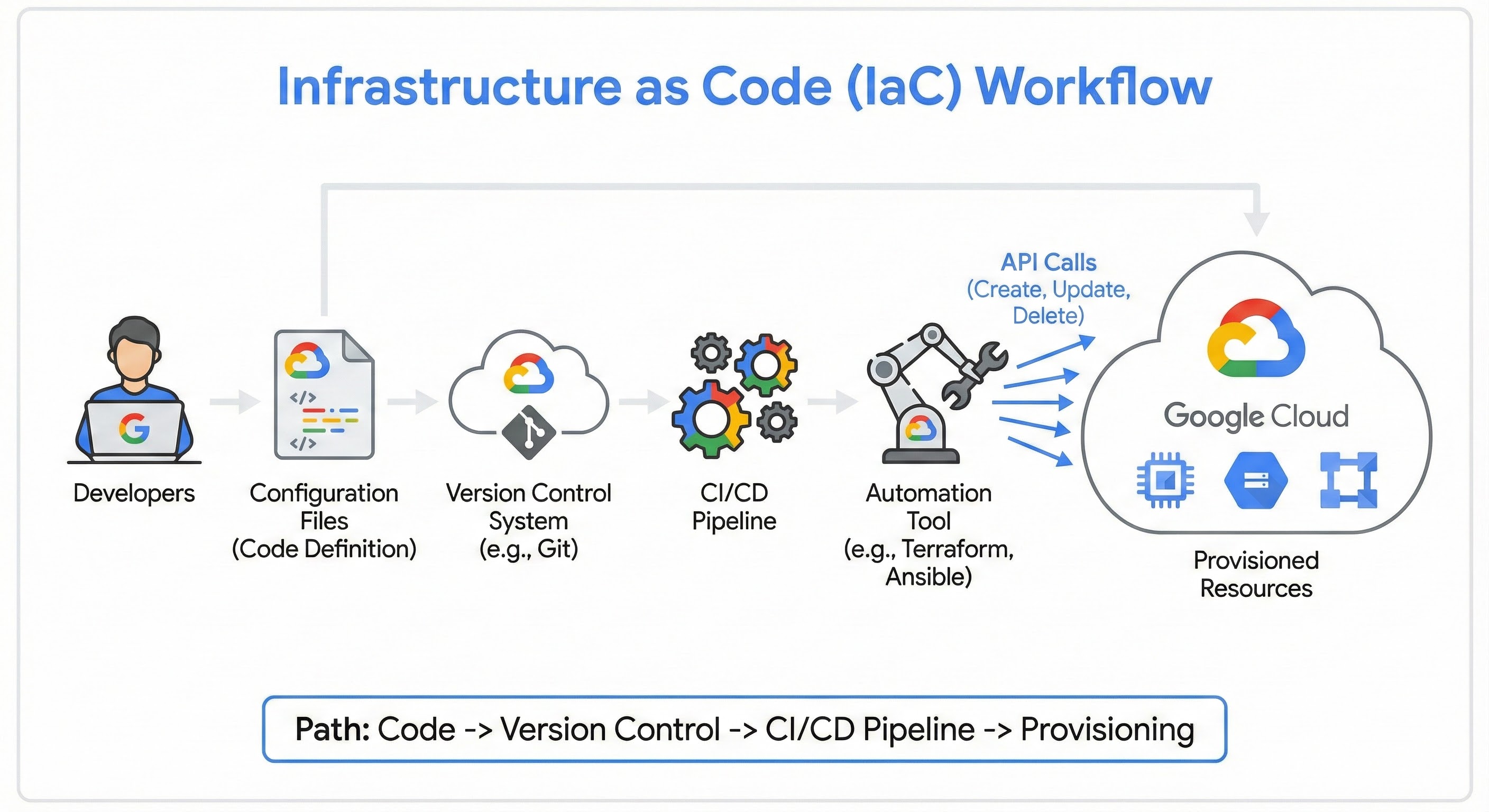
Declarativo frente a imperativo
Al implementar la IaC, los equipos suelen elegir entre dos enfoques: declarativo e imperativo. La principal diferencia radica en si te centras en el resultado final o en los pasos para llegar a él.
Método | Descripción | Ejemplo |
Declarativo | Tú defines cómo quieres que sea el estado final. La herramienta averigua los pasos necesarios para alcanzar ese estado. Este es el estándar moderno para herramientas como Terraform y Kubernetes. | "Quiero 3 máquinas virtuales con 8 GB de RAM cada una". |
Imperativo | Defines cómo cambiar la infraestructura enumerando comandos o secuencias de comandos específicos que se deben ejecutar en orden. | "Ejecuta la secuencia de comandos A para iniciar el servidor 1. Después, ejecuta la secuencia de comandos B para configurar la red. Luego, ejecuta la secuencia de comandos C..." |
Método
Descripción
Ejemplo
Declarativo
Tú defines cómo quieres que sea el estado final. La herramienta averigua los pasos necesarios para alcanzar ese estado. Este es el estándar moderno para herramientas como Terraform y Kubernetes.
"Quiero 3 máquinas virtuales con 8 GB de RAM cada una".
Imperativo
Defines cómo cambiar la infraestructura enumerando comandos o secuencias de comandos específicos que se deben ejecutar en orden.
"Ejecuta la secuencia de comandos A para iniciar el servidor 1. Después, ejecuta la secuencia de comandos B para configurar la red. Luego, ejecuta la secuencia de comandos C..."
Seguridad y análisis de la IaC
A medida que las definiciones de la infraestructura se trasladan a los repositorios de código, las prácticas de seguridad deben adaptarse para proteger estos archivos. La "seguridad de IaC" y el "análisis de IaC" hacen referencia a la práctica de analizar los archivos de configuración en busca de vulnerabilidades antes de que se despliegue la infraestructura. Este concepto se conoce como seguridad de "desplazamiento a la izquierda". Las herramientas especializadas analizan la cadena de código para detectar errores de configuración, como segmentos de almacenamiento que se han dejado abiertos al público o bases de datos sin cifrar, lo que evita que los riesgos de seguridad lleguen al entorno de producción.
Casos prácticos de la IaC
Además de admitir patrones de despliegue comunes, como las aplicaciones de generación aumentada de recuperación (RAG), la IaC ayuda a resolver los retos de los despliegues operativos complejos.
Despliegues multinube
Las empresas suelen necesitar ejecutar cargas de trabajo en distintos entornos. Con una herramienta como Terraform, un equipo puede usar un único flujo de trabajo de configuración para desplegar y gestionar recursos en Google Cloud, otros entornos de nube y centros de datos on-premise de forma simultánea. De esta forma, se reduce la complejidad de aprender a usar diferentes herramientas propias de cada plataforma.
Entornos desechables
Los desarrolladores suelen necesitar lugares seguros para probar nuevas funciones. Con la IaC, un equipo puede crear un entorno de ensayo temporal que refleje la producción exactamente, ejecutar sus pruebas y, a continuación, destruir el entorno inmediatamente después. De esta forma, se garantiza la precisión de las pruebas y se evita el coste de mantener un servidor de pruebas permanente en funcionamiento las 24 horas del día.
Recuperación tras fallos
En caso de una interrupción catastrófica del servicio en una región, la recuperación manual puede llevar días. La IaC permite la "recuperación ante desastres como código", lo que permite a una organización volver a aprovisionar rápidamente toda su infraestructura en otra región utilizando sus definiciones de código existentes. De esta forma, se puede reducir drásticamente el tiempo de inactividad y asegurar la continuidad del negocio.
Ventajas de la IaC
Adoptar IaC puede ofrecer ventajas significativas a las empresas que quieran modernizar sus operaciones de TI.
Velocidad
Velocidad
La automatización te permite desplegar entornos complejos en cuestión de minutos, en lugar de días o semanas.
Coherencia
Coherencia
Como el mismo código despliega el mismo entorno cada vez, la IaC elimina la "deriva de configuración", que se produce cuando los servidores se vuelven incoherentes debido a cambios manuales ad hoc.
Ahorro de costes
Ahorro de costes
Los equipos pueden desactivar fácilmente los recursos que no se estén usando cuando no los necesiten, como los entornos de desarrollo los fines de semana, lo que ayuda a gestionar el gasto de la nube.
Control de versiones
Control de versiones
Como la infraestructura se define como código, todo el historial de cambios de tu infraestructura se almacena en un solo lugar. De esta forma, es más fácil hacer un seguimiento de quién ha cambiado qué y volver a una versión anterior si algo se rompe.
Implementar la IaC en Google Cloud
Google Cloud proporciona un conjunto completo de herramientas para respaldar tu recorrido hacia la infraestructura como código, desde el diseño inicial hasta la implementación y la gestión continua. Un buen punto de partida es el Application Design Center, que te permite explorar, personalizar y desarrollar arquitecturas de referencia predefinidas. De esta forma, puedes diseñar tu pila de aplicaciones basándote en las prácticas recomendadas de Google Cloud antes de escribir una sola línea de código, lo que te permite asegurarte de que tu infraestructura está bien diseñada desde el principio.
Una vez que tengas un diseño, el ecosistema abierto de Google Cloud te permitirá implementarlo fácilmente como código. La plataforma trata los estándares de código abierto, como Terraform, como un elemento de primera clase, no como algo secundario. Servicios como Infrastructure Manager te permiten desplegar y gestionar recursos de Google Cloud directamente con Terraform, mientras que Config Connector te permite gestionar recursos de Google Cloud a través de Kubernetes, lo que ayuda a salvar la distancia entre la infraestructura de nube y la orquestación de contenedores.
Cloud Resource Manager
Cloud Resource Manager es el servicio que permite gestionar de forma programática la jerarquía de recursos de Google Cloud, incluidas las organizaciones, las carpetas y los proyectos. Aunque muchos equipos usan IaC para desplegar recursos como máquinas virtuales, Cloud Resource Manager te permite definir la estructura del proyecto como código. Esto ayuda a los equipos a automatizar la configuración de nuevos entornos con políticas de gestión de identidades y accesos (IAM) y restricciones organizativas coherentes, lo que garantiza que la gobernanza se integre en la infraestructura desde el principio.
Automatizar entornos de vista previa temporales
Una de las formas más valiosas de usar la infraestructura como código es para resolver el problema común de los desarrolladores: "Funcionaba en mi máquina, ¿por qué se ha estropeado en producción?". Puedes solucionar este problema creando entornos temporales.
En este flujo de trabajo, cuando un desarrollador abre una solicitud de extracción, las herramientas de IaC crean automáticamente una copia temporal y aislada de la aplicación. Cuando se combina la solicitud de extracción, el entorno se autodestruye.
Paso 1: Nombres dinámicos en Terraform
Para que esto funcione, tu código de Terraform no puede tener nombres codificados. Debes usar variables para crear recursos únicos para cada RP.
main.tf (fragmento)
- Terraform
Paso 2: La configuración de Cloud Build
En tu archivo cloudbuild.yaml, inyectas el número de la solicitud de extracción en Terraform mediante la variable de sustitución _PR_NUMBER que proporciona Cloud Build.
cloudbuild.yaml (fragmento)
- YAML
Este flujo de trabajo transforma la IaC de una tarea de mantenimiento estática en una herramienta de productividad dinámica que acelera el ciclo de revisión.
Soluciones y productos relacionados
 Cloud BuildUna plataforma de CI/CD sin servidor que te permite crear, probar y desplegar software en todos los lenguajes y entornos, lo que agiliza la integración de la IaC en flujos de procesamiento automatizados.
 Compute EngineMáquinas virtuales seguras y personalizables que sirven como infraestructura básica que puedes aprovisionar con Terraform.
 Cloud StorageUn servicio de almacén de objetos escalable que se usa en flujos de trabajo de IaC para almacenar de forma segura archivos de estado de Terraform remotos.
 Google Kubernetes Engine (GKE)El servicio de Kubernetes más escalable y totalmente automatizado, que suele configurarse mediante IaC declarativa para gestionar los ajustes de clúster y los grupos de nodos.
 Cloud RunUna plataforma sin servidor totalmente gestionada que te permite desplegar aplicaciones en contenedores mediante IaC sin tener que gestionar las máquinas subyacentes.
 Cloud SQLUn servicio de bases de datos relacionales totalmente gestionado para MySQL, PostgreSQL y SQL Server que se puede aprovisionar y conectar a tus aplicaciones mediante código.
Recursos adicionales
- Documentación sobre la infraestructura como código: consulta el centro de recursos oficial con resúmenes, guías y herramientas relacionadas con la implementación de la infraestructura como código en Google Cloud.
- Ejecutar la infraestructura como código con los mínimos accesos: descubre cómo mejorar la seguridad aplicando el principio de mínimos accesos a tus flujos de trabajo de IaC con esta entrada de blog técnica.
- Experimento de infraestructura como código con Terraform: adquiere experiencia práctica desplegando recursos en la nube con Terraform a través de esta Quest guiada de Google Cloud Skills Boost.
- Adoptar la infraestructura como código en GCP a una escala replicable: en este artículo de introducción, descubrirás por qué adoptar IaC es fundamental a la hora de realizar operaciones escalables y replicables.
- Gestionar la infraestructura como código con Terraform: profundiza en estrategias y prácticas recomendadas específicas para gestionar de forma eficaz las definiciones de tu infraestructura al usar Terraform en Google Cloud.
- Application Design Center: explora, personaliza y desarrolla arquitecturas de referencia predefinidas. Te ayuda a diseñar tu pila de aplicaciones basándote en las prácticas recomendadas de Google Cloud antes de escribir una sola línea de código.
- Infrastructure Manager: un servicio totalmente gestionado que automatiza el despliegue y la gestión de recursos de Google Cloud mediante Terraform, lo que permite a los equipos aprovisionar infraestructura de forma fiable y coherente.
Ve un paso más allá
Empieza a crear en Google Cloud con 300 USD en crédito y más de 20 productos sin coste.
¿Necesitas ayuda para empezar?
Contactar con VentasColabora con un partner de confianza
Buscar un partnerSigue explorando
Ver todos los productos











