Data Studio
Visualization and reporting for individuals and teams, and the discovery page for Data Cloud resources in the AI era.
Directly connect to more than 1,400 data sources, including Google Sheets, Google Ads, BigQuery, and Google Analytics
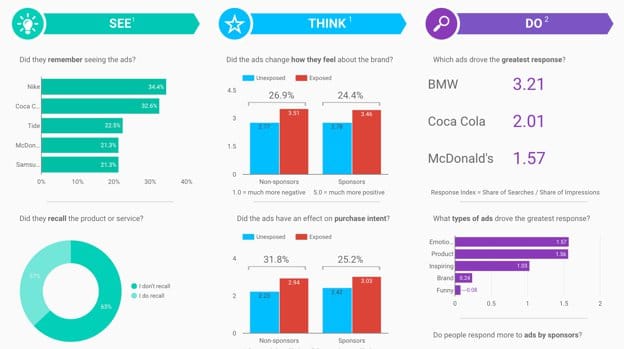
Create engaging, customizable data visualizations
Build rich, interactive reports with filters, images, text, and multiple tabs or pages
Share and collaborate with individuals and groups
Interact with BigQuery conversational agents and data apps built by technical users in Data Cloud
Benefits
Create visual reports in minutes
Create visual reports in minutes
Data Studio unlocks the power of your Google data by making it easy to create custom visualizations and interactive reports.
Connect to data without limits
Connect to data without limits
Connect directly to app sources, cloud databases and data warehouses to instantly gain access to any kind of data.
Share your data story
Share your data story
Share high-impact, compelling reports with your team or with the world. Collaborate in real time or embed your reports on the web to inspire action.
Key features
Key features
Drag-and-drop report editor
Data Studio is designed to be intuitive and easy to use. The report editor features simple drag-and-drop objects with fully custom property panels, and a choice of pixel perfect or snap-to-grid responsive canvas.
Data connectors
Data sources act as pipes to connect a Data Studio report to underlying data. Each source has a unique, prebuilt connector to ensure your data is easy to access and use. Connect to Google data, choose from over 1,300 Community Connectors for popular databases and applications, or build your own connector.
Portal for Data Cloud assets
Individuals and teams can browse and interact with a variety of data assets created throughout Data Cloud, including Data Apps built in Colab Notebooks, conversational agents built in BigQuery and reports built in Data Studio.
Conversational analytics with BigQuery data
Seamlessly integrate AI agents into your team’s existing workflows. Technical users can build specialized agents in BigQuery and share them with business users for conversations directly in Data Studio, enabling natural language data exploration for everyone.
Report embedding
Embedding allows you to include your Data Studio report in any web page or intranet, making it easier for you to tell your data story to your organization, your community, or the world.
Documentation
Documentation and resources
Pricing
Pricing
Data Studio is available at no charge for creators and report viewers.
Customers who upgrade to Data Studio Pro will receive support and expanded administrative features, including team content management. You can upgrade to Data Studio Pro directly from the Data Studio website.
Data Studio pricing
Pricing per user per month for Data Studio Pro varies depending on the length of the customer’s subscription. Our self-service tier remains available at no cost.
Service | Price |
|---|---|
Data Studio Self-service data visualizations and reports | No charge |
Data Studio Pro (Project subscription) Department level reports and visualizations with Google Cloud support and system administration. Enterprise-Grade Security Comprehensive support for advanced security controls, including Customer-Managed Encryption Keys (CMEK) for all assets developed within Data Studio. | $9 per user per project per month |
Take the next step
Start building on Google Cloud with $300 in free credits and 20+ always free products.
Need help getting started?
Contact salesWork with a trusted partner
Find a partnerContinue browsing
See all products











