Apa itu database AI?
Database AI, yang terkadang disebut database berbasis AI atau AI DB, adalah sistem penyimpanan data khusus yang dibuat untuk menangani informasi tidak terstruktur yang kompleks yang diperlukan untuk melatih dan menjalankan model kecerdasan buatan. Sistem ini berfungsi sebagai infrastruktur inti aplikasi AI modern dengan memungkinkan developer menyimpan, mengambil, dan memproses data dalam jumlah besar yang membantu AI berpikir, belajar, dan memberikan jawaban yang akurat.
Memahami hubungan antara data dan AI
Data adalah fondasi sistem cerdas. Tanpa data berkualitas tinggi, model AI tidak dapat memahami pola atau membuat prediksi yang berguna. Database tradisional sering kali kesulitan menangani hal ini karena dirancang untuk data terstruktur yang bersih seperti nama pelanggan atau jumlah transaksi.
AI modern memerlukan pendekatan yang berbeda untuk menangani skala, variasi, dan kompleksitas set data saat ini. LLM memerlukan konteks dan detail untuk membentuk hubungan antara data guna memberikan output yang cerdas.
Database AI dibuat khusus untuk mengelola hal ini. Data diatur sedemikian rupa sehingga software AI dapat mengaksesnya dengan cepat, baik data tersebut berupa teks, gambar, maupun audio. Dengan menggunakan sistem khusus ini, developer dapat melampaui penyimpanan sederhana dan membangun aplikasi yang memahami konteks serta makna.
Apa perbedaan antara database AI dan database tradisional?
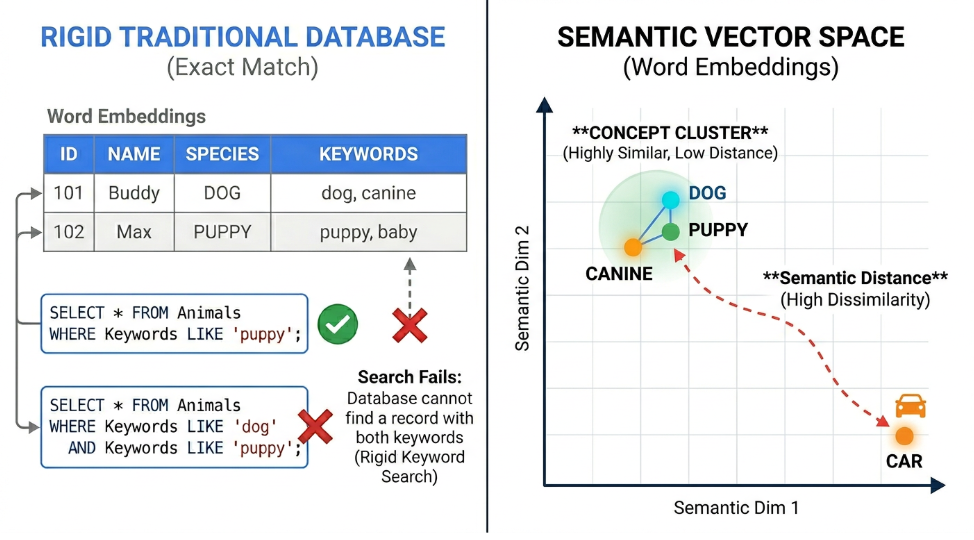
Database relasional tradisional sangat cocok untuk mengelola informasi terstruktur, seperti catatan keuangan dan profil pengguna. Sistem lama ini mengatur data ke dalam baris dan kolom yang ketat. Saat aplikasi perlu mengambil informasi, database mengandalkan kecocokan kata kunci yang tepat dan logika yang ketat. Meskipun metode ini menjaga akurasi data yang terorganisasi, metode ini dapat mengalami keterbatasan saat menangani file yang kompleks atau tidak terstruktur.
Database AI mengambil pendekatan yang sama sekali berbeda dengan berfokus pada vektor berdimensi tinggi. Saat membangun aplikasi cerdas, developer menggunakan model embedding untuk mengonversi teks, gambar, dan audio menjadi deretan angka yang panjang. Array numerik ini menangkap makna dan konteks matematika yang mendalam dari data asli. Database AI dibuat khusus untuk menyimpan, mengindeks, dan mengkueri daftar numerik yang sangat besar ini.
Hal ini menciptakan perubahan dalam cara aplikasi mengambil informasi karena database memahami makna semantik di balik data, yang nantinya dapat memungkinkan pengambilan machine learning yang lebih cepat. Jika pengguna menelusuri suatu konsep menggunakan sinonim, database AI tetap menemukan informasi yang tepat karena vektor numerik yang mendasarinya serupa.
Fitur | Database relasional tradisional | Database AI |
Jenis data utama | Data terstruktur, angka yang pasti, dan string teks pendek | Data tidak terstruktur, multimedia, dan embedding vektor |
Kapabilitas penelusuran | Pencocokan kata kunci yang tepat dan operator logika yang ketat | Makna semantik, pengambilan kontekstual, dan penelusuran campuran |
Integrasi machine learning | Memerlukan pipeline eksternal untuk memindahkan data ke model AI | Integrasi native dengan model bahasa besar dan alat embedding bawaan |
Pengelolaan performa | Sangat bergantung pada penyesuaian manual oleh administrator database | Menggunakan machine learning untuk penyesuaian otomatis dan penskalaan prediktif |
Fitur
Database relasional tradisional
Database AI
Jenis data utama
Data terstruktur, angka yang pasti, dan string teks pendek
Data tidak terstruktur, multimedia, dan embedding vektor
Kapabilitas penelusuran
Pencocokan kata kunci yang tepat dan operator logika yang ketat
Makna semantik, pengambilan kontekstual, dan penelusuran campuran
Integrasi machine learning
Memerlukan pipeline eksternal untuk memindahkan data ke model AI
Integrasi native dengan model bahasa besar dan alat embedding bawaan
Pengelolaan performa
Sangat bergantung pada penyesuaian manual oleh administrator database
Menggunakan machine learning untuk penyesuaian otomatis dan penskalaan prediktif
Apa saja jenis database AI?
Saat tim engineering membangun aplikasi cerdas, mereka dapat memilih dari berbagai arsitektur database yang berbeda. Bergantung pada project spesifik, Anda mungkin akan menggunakan salah satu format umum berikut:
- Database vektor native: Engineer membangun sistem ini dari awal secara khusus untuk menyimpan dan mengkueri embedding berdimensi tinggi. Sistem ini menawarkan kecepatan luar biasa saat Anda hanya perlu menjalankan penelusuran kemiripan semantik di seluruh set data yang sangat besar.
- Database relasional yang disempurnakan dengan AI: Banyak developer tidak ingin meninggalkan lingkungan SQL yang sudah familiar. Platform cloud modern kini menambahkan ekstensi khusus ke database tradisional, sehingga Anda dapat menjalankan penelusuran vektor dan memanggil model machine learning bersamaan dengan data transaksional standar.
- Database grafik: Sistem ini memetakan hubungan kompleks antara berbagai informasi. Database ini sangat bagus untuk membangun pustaka pengetahuan, yang memberi model AI konteks yang lebih mendalam tentang bagaimana orang, tempat, dan konsep saling terhubung.
- Database dokumen: Terkadang Anda perlu menyimpan file fleksibel, seperti dokumen JSON, bersama dengan vektor matematika Anda. Database dokumen menyimpan teks mentah, metadata deskriptif, dan embedding vektor Anda di satu tempat untuk memudahkan pengelolaan.
Mengelola data dan set data pelatihan AI
Database AI mengelola seluruh siklus proses data pelatihan dengan menyerap, menyimpan, dan memproses set data besar untuk pelatihan dan inferensi. Database ini bertindak sebagai area staging tempat developer membersihkan, mengurutkan, dan memberi tag pada data sehingga model AI dapat mempelajarinya secara efektif. Dengan menyediakan akses latensi rendah ke file besar ini, database memastikan bahwa developer dapat melatih model mereka tanpa menunggu berjam-jam agar sistem menemukan informasi yang tepat.
Seberapa amankah database AI?
Saat developer menghubungkan informasi perusahaan eksklusif ke model machine learning, menjaga keamanan data tersebut adalah prioritas utama. Database AI modern menawarkan fitur tangguh untuk melindungi set data sensitif Anda. Mereka menggunakan pengamanan perusahaan standar, seperti mengenkripsi data baik saat disimpan maupun saat dikirim melalui jaringan. Tim engineering juga dapat menyiapkan kontrol akses yang ketat sehingga mereka yakin bahwa hanya pengguna, aplikasi, dan model AI tertentu yang diizinkan untuk melihat data.
Manfaat keamanan utama dari penggunaan database AI khusus adalah bagaimana database tersebut menjaga informasi Anda tetap terisolasi. Daripada mengirimkan data bisnis sensitif ke alat AI publik, Anda dapat menjalankan kueri dengan aman dalam jaringan cloud pribadi Anda sendiri. Banyak database AI juga menggunakan machine learning untuk memantau traffic sistem secara otomatis. Fitur keamanan bawaan ini membantu mendeteksi perilaku yang tidak biasa dan dapat memblokir potensi ancaman sebelum mencapai pipeline data Anda.
Pertanyaan umum (FAQ)
Berikut beberapa pertanyaan umum yang mungkin diajukan oleh developer tentang database AI.
Kapan saya harus menggunakan database AI?
Anda harus menggunakan database AI saat aplikasi Anda perlu memproses data tidak terstruktur dalam jumlah besar, seperti dokumen teks, gambar, atau file audio. Database AI adalah pilihan yang cocok untuk beberapa skenario tertentu:
- Mendeteksi anomali dan penipuan: Amankan platform Anda dengan mengidentifikasi pola yang tidak biasa dalam set data besar. Saat Anda menyimpan log jaringan atau transaksi keuangan sebagai vektor matematika, aplikasi Anda dapat langsung menemukan anomali yang berada jauh di luar cluster aktivitas normal untuk menjaga keamanan sistem dan pengguna Anda.
- Penelusuran semantik: Bangun mesin telusur yang memahami intent di balik pertanyaan pengguna. Alih-alih mengandalkan pencocokan kata kunci yang persis, pengguna dapat menemukan dokumen atau file yang tepat menggunakan bahasa alami dan percakapan.
- Mesin rekomendasi canggih: Sarankan produk atau konten berdasarkan koneksi semantik yang mendalam. Anda dapat mencocokkan pembeli dengan item berdasarkan kemiripan visual atau deskripsi yang tidak jelas, bukan hanya mengandalkan tag kategori yang ketat dan kaku.
Bisakah database referensi global mendeteksi AI?
Database referensi global atau alat plagiarisme akademis serupa mungkin dapat mendeteksi konten yang dihasilkan AI dengan membandingkan teks yang dikirimkan dengan arsip besar tulisan manusia dan mesin yang sudah diketahui. Alat ini menggunakan algoritma khusus untuk menemukan frasa yang dapat diprediksi, struktur kalimat yang berulang, dan anomali data dalam set data. Meskipun berguna, akurasi alat ini bervariasi dan terkadang menghasilkan positif palsu.
Apa itu RAG dan hubungannya dengan database AI?
Retrieval-augmented generation (RAG) adalah teknik yang mendasarkan model bahasa pada informasi faktual dan dunia nyata. Database AI bertindak sebagai library pengetahuan dasar untuk pipeline RAG dengan menyimpan data eksklusif Anda secara aman. Saat pengguna mengajukan pertanyaan, database akan langsung menemukan informasi yang paling relevan dan memberikannya langsung ke model bahasa. Proses ini mendasarkan AI pada konteks faktual, sehingga membantu AI menghasilkan jawaban yang sangat akurat dan mencegahnya menebak-nebak.
Manfaat database AI
Menggunakan database kecerdasan buatan memberikan manfaat yang signifikan bagi tim engineering yang ingin melampaui pengembangan software tradisional. Sistem ini dibuat khusus untuk menangani kebutuhan unik aplikasi machine learning modern.
Performa tinggi dan skalabilitas cepat
Performa tinggi dan skalabilitas cepat
Sistem ini memungkinkan developer menangani jutaan kueri per detik tanpa penurunan kecepatan yang signifikan. Saat aplikasi berkembang dari beberapa ratus pengguna menjadi ratusan ribu, database akan diskalakan untuk mengelola peningkatan workload dan menjaga waktu respons tetap cepat.
Memproses data tidak terstruktur
Memproses data tidak terstruktur
Database tradisional sering kali kesulitan menangani informasi dunia nyata yang tidak teratur seperti dokumen teks, gambar, dan file audio. Database AI dioptimalkan secara khusus untuk memproses data tidak terstruktur ini secara efektif. Kemampuan ini memudahkan Anda membangun aplikasi yang benar-benar memahami bahasa manusia alami dan pola visual yang kompleks.
Integrasi cloud yang lancar
Integrasi cloud yang lancar
Database AI modern biasanya terhubung langsung dengan infrastruktur cloud yang sudah ada. Konektivitas ini berarti data scientist dan engineer dapat berkolaborasi dalam lingkungan terpadu. Bekerja dalam satu ekosistem yang terhubung akan mengurangi waktu yang diperlukan untuk memindahkan model machine learning dari prototipe lokal sederhana ke aplikasi produksi yang berfungsi penuh.
Penelusuran semantik versus penelusuran terstruktur tradisional
Penelusuran tradisional bekerja dengan mencari kecocokan persis. Jika Anda menelusuri "anak anjing", database tradisional mungkin mengabaikan dokumen tentang "anjing" karena kata-katanya berbeda. Penelusuran semantik mengatasi masalah ini dengan melihat makna di balik kata, sehingga sistem dapat memahami bahwa "anak anjing" dan "anjing" saling terkait.
Penelusuran campuran menggabungkan kedua pendekatan untuk memberikan hasil terbaik bagi pengguna. Penelusuran ini menggunakan penelusuran semantik untuk memahami maksud di balik kueri, sekaligus menggunakan penelusuran terstruktur untuk memfilter berdasarkan kolom tertentu, seperti tanggal atau kategori.
Menggunakan AI untuk pengoptimalan database
Hubungan antara AI dan database bersifat dua arah. Meskipun database mendukung model AI, developer juga menggunakan AI untuk pengoptimalan DB.
Misalnya, kecerdasan buatan dan machine learning secara aktif digunakan untuk mengoptimalkan performa database dengan memprediksi lonjakan traffic dan mengalokasikan resource komputasi sebelum terjadi bottleneck. Pengelolaan proaktif ini membantu menjaga aplikasi tetap berjalan lancar tanpa memerlukan administrator manusia untuk menyesuaikan ukuran server secara manual saat tengah malam.
Algoritma machine learning juga membantu mengotomatiskan penyesuaian database rutin dan meningkatkan protokol keamanan. Alat ini dapat menganalisis pola kueri untuk menyarankan strategi pengindeksan yang lebih baik, sehingga menghemat waktu engineer dalam memecahkan masalah secara manual. Model AI juga terus memantau traffic jaringan untuk mendeteksi pola akses yang tidak biasa, yang membantu mengidentifikasi dan memblokir potensi ancaman keamanan secara real time.
Memilih database AI yang tepat
Memilih database AI memerlukan pertimbangan cermat tentang cara database tersebut menangani kebutuhan khusus alur kerja machine learning. Organisasi harus memprioritaskan sistem yang menawarkan dukungan native untuk data vektor dan mampu berkembang seiring dengan perkembangan project mereka.
Saat memilih database, cari fitur-fitur berikut:
- Pengindeksan vektor native: Kemampuan untuk menyimpan dan menelusuri vektor secara langsung dalam mesin database.
- Fungsi penelusuran campuran: Kemampuan untuk menggabungkan pemahaman semantik dengan pemfilteran pencocokan persis.
- Skalabilitas: Kapasitas untuk menangani workload perusahaan yang besar tanpa perlu kehilangan kecepatan.
- Integrasi ekosistem: Koneksi lancar ke model embedding, LLM, dan pipeline data yang ada.
Apa yang dapat saya bangun dengan database AI?
Database AI membuka berbagai kemungkinan bagi developer yang ingin membuat aplikasi cerdas dan responsif. Karena sistem ini menangani data tidak terstruktur dan memahami makna semantik, sistem ini dapat membantu Anda menyelesaikan masalah kompleks yang mungkin sulit dikelola oleh database tradisional.
Berikut beberapa aplikasi umum yang dapat Anda buat:
- Agen dukungan cerdas: Alih-alih menulis chatbot yang kaku dan berbasis aturan, Anda dapat membangun agen dukungan yang benar-benar memahami konteks. Dengan menyimpan manual teknis perusahaan, panduan produk, dan tiket dukungan sebelumnya sebagai embedding vektor, agen AI Anda dapat membaca dokumentasi yang kompleks untuk memberikan petunjuk pemecahan masalah langkah demi langkah yang sangat akurat kepada pengguna.
- Mesin pemberi saran canggih: Aplikasi retail tradisional mengandalkan tag sederhana untuk menyarankan produk. Dengan database AI, Anda dapat membangun sistem rekomendasi yang memahami kemiripan visual atau deskripsi gaya hidup. Jika pembeli mengupload foto ruang keluarga yang mereka sukai, aplikasi Anda dapat langsung mengambil furnitur yang sesuai dengan estetika tersebut.
- Alat penelusuran semantik: Anda dapat membuat mesin telusur internal yang canggih yang memungkinkan karyawan menemukan informasi menggunakan bahasa alami. Misalnya, tim hukum dapat mengetikkan pertanyaan tentang klausul kontrak tertentu, dan database akan mengambil paragraf yang mereka butuhkan, meskipun kueri penelusuran tidak cocok dengan jargon hukum dalam dokumen.
- Alat developer kustom: Anda dapat mengindeks seluruh codebase eksklusif Anda ke dalam database AI. Hal ini memungkinkan tim engineering Anda menelusuri jutaan baris kode menggunakan bahasa alami. Jika developer baru perlu menemukan fungsi spesifik yang menangani autentikasi pengguna, mereka dapat langsung bertanya ke database, bukan mengklik ratusan file secara manual.
- Platform multimedia: Aplikasi modern sering kali perlu memproses lebih dari sekadar teks. Anda dapat membuat alat yang menganalisis dan mengambil klip audio, video, atau gambar berdasarkan konten sebenarnya. Misalnya, perusahaan media dapat membuat platform yang memungkinkan editor untuk langsung memunculkan klip video tertentu hanya dengan mengetikkan deskripsi singkat dari adegan tersebut.
Membangun dengan database Google Cloud dan Gemini Enterprise Agent Platform
Google Cloud menyediakan ekosistem yang canggih untuk membangun aplikasi berteknologi AI dengan menggabungkan solusi database seperti AlloyDB untuk PostgreSQL, yang mendukung penelusuran vektor, dengan kecerdasan Agent Platform. Infrastruktur ini dirancang untuk menangani set data besar sekaligus menjaga latensi tetap rendah.
Dengan menghubungkan alat-alat tersebut, developer dapat membangun aplikasi tangguh yang menyimpan konteks dalam database dan menghasilkan respons yang menyerupai manusia dengan mudah. Integrasi ini memberikan standar keandalan dan kecepatan dalam pengembangan AI modern.
Produk dan layanan Google Cloud terkait
Google Cloud menawarkan ekosistem alat yang canggih untuk membantu developer membangun, menskalakan, dan mengelola database kecerdasan buatan.
 AlloyDB untuk PostgreSQLDatabase relasional yang terkelola sepenuhnya ini menangani workload AI berperforma tinggi dengan menawarkan penelusuran vektor native dan integrasi langsung dengan model machine learning Anda.
 Cloud SQLDeveloper dapat menggunakan database terkelola yang populer ini untuk menyimpan dan mengkueri embedding vektor bersama data relasional tradisional menggunakan ekstensi PostgreSQL standar.
 SpannerDatabase terdistribusi secara global ini memungkinkan tim menjalankan penelusuran kemiripan semantik pada data terstruktur dan tidak terstruktur dalam jumlah besar di seluruh dunia dengan hampir tanpa waktu non-operasional.
 BigQueryData warehouse serverless ini membantu data engineer mengelola set data AI yang besar dan menjalankan penelusuran vektor secara langsung di tempat data perusahaan tersebut berada.
 Platform Agen Gemini EnterprisePlatform machine learning komprehensif ini menghasilkan embedding vektor yang disimpan oleh database AI Anda, sehingga memudahkan Anda membangun dan men-deploy pipeline pengambilan yang kompleks.
 FirestoreDatabase dokumen NoSQL yang fleksibel ini mencakup kemampuan penelusuran vektor, yang memungkinkan developer membangun fitur AI responsif ke dalam aplikasi seluler dan web mereka dengan cepat.
Langkah selanjutnya
Mulailah membangun solusi di Google Cloud dengan kredit gratis senilai $300 dan lebih dari 20 produk yang selalu gratis.
Perlu bantuan untuk memulai?
Hubungi bagian penjualanBekerja sama dengan partner tepercaya
Temukan partnerLanjutkan menjelajah
Lihat semua produk











