¿Qué es una base de datos de IA?
Una base de datos de IA, a veces llamada base de datos nativa de IA o BD de IA, es un sistema de almacenamiento de datos especializado creado para manejar la información compleja y no estructurada necesaria para entrenar y ejecutar modelos de Inteligencia Artificial. Sirve como la columna vertebral de las aplicaciones de IA modernas, ya que permite a los desarrolladores almacenar, recuperar y procesar las enormes cantidades de datos que ayudan a la IA a pensar, aprender y proporcionar respuestas precisas.
Comprende la conexión entre los datos y la IA
Los datos son la base de los sistemas inteligentes. Sin datos de alta calidad, los modelos de IA no pueden comprender patrones ni hacer predicciones útiles. Las bases de datos tradicionales suelen tener dificultades con esto porque se diseñaron para datos limpios y estructurados, como nombres de clientes o importes de transacciones.
La IA moderna requiere un enfoque diferente para manejar la escala, la variedad y la complejidad de los conjuntos de datos actuales. Requiere contexto y detalle para formar las relaciones entre los datos y, así, proporcionar resultados inteligentes.
Una base de datos de IA se crea específicamente para administrar esto. Organiza los datos de manera que el software de IA pueda acceder a ellos rápidamente, ya sean texto, imágenes o audio. Con estos sistemas especializados, los desarrolladores pueden ir más allá del almacenamiento simple y crear apps que comprendan el contexto y el significado.
¿Cuál es la diferencia entre las bases de datos de IA y las bases de datos tradicionales?
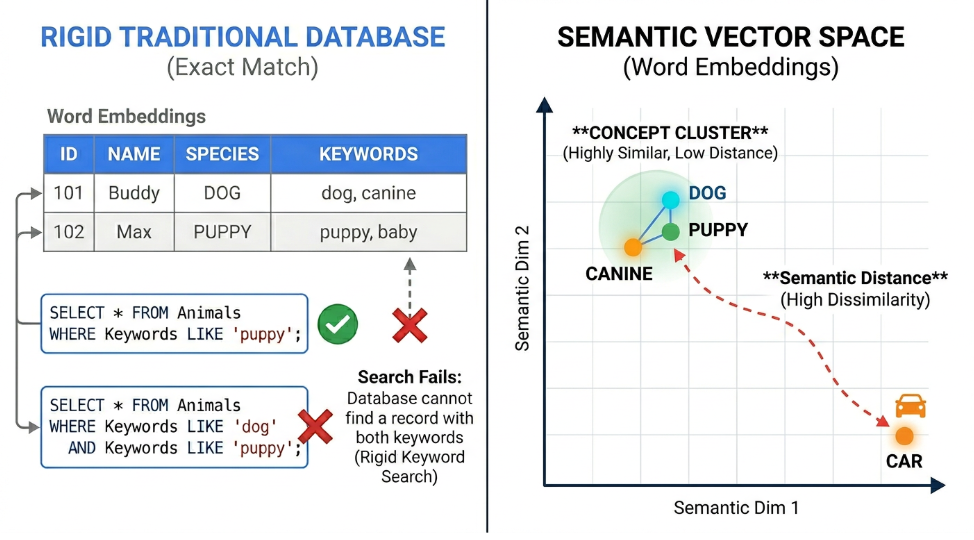
Las bases de datos relacionales tradicionales son adecuadas para administrar información estructurada, como registros financieros y perfiles de usuario. Estos sistemas heredados organizan los datos en filas y columnas estrictas. Cuando una aplicación necesita recuperar información, la base de datos se basa en coincidencias exactas de palabras clave y una lógica estricta. Si bien este método mantiene la exactitud de los datos organizados, puede tener limitaciones cuando se manejan archivos complejos o no estructurados.
Una base de datos de IA adopta un enfoque completamente diferente, ya que se enfoca en vectores de alta dimensión. Cuando los desarrolladores crean aplicaciones inteligentes, usan un modelo de embeddings para convertir texto, imágenes y audio en largas cadenas de números. Estos arrays numéricos capturan el significado matemático profundo y el contexto de los datos originales. La base de datos de IA se creó específicamente para almacenar, indexar y consultar estas enormes listas numéricas.
Esto crea un cambio en la forma en que las aplicaciones recuperan información, ya que la base de datos comprende el significado semántico detrás de los datos, lo que a su vez puede permitir una recuperación más rápida del aprendizaje automático. Si un usuario busca un concepto con un sinónimo, la base de datos de IA aún encuentra la información correcta porque los vectores numéricos subyacentes son similares.
Función | Bases de datos relacionales tradicionales | Bases de datos de IA |
Tipos de datos principales | Datos estructurados, números rígidos y cadenas de texto cortas | Datos no estructurados, rich media y embeddings de vectores |
Funciones de búsqueda | Coincidencias exactas de palabras clave y operadores lógicos estrictos | Significado semántico, recuperación con reconocimiento de contexto y búsqueda híbrida |
Integración de aprendizaje automático | Requiere canalizaciones externas para trasladar datos a modelos de IA | Integraciones nativas con modelos de lenguaje grandes y herramientas de embedding integradas |
Administración del rendimiento | Depende en gran medida del ajuste manual por parte de los administradores de bases de datos | Usa el aprendizaje automático para el ajuste automático y el escalamiento predictivo |
Función
Bases de datos relacionales tradicionales
Bases de datos de IA
Tipos de datos principales
Datos estructurados, números rígidos y cadenas de texto cortas
Datos no estructurados, rich media y embeddings de vectores
Funciones de búsqueda
Coincidencias exactas de palabras clave y operadores lógicos estrictos
Significado semántico, recuperación con reconocimiento de contexto y búsqueda híbrida
Integración de aprendizaje automático
Requiere canalizaciones externas para trasladar datos a modelos de IA
Integraciones nativas con modelos de lenguaje grandes y herramientas de embedding integradas
Administración del rendimiento
Depende en gran medida del ajuste manual por parte de los administradores de bases de datos
Usa el aprendizaje automático para el ajuste automático y el escalamiento predictivo
¿Cuáles son los tipos de bases de datos de IA?
Cuando los equipos de ingeniería crean aplicaciones inteligentes, pueden elegir entre algunas arquitecturas de bases de datos diferentes. Según tu proyecto específico, es probable que trabajes con uno de estos formatos comunes:
- Bases de datos de vectores nativas: Los ingenieros crean estos sistemas desde cero específicamente para almacenar y consultar embeddings de alta dimensión. Ofrecen una velocidad increíble cuando solo necesitas ejecutar búsquedas de similitud semántica en conjuntos de datos masivos.
- Bases de datos relacionales mejoradas con IA: Muchos desarrolladores no quieren abandonar los entornos SQL familiares. Las plataformas de nube modernas ahora agregan extensiones especializadas a las bases de datos tradicionales, lo que te permite ejecutar búsquedas de vectores y llamar a modelos de aprendizaje automático junto con datos transaccionales estándar.
- Bases de datos de gráficos: Estos sistemas mapean las relaciones complejas entre diferentes piezas de información. Son excelentes para crear gráficos de conocimiento, que proporcionan a los modelos de IA un contexto más profundo sobre cómo se conectan las personas, los lugares y los conceptos.
- Bases de datos de documentos: A veces, necesitas almacenar archivos flexibles, como documentos JSON, junto con tus vectores matemáticos. Las bases de datos de documentos mantienen tu texto sin procesar, metadatos descriptivos y embeddings de vectores en un solo lugar para una administración simple.
Administración de datos y conjuntos de datos de entrenamiento de IA
Una base de datos de IA administra todo el ciclo de vida de los datos de entrenamiento transfiriendo, almacenando y procesando conjuntos de datos masivos para el entrenamiento y la inferencia. Actúa como un área de almacenamiento temporal en la que los desarrolladores limpian, ordenan y etiquetan los datos para que el modelo de IA pueda aprender de ellos de manera eficaz. Dado que proporciona acceso de baja latencia a estos archivos grandes, la base de datos garantiza que los desarrolladores puedan entrenar sus modelos sin esperar horas para que el sistema encuentre la información correcta.
¿Qué tan seguras son las bases de datos de IA?
Cuando los desarrolladores conectan información de la empresa propietaria a modelos de aprendizaje automático, mantener esos datos seguros es una prioridad máxima. Las bases de datos modernas de IA ofrecen funciones sólidas para proteger tus conjuntos de datos sensibles. Utilizan protecciones empresariales estándar, como la encriptación de datos tanto cuando se encuentran en el almacenamiento como cuando viajan a través de las redes. Los equipos de ingeniería también pueden configurar controles de acceso estrictos para asegurarse de que solo los usuarios, las aplicaciones y los modelos de IA específicos autorizados puedan ver los datos.
Un beneficio importante de seguridad de usar una base de datos de IA dedicada es cómo mantiene aislada tu información. En lugar de enviar registros empresariales sensibles a herramientas de IA públicas, puedes ejecutar tus consultas de forma segura en tu propia red de nube privada. Muchas bases de datos de IA también usan el aprendizaje automático para supervisar el tráfico del sistema de forma automática. Estas funciones de seguridad integradas ayudan a detectar comportamientos inusuales y pueden bloquear posibles amenazas antes de que lleguen a tus canalizaciones de datos.
Preguntas frecuentes
Estas son algunas preguntas frecuentes que los desarrolladores pueden tener sobre las bases de datos de IA.
¿Cuándo debería usar una base de datos de IA?
Deberías usar una base de datos de IA cuando tu aplicación necesite procesar grandes cantidades de datos no estructurados, como documentos de texto, imágenes o archivos de audio. Son una buena opción para algunas situaciones específicas:
- Detección de anomalías y fraudes: Protege tus plataformas identificando patrones inusuales en grandes conjuntos de datos. Cuando almacenas registros de red o transacciones financieras como vectores matemáticos, tu aplicación puede detectar al instante valores atípicos que se encuentran muy fuera de los clústeres de actividad normal para mantener seguros tus sistemas y usuarios.
- Búsqueda semántica: Crea motores de búsqueda que comprendan la intención detrás de la pregunta de un usuario. En lugar de depender de coincidencias exactas de palabras clave, las personas pueden encontrar los documentos o archivos correctos usando un lenguaje natural y conversacional.
- Motores de recomendación avanzados: Sugiere productos o contenido en función de conexiones semánticas profundas. Puedes hacer coincidir a los compradores con los artículos en función de similitudes visuales o descripciones vagas en lugar de depender de etiquetas de categorías estrictas y rígidas.
¿Puede una base de datos de referencia global detectar la IA?
Una base de datos de referencia global o una herramienta académica similar de plagio puede detectar contenido generado por IA comparando el texto enviado con vastos archivos de escritura humana y de máquina conocida. Estas herramientas usan algoritmos especializados para detectar frases predecibles, estructuras de oraciones repetitivas y anomalías de datos en conjuntos de datos. Si bien son útiles, su precisión varía y, a veces, producen falsos positivos.
¿Qué es la RAG y cuál es su relación con las bases de datos de IA?
La generación mejorada por recuperación (RAG) es una técnica que fundamenta los modelos de lenguaje en información fáctica del mundo real. Las bases de datos de IA actúan como la biblioteca de conocimiento fundamental para las canalizaciones de RAG, ya que almacenan de forma segura los datos de tu propiedad. Cuando un usuario hace una pregunta, la base de datos encuentra al instante la información más pertinente y la envía directamente al modelo de lenguaje. Este proceso fundamenta la IA en un contexto fáctico, lo que la ayuda a generar respuestas muy precisas y evita que adivine.
Los beneficios de una base de datos de IA
Usar una base de datos de Inteligencia Artificial ofrece ventajas significativas para los equipos de ingeniería que van más allá del desarrollo de software tradicional. Estos sistemas se diseñaron específicamente para manejar las demandas únicas de las aplicaciones modernas de aprendizaje automático.
Alto rendimiento y escalabilidad rápida
Alto rendimiento y escalabilidad rápida
Estos sistemas permiten a los desarrolladores manejar millones de consultas por segundo sin una disminución notable en la velocidad. Cuando una aplicación crece de unos pocos cientos de usuarios a cientos de miles, la base de datos se escala para administrar el aumento de la carga de trabajo y mantener los tiempos de respuesta rápidos.
Procesamiento de datos no estructurados
Procesamiento de datos no estructurados
Las bases de datos tradicionales suelen tener dificultades con la información desordenada del mundo real, como documentos de texto, imágenes y archivos de audio. Una base de datos de IA está optimizada específicamente para procesar estos datos no estructurados de manera eficaz. Esta capacidad facilita mucho la creación de aplicaciones que realmente comprenden el lenguaje humano natural y los patrones visuales complejos.
Integración perfecta en la nube
Integración perfecta en la nube
Las bases de datos modernas de IA suelen conectarse directamente con tu infraestructura de nube existente. Esta conectividad significa que los ingenieros y científicos de datos pueden colaborar en un entorno unificado. Trabajar en un ecosistema conectado reduce el tiempo que se tarda en trasladar un modelo de aprendizaje automático desde un prototipo local simple a una aplicación de producción completamente funcional.
Búsqueda semántica en comparación con búsqueda estructurada tradicional
La búsqueda tradicional funciona buscando coincidencias exactas. Si buscas "cachorro", una base de datos tradicional podría ignorar un documento sobre un "perro" porque las palabras son diferentes. La búsqueda semántica resuelve este problema analizando el significado detrás de la palabra, lo que permite que el sistema comprenda que "cachorro" y "perro" están relacionados.
La búsqueda híbrida combina ambos enfoques para brindarles a los usuarios lo mejor de ambos mundos. Usa la búsqueda semántica para comprender el significado detrás de una consulta y la búsqueda estructurada para filtrar por campos específicos, como fechas o categorías.
Uso de la IA para la optimización de bases de datos
La relación entre la IA y las bases de datos funciona en ambas direcciones. Si bien las bases de datos admiten modelos de IA, los desarrolladores también usan la IA para la optimización de bases de datos.
Por ejemplo, la Inteligencia Artificial y el aprendizaje automático se usan de forma activa para optimizar el rendimiento de las bases de datos, ya que predicen los aumentos de tráfico y asignan recursos informáticos antes de que se produzca un cuello de botella. Esta administración proactiva ayuda a que las aplicaciones se ejecuten sin problemas sin necesidad de que un administrador humano ajuste manualmente los tamaños de los servidores en medio de la noche.
Los algoritmos de aprendizaje automático también ayudan a automatizar el ajuste de rutina de la base de datos y mejorar los protocolos de seguridad. Estas herramientas pueden analizar patrones de consultas para sugerir mejores estrategias de indexación, lo que ahorra a los ingenieros horas de solución de problemas manual. Los modelos de IA también supervisan constantemente el tráfico de red para detectar patrones de acceso inusuales, lo que ayuda a identificar y bloquear posibles amenazas de seguridad en tiempo real.
Elige la base de datos de IA adecuada
Para seleccionar una base de datos de IA, es necesario analizar cuidadosamente cómo maneja las demandas únicas de los flujos de trabajo de aprendizaje automático. Las organizaciones deben priorizar los sistemas que ofrecen asistencia nativa para datos vectoriales y la capacidad de crecer con su proyecto.
Cuando elijas una base de datos, busca estas funciones:
- Indexación de vectores nativa: La capacidad de almacenar y buscar vectores directamente en el motor de base de datos.
- Funcionalidad de búsqueda híbrida: La capacidad de combinar la comprensión semántica con el filtrado de concordancia exacta.
- Escalabilidad: La capacidad de manejar cargas de trabajo empresariales masivas sin perder velocidad.
- Integración de ecosistemas: Conexiones sin interrupciones a modelos de embeddings, LLM y canalizaciones de datos existentes.
¿Qué puedo crear con una base de datos de IA?
Una base de datos de IA abre un mundo de posibilidades para los desarrolladores que buscan crear aplicaciones inteligentes y responsivas. Como estos sistemas manejan datos no estructurados y comprenden el significado semántico, pueden ayudarte a resolver problemas complejos que las bases de datos tradicionales podrían tener dificultades para administrar.
Estas son algunas aplicaciones comunes que puedes crear:
- Agentes de asistencia inteligentes: En lugar de escribir chatbots rígidos basados en reglas, puedes crear agentes de asistencia al cliente que realmente comprendan el contexto. Almacenar los manuales técnicos, las guías de productos y los tickets de asistencia anteriores de tu empresa como embeddings de vectores permite que tu agente de IA lea documentación compleja para dar a los usuarios instrucciones de solución de problemas paso a paso y muy precisas.
- Motores de recomendación avanzados: Las apps de venta minorista tradicionales se basan en etiquetas simples para sugerir productos. Con una base de datos de IA, puedes crear un sistema de recomendación que comprenda la similitud visual o las descripciones de estilo de vida. Si un comprador sube una foto de una sala de estar que le gusta, tu aplicación puede recuperar al instante muebles que coincidan con esa estética exacta.
- Herramientas de búsqueda semántica: Puedes crear potentes motores de búsqueda internos que permitan a los empleados encontrar información con lenguaje natural. Por ejemplo, un equipo legal podría escribir una pregunta sobre cláusulas específicas de un contrato, y la base de datos recuperará los párrafos exactos que necesita, incluso si la búsqueda no coincide perfectamente con la jerga legal del documento.
- Herramientas para desarrolladores personalizadas: Puedes indexar toda tu base de código propietaria en una base de datos de IA. Esto permite que tu equipo de ingeniería busque entre millones de líneas de código con lenguaje natural. Si un nuevo desarrollador necesita encontrar la función específica que controla la autenticación de usuarios, puede preguntarle directamente a la base de datos en lugar de hacer clic manualmente en cientos de archivos.
- Plataformas de rich media: Las aplicaciones modernas a menudo necesitan procesar más que solo texto. Puedes crear herramientas que analicen y recuperen clips de audio, videos o imágenes en función de su contenido real. Por ejemplo, una empresa de medios podría crear una plataforma que permita a los editores recuperar clips de video específicos con solo escribir una descripción rápida de la escena.
Crea apps con bases de datos de Google Cloud y Gemini Enterprise Agent Platform
Google Cloud proporciona un ecosistema potente para crear apps potenciadas por IA combinando soluciones de bases de datos como AlloyDB para PostgreSQL, que admite la búsqueda de vectores, con la inteligencia de Agent Platform. Esta infraestructura está diseñada para manejar grandes conjuntos de datos y mantener una latencia baja.
Con la conexión de estas herramientas, los desarrolladores pueden crear aplicaciones sólidas que almacenan contexto en una base de datos y generan respuestas similares a las humanas con facilidad. Esta integración proporciona un estándar de confiabilidad y velocidad en el desarrollo moderno de la IA.
Productos y servicios de Google Cloud relacionados
Google Cloud ofrece un ecosistema potente de herramientas para ayudar a los desarrolladores a crear, escalar y administrar bases de datos de Inteligencia Artificial.
 AlloyDB para PostgreSQLEsta base de datos relacional completamente administrada controla cargas de trabajo de IA de alto rendimiento ofreciendo búsqueda de vectores nativa y una integración directa con tus modelos de aprendizaje automático.
 Cloud SQLLos desarrolladores pueden usar esta popular base de datos administrada para almacenar y consultar embeddings de vectores junto con datos relacionales tradicionales usando extensiones estándar de PostgreSQL.
 SpannerEsta base de datos distribuida a nivel global permite que los equipos ejecuten búsquedas de similitud semántica en grandes cantidades de datos estructurados y no estructurados en todo el mundo con un tiempo de inactividad casi nulo.
 BigQueryEste almacén de datos sin servidores ayuda a los ingenieros de datos a administrar conjuntos de datos de IA gigantes y ejecutar búsquedas de vectores directamente donde ya residen los datos empresariales.
 Gemini Enterprise Agent PlatformEsta plataforma integral de aprendizaje automático genera los embeddings de vectores que almacena tu base de datos de IA, lo que facilita la creación y la implementación de canalizaciones de recuperación complejas.
 FirestoreEsta base de datos de documentos NoSQL flexible incluye capacidades de búsqueda de vectores, lo que permite a los desarrolladores crear rápidamente funciones potenciadas por IA responsivas en sus aplicaciones web y para dispositivos móviles.
Da el siguiente paso
Comienza a desarrollar en Google Cloud con el crédito gratis de $300 y los más de 20 productos del nivel Siempre gratuito.
¿Necesitas ayuda para comenzar?
Comunicarse con VentasTrabaja con un socio confiable
Buscar un socioSigue explorando
Ver todos los productos











