
This page introduces you to the architecture of Config Sync, including the hosted components that run in Google Cloud and the open source components that run on your Google Kubernetes Engine cluster. Learning about the architecture can give you a deeper understanding of Config Sync and might help you debug and fix issues that you encounter.
The following section shows the architecture of Config Sync, including its components and dependencies, both in Google Cloud and on your GKE cluster:
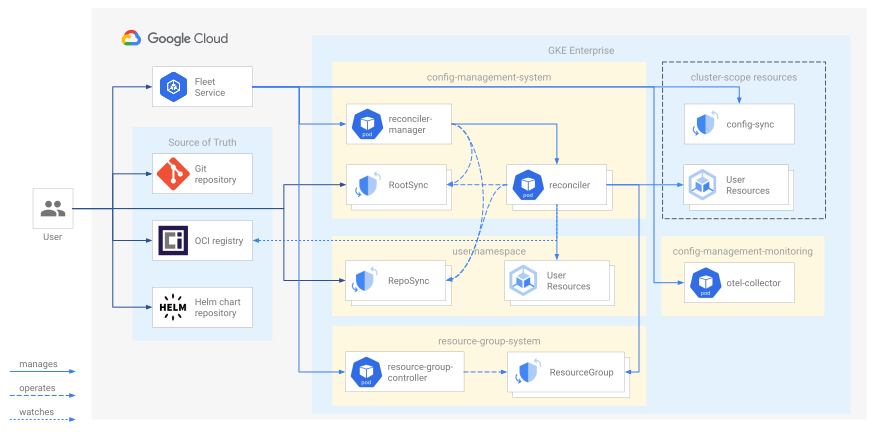
The
Fleet service
manages the Config Sync components on your cluster directly, without the
legacy ConfigManagement Operator or ConfigManagement object. You must manually
upgrade Config Sync as needed.
There are multiple steps to install Config Sync and each of these steps deploys additional components on your cluster:
Enabling Config Sync on your cluster adds the following components:
- The
ConfigSynccustom resource definition (CRD) - A
ConfigSyncobject namedconfig-sync. - The Reconciler Manager in a Deployment named
reconciler-manager. - The ResourceGroup Controller in a Deployment named
resource-group-controller-manager. - The OpenTelemetry Collector in
a Deployment named
otel-collector. - Optional: The Config Sync admission webhook in a Deployment named
admission-webhook. The Config Sync admission webhook is only installed if you enable drift prevention.
These resources and objects are automatically created when you install Config Sync and shouldn't be modified directly.
- The
Creating
RootSyncandRepoSyncobjects adds the following components:- For each
RootSyncobject, a reconciler Deployment namedroot-reconciler-ROOTSYNC_NAME. For theRootSyncobject namedroot-sync, the reconciler Deployment is namedroot-reconciler. - For each
RepoSyncobject, a reconciler Deployment namedns-reconciler-REPOSYNC_NAMESPACE-REPOSYNC_NAME-REPOSYNC_NAME_LENGTH. For theRepoSyncobject namedrepo-sync, the reconciler Deployment is namedns-reconciler.
- For each
Config Sync Deployments, Pods, and containers
The following table provides more information about the Config Sync Deployment, Pods, and containers:
| Deployment name | Deployment namespace | Deployment description | Replica count | Pod name regular expression | Container count | Container names |
|---|---|---|---|---|---|---|
reconciler-manager |
config-management-system |
The Reconciler Manager runs on every cluster with Config Sync
enabled in the ConfigManagement object. It watches
RootSync
and RepoSync objects and manages a reconciler Deployment
for each one. |
1 | reconciler-manager-.* |
2 | reconciler-managerotel-agent |
root-reconciler |
config-management-system |
A root reconciler Deployment is created for every RootSync object. |
1 | root-reconciler-.* |
3 - 51 |
reconcilerotel-agentgit-synchelm-syncoci-syncgcenode-askpass-sidecarhydration-controller |
ns-reconciler |
config-management-system |
A namespace reconciler Deployment is created for every RepoSync object. |
1 | ns-reconciler-.* |
3 - 51 |
reconcilerotel-agentgit-synchelm-syncoci-syncgcenode-askpass-sidecarhydration-controller |
otel-collector |
config-management-monitoring |
The OpenTelemetry Collector runs on every cluster with
Config Sync enabled in the ConfigManagement object.
It collects metrics
from the Config Sync components running under the
config-management-system and resource-group-system
namespaces, and exports these metrics to Prometheus and Cloud Monitoring. |
1 | otel-collector-.* |
1 | otel-collector |
resource-group-controller-manager |
resource-group-system |
The ResourceGroup Controller runs on every cluster with Config Sync
enabled in the ConfigManagement object. It watches
ResourceGroup objects and updates them with the current
reconciliation status of each object in their inventory. A
ResourceGroup object is created for every
RootSync and RepoSync object to inventory the
list of objects applied by the reconciler from the source of truth. |
1 | resource-group-controller-manager-.* |
2 | managerotel-agent |
admission-webhook |
config-management-system |
The Config Sync Admission Webhook runs on each cluster with
drift prevention
enabled in the ConfigManagement object. It monitors
Kubernetes API requests and prevents modification or deletion of
resources managed by Config Sync. The Config Sync admission
webhook is disabled by default. |
2 | admission-webhook-.* |
1 | admission-webhook |
1 For details about when these containers are created, see Reconciler containers.
Deployment resource requests
The following table lists Kubernetes resource requirements for Config Sync components. For more information, see Resource Management for Pods and Containers in the Kubernetes documentation.
The resource requests are the same for all supported versions of Config Sync.
| Deployment name | CPU request (m) per replica | Memory request (Mi) per replica |
|---|---|---|
config-management-operator |
100 | 200 |
resource-group-controller-manager |
110 | 300 |
admission-webhook1 |
10 | 100 |
otel-collector |
200 | 400 |
reconciler-manager |
20 | 150 |
reconciler (one per RootSync and RepoSync) |
See reconciler resource requests for details. | |
1 The admission webhook has two replicas. If you use the admission webhook and you need to calculate the total resource requests, double the value. The admission webhook is disabled by default.
Key components
The following sections explore important Config Sync components in greater detail.
Fleet service and the ConfigSync object
In Config Sync version 1.20.0 and later, the Hub Fleet service manages the Config Sync components on your cluster directly:
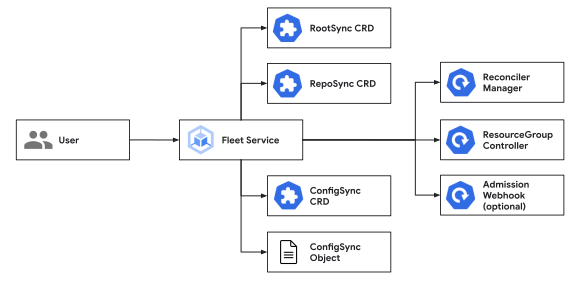
The Fleet service also manages the ConfigSync object on your cluster. The
Fleet service updates both the ConfigSync object's spec based on your inputs
to the Google Cloud API and its status to reflect the status of the
Config Sync components.
To make changes to your Config Sync installation configuration, you must use the Google Cloud API. But you can use either the Google Cloud API or the Kubernetes API to monitor the configuration and health of your Config Sync installation.
Reconciler Manager and reconcilers
The Reconciler Manager is responsible for creating and managing the individual reconcilers that ensure your cluster configuration stays in sync.
The Reconciler Manager creates a root reconciler for every RootSync object and
a namespace reconciler for every RepoSync object. Config Sync uses this
design instead of sharing a single monolithic reconciler because it improves
reliability by reducing single points of failure and allows for individual
reconcilers to be scaled independently.
Root and namespace reconcilers automatically fetch configs from your source of truth and apply them to enforce the state that you want within your cluster.
The following diagrams show how the Reconciler Manager handles controlling the lifecycle of each root reconciler and namespace reconciler:


Reconciler containers
The specific containers deployed in the reconciler Pods depend on the configuration choices you make. The following table explains more about what each of these reconciler containers do and the condition that causes Config Sync to create them:
| Container name | Description | Condition |
|---|---|---|
reconciler |
Handles syncing and drift remediation. | Always enabled. | otel-agent |
Receives metrics from the other reconciler containers and sends them to the OpenTelemetry Collector. | Always enabled. |
git-sync |
Pulls configs from your Git repository to a local directory that the reconciler container can read. | Enabled when spec.sourceType is git. |
helm-sync |
Pulls and renders Helm charts from your chart repository to a local directory that the reconciler container can read. | Enabled when spec.sourceType is helm. |
oci-sync |
Pulls OCI images containing your configs from your container registry to a local directory that the reconciler container can read. | Enabled when spec.sourceType is oci. |
gcenode-askpass-sidecar |
Caches Git credentials from the GKE metadata service for
use by the git-sync container. |
Enabled when spec.sourceType is git and
spec.git.auth is gcenode or
gcpserviceaccount. |
hydration-controller |
Handles building Kustomize configurations to a local directory that the reconciler container can read. | Enabled when the source includes a kustomize.yaml file. |
As shown in the preceding table, you can typically expect a container count of
three to five within each reconciler Pod. The reconciler and otel-agent
containers are always present. Specifying a type for your source of truth
dictates which sync container is added. Additionally, the hydration-controller
and gcenode-askpass-sidecar containers are created if you made the
configuration changes mentioned in the table.
Reconciler resource requests
For each RootSync and RepoSync object, Config Sync creates an
independent reconciler deployment to handle syncing. The reconciler deployment
consists of multiple containers. For more information about these containers,
see Reconciler containers.
The resource requests are the same for all supported versions of Config Sync.
The following table lists the resource requests for Standard clusters:
| Container name | CPU request (m) | Memory request (Mi) |
|---|---|---|
reconciler |
50 | 200 |
otel-agent |
10 | 100 |
hydration-controller (Optional) |
10 | 100 |
git-sync |
10 | 16 |
gcenode-askpass-sidecar (Optional) |
10 | 20 |
helm-sync |
75 | 128 |
oci-sync |
25 | 32 |
The following table lists the resource requests for Autopilot clusters:
| Container name | CPU request and limit (m) | Memory request and limit (Mi) |
|---|---|---|
reconciler |
700 | 512 |
otel-agent |
10 | 64 |
hydration-controller (Optional) |
200 | 256 |
git-sync |
20 | 32 |
gcenode-askpass-sidecar (Optional) |
50 | 64 |
helm-sync |
250 | 384 |
oci-sync |
50 | 64 |
For more information about how to override the default resource requests and limits, see Overriding resource requests and limits.
Bundled Helm and Kustomize versions
Config Sync leverages the Helm and Kustomize executables to render the configurations. The following table provides a list of Config Sync versions that support the rendering feature, alongside the bundled Helm and Kustomize versions.
| Config Sync versions | Helm version | Kustomize version |
|---|---|---|
| 1.22.0 | v3.15.3 | v5.3.0 |
| 1.21.0 | v3.15.3 | v5.3.0 |
| 1.20.0 | v3.15.3 | v5.3.0 |
For information about rendering Helm through Kustomize, see Configure Kubernetes with Kustomize. For information about using the Helm API, see Sync Helm charts from Artifact Registry.
ResourceGroup Controller and ResourceGroup objects
The root and namespace reconcilers create a ResourceGroup inventory object for
each RootSync and RepoSync object you set up. Each ResourceGroup object
contains a list of objects synced to the cluster from the source of truth by the
reconciler for that RootSync or RepoSync object. The ResourceGroup
Controller then watches all the objects in the ResourceGroup object and
updates the status of the ResourceGroup object with the current reconciliation
status of the synced objects. This lets you check the status of the ResourceGroup
object
for an overview of the sync status, instead of having to query the status of
every individual object yourself.
ResourceGroup objects have the same name and namespace as their corresponding
RootSync or RepoSync object. For example, for the RootSync object with the
name root-sync in the namespace config-management-system, the corresponding
ResourceGroup object is also named root-sync in the
config-management-system namespace.
Don't create or modify ResourceGroup objects, as this can interfere with
the operation of Config Sync.
Admission Webhook
The Config Sync Admission Webhook is created when you enable drift prevention. Drift prevention proactively intercepts modification requests, ensuring they align with the source of truth before allowing changes.
If you don't enable drift prevention, Config Sync still uses a self-healing mechanism to revert configuration drift. With self-healing, Config Sync continuously monitors managed objects and automatically reverses any changes that deviate from the intended state.
RootSync and RepoSync objects
RootSync objects configure Config Sync to create a root reconciler that
watches the specified source of truth and apply objects from that source to the
cluster. By default, the root reconciler for each RootSync object has cluster-admin permission. With
this default permission, root reconcilers can sync both cluster-scoped and
namespace-scoped resources. If needed, you can change these permissions by
configuring the
spec.override.roleRefs
fields. RootSync objects are designed for use by cluster admins.
RepoSync objects configure Config Sync to create a namespace reconciler
that watches the specified source and apply objects from that source to a
specific namespace in the cluster. Namespace reconcilers can sync any
namespace-scoped resources in that namespace with custom user-specified
permissions. RepoSync objects are designed for use by namespace tenants.
How the Fleet service manages RootSync objects
When you install Config Sync with the Google Cloud console, Google Cloud CLI, Config Connector, or Terraform, Config Sync is managed by the Fleet service, based on your inputs to the Google Cloud API.
When your Config Sync installation is managed by the Fleet service, you can
optionally also have it manage your initial RootSync object, named
root-sync. This lets you bootstrap GitOps on your cluster without needing to
manually apply anything to the cluster directly. If you decide not to have the
Fleet service manage your initial RootSync object, you can still apply
whatever RootSync and RepoSync objects you want directly to the cluster.
The RootSync object named root-sync is created based on your inputs to the
Google Cloud API, specifically the spec.configSync section of the
config-management apply
API. Because this API
only exposes a subset of the RootSync
fields,
those fields are considered managed in the root-sync, while the other fields
are considered unmanaged. Managed fields can only be edited using the
Google Cloud API. The unmanaged
fields
can be edited using kubectl,
or any other Kubernetes client.
Additional RootSync and RepoSync objects
To create additional RootSync or RepoSync objects, you can use the kubectl
command-line tool or another Kubernetes client. You can also use the initial
root-sync object to manage additional RootSync or RepoSync objects with
GitOps, by adding their YAML manifests to the source of truth that the
root-sync is configured to sync from. This method cannot be used to manage the
config of the initial root-sync, because some of its fields are managed by the
Fleet service. To manage the root-sync object with GitOps, use Config Connector or
Terraform. For more information about creating additional RootSync and
RepoSync objects, see
Configure syncing from more than one source of truth.
What's next
- You might want to monitor Config Sync components or check their logs. For an introduction, see Use monitoring and logs.
- Learn about the Resource requests for Config Sync components.