Flutter on Cloud Run: Full Stack Dart Architecture

Karl Weinmeister
Director, Developer Relations
Flutter is a framework for building mobile, web, and desktop applications from a single codebase. The language that powers Flutter, Dart, is a compiled language well-suited for backend development as well.
By using Dart for both your frontend and your backend, you enable a full-stack architecture. This provides you with many benefits. You simplify your codebase, you can share logic between client and server, and you can deploy your entire stack to the same container.
Bringing this all together on Cloud Run makes deployment simple. Because it is a fully managed, serverless platform, it handles the infrastructure and scaling for you. You just provide the container, and it takes care of the rest—giving you a secure, production-ready HTTPS URL for your entire stack in minutes.
In this blog post, I'll show how to build and deploy a full-stack Dart application. I'll demonstrate this all with the industry standard for technical tutorials: a To-Do app! All of the code is available in the Flutter Cloud Run repository.
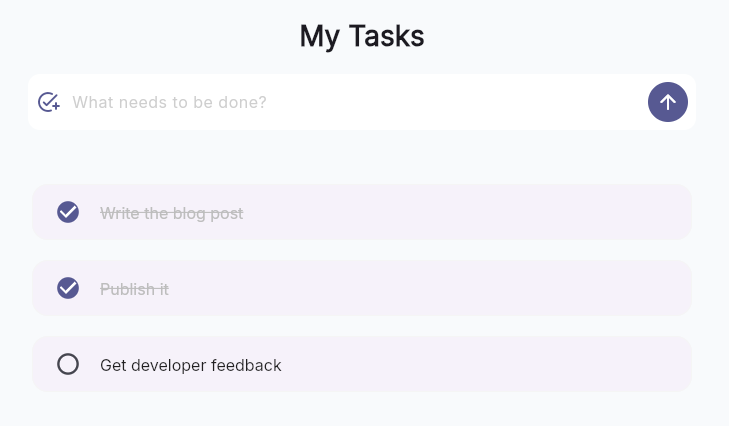
The live To-Do application deployed to Cloud Run
Flutter Web Frontend
In Flutter, you create user interfaces by assembling reusable components called widgets.
For the To-Do app, I've isolated the logic for rendering a single task into a TodoTile widget. This widget imports the TodoItem data model directly from a shared package used across the entire stack. This ensures that if the TodoItem definition changes (e.g., adding a priority field), the compiler will immediately alert you to update your UI widgets.
The next step is to override the tile's build() method to define its UI. This method will compose the TodoTile from standard, lower-level widgets: a ListTile for structure, a Checkbox for interaction, and Text for display.
Dart Backend
Many Flutter tutorials connect the frontend directly to Firebase as a Backend-as-a-Service (BaaS). This is a trusted architecture pattern that can greatly accelerate your development velocity.
Depending on your needs, there can also be advantages to a full-stack architecture on Dart: portability and control. You can easily deploy to different infrastructure environments and also reuse code between the client and server.
In this example, I used Dart's Shelf package. I chose raw Shelf here to demonstrate the fundamentals without "magic," but the ecosystem is rich with higher-level tools.
For larger production applications, consider using higher-level frameworks such as Serverpod, a complete backend solution that generates client-side code and handles database interactions with type safety, or Dart Frog for a minimalistic developer experience.
The server has two main jobs. First, it handles API business logic, using the same data structures as the client. Second, it serves the Flutter Web app files (HTML, JS, Wasm) to the browser. By serving both the API and static files from a single process, I've simplified deployment to a single container with unified routing and observability.
This Dart server compiles to a standalone native executable using dart compile exe. It starts in milliseconds, making it ideal for scale-to-zero workloads.
Shared Business Logic
The full-stack architecture enables sharing data models and business logic between the client and server. By defining the TodoItem model in a shared package, I've created a single source of truth for the data.
Common logic like title sanitization or data validation can be attached to these models via extensions. Because both the frontend and backend import this package, they enforce identical rules across the stack.
For more complex validation requirements, you might consider using Serverpod. It excels at this full-stack cohesion by generating client-side code that automatically mirrors your server-side models and validation rules, ensuring everything stays perfectly in sync.
In the frontend, I've used this shared logic to ensure that your "optimistic" UI updates remain consistent with the server's requirements. This allows for a fast, responsive user experience without the need to maintain duplicate logic.
Dart Workspaces
Managing multiple packages in a single repository (a "monorepo") can get complicated. You need a way to link them together so that the frontend can see the shared package without having to publish shared to the internet. You also need a way to run tests across all your packages at once.
Since Dart 3.5, Dart Workspaces solves this natively. It allows you to define a pubspec.yaml in the root that lists all your member packages. Member packages can then depend on each other directly, and dart pub get in the root resolves dependencies for the entire workspace.
For complex monorepo needs, Melos is a powerful tool. It offers advanced capabilities like automated versioning and changelog generation, as well as granular script filtering (e.g., running tests only in packages that have changed).
Deployment on Cloud Run
Cloud Run supports both vertical and horizontal scaling. You can vertically scale your Dart application by allocating more vCPUs and leveraging isolates for concurrency.
The platform truly excels at horizontal scaling. By treating each container as a disposable unit, you can rely on Cloud Run's autoscaling capabilities to automatically handle traffic spikes. This tutorial focuses on this horizontal approach, and I've configured min/max instances to optimize for cost and latency.
Cloud Run offers flexible deployment options. For this full-stack Dart app, I recommend the "OS Only" runtime for speed and simplicity, though standard Docker containers offer maximum control.
OS-only runtime
The OS-only runtime allows you to deploy pre-compiled binaries directly to a minimal Linux environment. This is my recommended approach because it significantly speeds up deployment by skipping the remote container build process. It also simplifies your workflow by eliminating the need to maintain a Dockerfile and ensures consistency, as you deploy the exact binary verified on your local machine.
You simply compile your backend for Linux locally, and Cloud Run mounts it into a lightweight Ubuntu base image.
(Note: The repository includes a helper script tool/deploy.sh that automates this process.)
This deploys a publicly accessible instance. For production, you would remove --allow-unauthenticated to require Google IAM authentication. You might also configure a custom domain and set minimum instances to keep the service warm.
Container deployment with a Dockerfile
Alternatively, deploying via a standard Dockerfile offers maximum control over the runtime environment. This approach allows you to customize the base operating system (e.g., using Distroless or Alpine), manage system dependencies, and ensure reproducible builds in a pristine "clean room" environment on Cloud Build. The resulting container is also fully portable, capable of running anywhere Docker is supported.
Continuous Integration
You can automate your quality checks to the app using GitHub Actions. The native Dart Workspace support simplifies your CI pipelines, as a single dart pub get sets up the entire project.
A key part of the workflow is the flutter-action, which sets up the Flutter SDK environment. This is particularly useful in a monorepo like this one, as it provides the necessary tooling to build and test both standard Dart packages (like the backend and shared logic) and Flutter-specific packages (the frontend) in a single unified pipeline. While setup-dart alone could handle pure Dart packages, the Flutter SDK is required for the frontend's widget tests and web compilation.
Final Thoughts
By aligning your language, your architecture, and your platform, you ensure that the code you write for the frontend lives in harmony with your backend.
This journey starts with a responsive Flutter frontend that shares its core data models with a Dart backend. From there, I've managed the entire workspace with Melos and automated quality checks with GitHub Actions. Then, deployment to Cloud Run just takes a single command.
If you're ready to start your own full-stack journey, the complete reference implementation is available in the Flutter Cloud Run repository. I'd love to hear how you're using Dart and Cloud Run in your own projects. Reach out and continue the discussion on LinkedIn, X, or Bluesky.