Mastering Model Adaptation: A Guide to Fine-Tuning on Google Cloud

Drew Brown
Developer Advocate
If you are building AI applications, you might experiment with prompts, or even dip your toes into agents. But as you move from prototype to production, you might hit a common wall: the model is just not as consistent as you need it to be.
Gemini is an incredibly capable universal foundation model, but you might want responses to adhere to brand style guides more consistently, or maybe you need to ensure that an API is formatted in a custom, non-standard JSON format every single time. In many cases, prompt engineering and in-context learning will be enough to get the results you want. However, as you move toward more specialized production requirements, you might want to push your model even further. This is where fine-tuning comes in.
Fine-tuning allows you to take a general-purpose model like Gemini 2.5 Flash or an open-source model like Llama and adapt it to your specific domain. By training the model on a curated dataset of your own examples, you can:
-
Enforce consistency: Return a specific response style or non-standard data format every time.
-
Improve efficiency: Some tasks can achieve similar performance on a smaller, cheaper and lower latency model that has been fine tuned.
-
Specialize: In areas where training data is sparse, fine tuning can improve accuracy and reduce hallucinations.
As part of the Production-Ready AI series, we’re releasing two new hands-on labs that cover two different fine-tuning options on Google Cloud: the fully managed experience on Vertex AI and the fully customizable path on Google Kubernetes Engine (GKE).
Option 1: The Managed Path with Vertex AI
For many developers, the goal is to improve model performance with as little infrastructure overhead as possible. You want the "easy button" for adaptation.
Vertex AI provides a fully managed service for fine-tuning models like Gemini. You don't need to worry about provisioning GPUs, managing checkpoints, or writing complex training loops. You simply provide your data, configure your parameters, and let Vertex AI handle the rest.
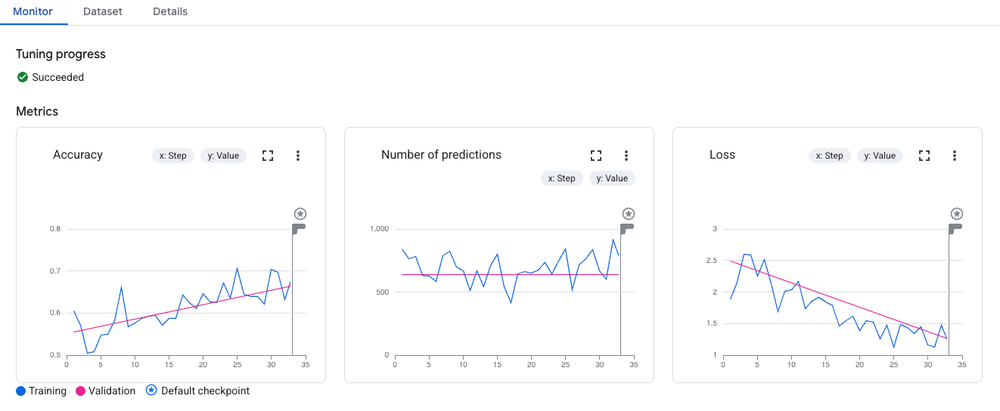
In our first new codelab, you will learn how to fine-tune Gemini 2.5 Flash, a lightweight and highly efficient model. You will walk through the complete Supervised Fine-Tuning (SFT) workflow using the Vertex AI SDK for Python.
What you’ll learn:
-
Data Preparation: How to convert your raw data into the JSONL format Gemini expects.
-
Baselines: How to evaluate the base model first to quantify your improvements.
-
Tuning: How to launch a tuning job with just a few lines of Python.
-
Evaluation: How to compare your new, tuned model against the base model using automated metrics like ROUGE.
Option 2: The Custom Path with GKE
Sometimes, your production requirements call for total control. You might be using open-source models like Llama, Mistral, or Gemma, and you need to manipulate the specific weights, use custom training libraries, or run on specific hardware configurations.
For this, Google Kubernetes Engine (GKE) is a great platform. It allows you to orchestrate AI workloads with flexibility, managing your own GPU resources and environment while benefiting from Google’s scalable infrastructure.
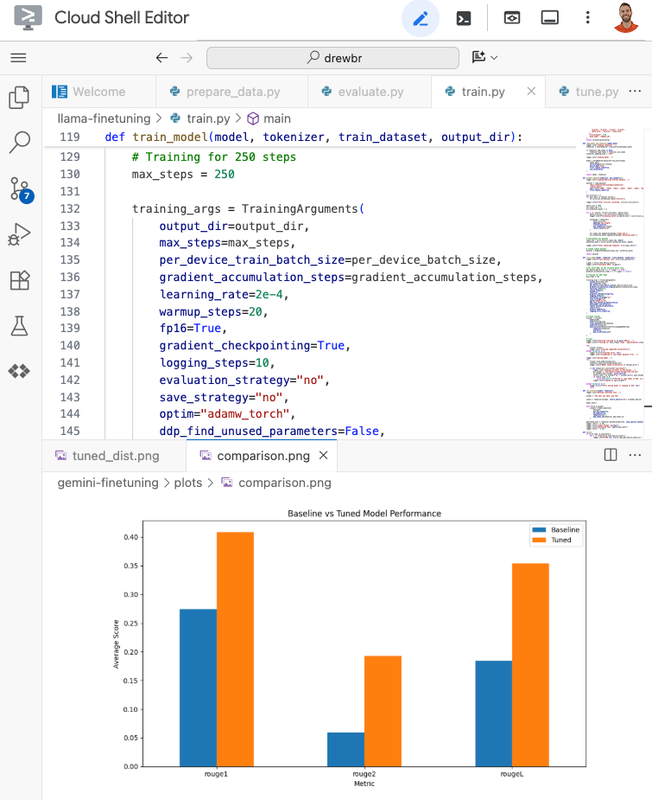
In our second fine tuning codelab, we learn the basics of MLOps on Kubernetes. You will fine-tune Llama 2 using a technique called LoRA (Low-Rank Adaptation). LoRA is an efficient way to fine tune many models because it freezes the pre-trained model weights and injects smaller, trainable parameter layers that are tuned to your purpose. This drastically reduces the number of trainable parameters, meaning you can fine-tune huge models on smaller, more cost-effective accelerators.
What you’ll learn:
-
Infrastructure: How to provision GKE clusters with GPU node pools (specifically using NVIDIA L4 GPUs).
-
Efficiency: How to use LoRA to fine-tune a 7-billion parameter model without breaking the bank.
-
Security: How to use Workload Identity to securely access Cloud Storage without managing service account keys.
-
Containerization: How to package your PyTorch training code into a Docker container for reproducible runs.
Which path should you choose?
-
Choose Vertex AI if you want to iterate quickly, prefer a managed service, and are building on top of Google’s powerful Gemini models.
-
Choose GKE if you need deep customization, are committed to the open-source ecosystem (Hugging Face, Llama, etc.), or need to integrate training tightly into an existing Kubernetes-based platform.
Both paths lead to the same destination: a production-ready model that knows your business better than any generic model ever could.
From Prototype to Production
These labs are part of our official Production-Ready AI with Google Cloud learning path. Explore the full curriculum to bridge the gap from a promising prototype to a robust, production-grade AI application.
Explore the full Learning Path
Share your progress and connect with others on the journey using the hashtag #ProductionReadyAI. Happy tuning!