A developer's guide to Gemini Live API in Vertex AI

Shubham Saboo
Senior AI Product Manager
Zack Akil
Developer Relations Engineer
Give your AI apps and agents a natural, almost human-like interface, all through a single WebSocket connection.
Today, we announced the general availability of Gemini Live API on Vertex AI, which is powered by the latest Gemini 2.5 Flash Native Audio model. This is more than just a model upgrade; it represents a fundamental move away from rigid, multi-stage voice systems towards a single, real-time, emotionally aware, and multimodal conversational architecture.
We’re thrilled to give developers a deep dive into what this means for building the next generation of multimodal AI applications. In this post we'll look at two templates and three reference demos that help you understand how to best use Gemini Live API.
Gemini Live API as your new voice foundation
For years, building conversational AI involved stitching together a high-latency pipeline of Speech-to-Text (STT), a Large Language Model (LLM), and Text-to-Speech (TTS). This sequential process created the awkward, turn-taking delays that prevented conversations from ever feeling natural.
Gemini Live API fundamentally changes the engineering approach with a unified, low-latency, native audio architecture.
- Native audio processing: Gemini 2.5 Flash Native Audio model processes raw audio natively through a single, low-latency model. This unification is the core technical innovation that dramatically reduces latency.
- Real-time multimodality: The API is designed for unified processing across audio, text, and visual modalities. Your agent can converse about topics informed by live streams of visual data (like charts or live video feeds shared by a user) simultaneously with spoken input.
Next-generation conversation features
Gemini Live API gives you a suite of production-ready features that define a new standard for AI agents:
- Affective dialogue (emotional intelligence): By natively processing raw audio, the model can interpret subtle acoustic nuances like tone, emotion, and pace. This allows the agent to automatically de-escalate stressful support calls or adopt an appropriately empathetic tone.
- Proactive audio (smarter barge-in): This feature moves beyond simple Voice Activity Detection (VAD). As demonstrated in our live demo, you can configure the agent to intelligently decide when to respond and when to remain a silent co-listener. This prevents unnecessary interruptions when passive listening is required, making the interaction feel truly natural.
- Tool use: Developers can seamlessly integrate tools like Function Calling and Grounding with Google Search into these real-time conversations, allowing agents to pull real-time world knowledge and execute complex actions immediately based on spoken and visual input.
- Continuous memory: Agents maintain long, continuous context across all modalities.
- Enterprise-grade stability: With GA release, you get the high availability required for production workloads, including multi-region support to ensure your agents remain responsive and reliable for users globally.

Developer quickstart: Getting started
For developers, the quickest way to experience the power of low-latency, real-time audio is to understand the flow of data. Unlike REST APIs where you make a request and wait, Gemini Live API requires managing a bi-directional stream.
Gemini Live API flow
Before diving into code, it is critical to visualize the production architecture. While a direct connection is possible for prototyping, most enterprise applications require a secure, proxied flow: User-facing App -> Your Backend Server -> Gemini Live API (Google Backend).
In this architecture, your frontend captures media (microphone/camera) and streams it to your secure backend, which then manages the persistent WebSocket connection to Gemini Live API in Vertex AI. This ensures sensitive credentials never leave your server and allows you to inject business logic, persist conversation state, or manage access control before data flows to Google.
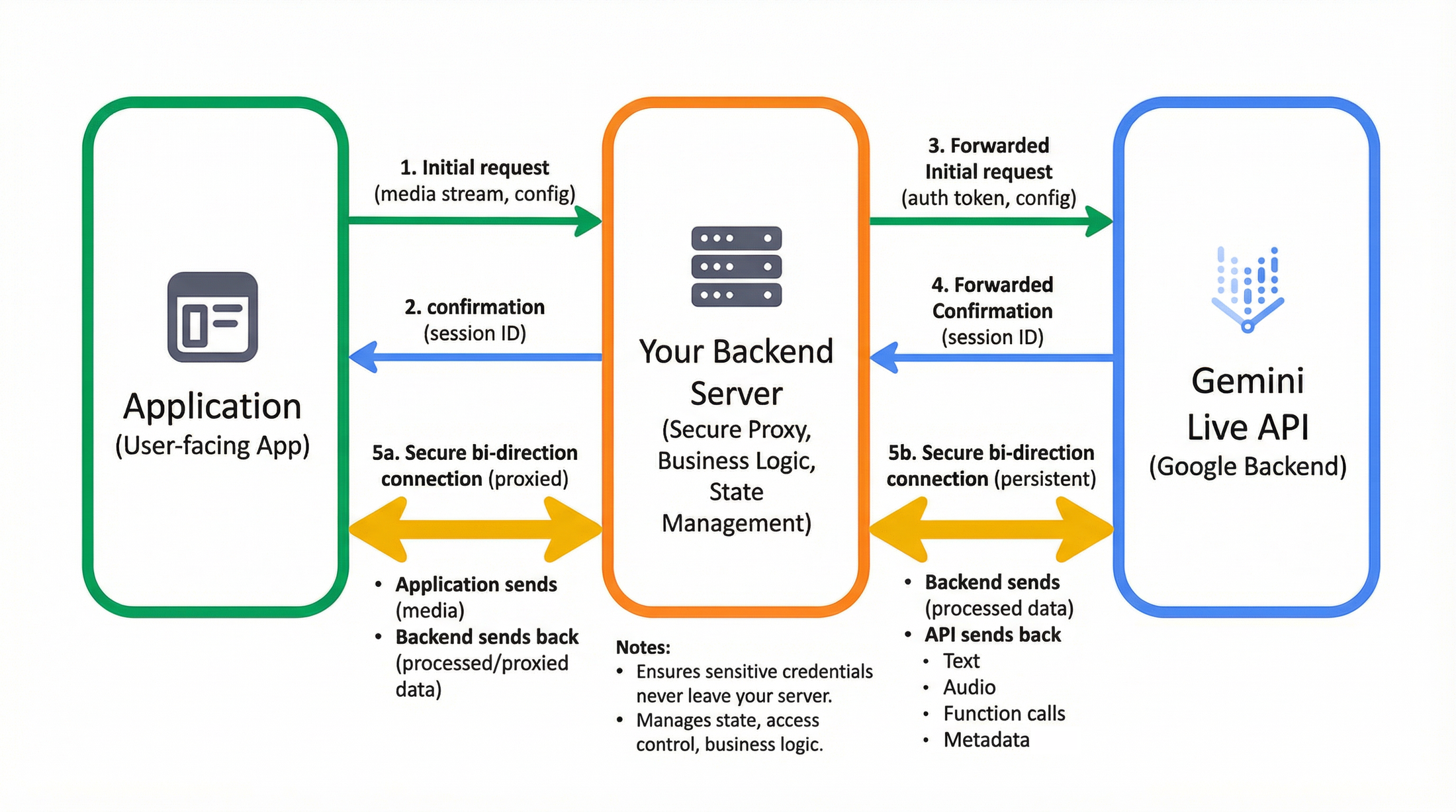
To help you get started, we have released two distinct Quickstart templates - one for understanding the raw protocol, and one for modern component-based development.
Option A: Vanilla JS Template (zero dependency)
Best for: Understanding the raw WebSocket implementation and media handling without framework overhead.
This template handles the WebSocket handshakes and media streaming, giving you a clean slate to build your logic.
Project Structure:
Core implementation: You interact with the gemini-live-2.5-flash-native-audio model via a stateful WebSocket connection.
Running the Vanilla JS Demo:
Follow along the step-by-step video walkthrough.
Pro-tip: Debugging raw audio Working with raw PCM audio streams can be tricky. If you need to verify your audio chunks or test Base64 strings, we’ve included a PCM Audio Debugger in the repository.
Option B: React demo (modular & modern)
Best for: Building scalable, production-ready applications with complex UIs.
If you are building a robust enterprise application, our React starter provides a modular architecture using AudioWorklets for high-performance, low-latency audio processing.
Features:
- Real-time streaming: Audio and video streaming to Gemini with React state management.
- AudioWorklets: Uses capture.worklet.js and playback.worklet.js for dedicated audio processing threads.
- Secure proxy: Python backend handles Google Cloud authentication.
Project structure:
Running the react demo:
Follow along the step-by-step video walkthrough.
Partner Integrations
If you prefer a simpler development process for specific telephony or WebRTC environments, we have third-party partner integrations with Daily, Twilio, LiveKit, and Voximplant. These platforms have integrated the Gemini Live API over the WebRTC protocol, allowing you to drop these capabilities directly into your existing voice and video workflows without managing the networking stack yourself .
Gemini Live API: Three production-ready demos
Once you have your foundation set with either template, how do you scale this into a product? We’ve built three demos showcasing the distinct "superpowers" of Gemini Live API.
1. Real-time proactive advisor agent
The core of building truly natural conversational AI lies in creating a partner, not just a chatbot. This specialized application demonstrates how to build a business advisor that listens to a conversation and provides relevant insights based on a provided knowledge base.
It showcases two critical capabilities for professional agents: Dynamic Knowledge Injection and Dual Interaction Modes.
-
The Scenario: An advisor sits in on a business meeting. It has access to specific injected data (revenue stats, employee counts) that the user defines in the UI.
-
Dual modes:
-
Silent mode: The advisor listens and "pushes" visual information via a show_modal tool without speaking. This is perfect for unobtrusive assistance where you want data, not interruption.
-
Outspoken mode: The advisor politely interjects verbally to offer advice, combining audio response with visual data.
-
Barge-in control: The demo uses activity_handling configurations to prevent the user from accidentally interrupting the advisor, ensuring complete delivery of complex advice when necessary.
- Tool use: Uses a custom show_modal tool to display structured information to the user.

Check out the full source code for the real-time advisor agent implementation in our GitHub repository.
2. Multimodal customer support agent
Customer support agents must be able to act on what they "see" and "hear." This demo layers Contextual Action and Affective Dialogue onto the voice stream, creating a support agent that can resolve issues instantly.
This application simulates a futuristic customer support interaction where the agent can see what you see, understand your tone, and take real actions to resolve your issues instantly. Instead of describing an item for a return, the user simply shows it to the camera. The agent combines this visual input with emotional understanding to drive real actions:
- Multimodal Understanding: The agent visually inspects items shown by the customer (e.g., verifying a product for return) while listening to their request.
- Empathetic Response: Using affective dialogue, the agent detects the user's emotional state (frustration, confusion) and adjusts its tone to respond with appropriate empathy.
- Action Taking and Tool Use: It doesn't just chat; it uses custom tools like process_refund (handling transaction IDs) or connect_to_human (transferring complex issues) to actually solve the problem.
- Real-time Interaction: Low-latency voice interaction using Gemini Live API over WebSockets.

Check out the full source code for the multi-modal customer support agent implementation in our GitHub repository.
3. Real-time video game assistant
Gaming is better with a co-pilot. In this demo, we build a Real-Time Gaming Guide that moves beyond simple chat to become a true companion that watches your gameplay and adapts to your style.
This React application streams both your screen capture and microphone audio to the model simultaneously, allowing the agent to understand the game state instantly. It showcases three advanced capabilities:
- Multimodal awareness: The agent acts as a second pair of eyes, analyzing your screen to spot enemies, loot, or puzzle clues that you might miss.
- Persona switching: You can dynamically toggle the agent's personality - from a "Wise Wizard" offering cryptic hints to a "SciFi Robot" or "Commander" giving tactical orders. This demonstrates how system instructions can instantly change the voice and style of assistance.
- Google Search Grounding: The agent pulls real-time information to provide up-to-date walkthroughs and tips, ensuring you never get stuck on a new level.

Check out the full source code for the real-time video game assistant implementation in our GitHub repository.
Get started today
- Try it out today: Experiment with Gemini Live API in Vertex AI Studio
- Start building: Access Gemini Live API on Vertex AI today and move beyond chatbots to create truly intelligent, responsive, and empathetic user experiences.
- Get the code: All demos and quickstarts are available in our official GitHub repository.