Responding to CVE-2025-55182: Secure your React and Next.js workloads
Tim April
Security Reliability Engineer
Emil Kiner
Senior Product Manager
Editor's note: This blog was updated on Dec. 4, 5, 7, and 12, 2025, with additional guidance on Cloud Armor WAF rule syntax, and WAF enforcement across App Engine Standard, Cloud Functions, and Cloud Run.
Earlier today, Meta and Vercel publicly disclosed two vulnerabilities that expose services built using the popular open-source frameworks React Server Components (CVE-2025-55182) and Next.js to remote code execution risks when used for some server-side use cases. At Google Cloud, we understand the severity of these vulnerabilities, also known as React2Shell, and our security teams have shared their recommendations to help our customers take immediate, decisive action to secure their applications.
Vulnerability background
The React Server Components framework is commonly used for building user interfaces. On Dec. 3, 2025, CVE.org assigned this vulnerability as CVE-2025-55182. The official Common Vulnerability Scoring System (CVSS) base severity score has been determined as Critical, a severity of 10.0.
-
Vulnerable versions: React 19.0, 19.1.0, 19.1.1, and 19.2.0
-
Patched in React 19.2.1
-
Fix: https://github.com/facebook/react/commit/7dc903cd29dac55efb4424853fd0442fef3a8700
-
Announcement: https://react.dev/blog/2025/12/03/critical-security-vulnerability-in-react-server-components
Next.js is a web development framework that depends on React, and is also commonly used for building user interfaces. (The Next.js vulnerability was referenced as CVE-2025-66478 before being marked as a duplicate.)
-
Vulnerable versions: Next.js 15.x, Next.js 16.x, Next.js 14.3.0-canary.77 and later canary releases
-
Patched versions are listed here.
-
Fix: https://github.com/vercel/next.js/commit/6ef90ef49fd32171150b6f81d14708aa54cd07b2
-
Announcement: https://nextjs.org/blog/CVE-2025-66478
Google Threat Intelligence Group (GTIG) has also published a new report to help understand the specific threats exploiting React2Shell.
We strongly encourage organizations who manage environments relying on the React and Next.js frameworks to update to the latest version, and take the mitigation actions outlined below.
Mitigating CVE-2025-55182
We have created and rolled out a new Cloud Armor web application firewall (WAF) rule designed to detect and block exploitation attempts related to CVE-2025-55182. This new rule is available now and is intended to help protect your internet-facing applications and services that use global or regional Application Load Balancers. We recommend deploying this rule as a temporary mitigation while your vulnerability management program patches and verifies all vulnerable instances in your environment.
For customers using App Engine Standard, Cloud Functions, Cloud Run, Firebase Hosting or Firebase App Hosting, we provide an additional layer of defense for serverless workloads by automatically enforcing platform-level WAF rules that can detect and block the most common exploitation attempts related to CVE-2025-55182.
For Project Shield users, we have deployed WAF protections for all sites and no action is necessary to enable these WAF rules. For long-term mitigation, you will need to patch your origin servers as an essential step to eliminate the vulnerability (see additional guidance below).
Cloud Armor and the Application Load Balancer can be used to deliver and protect your applications and services regardless of whether they are deployed on Google Cloud, on-premises, or on another infrastructure provider. If you are not yet using Cloud Armor and the Application Load Balancer, please follow the guidance further down to get started.
While these platform-level rules and the optional Cloud Armor WAF rules (for services behind an Application Load Balancer) help mitigate the risk from exploits of the CVE, we continue to strongly recommend updating your application dependencies as the primary long-term mitigation.
Deploying the cve-canary WAF rule for Cloud Armor
To configure Cloud Armor to detect and protect from CVE-2025-55182, you can use the cve-canary preconfigured WAF rule leveraging the new ruleID that we have added for this vulnerability. This rule is opt-in only, and must be added to your policy even if you are already using the cve-canary rules.
In your Cloud Armor backend security policy, create a new rule and configure the following match condition:
This can be accomplished from the Google Cloud console by navigating to Cloud Armor and modifying an existing or creating a new policy.
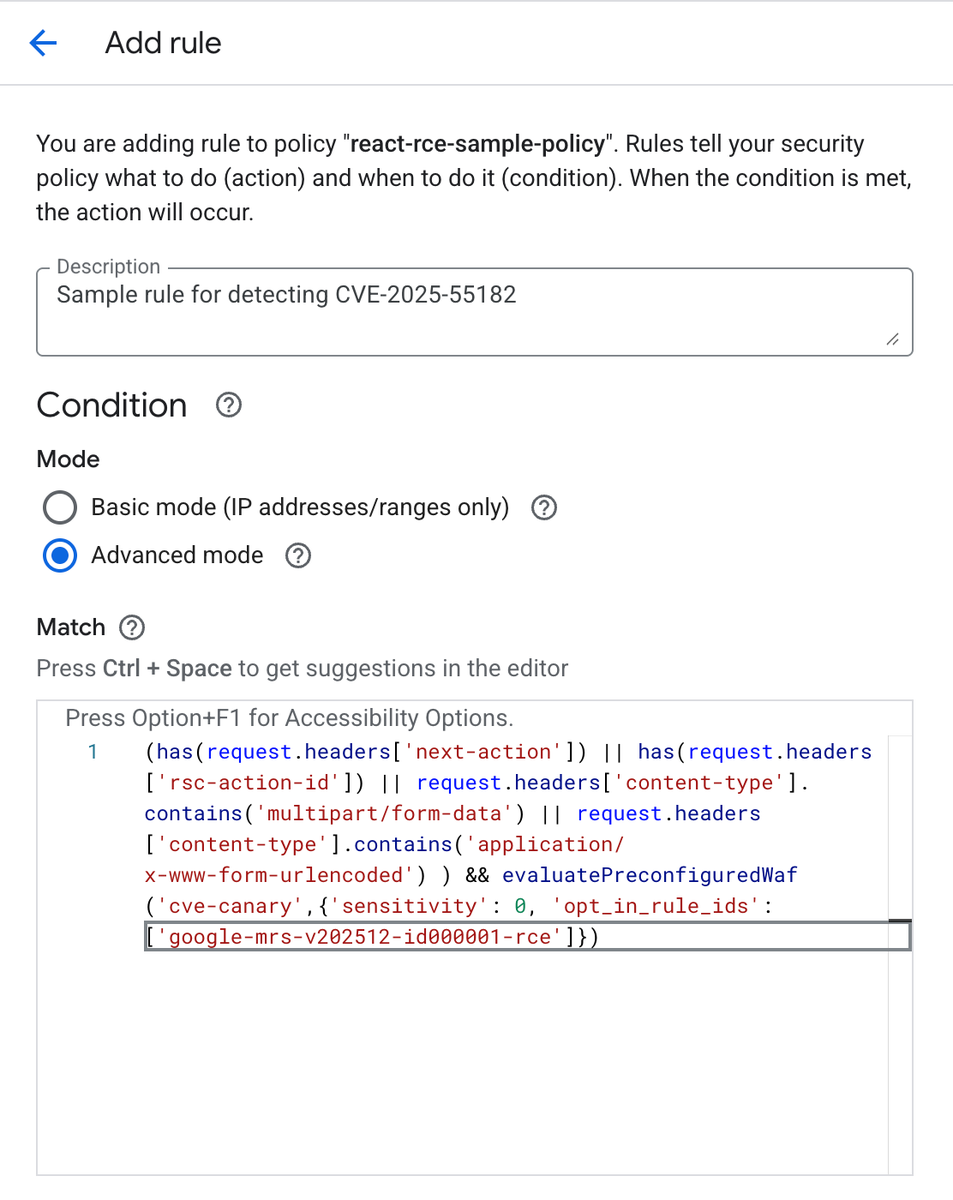
Cloud Armor rule creation in the Google Cloud console.
Alternatively, the gcloud CLI can be used to create or modify a policy with the requisite rule:
Additionally, if you are managing your rules with Terraform, you may implement the rule via the following syntax:
Verifying WAF rule safety for your application and consuming telemetry
Cloud Armor rules can be configured in preview mode, a logging-only mode to test or monitor the expected impact of the rule without Cloud Armor enforcing the configured action. We recommend that the new rule described above first be deployed in preview mode in your production environments so that you can see what traffic it would block.
Once you verify that the new rule is behaving as desired in your environment, then you can disable preview mode to allow Cloud Armor to actively enforce it.
Cloud Armor per-request WAF logs are emitted as part of the Application Load Balancer logs to Cloud Logging. To see what Cloud Armor’s decision was on every request, load balancer logging first needs to be enabled on a per backend service basis. Once it is enabled, all subsequent Cloud Armor decisions will be logged and can be found in Cloud Logging by following these instructions.
Interaction of Cloud Armor rules with vulnerability scanning tools
There has been a proliferation of scanning tools designed to help identify vulnerable instances of React and Next.js in your environments. Many of those scanners are designed to identify the version number of relevant frameworks in your servers and do so by crafting a legitimate query and inspecting the response from the server to detect the version of React and Next.js that is running.
Our WAF rule is designed to detect and prevent exploit attempts of CVE-2025-55182. As the scanners discussed above are not attempting an exploit, but sending a safe query to elicit a response revealing indications of the version of the software, the above Cloud Armor rule will not detect or block such scanners.
If the findings of these scanners indicate a vulnerable instance of software protected by Cloud Armor, that does not mean that an actual exploit attempt of the vulnerability will successfully get through your Cloud Armor security policy. Instead, such findings mean that the version React or Next.js detected is known to be vulnerable and should be patched.
How to get started with Cloud Armor for new users
If your workload is already using an Application Load Balancer to receive traffic from the internet, you can configure Cloud Armor to protect your workload from this and other application-level vulnerabilities (as well as DDoS attacks) by following these instructions.
If you are not yet using an Application Load Balancer and Cloud Armor, you can get started with the external Application Load Balancer overview, the Cloud Armor overview, and the Cloud Armor best practices.
If your workload is using Cloud Run, Cloud Run functions, or App Engine and receives traffic from the internet, you must first set up an Application Load Balancer in front of your endpoint to leverage Cloud Armor security policies to protect your workload. You will then need to configure the appropriate controls to ensure that Cloud Armor and the Application Load Balancer can’t be bypassed.
Best practices and additional risk mitigations
Once you configure Cloud Armor, we recommend consulting our best practices guide. Be sure to account for limitations discussed in the documentation to minimize risk and optimize performance while ensuring the safety and availability of your workloads.
Serverless platform protections
Google Cloud is enforcing platform-level protections across App Engine Standard, Cloud Functions, and Cloud Run to automatically help protect against common exploit attempts of CVE-2025-55182. This protection supplements the protections already in place for Firebase Hosting and Firebase App Hosting.
What this means for you:
-
Applications deployed to those serverless services benefit from these WAF rules that are enabled by default to help provide a base level of protection without requiring manual configuration.
-
These rules are designed to block known malicious payloads targeting this vulnerability.
Important considerations:
-
Patching is still critical: These platform-level defenses are intended to be a temporary mitigation. The most effective long-term solution is to update your application's dependencies to non-vulnerable versions of React and Next.js, and redeploy them.
-
Potential impacts: While unlikely, if you believe this platform-level filtering is incorrectly impacting your application's traffic, please contact Google Cloud Support and reference issue number 465748820.
Long-term mitigation: Mandatory framework update and redeployment
While WAF rules provide critical frontline defense, the most comprehensive long-term solution is to patch the underlying frameworks.
While Google Cloud is providing platform-level protections and Cloud Armor options, we urge all customers running React and Next.js applications on Google Cloud to immediately update their dependencies to the latest stable versions (React 19.2.1 or the relevant version of Next.js listed here), and redeploy their services.
This applies specifically to applications deployed on:
- Cloud Run, Cloud Run functions, or App Engine: Update your application dependencies with the updated framework versions and redeploy.
- Google Kubernetes Engine (GKE): Update your container images with the latest framework versions and redeploy your pods.
- Compute Engine: The public OS images provided by Google Cloud do not have React or Next.js packages installed by default. If you have installed a custom OS with the affected packages, update your workloads to include the latest framework versions and enable WAF rules in front of all workloads.
- Firebase: If you’re using Cloud Functions for Firebase, Firebase Hosting, or Firebase App Hosting, update your application dependencies with the updated framework versions and redeploy. Firebase Hosting and App Hosting are also automatically enforcing a rule to limit exploitation of CVE-2025-55182 through requests to custom and default domains.
Patching your applications is an essential step to eliminate the vulnerability at its source and ensure the continued integrity and security of your services.
We will continue to monitor the situation closely and provide further updates and guidance as necessary. Please refer to our official Google Cloud Security advisories for the most current information and detailed steps.
If you have any questions or require assistance, please contact Google Cloud Support and reference issue number 465748820.