Bringing conversational analytics to Gemini with Agentic Data Cloud connectors
Leigha Reid
Senior Product Manager, Data Cloud
Mohsin Imam
Senior Product Manager, Data Cloud
Data Cloud connectors in Gemini for business, now in preview, give business users and analysts a direct way to query live enterprise data in natural language. Across most organizations, data questions multiply faster than analysts can answer them: Projects stall in ticket queues, leaders fall back on guesswork, and unmanaged spreadsheets spread across teams. Early generative AI tools promised conversational access to data, but they often struggled to generate accurate SQL across complex schemas or to respect governance rules. Data Cloud connectors let you query governed data directly from your workspace while enforcing row- and column-level security and respecting end-user credentials.
A new way to query enterprise data
Gemini brings conversational analytics directly into your day-to-day workflow through two paths: Conversational Analytics agents, which let you create data agents that include context and instructions to effectively answer questions for specific use cases, and Data Cloud connectors, allowing you to query live data directly with Gemini. End users can pull data directly from BigQuery (preview), operational databases like Spanner, AlloyDB, and Cloud SQL (preview), and governed data from Looker (preview). From there, you can move your findings directly into everyday tools, such as turning query results into a Google Doc, an email draft in Gmail, or a deck in Google Slides.
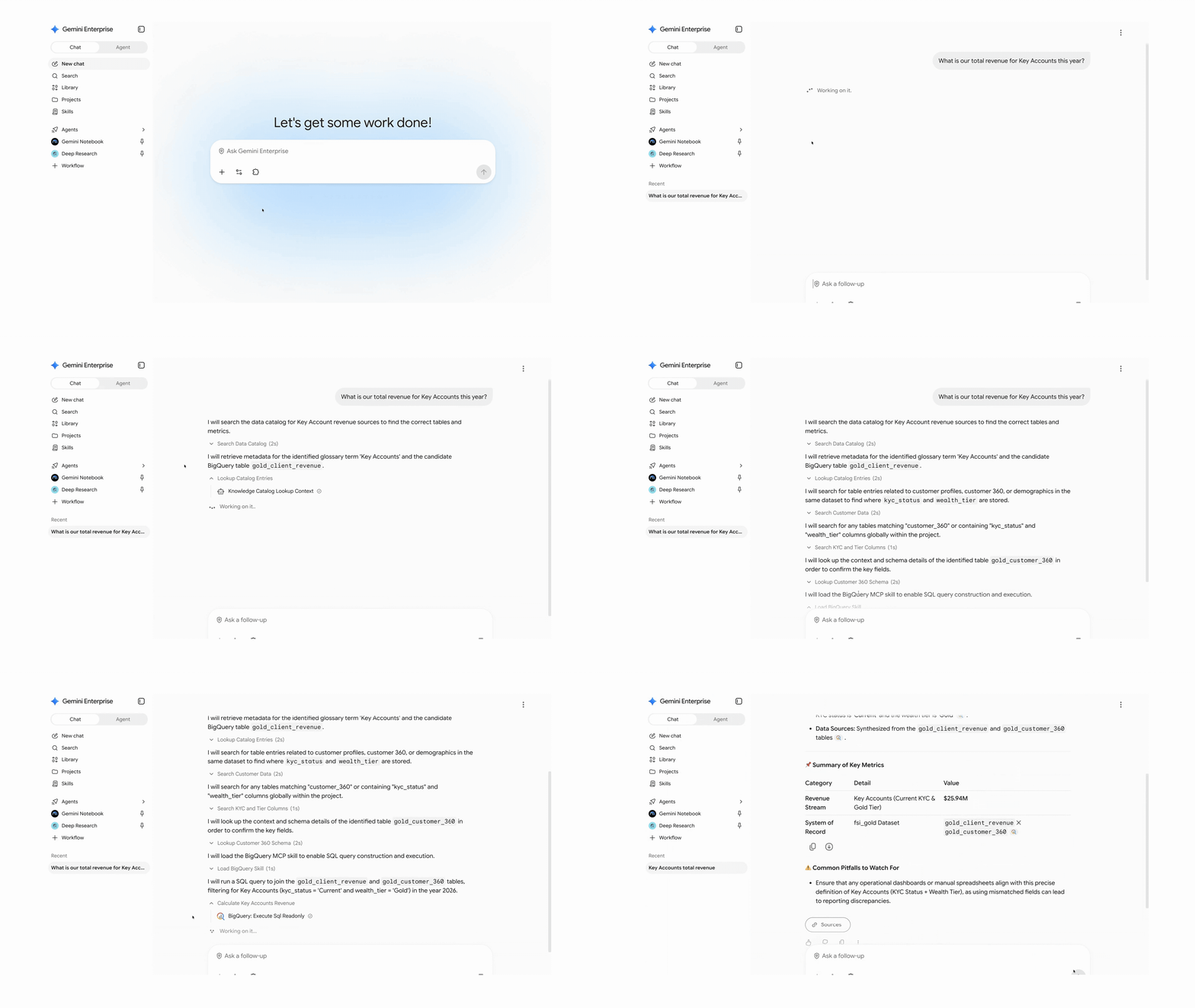
Ask natural-language questions across enterprise data using Data Cloud connectors.
How Data Cloud connectors work
Data Cloud connectors work with Knowledge Catalog to locate relevant data, interpret your question, and execute permission-scoped queries under your identity.
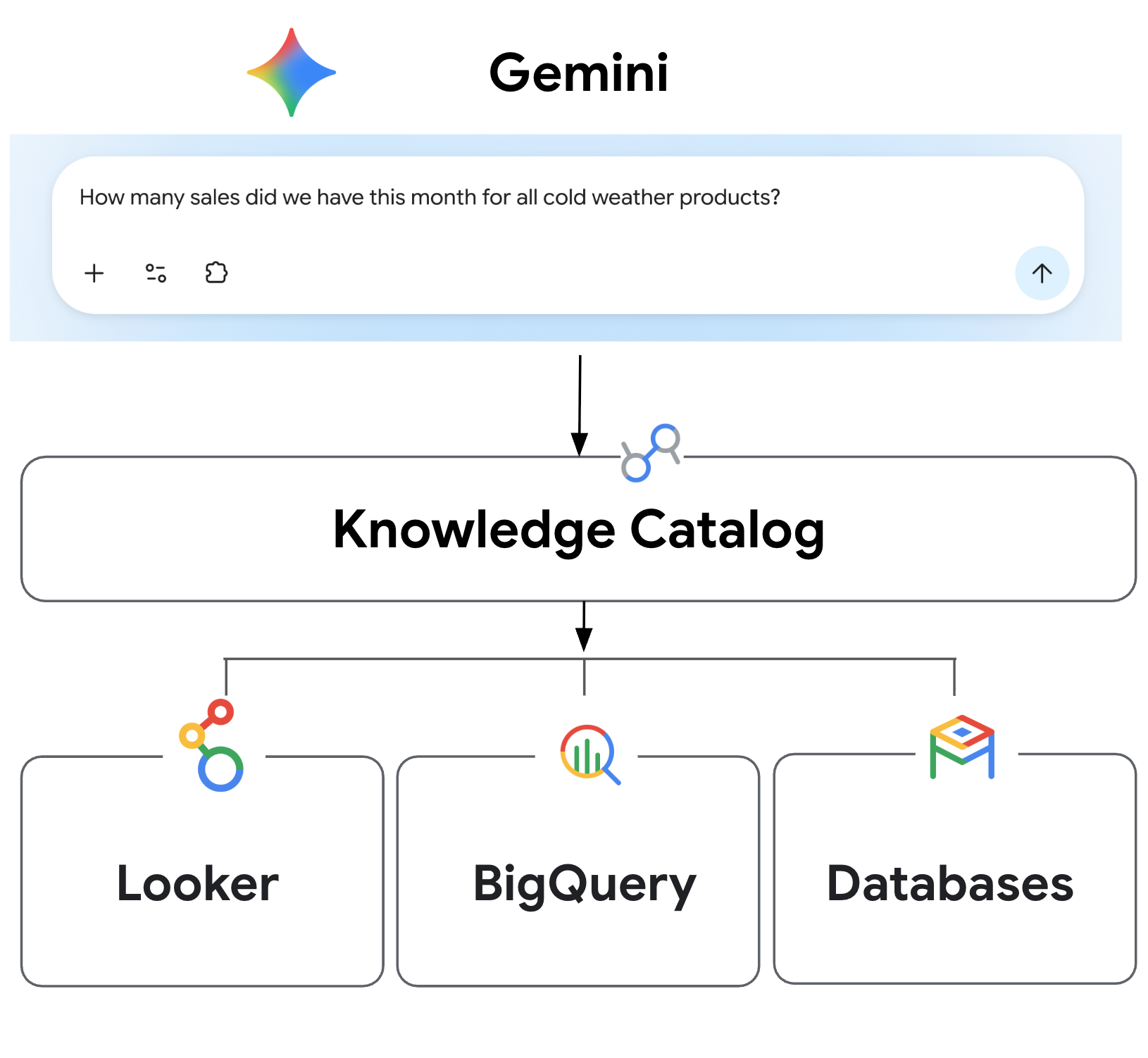
Knowledge Catalog interprets the user prompt and identifies the right data source for the query.
When you ask a question in Gemini, the system coordinates discovery, semantic interpretation, and query execution, using the following capabilities:
-
Natural-language question: You ask an exploratory question in plain language (for example, "How many sales did we have this month for all cold weather products?"). End users aren’t expected to know the table or project to use.
-
Semantic discovery: Gemini searches Knowledge Catalog to locate candidate data across your estate, considering key attributes like usage patterns.
-
Context mapping: The system uses technical metadata, business glossaries, and semantic models to map everyday terms into exact database structures, such as resolving "cold weather products" to specific categories like sweaters, coats, and jackets in an ecommerce catalog.
-
Permission-aware execution: Gemini generates a SQL query and runs it through the connector under your user credentials, respecting your existing row- and column-level database permissions.
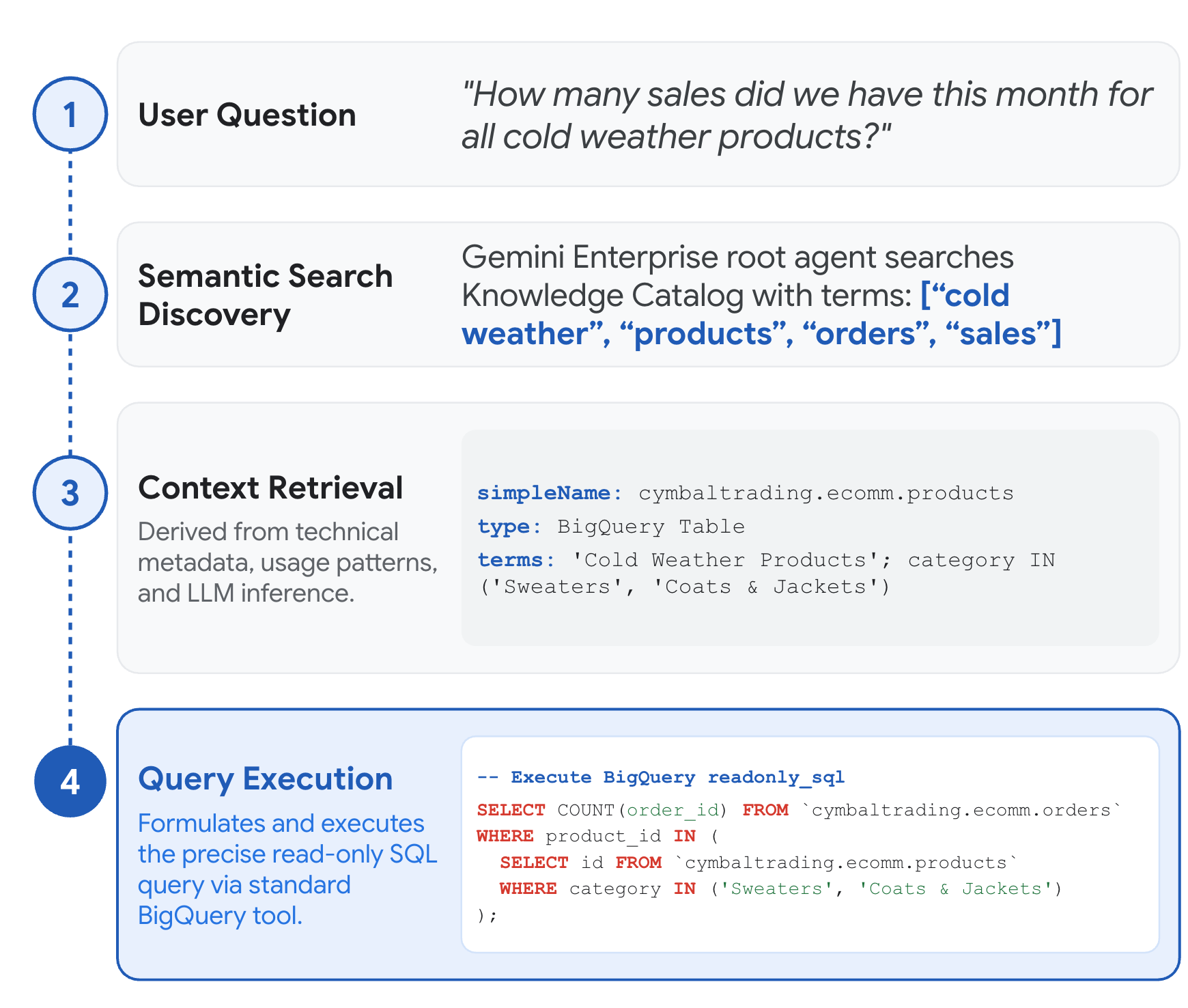
Step-by-step flow of a user prompt from Gemini to query execution.
To accurately navigate an enterprise data estate, language models need business context alongside raw database access. Knowledge Catalog provides a curated context bundle, including technical metadata, business logic, table relationships, and verified queries, that improves query accuracy while reducing latency and token consumption.

Navigating the context graph visually in Knowledge Catalog.
Enterprise analytics has long been fragmented by physical borders: data locked in proprietary silos, open lakehouse tables in cloud object storage, and datasets distributed across multicloud environments. Beyond native BigQuery storage, the BigQuery connector brings conversational analytics to a borderless lakehouse, unifying these environments into a single conversational interface to query open table formats (including Apache Iceberg, Delta Lake, and Parquet) and cross-cloud datasets in AWS or Azure using BigQuery. The connector inherits fine-grained access policies from BigQuery and Knowledge Catalog, so row- and column-level access controls apply whether you query native tables or open lakehouse files.

Gemini accesses data across BigQuery and AWS S3 (through the AWS Glue federated catalog) to answer questions in plain language.
Choosing between connectors and data agents
In addition to using direct Data Cloud connectors to query data in plain language, you can also use Conversational Analytics agents to enable these experiences. While Data Cloud connectors allow you to provide exploratory and ad hoc analysis for users, conversational analytics agents are scoped agents that are built and certified directly by data teams within your organization. These can be built across Data Cloud products such as BigQuery, Looker, and operational databases including Spanner, AlloyDB, and Cloud SQL.
These pre-configured agents allow users to run highly governed, multi-step strategic analyses that are scoped to particular subsets of data, supporting compliance requirements and predictable results for reporting. These data agents can also be published in Gemini for consumption or made available via API for building your own conversational apps in the enterprise.
These approaches are complementary. Gemini direct connectivity also surfaces relevant published agents created by central data teams, so users can decide whether to proceed with ad hoc analysis using the connectors or use the scoped agent. You can choose the right approach for each workload.
Built-in access controls and governance
Data Cloud connector queries execute under the end user’s identity. An employee without access to executive salary data or protected healthcare records cannot query that data through natural-language prompts. The agent only discovers metadata in Knowledge Catalog to which you have access, and only executes queries that your account has permission to run.
How to create Data Cloud connectors
Administrators can configure Data Cloud connectors in the Gemini admin console. From there, admins set up default read-only connections to datasets in BigQuery, operational databases, or Looker, with Knowledge Catalog enabled automatically. Once configured, end users can enable the connector in Gemini to start querying data and building reports in plain language.
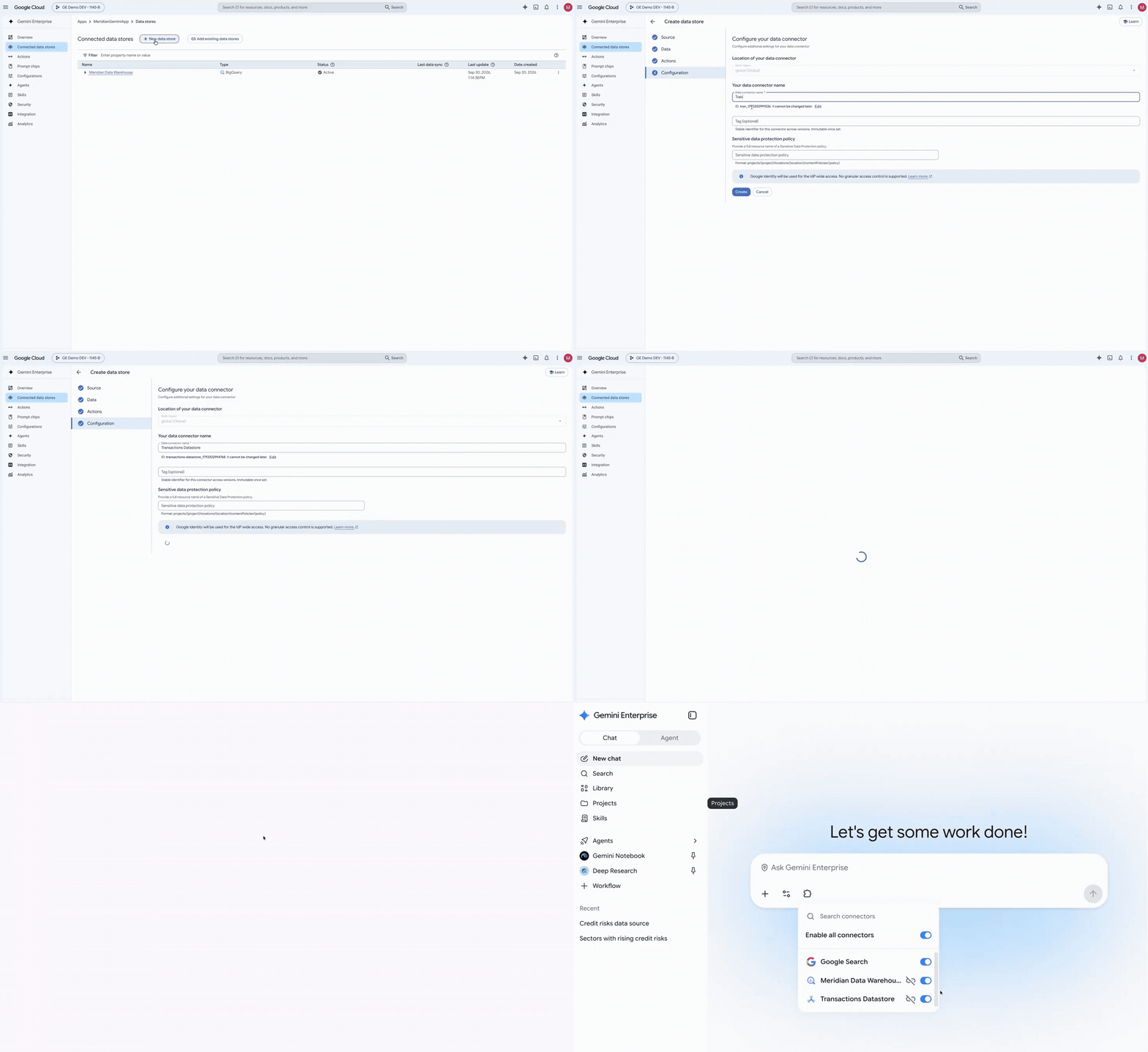
Create a connected data store in Gemini and authorize it on first use.
Setup documentation is available for the BigQuery, Spanner, Cloud SQL, and AlloyDB for PostgreSQL connectors, with Looker also in preview.
Unlike data ingestion mode, which copies data into a Gemini data store, Data Cloud connectors use federated query mode to query your data in place without copying or indexing it — using Knowledge Catalog automatically to search accessible metadata and look up business context.
Why use Data Cloud connectors over custom MCP
Compared to connecting to public or self-managed Model Context Protocol (MCP) servers, first-party Data Cloud connectors provide two main advantages:
-
Built-in skills for higher response quality: Data Cloud connectors include pre-configured agent skills tailored to each data engine, such as advanced SQL and AI function generation for BigQuery and operational databases, to improve query accuracy and response quality.
-
Guided setup and managed authentication: First-party connectors provide a guided setup experience with managed authentication for Google Cloud databases and BigQuery, removing the need to deploy MCP middleware or manage your own OAuth client configuration for Google Cloud services. In addition, connector-specific settings, such as specifying a default Google Cloud billing project for BigQuery query execution, help administrators enforce governance and manage query costs.
Get started today
Data Cloud connectors help teams find answers from enterprise data sources without waiting on backlog queues. To get started, review the Data Cloud connectors documentation or explore Conversational Analytics agents.