Temporal Serverless Workers on Cloud Run: Scale workers ahead of demand
Sagar Randive
Product Manager
Aniruddh Chaturvedi
Engineering Manager
The open-source Temporal execution platform is rapidly becoming a foundational layer of modern software infrastructure — especially for orchestration in distributed systems and AI agent workloads. However, deploying and scaling workers in Temporal comes with unique challenges. Workers poll for tasks instead of serving requests, so request-driven serverless platforms can be an awkward fit. This often results in running worker fleets on Kubernetes or VMs, which you have to manage and pay for continuously. You build a metrics pipeline and tune autoscaling triggers, and scaling still trails bursts because of metrics lag. Every deployment means juggling upgrades and versions, and you pay for that compute whether or not there's work in the queue.
We built Cloud Run worker pools for exactly this kind of pull-based work: Your instances connect to a queue or stream, take the next item, and process it. Starting today, Temporal Cloud, which is the fully managed version of Temporal’s open-source platform, can scale them for you. Currently in preview, Temporal Serverless Workers on Cloud Run let you deploy your workers as a worker pool, and Temporal sizes the pool to match the work on your task queues. When there's no work, it can scale the pool to zero. There's no cluster or autoscaler to run, and your worker code stays the same.
How Cloud Run worker pools fit with Temporal
A worker pool is Cloud Run's resource for continuous background work. It has no public endpoint, and each instance is allocated CPU for its whole lifetime, which matches how a Temporal worker runs. Temporal manages your Cloud Run worker pools as follows:
-
Your Temporal workers run as Cloud Run worker pool instances in your project and poll Temporal Cloud for tasks.
-
Temporal Cloud tracks your task queues and sets the worker pool's instance count through the Cloud Run Admin API, using the IAM permissions you grant. Temporal never opens a connection to your instances, so you don't need to open ports or add firewall rules for it.
-
You run each build version as its own Cloud Run worker pool. An older build's worker pool can sit at zero instances until a workflow that started on it needs it again.
Your Temporal workers run in your project, under your service account, and on your network. Temporal decides how many of them run.
What you can build with Temporal Serverless Workers
The combination of Cloud Run worker pools with Temporal Serverless Workers opens up a variety of interesting use cases:
Autoscaled agentic workers: AI agents run multi-step chains of LLM reasoning and tool calls. Temporal's durable execution and Cloud Run worker pools work together here. Temporal workers spin up instantly to handle bursts of LLM steps, embeddings or API calls, then scale to zero when the queue empties. Workers get keyless access to Google Cloud AI APIs. You can also attach a GPU for inference, and the workers attached to the GPUs will still scale to zero. Temporal runs each model and tool call as a durable activity; if a worker disappears mid-step, the activity retries on another worker and the workflow continues.
Long-running Workflows: Temporal Workflows can run indefinitely, allowing for building applications that track the state of real-world resources over long periods of time. This pattern is typically known as the “Entity Pattern,” because the Workflow represents the state of some entity. However, these long-running Workflows don’t usually have consistent compute requirements: Some individual steps are short, some are long, and other times, the Workflow is sleeping, waiting for external input, such as from a human or another system. Cloud Run worker pools provide flexible compute to support this pattern: Individual steps can run for as long as is required, and Temporal will automatically scale down the worker pool when there is no work to be done.
Bursty batch work: Worker pools bill only while instances run, so a worker pool that sits idle between batch runs costs nothing while it's at zero instances. For jobs like billing runs or media transcoding, Temporal scales the pool out as batches arrive and back in once the queue drains. Your maximum instance count caps how many instances you pay for. Tasks beyond that capacity wait in the queue rather than being dropped.
Why Cloud Run worker pools for Temporal workers
Before, running Temporal workers on Cloud Run services took some workarounds:
-
an HTTP listener, because services expect containers to listen on a port
-
instance-based billing, so workers kept their CPU between requests
-
minimum instances, so the service didn't scale to zero
By running Temporal workers on Cloud Run worker pools, you don’t need those workarounds anymore, and you have:
-
No endpoint to manage. There's no public URL or load balancer to lock down, and no health-check port to implement.
-
Steady CPU at a lower price. Instances don't idle or throttle. Cloud Run doesn't remove instances because they look idle, so Temporal alone decides when the pool shrinks. Worker pools list at almost 40% less per vCPU-hour and GB-hour than instance-billed Cloud Run services.
-
Scaling without revision churn. Changing the instance count doesn't create a new revision, so Temporal can resize the pool as often as the load changes.
How Temporal manages scaling and versioning of worker pools
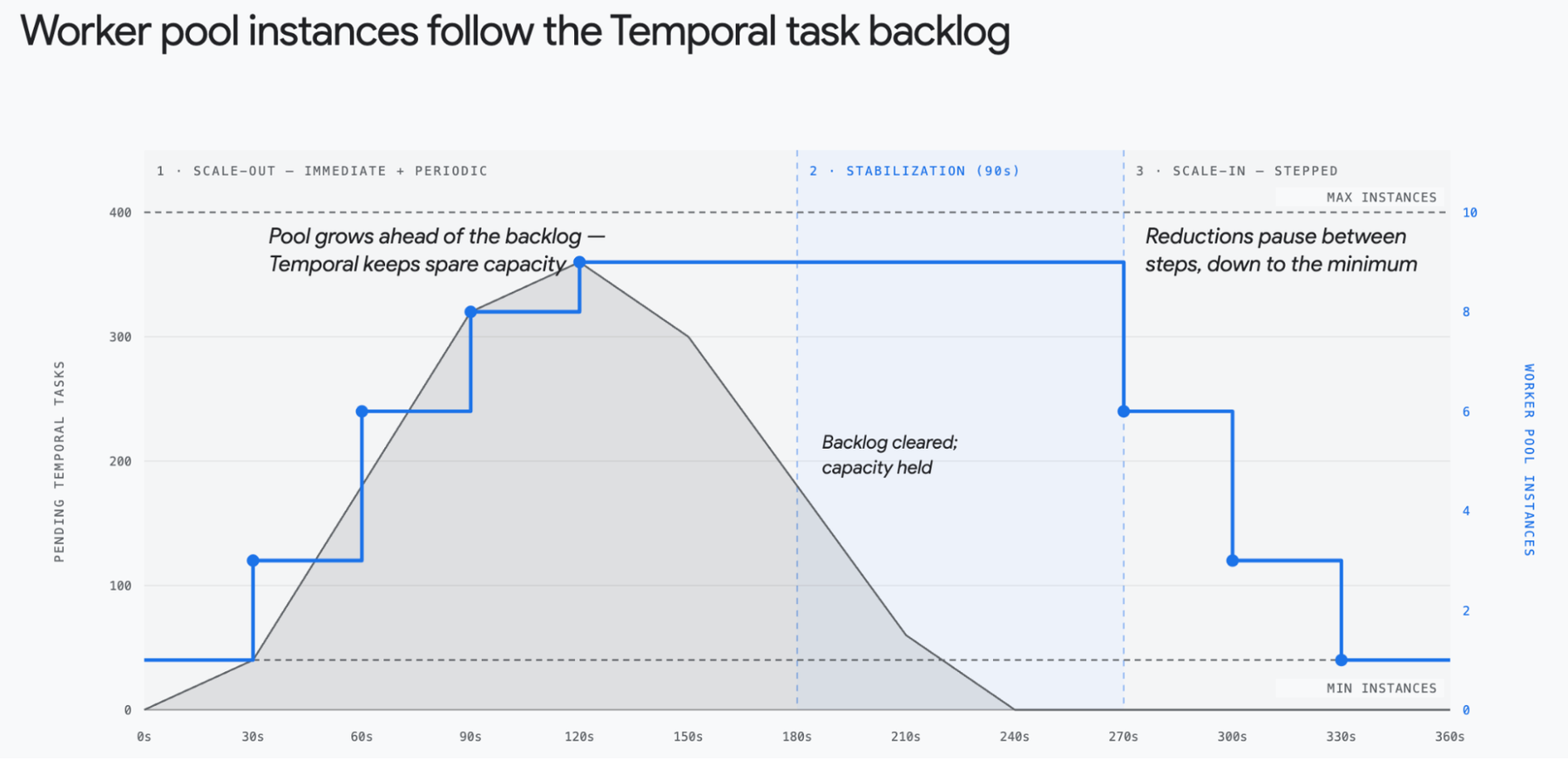
Temporal decides when to add capacity using one main signal: the delay between a task landing in the task queue backlog and a worker picking it up. If that delay grows, the available workers are saturated. Scaling occurs as follows:
-
Server-side detection: The Temporal server tracks this backlog-to-worker latency for each task queue.
-
Push notification: When the latency crosses its trigger conditions, the server sends a push notification to the worker controller instance.
-
Provisioning: The worker controller then adds capacity to the worker pool. New instances take time to start and connect before they can poll for tasks, so capacity lags behind the signal.
Because Temporal keeps spare capacity, the pool grows ahead of demand instead of after tasks pile up. Scale-in is more conservative. Temporal waits for a stabilization period after the last time a task found no available worker (90 seconds by default), and it pauses between successive reductions. Cloud Run’s configurable graceful shutdown extends shutdown from 10 seconds to 10 minutes. That gives SIGTERM-aware workers time to finish or checkpoint. The instance count stays between a minimum and a maximum that you set. If the first task after an idle period can't wait for an instance to start, set the minimum above zero.
Deploying new workflow code without breaking running executions is hard. Temporal workflows are stateful and deterministic, so if you swap their code mid-run, you get non-determinism errors. Serverless Workers on Cloud Run solve this by requiring Temporal Worker Versioning. You don't patch code with conditional branches. Instead, you deploy each Worker Deployment Version as its own worker pool deployment, identified by a deploymentName and a buildId. Using distinct worker pools solves two problems:
-
Workflows that started on a particular Worker Deployment Version continue to run and complete on that version.
-
Each Worker Deployment Version is scaled and drained individually, matching compute spend and utilization to the requirements of your application. As existing workflows complete and drain on a previous Worker Deployment Version, the underlying Worker Pool is eventually scaled down to zero automatically.
You set a versioning behavior for each Workflow type, or set a Worker-level default:
-
PINNED: A workflow stays on the Worker version (Build ID) it started on and finishes there. Best for short-running workflows, order processing and multi-step APIs.
-
AUTO_UPGRADE: A workflow moves to the new "Current" or "Target" Worker Deployment Version as you roll it out. Best for long-running workflows, such as subscription billing or tasks that run for weeks.
Learn more about configuring worker versioning here.
Get started
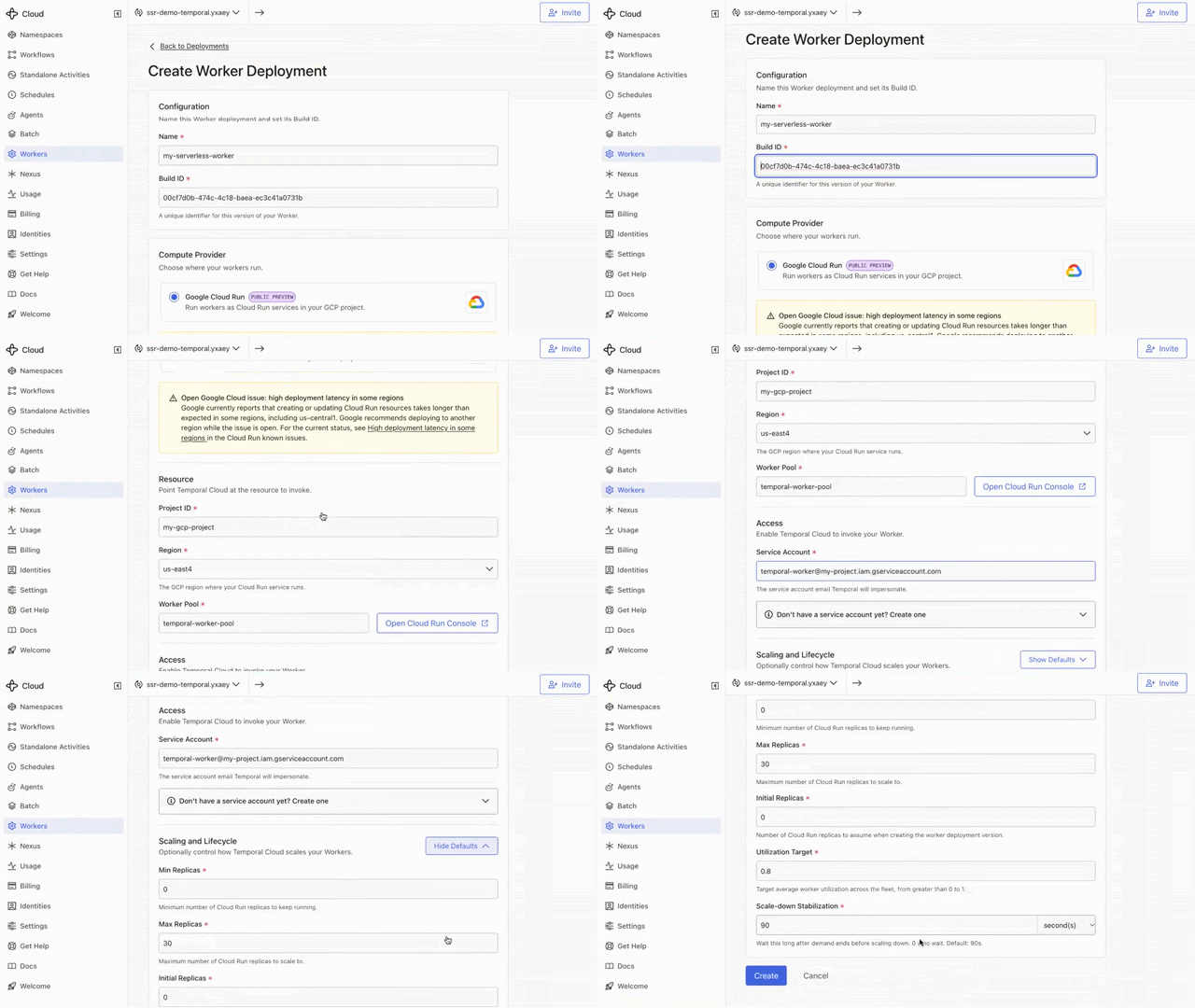
Setup takes three steps:
-
Containerize your Temporal Worker and deploy the container as a Cloud Run worker pool, with the Build ID in the pool name. Keep credentials such as your Temporal API key in Secret Manager.
-
Connect Temporal to your worker pool by granting Temporal Cloud permission to manage the worker pool so it can scale it.
-
Create a Worker Deployment Version in Temporal that points at the pool's project, region, and name.
Temporal Serverless Workers on Cloud Run is in preview, so APIs and configuration may change before the stable release. To get started,
-
Learn how Serverless Workers on Cloud Run scale and handle versions.
-
Deploy your first worker with the setup guide.
-
See Cloud Run worker pools for CPU, memory, GPU and networking options.
-
Sign up for the configurable graceful shutdown preview.