Supercharge your Cloud SQL for MySQL write performance with new optimized writes
Alex Joseph
Senior Software Engineering Manager
Somdyuti Paul
Data Management Specialist
Tuning MySQL instances for write-intensive workloads is a persistent engineering challenge. Cloud SQL for MySQL Enterprise Plus edition now includes optimized writes, a set of automated features that adjust MySQL configurations based on real-time workload and infrastructure metrics. This reduces write latency and increases throughput without manual intervention.
All Enterprise Plus edition instances have this feature enabled by default. This post details the underlying optimizations and provides a reproducible benchmark to measure the performance improvements.
Inside Cloud SQL for MySQL optimized writes
The optimized writes feature includes five different optimizations that all automatically tune MySQL parameters, flags, and data handling, in order to optimize write performance based on instance and workload needs. Here’s a little more about how each component of optimized writes works:
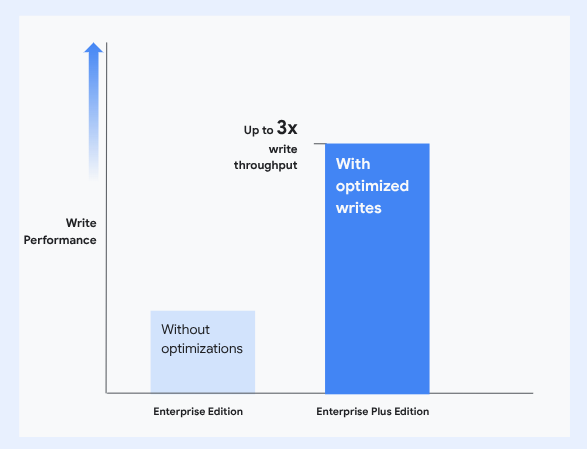
We've observed that with optimized writes, Cloud SQL for MySQL Enterprise Plus now delivers up to 3x better write throughput when compared to its Enterprise edition counterpart, while reducing latency significantly. These optimizations are most effective for write-intensive OLTP workloads and results can vary based on machine configurations. For workloads that are primarily read, Cloud SQL Enterprise Plus edition also provides an integrated SSD-backed data cache option, enabling up to 3x higher read throughput, as detailed in our initial launch blog.
Testing the optimized write performance improvement
Now that you're aware of the exceptional write performance offered by Cloud SQL for MySQL Enterprise Plus edition, you might be curious about its potential impact within your own environment. Measuring this performance enhancement can be done with the sysbench benchmarking tool. You can follow the steps below and adjust specific machine configuration parameters to conduct testing tailored to your typical workloads.
Step 1: Create database instances
To help study the performance improvement, first create three different class of machines:
- Enterprise edition (ee)
- Enterprise Plus edition (ee+) without optimized writes
- Enterprise Plus edition (ee+) with optimized writes
Step 2: Create client
Next, create a VM for the client instance. Client instances are placed in the same region but different zone.
# Note: Best practice is to benchmark instances at the same time. To do so, create three separate client instances.
Then, log in to the client instances and execute following commands to install sysbench and mysqladmin:
# Note: We use the latest sysbench binaries with all the fixes.
Step 3: Run the benchmarking workload
Finally, you can run the sysbench write benchmark using the following script:
Upon completion, you will observe the throughput and latency results from the three Cloud SQL instances created in Step 1. These results should demonstrate the performance advantages of the Enterprise Plus edition and further improvements brought by optimized writes. Please note that performance outcomes can fluctuate and may vary based on specific machine configurations.
Ready to enable optimized writes?
All existing and newly created instances have optimized writes enabled by default, so upgrade your Cloud SQL instances to Enterprise Plus edition today to experience the performance improvement!