Serverless Apache Spark on Google Cloud: Architecture Choices & AI Troubleshooting

Lior (Leo) Ginzberg
Data & Analytics Customer Engineer, Google Cloud
In modern enterprise data engineering, Apache Spark remains a cornerstone framework for processing massive datasets at scale. However, managing infrastructure such as provisioning clusters, tuning YARN configurations, and avoiding costs for idle hardware often detracts from what matters most: building resilient data pipelines. Google Cloud addresses this operational overhead via its Managed Service for Apache Spark, offering flexible deployment modes of serverless and managed clusters tailored to specific operational needs.
This technical guide walks through the architectural decision matrix for deploying Spark on Google Cloud, details resource and cost optimization techniques, and demonstrates how to apply built-in Gemini Cloud Assist to rapidly troubleshoot and resolve serverless batch pipeline failures. While there is benefit to reading these three parts in a sequence, each one can be read independently and add value to how you approach Spark development on Google Cloud.
Part 1: Choosing your Apache Spark deployment model
When launching Spark workloads on Managed Service for Apache Spark, the first major decision point is evaluating whether to construct traditional managed clusters or transition to a zero-management, serverless infrastructure footprint.
Decision #1: Managed clusters vs. serverless
*Created using Nano Banana 2 in Gemini Enterprise Agent Platform
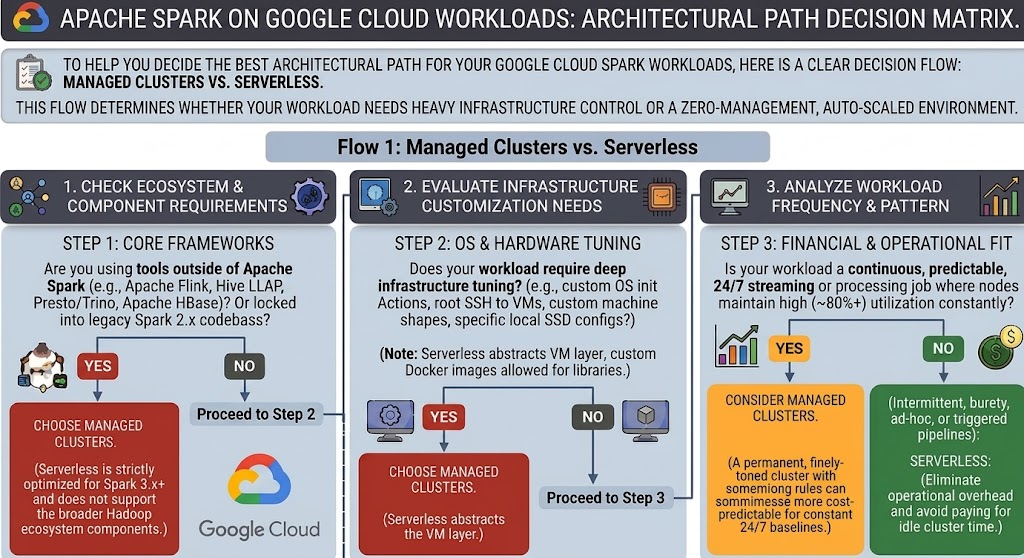
Choosing between traditional Managed Spark clusters and serverless depends on ecosystem requirements, infrastructure control needs, and financial utilization patterns:
-
Workload frequency, latency sensitive workloads & financial fit: For continuous, highly predictable, 24/7 streaming or batch processing pipelines where cluster nodes maintain constant high utilization baselines (80%+) or when the workflow’s accumulated startup time risk meeting SLA target, a permanently running, finely tuned traditional cluster, with custom YARN autoscaling rules, can sometimes be more cost-predictable. Conversely, for intermittent, bursty, ad-hoc, or orchestrator-triggered pipelines, Managed Spark serverless is highly optimal, eliminating operational management, requiring less planning time and ensuring you don’t pay for idle compute time.
-
Ecosystem & component requirements: Managed Spark serverless is strictly optimized for Apache Spark 3.x+ codebases. If your processing pipeline relies on other ecosystem components such as Apache Flink, Presto/Trino, Hive LLAP, or Apache HBase, or if you are locked into a legacy Spark 2.x codebase, you must use Managed Spark clusters.
-
Infrastructure customization needs: Managed Spark serverless abstracts away the underlying virtual machine (VM) layer. If your workload mandates deep OS-level hardware tuning, custom OS initialization actions, root SSH access to instances, specific local SSD configurations, or custom machine shapes, a traditional cluster is required. Note that serverless does support custom Docker container images for bundling specific application-level libraries.
Decision #2: Serverless interactive sessions vs. serverless batches
*Created using Nano Banana 2 in Gemini Enterprise Agent Platform
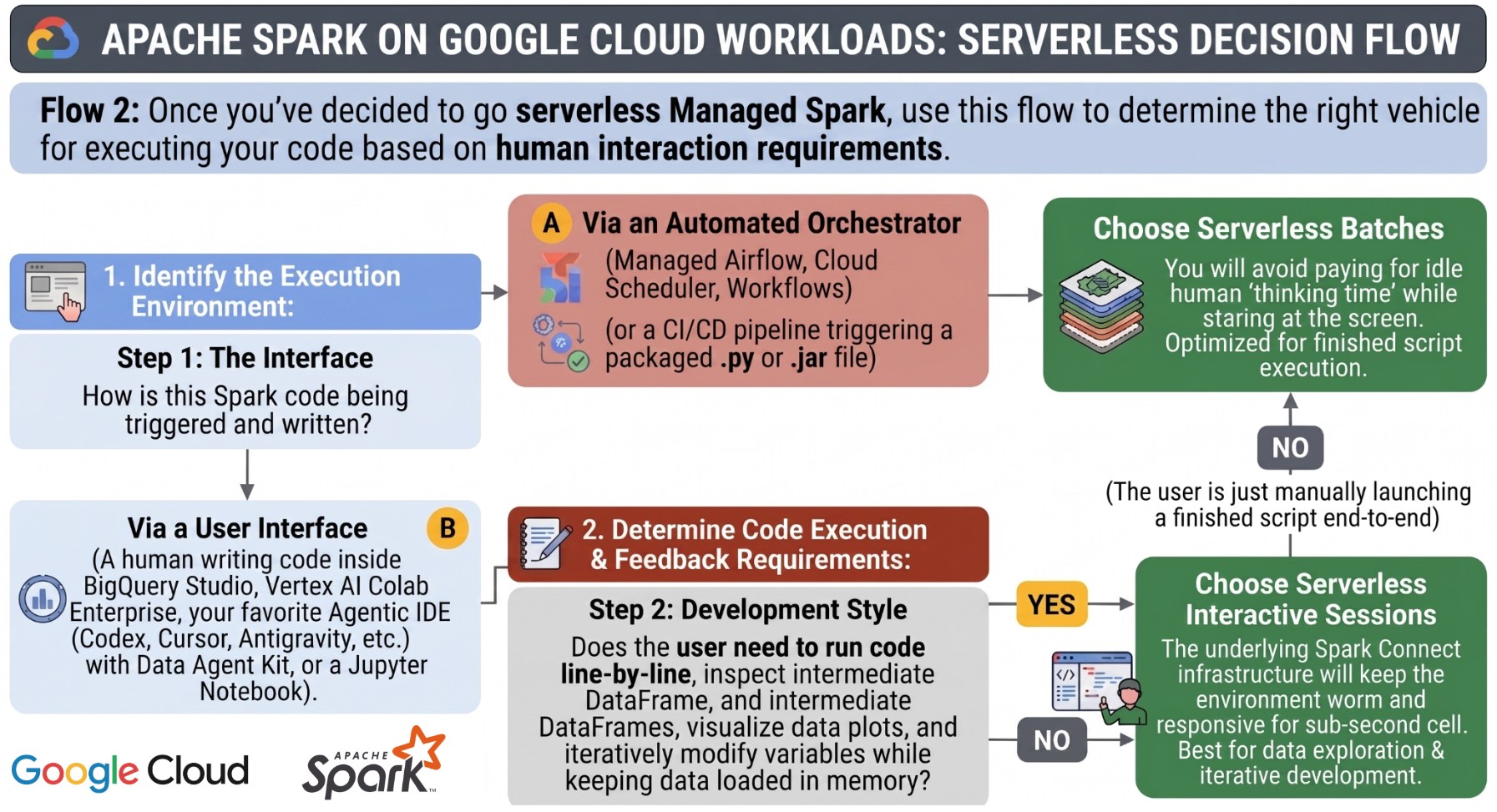
Once you select the serverless deployment mode, you must choose the appropriate execution model based on your development stage and operational requirements. Managed Service for Apache Spark provides two options for running serverless workloads:
Serverless interactive sessions
Interactive sessions are great for iterative and exploratory use cases. You write blocks of code, inspect intermediate DataFrames, modify variables, and generate visualizations with your dataset held warm in-memory.
-
Primary interface: Designed for human-in-the-loop interaction. Developers execute code cell-by-cell using their IDE of choice, such as Colab, Gemini Enterprise Agent Platform Workbench, Antigravity, Jupyter notebooks, etc.
-
Idle cost profile: Compute resources remain active to support immediate execution during developer thinking time, which can incur some idle compute charges if sessions are left inactive.
Serverless batches
Batches are useful when you know what you want to run, and need automated, non-interactive execution. The engine runs fully completed, packaged PySpark scripts (.py) or Java/Scala application files (.jar) from start to finish without manual human intervention.
-
Primary interface: Managed by automated orchestrators, such as Managed Service for Apache Airflow, Cloud Scheduler, or CI/CD pipelines.
-
Idle cost profile: Billed strictly for the duration of the run. Compute resources are provisioned on-demand, run the script, and immediately shut down upon completion to prevent idle costs.
The development-to-production lifecycle
These execution options are designed to work together as a natural pipeline lifecycle. During the initial development phase, you open a serverless interactive session within your notebook interface to explore datasets, clean schemas, and prototype transformations. Once your logic is validated and the transformations are finalized, you package the code into a Python script and schedule it as a serverless batch job orchestrated by Managed Service for Apache Airflow for production execution. This transition minimizes ongoing development costs while maintaining operational reliability.
Part 2: Advanced performance tuning and DCU cost optimization
While serverless Managed Spark eliminates the operational overhead of cluster maintenance, running production enterprise-grade pipelines on default settings can result in performance bottlenecks or budget waste. Resource allocation must be explicitly declared during submission using runtime configuration properties to maintain an efficient Data Compute Unit (DCU) burn rate.
Google recently introduced history-based autotuning. In the context of serverless, this capability automatically applies optimizations based on best practices and historical execution. It does this by grouping recurring batch workloads into what Google calls cohorts. The autotuner analyzes the telemetry and statistics from previous runs under that same cohort name to figure out where the bottlenecks are.
Customizing driver and executor shapes
By default, serverless batches allocate generic specifications (4 cores and 16,000MB RAM). This can cause critical efficiency issues depending on the nature of the application:
-
The Memory-Bound job: Pipelines processing highly uncompressed data volumes may hit Out-Of-Memory (OOM) errors and crash. To counter this, increase heap sizing independently using spark.driver.memory and spark.executor.memory.
-
The Compute-Bound Job: Processing-intensive jobs running mathematical modeling or heavy tokenization might saturate CPUs while leaving expensive RAM sitting idle. Fine-tune processing concurrency per instance by explicitly adjusting spark.driver.cores and spark.executor.cores.
Remember that by default increasing cores, automatically provisions a proportionate baseline of memory to match the vCPU-to-RAM ratio. This is why overriding the values for both cores and memory is critical
Controlling autoscaling boundaries
Managed Spark serverless dynamically scales up and down the number of active executors based on backlogged tasks. However, unconstrained scaling can lead to budget overruns if a rogue code loop or unoptimized cartesian join is introduced.
As a defensive guardrail, always declare an explicit upper limit using spark.dynamicAllocation.maxExecutors. This acts as your budget deadman-switch. By capping this at a reasonable ceiling, you guarantee that even if the code behaves sub-optimally, the job will never scale past a fixed infrastructure footprint.
-
High priority (SLA-driven): Set maxExecutors to a higher ceiling to allow resource bursting and minimize overall runtime duration.
-
Low priority (nightly batch): Set maxExecutors to a low, tight ceiling. The workload will run longer but will consume a predictable, flat, cost-efficient stream of DCUs.
Managing shuffle storage efficiency
When execution involves wide transformations like groupBy(), join(), or distinct(), data must be redistributed across the network, generating intermediate disk writes known as shuffle storage.
Spark defaults to a static setting of 200 partitions (spark.sql.shuffle.partitions). If you are processing a massive, multi-gigabyte dataset, 200 partitions means each individual chunk will be too large. When a partition's size exceeds available executor RAM (e.g., a 1GB partition trying to process inside 0.5GB of assigned heap space), data spills onto disk. This slows execution and incurs additional billing fees for premium or standard shuffle storage blocks. A helpful rule of thumb: Dynamically scale your partition parameters based on total data size so that each partition handles roughly 100MB to 200MB of data in memory. This may require a few iterations before the optimal results are achieved.
The above properties are the main tunable properties. Additional Serverless runtime configuration properties can be found in this link
Part 3: Operational diagnosis with Gemini Cloud Assist
When automated data pipelines fail in production, data engineers are traditionally forced to spend hours sifting through verbose, disjointed log files across drivers and executors. Managed Service for Apache Spark addresses this friction by natively integrating Gemini Cloud Assist into the Google Cloud console, allowing engineers to diagnose and resolve failures using natural language.
To illustrate this operational shift, we examine the typical troubleshooting lifecycle for a failed PySpark ETL pipeline that reads customer transaction data from a Google Cloud Storage (GCS) bucket, applies transformations, and encounters unexpected runtime errors.
Stage 1: Diagnosing missing execution parameters
During the initial execution attempt of a new pipeline, the batch job status switches from pending to running, and ultimately ends in a failed state with a generic exit message: Application failed with exit code 1.
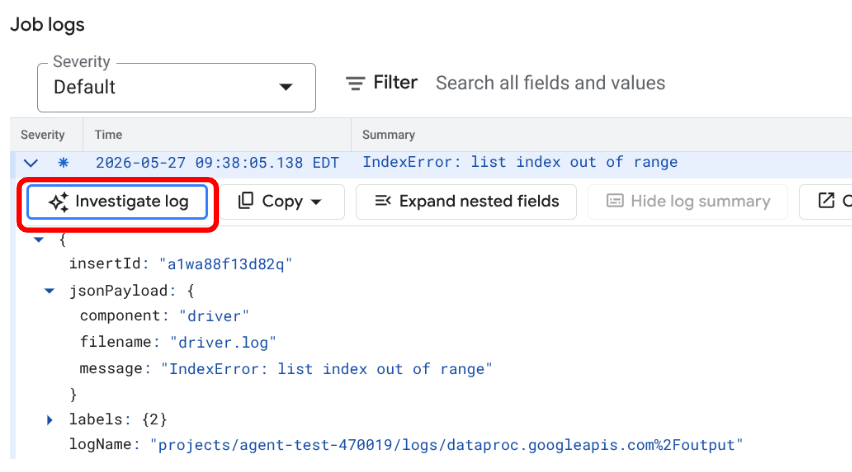
Rather than manually querying Cloud Logging or navigating through multiple sections of the console, the engineer can locate the error log and select the ‘Investigate log’ option. This action opens a native conversation pane where Gemini Cloud Assist automatically analyzes the driver telemetry and system logs.
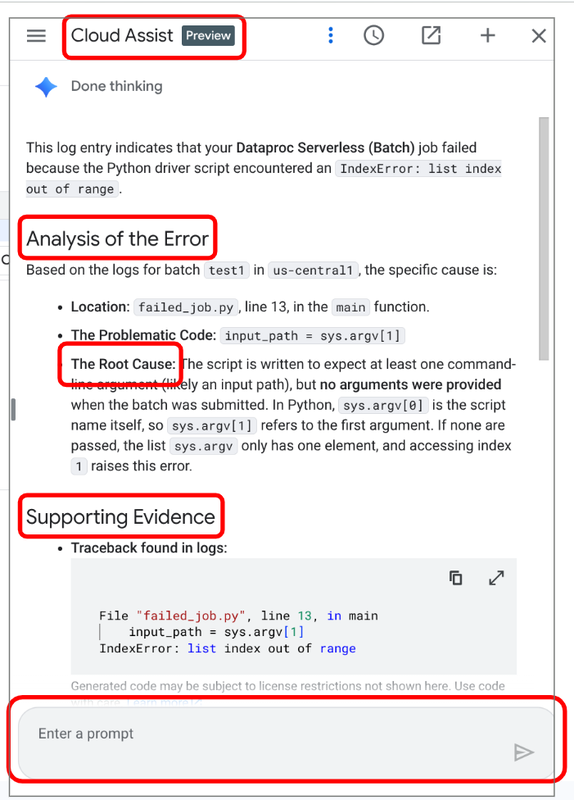
In this scenario, the assistant explains in plain English that the PySpark script failed because required runtime arguments (such as the source GCS bucket path) were omitted during submission. It instantly identifies the exact lines in the script expecting these arguments, eliminating the need to read through the stack trace.
Stage 2: Resolving schema and data type anomalies
Once the missing arguments are resolved and the job is re-submitted, the pipeline runs but encounters a secondary data anomaly. In high-volume ingest pipelines, upstream source files frequently contain corrupted records or formatting inconsistencies.
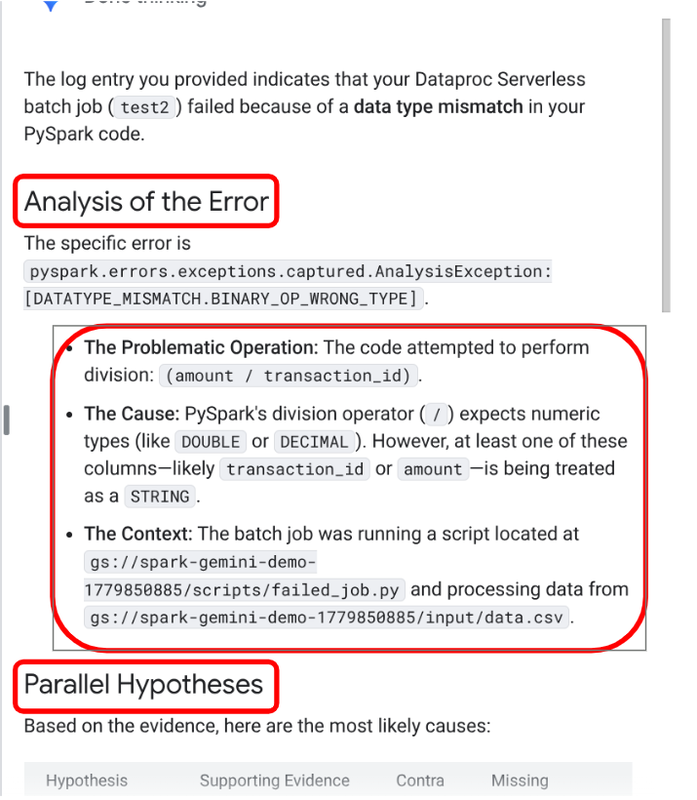
Upon the second failure, the engineer again prompts Gemini Cloud Assist to investigate the logs. The assistant identifies a TypeError and pinpoints the exact DataFrame transformation causing the crash: a division operation (df['amount'] / df['transaction_id']) that failed because the schema auto-inferred the columns as strings.
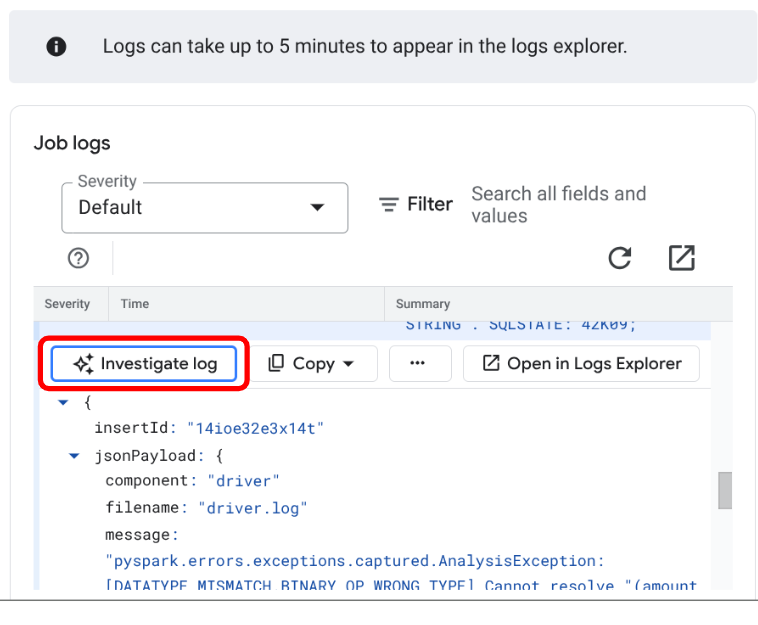
Additionally, the assistant scans the underlying GCS file data to identify the root cause: non-numeric anomalies (such as text strings within numerical cells) in the source dataset.
Stage 3: Generating and deploying verified code fixes
Rather than manually rewriting the PySpark logic to cast schema types and catch null values, the engineer can prompt Gemini Cloud Assist directly to generate a resilient solution:
User Prompt: "Suggest how to rewrite the code to divide the amount by quantity instead of transaction_id. In addition, add logic to skip invalid records without failing the process."
The assistant generates the corrected PySpark code block, using resilient casting and null-handling functions (such as coalesce and try_cast).
By implementing this corrected script, the orchestration pipeline can filter out bad source records smoothly without crashing the entire batch run. The subsequent execution completes successfully, preserving data freshness SLAs.
Unlock serverless Apache Spark: Benefits and next steps
Managing data processing pipelines should not require a deep specialization in infrastructure configuration. By pairing the hands-off scale of serverless batches with explicit resource tuning — such as dynamic allocation caps and calculated shuffle sizing — data teams can maintain strict control over performance and cost profiles. When failures do occur, integrating Gemini Cloud Assist directly into your logging workflows transforms complex troubleshooting from a manual log-sifting exercise into a rapid, automated cycle.
To start putting these architectures into practice, you can explore the Managed Service for Apache Spark documentation and execute a serverless batch directly in the Google Cloud console.
For a deep architectural analysis of these concepts, get instant access to A practitioner’s guide to Apache Spark® in the agentic era. This guide includes step-by-step workflows, Codelabs, and runnable PySpark and Terraform templates directly from our GitHub repository. If you are new to Google Cloud, you can test these blueprints on serverless and managed clusters at zero cost by signing up for a free trial with $300 in credits.