BigQuery AI supports Gemini 3.0, simplified embedding generation and new similarity function
Tianxiang Gao
Software Engineer
Derrick Li
Software Engineer
The digital landscape is flooded with unstructured data — images, videos, audio, and documents — that often remain untapped. To help you unlock this data's potential with minimal friction, we have integrated Gemini and other Vertex AI models directly into BigQuery, simplifying how you work with generative AI and embedding models using BigQuery SQL.
New launches in this area further simplify setup and expand what you can do with AI functions:
-
Simplified permission setup by using End User Credentials (EUC)
-
AI.generate() function for both text and structured data generation
-
AI.embed() function for embedding generation
-
AI.similarity() for computing semantic similarity scores between text and images
-
Gemini 3.0 Pro/Flash support
Streamlined setup with EUC
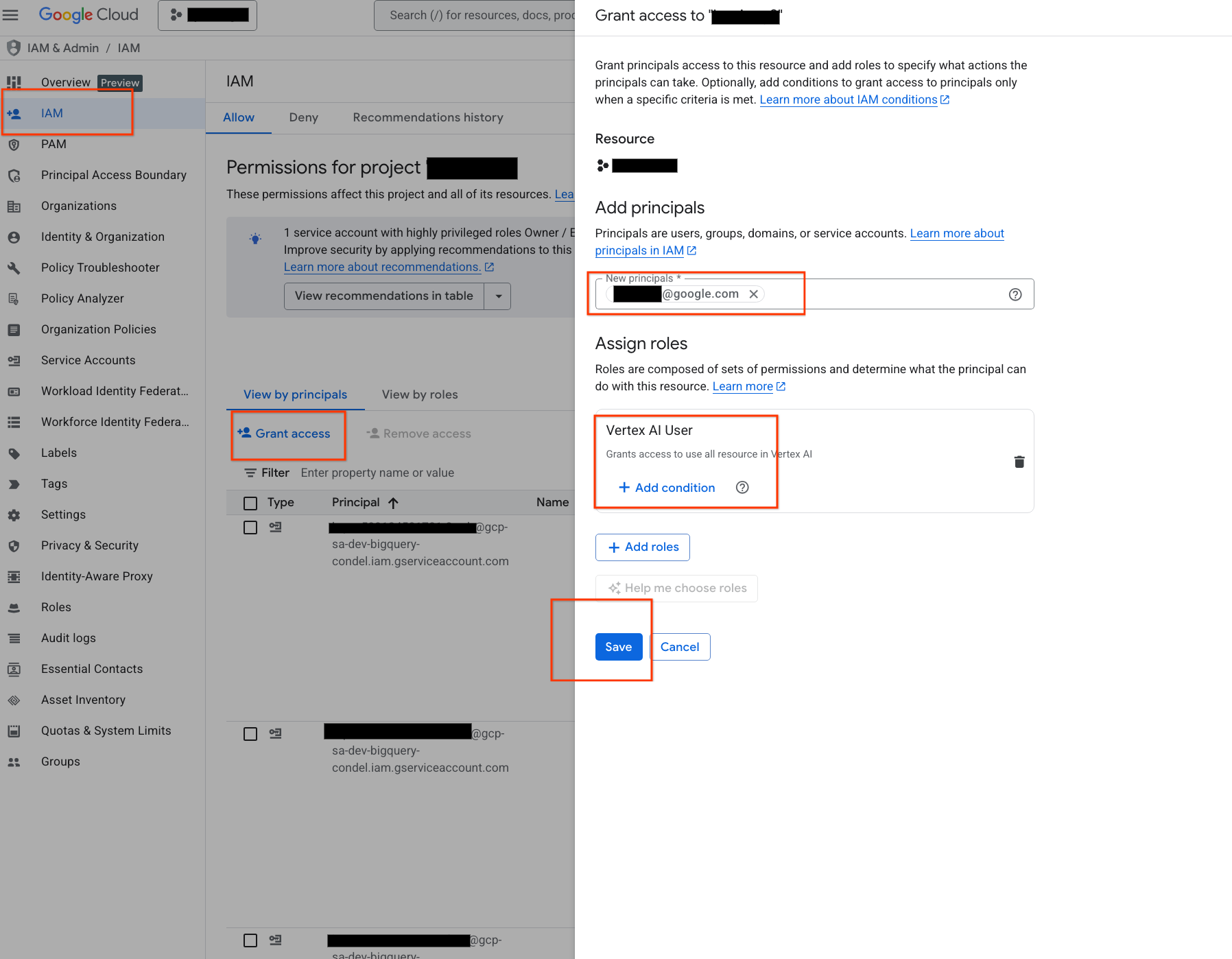
Previously, when integrating Vertex AI models with BigQuery, you needed to configure a separate connection and manage service account permissions. You can now authenticate Vertex AI requests using your personal IAM identity by enabling EUC. This eliminates the need for intermediary connections for standard interactive queries, making the connection_id parameter optional. To utilize EUC, simply ensure your account has the Vertex AI User role granted in IAM. See the screenshot below which illustrates the steps, or our public doc for more details. Note that if you are a project owner, you don’t even need to do this setup as you have the permission already.
Next gen text and structured generation functions in GA
The next generation of BigQuery gen AI functions — AI.GENERATE and AI.GENERATE_TABLE, previously in preview, are now in GA. With these new functions, BigQuery's generative AI inference capabilities let you:
-
Analyze any type of data: The new functions accept any type of input — text, images, video, audios and documents.
-
Accomplish most major AI/ML tasks: Provide the prompt of what you desire the LLM to do and perform extraction, translation, summarization, sentiment analysis etc. tasks with ease.
-
Use AI anywhere in your SQL: These functions are fully composable and can be placed anywhere standard SQL functions can go: in the SELECT statement, WHERE clause, and ORDER BY clause, allowing for sophisticated and flexible data processing.
-
Generate structured output: Convert your unstructured data to structured insights by specifying your desired output_schema.
AI.GENERATE is excellent for free-form text generation, which is useful for a wide range of generic LLM tasks such as summarization, translation, sentiment analysis, and more, all from a simple user prompt.
Additionally, AI.GENERATE can also generate structured output. By using the output_schema parameter, you can define the names and types of output fields, making the results immediately parseable and ready for use in downstream applications.
Furthermore, by specifying descriptive output field names like "sentiment" or "summarize_in_one_sentence", AI.GENERATE can accomplish multiple AI tasks with a single function call, returning the results in multiple, easily consumable columns.
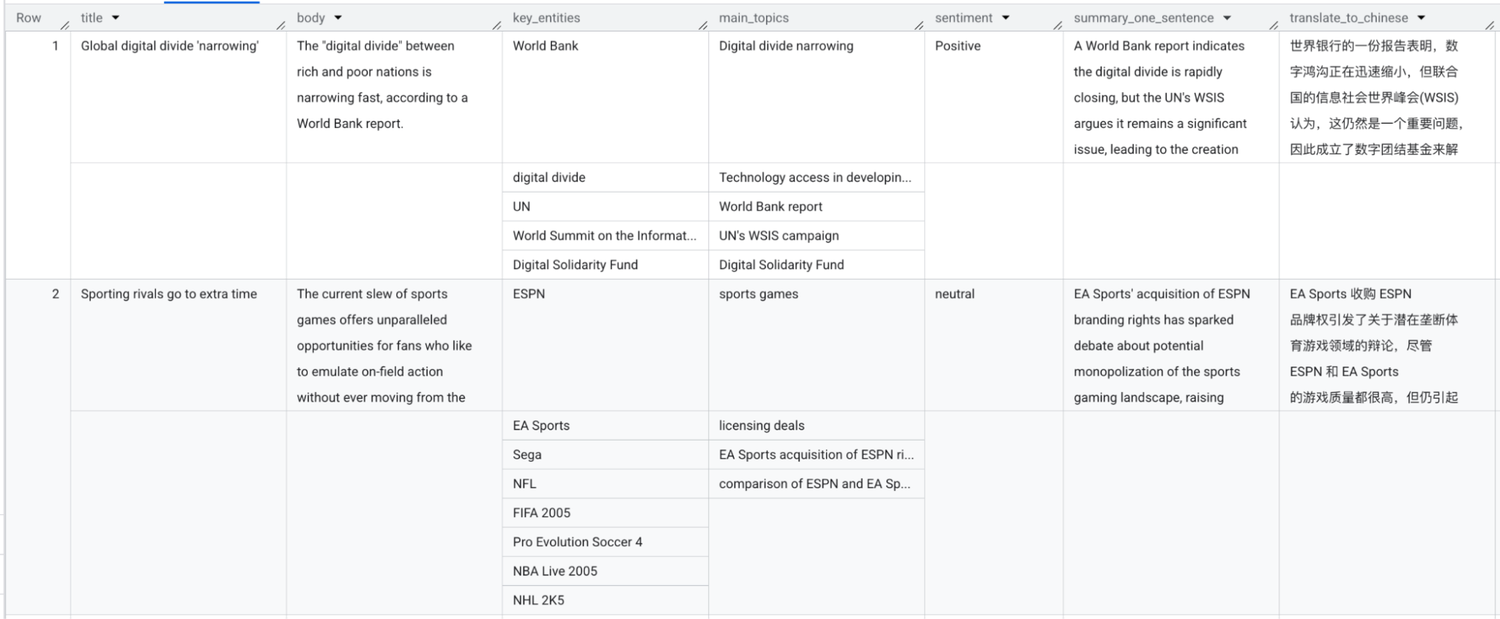
We illustrate this below using two examples. The first example uses text data in the bigquery-public-data.bbc_news.fulltext table. A single AI.GENERATE call simultaneously performs five tasks: 1) key entity extraction; 2) topic modeling; 3) sentiment analysis; 4) translation; and 5) summarization.
Running the above query gives the following output:
The second example involves analyzing the images. First, create a BigQuery external table that points to the images in Cloud Storage.
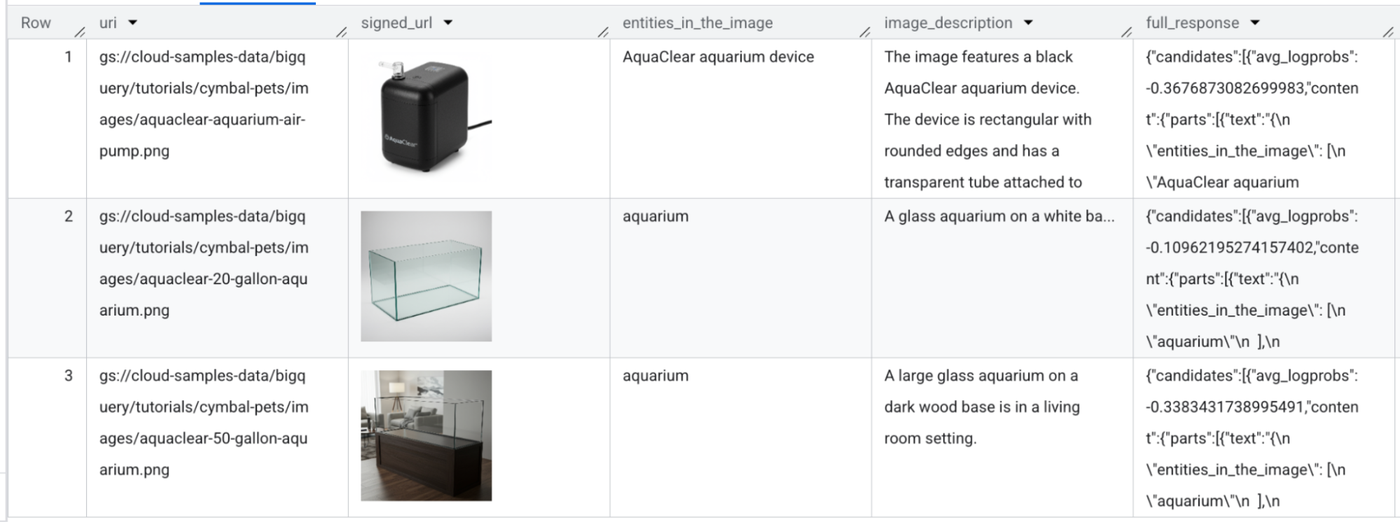
Next, run the following query, which uses a single AI.GENERATE function call to generate the image description and extract key entities.
This gives you the following results. BigQuery can automatically visualize the image using its signed URL.
BigQuery also offers the AI.GENERATE_TABLE TVF, which has similar functionality as AI.GENERATE for structured output capabilities. Learn more in the official documentation and a previous blog post: Convert AI-generated unstructured data to a BigQuery table.
New simplified functions for embedding generation and computing similarity
The AI.EMBED function translates complex data into embeddings — numerical vectors where semantic similarity is represented by mathematical closeness. By converting data with AI.EMBED, you can turn abstract concepts into measurable distances, allowing you to mathematically compare items to find the best matches. Both of these features are currently available in preview.
Returning to the BBC news dataset used above, we can generate embeddings for the entire table using the following query:
The following screenshot shows the output produced:
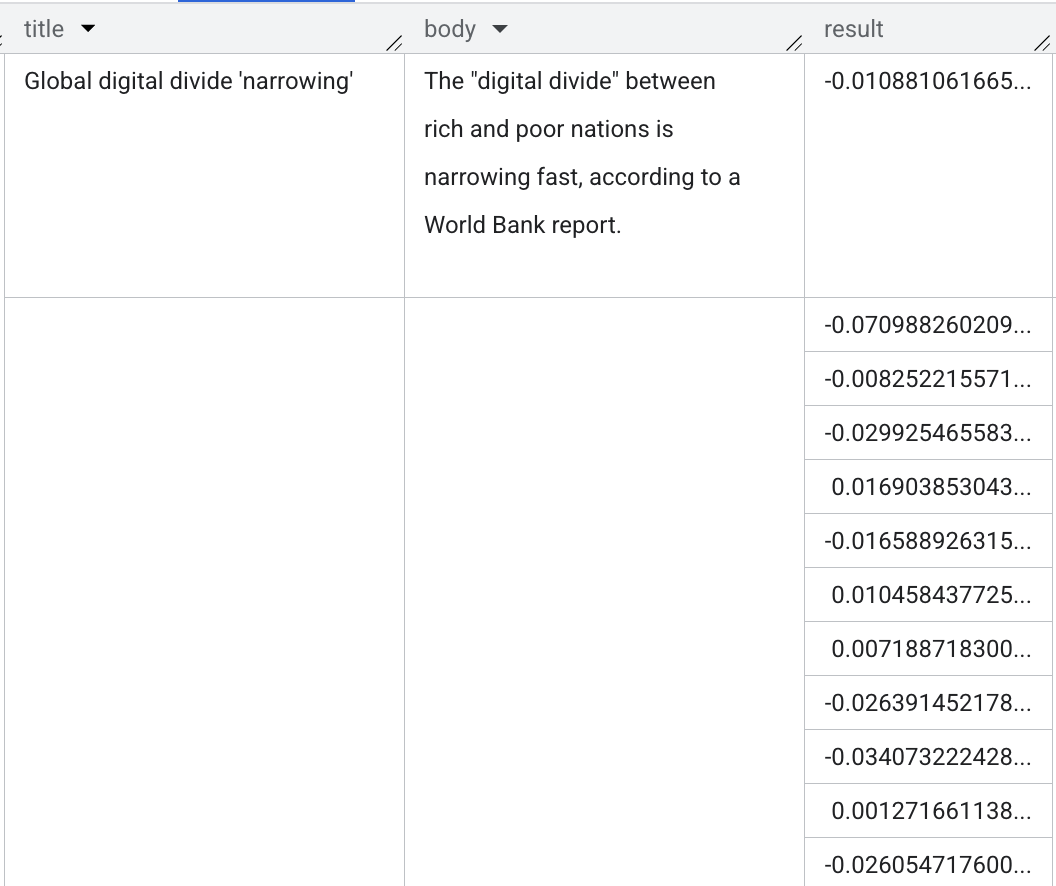
In addition, the new AI.SIMILARITY scalar function computes the semantic similarity of two pieces of text, two images, or across text and images. Under the hood, the function computes the embeddings of the two inputs and then computes their cosine similarity. To use this, imagine you want to find articles about downward trends in the housing market. You can use the following query to get the top five articles in the dataset with the most similar content:
The output is shown below.
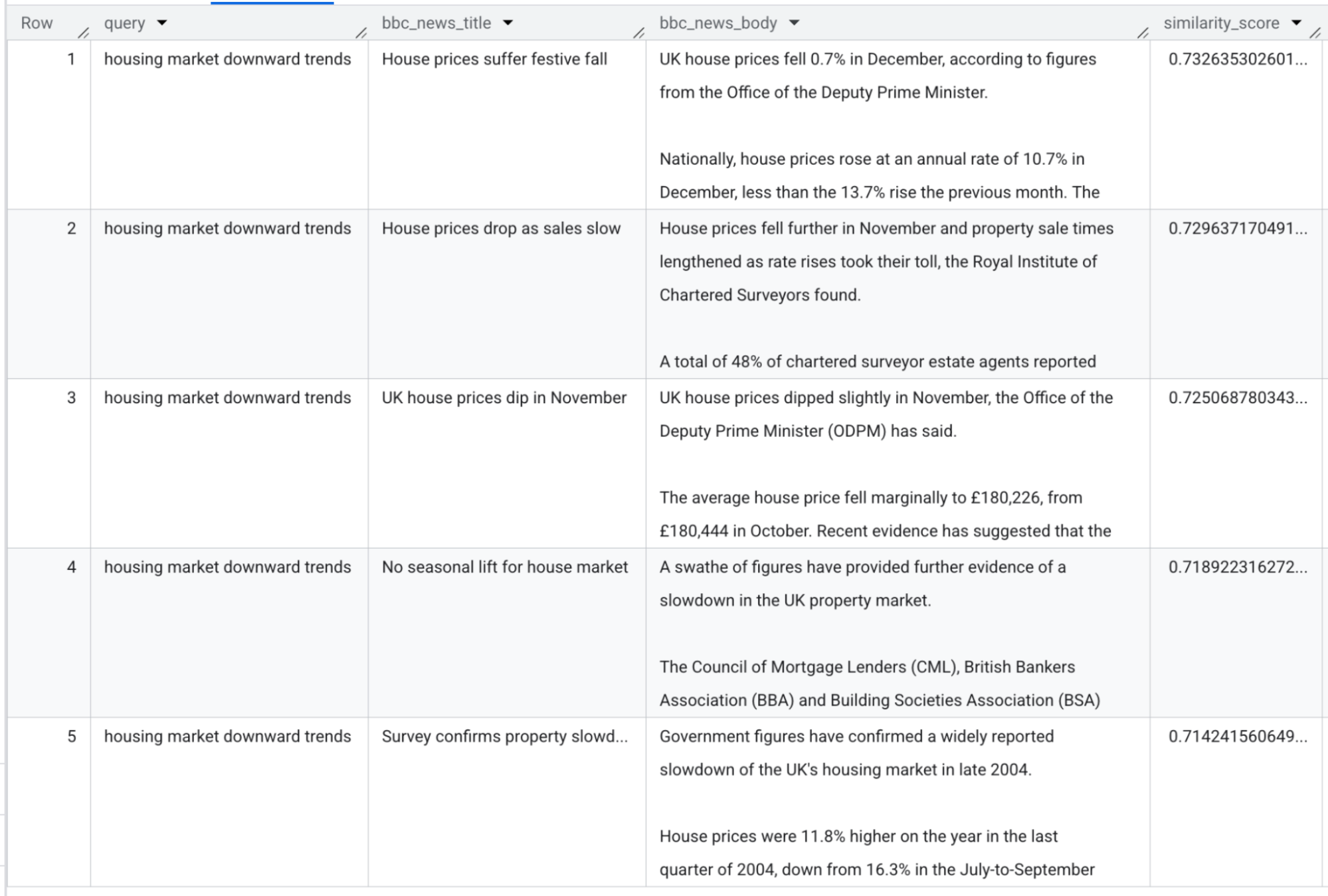
This demonstrates how AI.SIMILARITY transcends simple substring searches by understanding the underlying concept of a query. It is the most streamlined way to perform semantic search in BigQuery, as it handles both embedding generation and similarity calculations in a single, elegant step — no pre-computation or complex pipeline required. This makes it an ideal choice for interactive analysis, prototyping, or joining small to medium-sized datasets where agility is key.
For use cases where you need to scale these semantic capabilities across millions or billions of rows, you can seamlessly transition to the VECTOR_SEARCH function to leverage precomputed embeddings and vector indexing.
Gemini 3.0 support
BQML supports Gemini 3.0 for its generative AI functions such as AI.GENERATE. You can invoke Gemini 3.0 using the following query.
During preview of Gemini 3.0, you will need to specify the whole http endpoint string as in the example above. In the near future the endpoint name to be specified will simplify to endpoint => 'gemini-3-flash'.
Get started
Ready to explore your data with BigQuery’s AI functions? To get started, check out the documentation. Have feedback on these new features or have additional feature requests? Let us know at bqml-feedback@google.com.