Synthesize the big picture and analyze trends with BigQuery's AI.AGG function

Thomas Anchor
Software Engineer
Alicia Williams
Developer Advocate
We recently announced the preview of the BigQuery AI.AGG() function. With AI.AGG(), you can use natural-language instructions within a single line of SQL to summarize or synthesize information over millions of rows of unstructured or even multimodal data.
While BigQuery already offers powerful AI functions that help you analyze individual rows of data, analyzing unstructured data at scale requires a different approach. AI.AGG() lets you ask questions from unstructured data such as logs and documents, for example:
-
What are the top three feature requests among the negative product reviews?
-
What kind of errors are users seeing most frequently, and how should I start investigating them?
-
In which specific scenarios is our automated agent consistently failing to resolve customer issues?
In this post, we'll dive deeper into the AI.AGG() function and look at a few of the use cases that it unlocks, including how it can be used in combination with BigQuery’s other managed AI functions for complex, intelligent data analysis.
Analyzing system logs with AI.AGG()
A great example of the power of AI.AGG() is analyzing system logging. Log messages, warnings, errors, and stack traces can contain extremely useful information for improving your service, but it can be time- and labor-intensive to investigate them manually — especially if you operate at scale and have thousands of them to review.
With AI.AGG(), you can easily analyze many logs at once, grouping and prioritizing them to decide which ones to dig deeper into first. In fact, our BigQuery engineering team used this exact approach while developing AI.AGG() — using the function to help identify edge cases related to input handling for the feature itself!
To demonstrate this, let’s analyze a public dataset of Apache Spark standard INFO logs available from Loghub. Often, clusters can run into issues like memory thrashing, clock drift, or broadcast bottlenecks without ever throwing a FATAL error. You can use AI.AGG() to analyze these seemingly normal logs for hidden inefficiencies. You can load the sample data file into BigQuery using any of the supported methods, such as the UI, CLI, or client libraries. The following example assumes you’ve loaded the log file into a dataset called bq_logs_demo and table named spark_logs_unstructured.
Notice how we construct the prompt here. We explicitly give the model permission to say "everything is fine," which prevents it from hallucinating errors, while instructing it to hunt for specific anomalies:
You can see in these results that AI.AGG() successfully acknowledges the "operating normally" messages while surfacing the critical diagnostic insights:
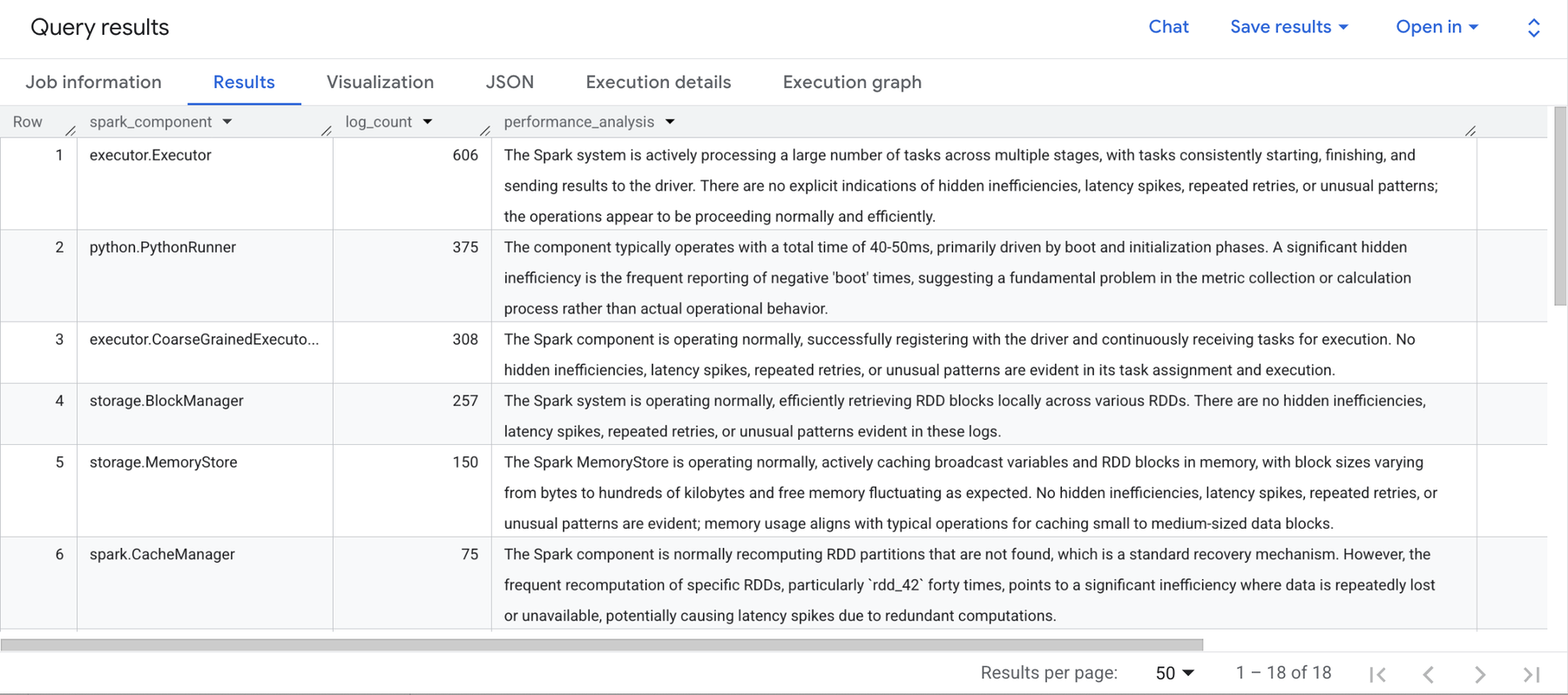
The query results pane showing the insights generated by AI.AGG() over the logs dataset.
Extracting categories from unstructured text and image data
Now, let’s look at some more use cases that demonstrate the flexibility of AI.AGG(), using one of BigQuery’s public datasets, cymbal_pets, a fictional pet supply shop. It includes a catalog of products carried by the store, with unstructured data like product names, descriptions, and images, making it a great example of the power of AI functions for handling unstructured data.
For example, let’s say you want to categorize the products in the dataset. The first hurdle in this case isn't applying labels to your products, but discovering what categories exist across the product catalog. With AI.AGG(), you can ask the model to analyze the raw product names and descriptions to identify the overarching categories for you.
This query returns a simple plaintext list of categories:
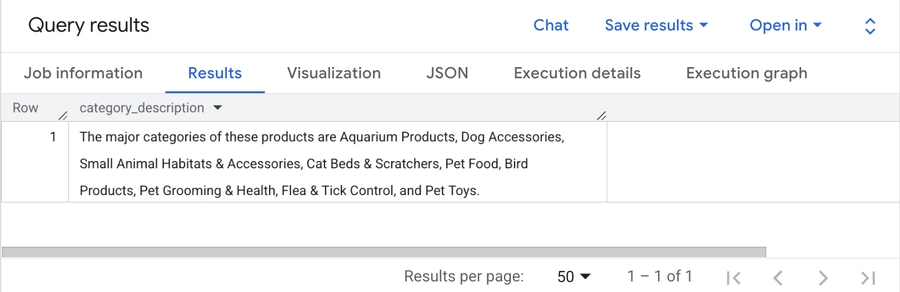
The plaintext result of categories determined by AI.AGG() over our products dataset.
This initial query is great for discovery, but a simple plaintext string isn't enough to build a reliable, automated data pipeline. To actually tag your data, you need to instruct AI.AGG() to return a structured format, like a JSON array. Then, you can use the structured categories as a parameter within another AI function, AI.CLASSIFY(), to actually label each product with its category.
The following SQL statement completes each of these steps in one script:
You can now view the resulting table, which includes an assigned_category:
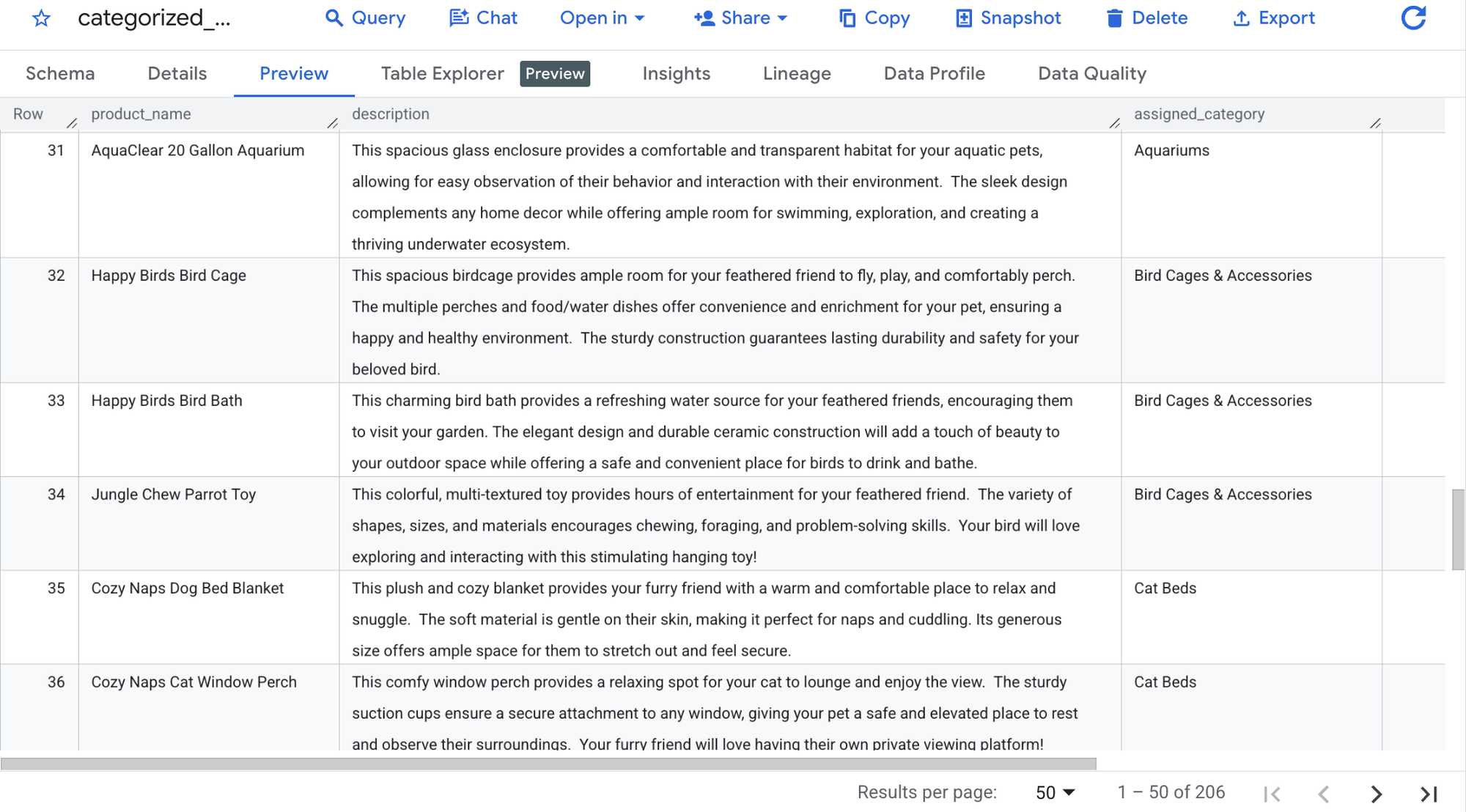
A preview of the categorized_products table which includes the new assigned_category column created by AI.AGG() and AI.CLASSIFY().
If you look closely at the intermediate table, you'll notice the structured categories changed slightly from the initial plaintext results. This happens for two reasons: First, LLMs are nondeterministic, meaning that they don't always give the exact same response to the same prompt. Second, the prompt was adjusted to accommodate the new output structure.
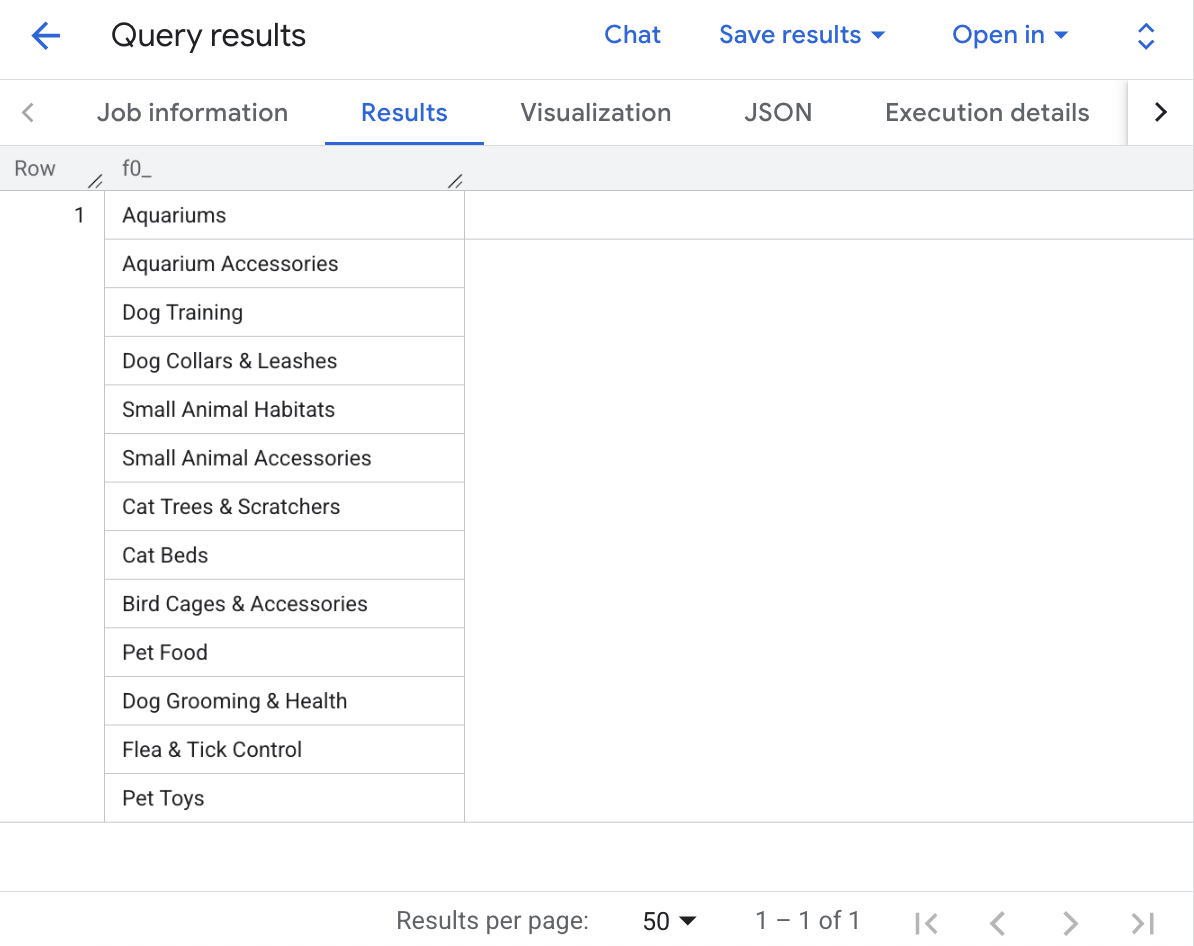
The returned product categories are structured as JSON by AI.AGG() as requested as part of the prompt.
With the table now labeled by category, you can group by the categories to do traditional SQL aggregation, or use AI.AGG() to consider each category separately.
For example, the following query fetches traditional metrics (like row counts) right alongside a synthesized AI summary of what those specific grouped products have in common:
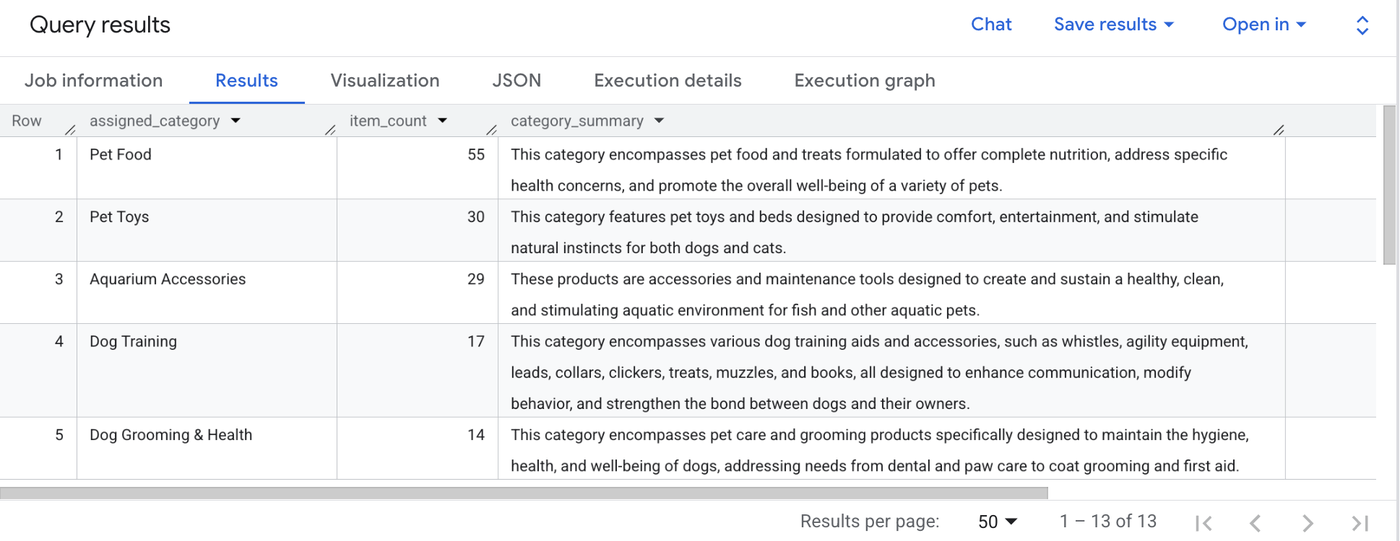
Query results showing analyzing with AI.AGG() alongside more traditional SQL methods.
Unstructured data isn't limited to text. Because AI.AGG() natively supports multimodal inputs, you can return aggregated insights directly from image files.
The cymbal_pets Google Cloud project also contains a Cloud Storage bucket full of product photos. By creating an external object table, you can securely pass the image URIs directly into AI.AGG() and ask the model to summarize the visual content of the entire collection.
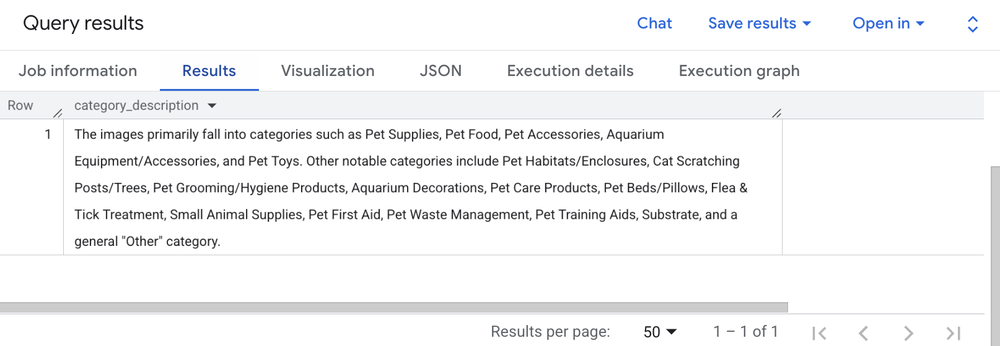
Query results showing AI.AGG() surface product categories by analyzing the product images located in Google Cloud Storage.
How AI.AGG() works and best practices
To use AI.AGG() effectively in your own environment, it helps to understand how it processes data behind the scenes. Here’s what you need to know about context windows, error handling, and optimizing your pipelines.
1. Context windows and multi-level aggregation
LLMs have a specific context window and can have a hard time handling massive amounts of input. AI.AGG() solves this problem by automatically dividing your input rows into batches, aggregating those batches, and then aggregating the results of those batches into a final answer. This means you don’t have to worry about manually managing the context window when passing in large numbers of rows. Note that AI.AGG() won’t split up a row of data across batches, so make sure that each individual row is smaller than the context window, to avoid the row being skipped. Many smaller rows will give AI.AGG() more flexibility with how to batch each row.
2. Token usage with multi-level aggregation
Because AI.AGG() uses a multi-level aggregation structure, the total input tokens sent to the model may be higher than the raw tokens in your starting table (depending on how many rounds of aggregation are required). As a best practice, always reduce the number of input tokens by using LIMIT or pre-filtering your data upstream before passing it to AI.AGG().
3. Specifying your model endpoint
If you don’t specify a model endpoint, AI.AGG() will default to a recent model. However, for production pipelines, you often want explicit control:
-
Short-form names: You can use a short-form endpoint (e.g.,
gemini-2.5-flash), in which caseAI.AGG()will use that model in the query execution region:
- Fully-qualified names: If the query execution region doesn’t support your desired model, or you prefer to use a global or multiregional endpoint, provide the fully qualified model name:
4. Input and output modalities
-
Inputs:
AI.AGG()supports text (via strings or references to text files) and image data. It also supports arrays of these types, though you should refer to the known issues documentation for edge cases regarding arrays of images. -
Outputs: The function will always return a string. While you can prompt the model in your instructions to format the output as JSON or Markdown, keep in mind that the database engine does not strictly enforce this. Multimodal output (e.g., generating an image) is not currently supported.
5. Treatment of NULLsAI.AGG() automatically skips NULL input rows without processing them. However, you must be careful when passing structured data. Like other BigQuery AI functions, AI.AGG() concatenates STRUCT fields similarly to the standard CONCAT() function. This means if even one field within your STRUCT is NULL, the entire row is treated as NULL and will be skipped.
Let's revisit our first categorization query. What if several rows of our products table are missing their description? Because of the NULL concatenation rule, those rows would be silently dropped from the analysis entirely. Here is how we can use IFNULL() to provide a fallback string, guaranteeing that every product is taken into account even if its description is blank:
6. Error handling
If AI.AGG() receives invalid input, or encounters an error during LLM processing, it will attempt to provide partial results. Rows containing invalid input or which were rejected by the LLM model will not be considered in the final results.
You can review exactly how many rows failed to process by checking your BigQuery job statistics, exactly as you would for scalar managed AI functions like AI.IF().
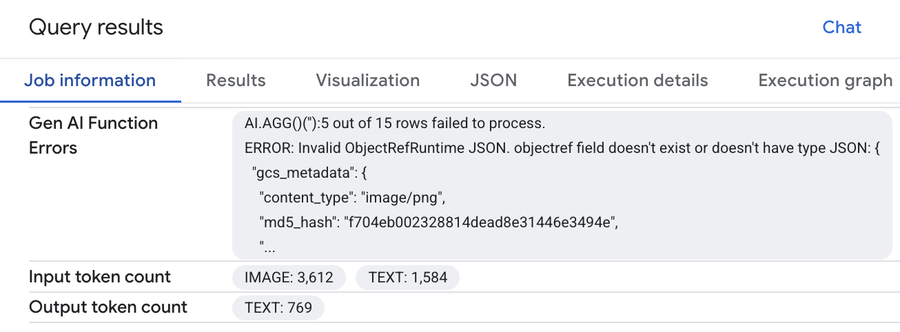
information showing an example of Gen AI function error details.
Give it a try!
These are just a few examples of the ways AI.AGG() can help analyze unstructured data. The AI.AGG() function is in preview in BigQuery now, so it’s available to all BigQuery users. Try it out on your own use cases!
You may also be interested in checking out BigQuery's other managed AI functions, AI.CLASSIFY(), AI.IF(), and AI.SCORE(), as well as general-purpose functions like AI.GENERATE(). We look forward to seeing what you build with them.