Simplify VM OS agent management at scale: Introducing VM Extensions Manager
Omkar Suram
Product Manager
Mike Columbus
CE Director, Northam Platform Specialists
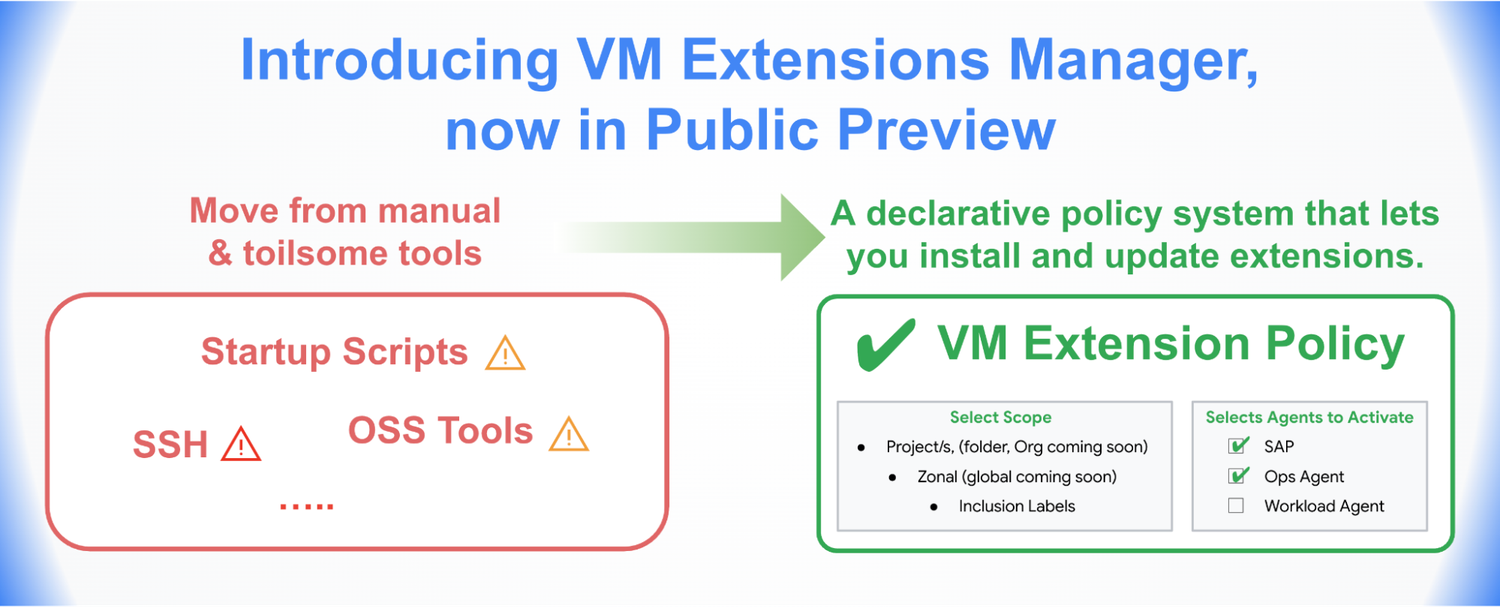
If you're an IT administrator, you know that managing Operating System (OS) agents (Google calls them extensions) across a large fleet of VM instances can be complex and frustrating. Indeed, this operational overhead can be a major barrier to adopting extension-based services on VM fleets, despite the fact that they unlock powerful application-level capabilities.
To solve this problem, we’re excited to announce the preview of VM Extensions Manager, a new capability integrated directly into the Compute Engine API that simplifies installing and managing these Google-provided extensions.
VM Extensions Manager provides a centralized, policy-driven framework for managing the entire lifecycle of Google Cloud extensions on your VM instances. Instead of relying on manual scripts, startup scripts, or other bespoke solutions, you can now define a policy to ensure all your VM instances — both existing and new — conform to that state, reducing operational overhead from months to hours.
How to get started with VM Extensions Manager
VM Extensions Manager is integrated directly into the compute.googleapis.com API, meaning there are no new APIs to discover or enable. You can get started in minutes.
1. Define your extension policy
First, define a policy that specifies the desired state of your extensions.
For the preview, you can create zonal policies at the Project level. This policy targets VM instances within a single, specific zone.
Over the coming months, we’ll expand support to include global policies, as well as policies at the Organization and Folder levels. This will allow you to build a flexible hierarchy of policies (using priorities) to manage your extension on your enterprise fleet from a single control plane.
You can create this policy directly from the Google Cloud console:
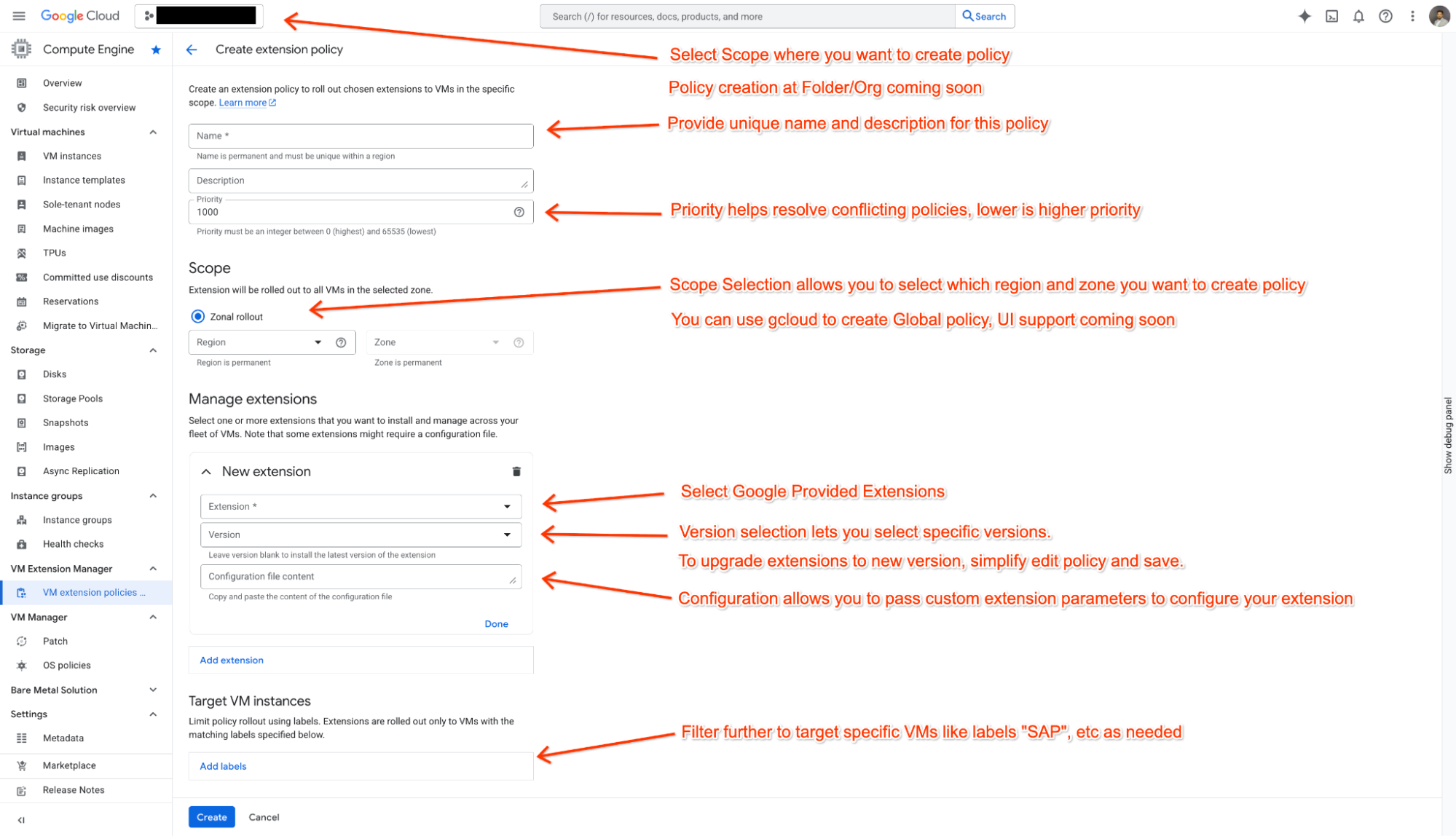
Demo of Creating VM Extension policy using Cloud Console
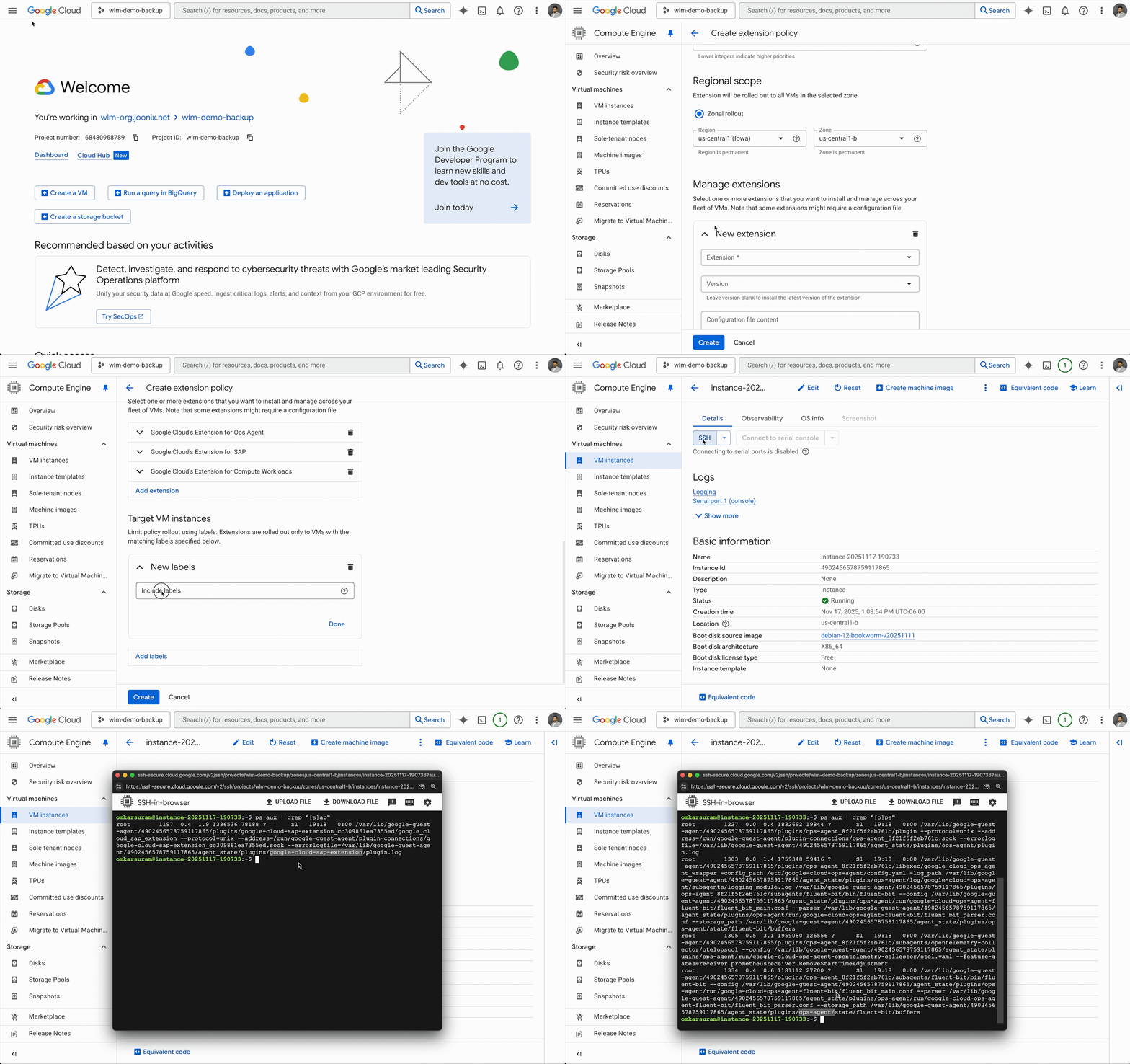
2. Select your extensions
In the policy, you select the Google Cloud extensions you want to manage. For the preview, VM Extensions Manager supports several critical Google Cloud extensions, including:
- Cloud Ops Agent (ops-agent): The Ops Agent is the primary agent for collecting telemetry from your Compute Engine instances.
- Agent for SAP (sap-extension): Google Cloud's Agent for SAP is provided by Google Cloud for the support and monitoring of SAP workloads running on Compute Engine instances and Bare Metal Solution servers.
- Agent for Compute Workload (workload-extension): The Agent for Compute Workloads lets you monitor and evaluate workloads running on Compute Engine.
We'll be adding support for more extension-based services in the coming months.
You can choose to pin a specific extension version or, keep it empty (the default) to get the latest extension installed. If you choose the default, VM Extensions Manager automatically handles the rollout of new versions as they are released — no more waiting to access new features and improvements.
3. Roll out global policy with more control
VM Extensions Manager gives you control over how global policy changes are deployed across many zones with rollout speeds. Zonal policies don't offer rollout speeds; they are enforced instantaneously when the VMs are online.
In coming weeks, we will expand support for global policy via gcloud first and update the documentation with relevant information. UI updates will follow in coming months.
At preview, however, global policy lets you select two distinct rollout speeds:
-
SLOW (Recommended): This is the default option, designed for safety. It orchestrates a zone-by-zone rollout (within the scope of the policy) with a built-in wait time between waves, minimizing the potential blast radius of a problematic change over a period of time, by default 5 days. This is perfect for standard maintenance and updates.
-
FAST: This option eliminates the wait time between waves, executing the change across the entire fleet across zones as quickly as possible. It is intended for urgent use cases, such as deploying a critical security patch in a "break-glass" emergency scenario across all VMs in all zones.
Once you save the policy, VM Extensions Manager takes over. The underlying progressive rollout engine manages the complex orchestration, and you can monitor its progress.
A flexible system for standardization and control
VM Extensions Manager is designed to bring standardization and control to extensions on your VM fleets. You can start today by applying zonal policies to your projects to ensure extensions are correctly installed on VM instances in the correct zones.
To get started defining Extension policies for your Compute Engine VM instances, read the documentation to create your first policy. We're excited to see how you use VM Extensions Manager to standardize, secure, and simplify the management of your VM fleet.