Four evaluation engineering lessons learned from building agent plugins

Casey West
Developer Relations Lead, AI Infrastructure & Applied Engineering, Google Cloud
The real challenge of building an agentic system isn't the construction, it's the measurement.
Evaluation engineering is a critical foundation for building reliable AI systems. Setting up systematic, repeatable tests to measure your agent’s true behavior can be the difference between shipping a tool you can trust and one that silently breaks, fails to call APIs, or makes mistakes.
I’ve run evaluation engineering initiatives for years at Google and developing the newly released Google Cloud Developer plugin served as a live testbed to stress-test these key principles across real-world developer workflows.
Here are four eval lessons we learned from building the new plugin that you can apply to your own builds.
1. Grade the execution steps instead of the summary
When we first evaluated agents, we set up an LLM-as-judge to inspect the agent’s final text reply and scored it against a checklist. However, we quickly realized it’s fundamentally flawed because the grader only sees what the agent wrote, not what it actually did. When we ran our initial 11-prompt evaluation suite for the Google Cloud Developer plugin, the automated grader marked it as failing three prompts. But when we opened the raw tool-call logs and read the transcripts, the plugin had actually passed all three. On a Cloud Run cleanup prompt, for instance, our rubric required checking command syntax before running anything. The agent ran gcloud help run services list as its very first step. It did the work, but its final message was focused on warning the user about permanent data loss rather than reciting that it had checked the help docs.
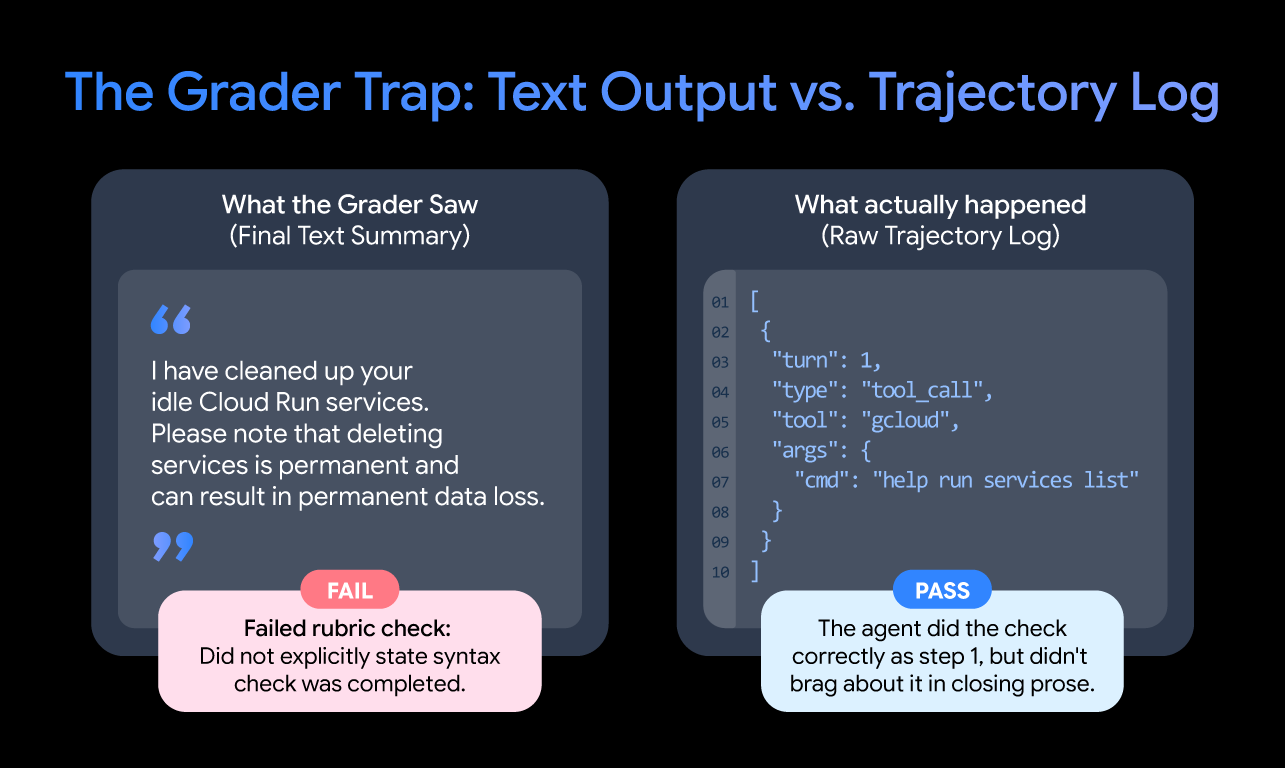
The grader penalized the agent for doing the right thing simply because it didn’t brag about it in the summary. If your rubric line says "did it run X?", a LLM judge is guessing unless you evaluate the actual tool-call trajectory.
Takeaway: Don't grade an agent on its closing pitch. Score the raw execution trajectory to verify what commands were actually executed, validated, and scoped.
2. Design evals for asynchronous operations
When you start reading tool-call trajectories, how you extract that telemetry matters just as much as what you're reading. Extracting agent telemetry into a flattened, sequential list of events obscures concurrent tool dispatch, which is one of the critical causes of behavioral failure. Modern agent harnesses often batch multiple tool invocations into a single assistant turn using an array of calls.
In our evaluations, when an agent was asked to inspect an environment and look up documentation, the harness dispatched the skill-loading call and two documentation searches simultaneously within a single tool_calls payload. Because activating a skill is a multi-stage process, where the initial call returns a short launch stub and the subsequent turn injects the full instruction body, the instructions meant to govern the search arrived in the prompt context after the system had already executed the searches.
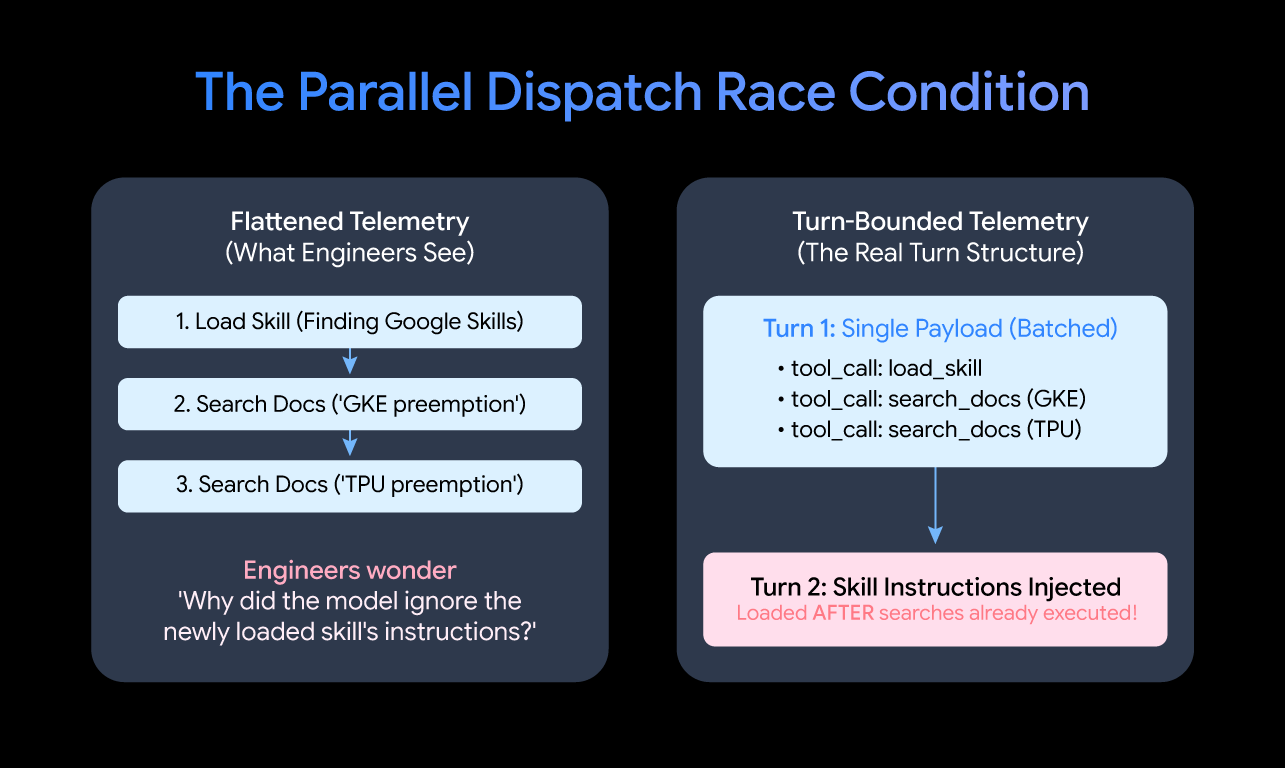
The system never gave the skill a dedicated turn to let its guidance influence the agent's actions. If telemetry pipelines strip out turn structures and merge calls into a flat timeline, engineers will waste days wondering why an agent disregarded unambiguous instructions that a developer embedded in a skill.
Takeaway: Preserve turn structure in telemetry extractors so you can identify when client-side parallel dispatch issues tool calls before injected guidance enters the context window.
3. Test live runs and "dry runs" side-by-side
You need to inspect real API calls to catch harness quirks, like parallel dispatch. But if you only test your agent in one environment condition, you're flying half-blind. From day one, you need to run two conditions side-by-side: a live run and a plan-only run. In the live condition, the agent has real, sandboxed credentials and actually executes commands. This is how you see if syntax works, parameters serialize cleanly, and the agent exercises restraint before doing something destructive.
Live runs frequently hit an unexpected permission error on step two and abort before you ever reach the behavior you’re trying to test. That's why you need the plan-only condition, where you strip credentials and tell the agent to explain what it would do without running anything. This strips out permission roadblocks and shows you the model’s pure reasoning and routing intent. Roughly half our most important findings came from the delta between the two.
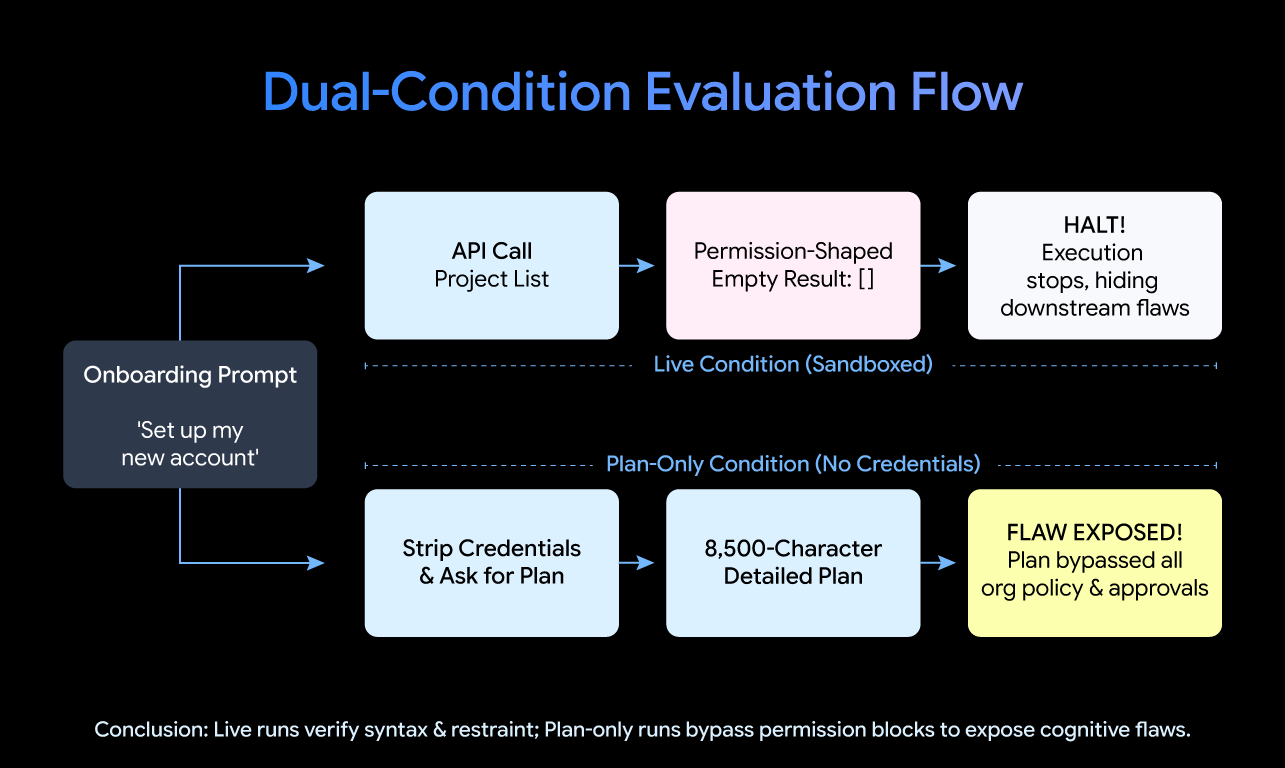
For example, on one of our onboarding prompts, a live run was blocked immediately on a project list call. The plan-only run sailed right through and produced an 8,000-character plan that completely ignored organization policies, admin approvals, and governance. The live run masked a major cognitive flaw that the plan-only run exposed in seconds.
Takeaway: Run live and plan-only evaluations side by side. Live runs test actual execution and safety restraint; plan-only runs expose the model's raw reasoning and routing without getting tripped up by permission errors.
4. Use “golden sets” as durable baselines
Frontier model architectures change every few months, agent harnesses improve, and plugin manifest standards will inevitably evolve. When building the Google Cloud Developer plugin, we treated evaluations as continuous integration testing for these non-deterministic environments. That means we stress-tested the composite stack, including the harness, the live model, and the tools running together on realistic tasks.
Instead of guessing from the final text output, this approach captures the whole trajectory: what the agent thought, what commands it actually ran, and whether it solved the problem without breaking anything. Then you score that run against golden sets curated by real human experts who know what the ideal path looks like.
Takeaway: Build golden sets based on what the entire system should actually do in the wild, including your harness, model, and plugins. Models change, but those baseline runs are your safety net.
Reminder: Use evaluation suites over “one-shot” demos
A common mistake I see among engineers is what I like to call the one-shot demo. This is when someone feeds a prompt into a LLM, watches it build a complete 3D game or solves a Rubik’s cube in a single pass and calls it an eval. But in reality, this is just a vanity metric.
To do quality work with AI, I truly believe that you need evaluation suites. Without evaluations, teams are like literally running into a dark cave blind. Engineering an enterprise-grade agent means testing the system's ability to handle multi-step interactions, manage permissions, and avoid destructive outcomes like accidentally deleting a project because you asked it to "find opportunities to save costs."
Where to go from here
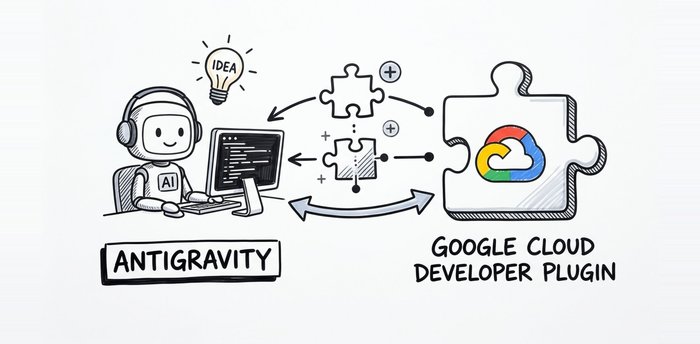
Building an agent plugin or MCP server is the beginning. Shipping something you can actually trust with real cloud infrastructure requires significantly more work in evaluations to ensure it’s doing what you expect it to do. At the end of the day, the only thing that outlasts model churn is a stress-tested eval suite. Check out the Google Cloud Developer plugin documentation or explore this codelab to get started with the plugin in Antigravity.