Announcing the MCP Toolbox Java SDK
Abirami Sukumaran
Staff Developer Advocate, Google
Anubhav Dhawan
Software Engineer, Google
Engineering teams are moving beyond simple chatbots to build agentic systems that interact directly with mission critical databases. However, building these enterprise agents often means hitting an integration wall of custom glue code, brittle APIs, and complex database logic.
To replace these hardcoded bottlenecks with a secure, unified control plane, we are thrilled to announce the Java SDK for the Model Context Protocol (MCP) Toolbox for Databases. This release brings first-class, typesafe agent orchestration to the world’s most widely adopted enterprise ecosystem. Java's mature architecture is purpose-built for these rigorous demands, providing the high concurrency, strict transactional integrity, and robust state management required to safely scale mission-critical AI agents in production.
MCP: The USB Type-C for AI Agents
Think of the Model Context Protocol (MCP) as a universal translator for AI.
Created to standardize how AI models connect to external tools and datasets, MCP replaces custom, fragmented integration scripts with a secure, universal protocol. Whether your agent needs to execute a transactional SQL query, search through thousands of policy documents, or trigger a REST API, MCP provides a single, unified interface.
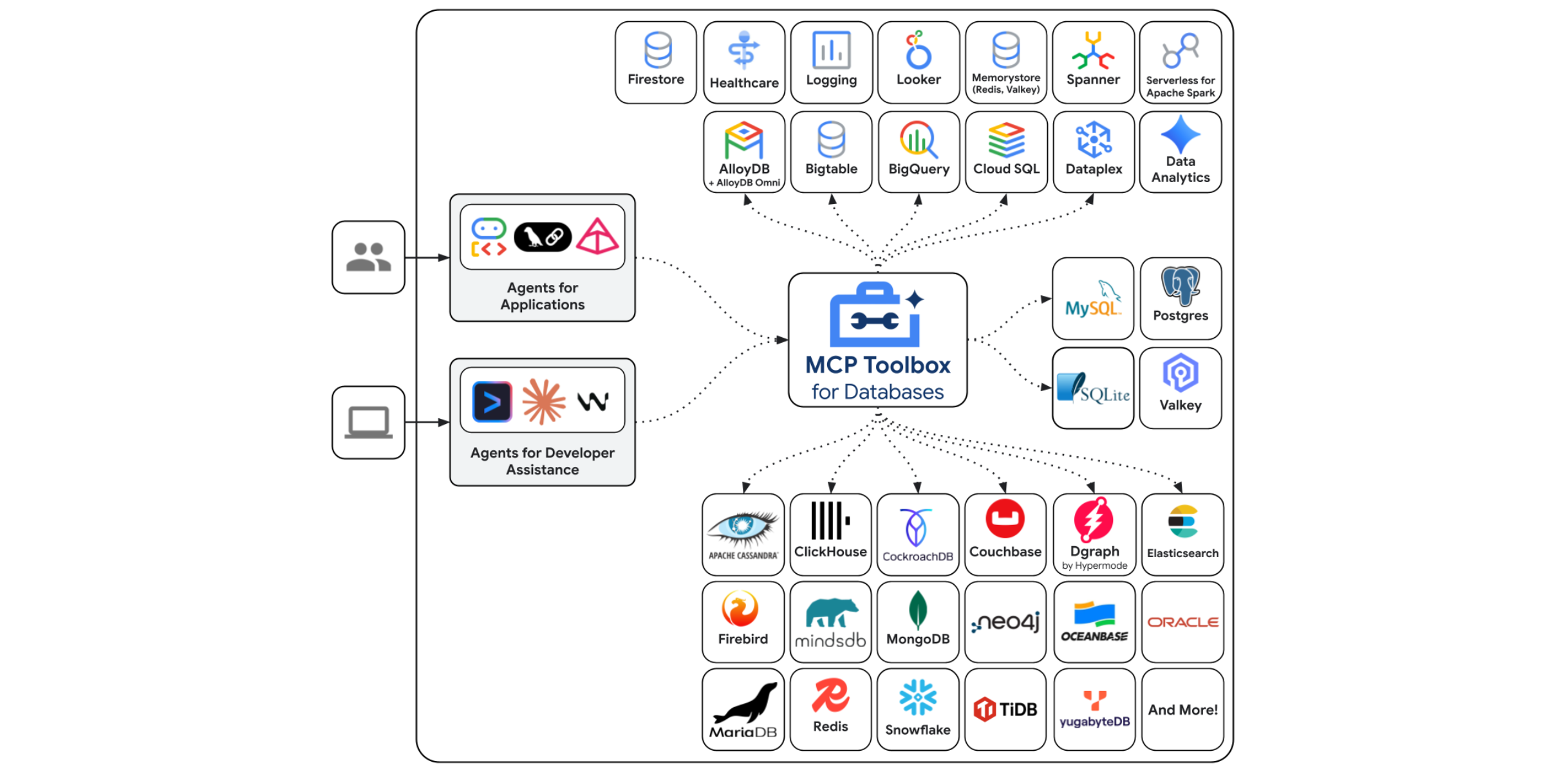
With MCP Toolbox for databases, we’ve made implementing this protocol effortless.
MCP Toolbox for Databases
MCP Toolbox for Databases is an open source MCP server for databases. It natively supports 42 different data sources spanning AlloyDB, Cloud SQL, Cloud Spanner, and many more including third party data sources as well. Crucially, it gives you the ability to define custom tools that safely map an AI agent's natural language intents directly to specific database operations. It enables you to develop tools easier, faster, and more securely by handling the complexities such as connection pooling, authentication, and more.
We already provide robust, production-ready SDKs for Python, JavaScript, TypeScript, and Go. But when it comes to "Day 2" production workloads—where high concurrency, transactional integrity, and conversational state management are non-negotiable—Java and Spring Boot remain the undisputed heavyweights.
With the new Java SDK, you can natively build stateful, highly concurrent multi-agent systems without ever leaving your preferred tech stack. This SDK brings first-class, type-safe orchestration to Java, which is potentially a major priority for enterprise architects.
Get Started with the Java SDK
We’ve designed the MCP Toolbox Java SDK to be frictionless for enterprise teams. You can start building your agents today.
Add the Dependency
To bring the MCP Toolbox into your Java or Spring Boot project, simply add the following dependency to your pom.xml:
That’s it!!! You’d be good to go, just like we did in this enterprise grade use case sample below!!
Real World Example: The Autonomous Transit Concierge
To demonstrate the power of the Java SDK for MCP Toolbox combined with AlloyDB, let’s look at a use case from the transportation sector.
Meet Cymbal Transit, a fictitious intercity bus network. Customers don't want to click through 15 dropdown menus to plan a trip. They want to ask:
"I need to get from New York to Boston tomorrow morning. Can I bring my Golden Retriever? If so, book me the fastest trip."
To answer this, an AI agent must seamlessly cross-reference unstructured data (pet policies) with structured data (schedules, seat availability) and execute a transaction (booking)—all while remembering the context of the conversation.
Here is how we build this using the Java SDK for MCP Toolbox.
The Foundation: Database! (AlloyDB Schema with Native Embeddings)
AlloyDB is the perfect engine for this because it handles relational data and high-dimensional AI vectors in a single query engine. Even better, AlloyDB can generate embeddings natively using the google_ml_integration extension, meaning your Java app doesn't have to shuffle text back and forth to an embedding API.
First, set up AlloyDB cluster and instance by following this quick one-click deploy lab.
Then, set up database objects using the SQL statements below:
With our tables defined and vector support enabled, AlloyDB is now ready to serve as the unified brain for both our structured transactional data and semantic knowledge base.
Ingesting Records and Generating Real Embeddings
We need a robust dataset to ensure our agent's context window has real options to reason over. Using PostgreSQL's powerful generate_series in AlloyDB, we can instantly seed our database with over 200 realistic bus trips for tomorrow. We have taken this approach to ingesting mock data for this demo application.
Refer to the repo for the full code.
Just like that, our database is dynamically populated with realistic schedules and natively generated embeddings, giving our AI agent immediate access to a rich, queryable environment.
Stateful Agent Architecture in Spring Boot
The hardest part of building a conversational UI is session management. If a user asks, "What times are available?" and then says, "Book the 8 AM one," the agent needs to remember the context.
Using the Java MCP Toolbox SDK with Spring Boot and LangChain4j, we can seamlessly maintain conversational memory in the HTTP Session and inject it into the agent's thought process. By pairing a modern frontend with this stateful backend, your enterprise application becomes a continuous, intelligent workspace.
Instead of writing massive if/else blocks to parse user intent, we simply define a declarative AI interface and bind our MCP tools to it. How simple it is to bring orchestration logic to the code without having to hard-code detailed queries or add blocks of static conditional code:
By cleanly separating the LLM prompt logic from the actual tool execution, LangChain4j ensures our agent remains focused, predictable, and remarkably easy to maintain over time. By pairing a modern frontend with this stateful Spring Boot backend, your enterprise application becomes a continuous, intelligent workspace rather than a series of disconnected prompts.
Mapping Intents to SQL: The tools.yaml
The true magic of MCP Toolbox for Databases is how you define these custom tools. Your Java application doesn't need direct SQL access, nor does the LLM need to hallucinate table schemas. Instead, you provide the MCP server with a clean tools.yaml configuration. This file securely maps the agent’s tool calls directly to parameterized SQL statements in AlloyDB.
With this simple declarative configuration, you've bridged the gap between natural language intents and complex SQL queries—without ever exposing your database schema directly to the LLM.
Connecting the Dots: Listing, Invoking, and Executing Tools in Java
Now that our database and tools are configured, the MCP Toolbox Java SDK handles the heavy lifting of interacting with them. The SDK provides an intuitive, type-safe API to securely discover, query, and execute transactions from your Spring Boot service.
And there you have it—in just a few lines of type-safe Java, your Spring Boot application is securely discovering and executing remote tools as if they were local methods. Notice the bindParam method above? This powerful feature allows you to securely inject application-level context (like the authenticated user's identity) directly into the database transaction, bypassing the LLM entirely. You can learn more about this in the MCP Toolbox Java SDK documentation.
Zero-Config Security with Application Default Credentials (ADC)
Notice there are no hardcoded secrets or JSON keys to manage! By fetching myIdToken using Google's Application Default Credentials (ADC) under the hood, your Java app automatically inherits its secure identity directly from the environment. Whether you are developing locally via the gcloud CLI or running in production, your application stays secure by default with zero manual credential configuration.
Deploying the Fleet to Cloud Run
Remember those "Day 2" enterprise requirements we mentioned earlier? To successfully handle high concurrency, transactional integrity, and maintain stateful conversations at scale, your architecture needs to be robust. Because the MCP Toolbox for Databases and our Spring Boot Agent are fully decoupled, they can scale independently on Google Cloud Run to meet those exact demands.
First, you deploy the open-source MCP Toolbox for Databases as its own secure service:
Next, deploy the local toolbox server to Cloud Run:Follow instructions here in the official documentation.
Once the Toolbox is running, it acts as the secure, highly scalable bridge between your database and the outside world.
Next, deploy your Java Spring Boot Agent, injecting the dynamically generated MCP Toolbox URL and your Vertex AI settings as environment variables:
Set up the Cymbal Transit Agent App:
-
Clone the repo.
-
Then, you deploy your Java Spring Boot Agent, injecting the dynamically generated MCP Toolbox URL and your Vertex AI settings as environment variables:
With a single command, your stateful, multi-agent enterprise application is live on Cloud Run, ready to securely orchestrate workflows on behalf of your users!
The Era of Hardcoded Integrations is Over
The transition from stateless chatbots to autonomous, transactional agents is the defining technological shift of this decade. But agents are only as powerful as the systems they can securely interact with.
With the MCP Toolbox for Databases Java SDK, enterprise developers finally have a native, elegant, and highly scalable way to give their AI agents read-and-write access to the mission-critical systems of record that run their business.
Ready to build your own stateful enterprise agents? Explore the official MCP Toolbox Java SDK GitHub Repository to get started, and check out the demo application Cymbal Bus Agent GitHub Repository to explore the complete source code and try it out today!