Turn your API sprawl into an agent-ready catalog
Mak Ahmad
Product Manager
Kyle Wiese
Software Engineer
In modern cloud architectures, APIs are the fundamental building blocks of applications. However, as organizations scale, these APIs often end up scattered across multiple gateways, teams, and platforms. This sprawl creates blind spots that hinder governance and reusability, but it creates an even bigger problem for the next generation of software: it can block the effective use of AI.
Today, we’ll share two ways you can solve this:
-
Specification boost (spec boost) add-on, which lets you automatically enhance the readability and discoverability of your API specifications in Apigee API hub.
-
A new integration between API hub and API Gateway.
Together, these features help you bring your distributed APIs into a single control plane and ensure they are ready for the agentic future.
Why this matters for your AI strategy
An agent is only as good as the tools you give it. Apigee API hub lets you consolidate and organize information about all of the APIs of interest to your organization. API hub lets you capture critical information about APIs that allows developers to discover and evaluate them easily and leverage the work of other teams wherever possible. By using API hub to control API sprawl, you ensure that:
-
Agents can find your APIs: Centralization prevents shadow APIs from being ignored by your AI tools.
-
Agents can use your APIs: Enhanced documentation reduces hallucinations and improves the success rate of function calling.
Sprawl hurts AI adoption
We often see organizations managing APIs across a mix of platforms — using API Gateway for simple serverless cases, Apigee for mission-critical workloads, and various third-party solutions. This distributed reality makes it difficult for platform teams to enforce security or track usage in three ways:
-
Scattered APIs: Hidden in different systems where agents can't discover them.
-
Incomplete APIs: Lacking the rich context — like examples and error codes — that agents need to understand how to use the API.
-
Non-existent APIs: Many legacy specless proxies run with no documentation at all, making them invisible to automated tools.
Step 1: Centralize your API metadata
The first step to fixing this is visibility. The new integration between API Gateway and API hub allows you to automatically synchronize your API metadata into a single repository.
API Gateway enables you to provide secure access to your backend services through a well-defined REST API that is consistent across all of your services, regardless of the service implementation.
When you connect API Gateway to API hub, the system automatically discovers and synchronizes your API definitions, OpenAPI specifications, and gateway configurations in near real-time . This works transparently in the background without requiring changes to your existing APIs or clients.
By bringing these assets together, you maintain distributed control — letting teams use the right gateway for the job — while standardizing knowledge in one place.
Step 2: Make APIs agent-ready with API spec boosting add-on
Once your APIs are centralized, you might realize that while your specifications are technically accurate, they aren't helpful enough for an AI agent. To bridge this gap, we are introducing a specification boost add-on for API hub in public preview.
This add-on makes your specification files agent ready. Boosting your specifications makes them more accessible to developers, API consumers, and AI agents.
How it works:
-
Analysis: It scans your centralized APIs to find gaps, such as missing usage examples or undefined error conditions.
-
Enhancement: It generates a "boosted" version of the specification that includes the precise parameter validation and behavioral examples agents need to function reliably.
-
Easy comparison: It creates a parallel version labeled specboost-draft. It does not overwrite your original source, allowing you to compare the original and boosted versions side-by-side before adoption.
You can enable this capability directly from the Add-on management section of the API hub console (see Figure 1).
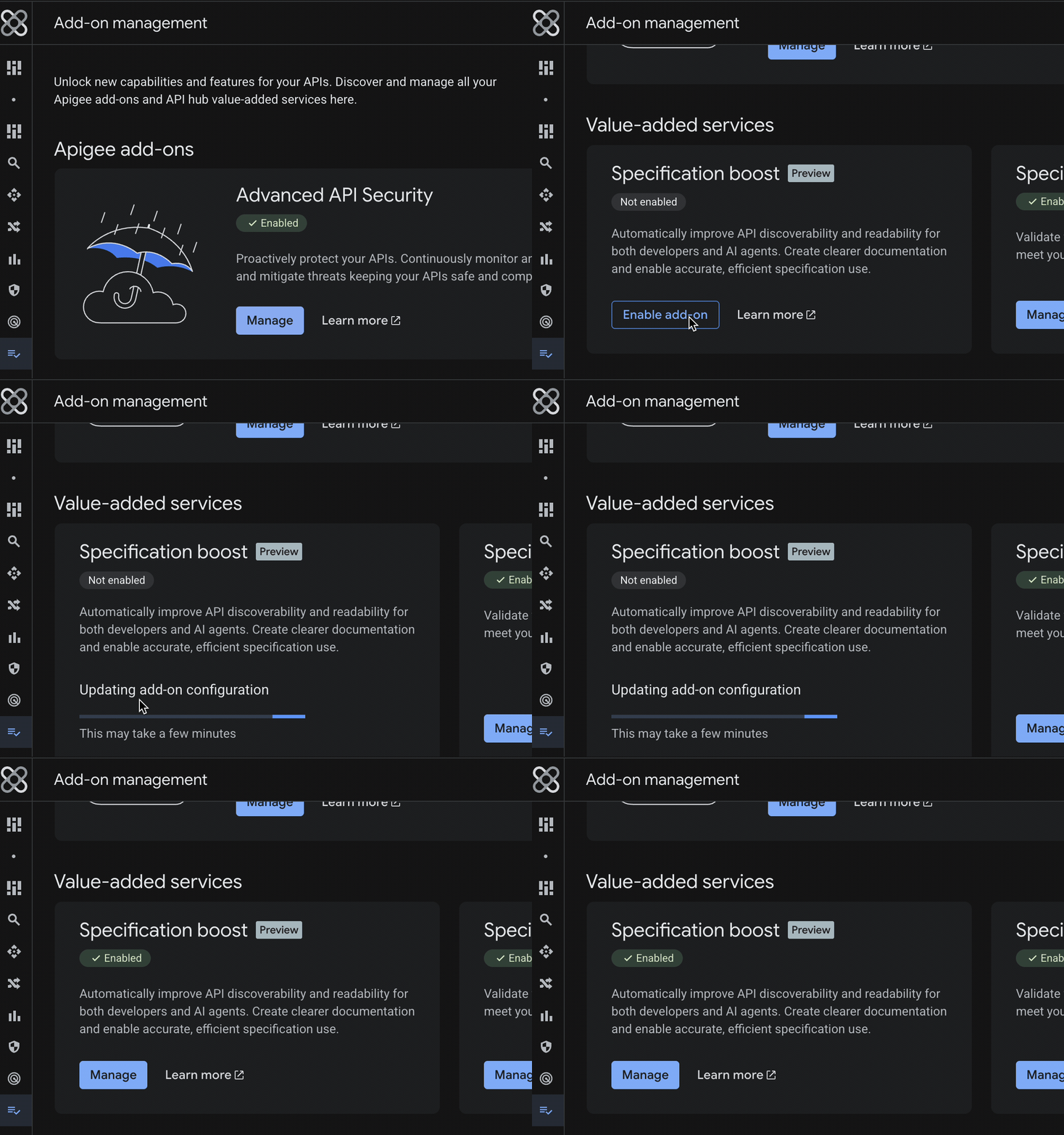
Figure 1: The Add-on management screen in Google Cloud console where you can enable the specification boost add-on.
Once enabled, you can view the status of your specifications in the API hub list view. As shown in Figure 2, boosted specifications are clearly linked alongside your original files, making it easy to access the enhanced versions.
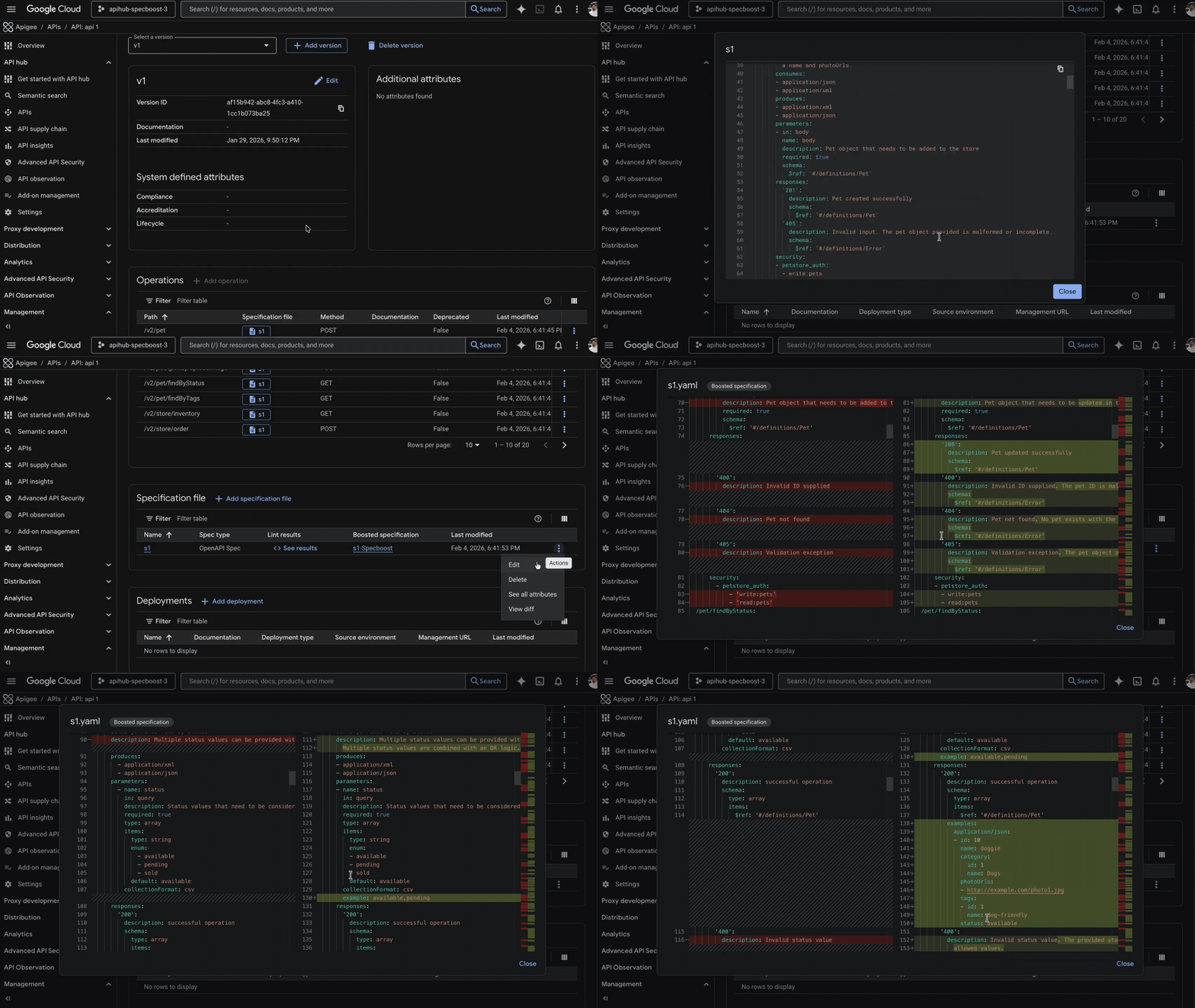
Figure 2: The Specification file list showing the original "s1" spec and the generated "s1-Specboost" version.
Get started
Both capabilities are available now.
-
For API Gateway users: You will see prompts to onboard to API hub directly in your console. To learn more about how to bring your APIs into a single control plane, read the API Gateway integration documentation.
- For specification boost add-on: You can enable this directly within your API hub settings to begin generating enhanced specifications. Visit the documentation to learn how to prepare your portfolio for the agentic future.